The “address”, “port” and “ip Whitelist” parts do not belong into this module but into the main structure of the config file. Look it up in other people 's config files.
A New Chapter for MagicMirror: The Community Takes the Lead
Read the statement by Michael Teeuw here.
Read the statement by Michael Teeuw here.
 L
Offline
L
Offline
Posts
-
RE: Remote into MM not working
-
RE: Unable to Install Dependencies
@alenba2 Well MM definitely works with stretch but nevertheless… if it works, I guess it’s ok
-
RE: COUNTING unread emails
@amanzimdwini so, I played around a bit since I thought it would be a good idea as well.
I found two mail modules, MMM-Mail by @Pieps and one called email. I can’t get the email module to work, but this one has support for multiple accounts, so that’s unfortunate.
With the MMM-Mail one, I have forked it and created a branch. Unfortunately it currently only supports one account as far as I can see. Try it out and let me know what you think.
https://github.com/lavolp3/MMM-MailClone it by putting in
git clone https://github.com/lavolp3/MMM-MailI still have some issues with the module itself (giving me popup messages far too often and failing to connect with the mail account too often, but if this works I’ll make a PR for the original module
-
RE: Unable to Install Dependencies
@alenba2 your npm and node versions are way too old.
Update npm using:
npm install npm@latest -g(you may need sudo access for that, I’m not sure anymore. Try without first.)
Update node FOR EXAMPLE by using n:
npm cache clean -f
npm install -g n
n stable
Again, I’m not sure, try without sudo. If it’s not working try with sudo.
-
RE: Getting my Google calendar working.... need help.
@mwel1977 have a look at MMM-CalendarExt
-
RE: Getting my Google calendar working.... need help.
@mwel1977 @mwel1977
If you have separate calendars in google then it should work.
You just need to look for the calendar you want to show.
If it looks in google like this (showing calendars you have created for yourself)
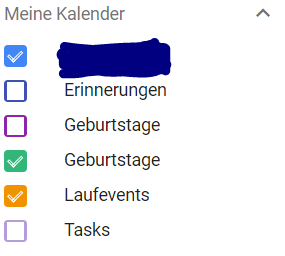
you can show each calendar for itself.
Go into the options of the respective calendar, make it publicly available, and create the .ics link.
Use this for your calendar.Or have I misunderstood anything?
-
RE: Which type of mirror to use
@radokristof I have a mirror in quite a dark room installed, where usually we have lights on.
I use a glass called mirastar in this
Reflectance 58%.
Transmission 3%.In this case the transmittance of 3% is well enough. All of the modules can be seen very well although I have to admit that I have played with the css styles making all the brightness levels a bit brighter. When lighting is on the monitor frame can only be seen when you look very closely.
However, I’m not completely satisfied with the reflection of the glass. There is a brown tint to it and the mirror looks a bit too dark.Hopefully today I’ll pick up my new Chrome Spy then I have a comparison.
@j-e-f-f I was hoping that at least these values are comparable since they are physical ones and should not be limited to a glass brand.
-
RE: Best mirror? Here the answer
From a small bit of research it seems that dielectric glass IS the top solution for a smart mirror, but just to complete the picture, it seems much more expensive than usual spy glass.
Does anyone have any experience? -
RE: Which type of mirror to use
@j-e-f-f said in Which type of mirror to use:
Transmittance depends on the brightness of your room. If the location of your mirror will get a lot of natural light, then you’ll want a higher level of transmittance. If it’s in a darker location, then 20 - 30% transmittance will be fine.
I can’t really agree on transmittance. Isn’t 20-30% much too high for a darker room?
The glass I have in mind as one of the best experienced is Pilkington MirroPane ChromeSpy.
It has a transmittance of 8% and I hear that’s very good for rooms with natural lighting…My current view:
Two values are important in terms of glass: Reflectance and transmittance.
Highest possible reflectance is always best as I would assume. Values of >60% are good. The more the better
Transmittance of < 10% is best for darker rooms
Transmittance of > 5% is best for lit rooms.Please correct me if I’m wrong…
-
RE: Associating module output with custom.css
@j-e-f-f I currently don’t see the advantage in having a local duplicate for the mirror.
I have a smb share on the mirror open to access the files directly with a programming tool from my laptop. (I’m using notepad++ or atom)
Then I access the mirror from my laptop via chrome.A reload of the MM homepage in Chrome is automatically a reload of all the program code I have updated. Better than doing pm2 reload mm, which takes far longer.
And I have it all on one screen at one machine. -
RE: Associating module output with custom.css
One small remark the @j-e-f-f 's great explanations:
You don’t need to run serveronly mode to access the mirror in your browser with dev console.
The standard running mode already has the server on port 8080 running as well. So with the standard MM running (e.g. with pm2) you can already access the mirror with your browser as well. -
RE: Bathroom Magic Mirror
@spitzlbergerj OK so you’re using the Mirropane Chrome Spy there I assume.
Going to order that as well since I have the feeling it’s the best glass for a well lit bath.Thanks for the Alu Dibond tip.
-
RE: Playing a local mp4 file as a module
WAF : Woman Acceptance Factor (the most important thing that drive your life :-)
Ha! Great!
Isn’t there already at least one video player module out?
Can’t you use that one for your purpose.
Have a look into the 3rd party modules section at the MM github site. -
RE: Bathroom Magic Mirror
@spitzlbergerj Impressive mirror!
Especially like the lighting solution.
What glass did you use? (also from Germany here)
What is the material you have used for the backplate? -
RE: MMM-DarkSkyForecast - Yet ANOTHER weather module
Beautiful module!
A bit too beautiful in my opinion since I’m currently putting a lot of work into MMM-forecast-io :-D -
RE: COUNTING unread emails
Good idea for a module.
A first idea looking at this module
https://github.com/MMPieps/MMM-Mail.
In the node_helper.js you can find an idea how emails are fetched.
There is a variable in client.search function:console.log("%s Mails fetched",Result.length);Result.length is the variable you’re looking for.
So maybe you could use this module and rework it to just show the number of mails and not the mails themselves. -
RE: Rude Module Developers
So I did a little research and I can’t really comprehend.
I cannot find any developer being just a little rude to you at all!“Feel free to fork the module and customize it for your own needs.”
Rude?
Only one developer suggesting (!) to you to make your own fork. While I think working with PR’s and improving the original module is better I guess you can just respect his view.
Sorry but we’re all at the beginning at some point (I am as well).
Pointing out someone as rude just because he is not interested in doing the work you suggested is a bit off.Go ahead, learn more Javascript, do forks and send PR’s.
It’s fun! -
RE: MM booting to black
@dwleo You need to access the mirror from another device to “ssh into it”. Read the info from the link.
Will make things easier.Regarding pm2, you can find out the name of the process entering
pm2 listor just try killing the process using
pm2 stop allNot sure if this works.
-
RE: MMM-forecast-io -- Localized up to the minute weather
@morozgrafix Guess I’ll use the weekend to steal from all of you and build my perfect module. And learn stuff!
Might also send a few PRs then because I’m new to git and it really satisfies me :-D