
MagicMirror Forum
    • Recent
    • Tags
    • Unsolved
    • Solved
    • MagicMirror² Repository
    • Documentation
    • 3rd-Party-Modules
    • Donate
    • Discord
    • Register
    • Login
    1. Home
    2. lavolp3
    3. Posts
    A New Chapter for MagicMirror: The Community Takes the Lead
    Read the statement by Michael Teeuw here.
    Offline
    • Profile
    • Following 0
    • Followers 11
    • Topics 38
    • Posts 892
    • Groups 3

    Posts

    Recent Best Controversial
    • RE: Turning TV on/off via PIR sensor - current problem: TV displays "No Signal" screen

      @mcmalone said in Turning TV on/off via PIR sensor - current problem: TV displays "No Signal" screen:

      @mcmalone I don’t know exactly why but the following solution worked for me.

      Posting my solution for others in the future and also so that maybe someone in the future can explain to me why this works (and maybe a more efficient solution).

      I changed the monitor_on.sh and monitor_off.sh files to read, respectively:

      DISPLAY=:0 xscreensaver-command -deactivate
      

      and

      DISPLAY=:0 xscreensaver-command -activate
      

      Before I made these changes, I also configured xscreensaver by running xscreensaver-demo in the terminal, then on my monitor connected to the Pi, a preferences box pops up. I selected “black screen” from the options so that when the screensaver activates through the above files, it will be a black screen (no backlight).

      With this procedure you are turning on the screensaver (which is set to black) instead of turning the screen off.
      It may serve as a solution wiht regard to the picture, but keep in mind that 1) a black screen is brighter than a screen turned off (except you have an oled screen) 2) you are wasting power.
      My screen consumes ~ 20W running, my pi consumes ~ 2W.
      I’d rather have the screen turned off in absence of any person.

      Still, I had the same problem for some time.
      Last time I tried the MMM-NewPIR module it worked for me. That one has a configuration option for the different modes (display_power vs tvservice).
      You may have a look into that module.
      posted in Troubleshooting
      lavolp3L
      lavolp3
    • RE: MMM-OpenWeatherForecast - Replacement for MMM-DarkSkyForecast

      @j-e-f-f That looks REALLY tasty! Thank you for the great work!

      posted in Utilities
      lavolp3L
      lavolp3
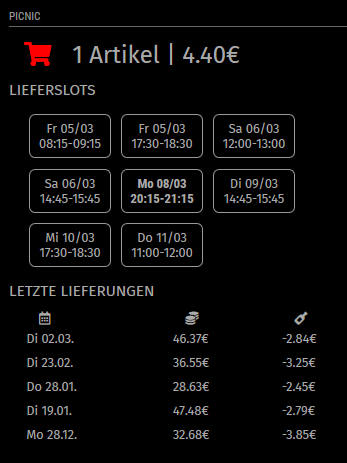
    • MMM-Picnic

      This is a module that allows you to view your Picnic status using your picnic login data. It uses the npm module picnic-api by MRDVH.

      Picnic is a groceries delivery service established in Netherlands and Germany.

      Download the module here

      Screenshot:

      screenshot

      Version 1.0.0, not tested too much, so let me know any issues you have.
      Best to post them on github, Im not here that often currently.

      Enjoy!

      posted in Utilities
      lavolp3L
      lavolp3
    • RE: MMM-rain-forecast

      @jermaine171993 I’m working on it but have to say that the climacell data is very disappointing for Germany, where I live.
      I will publish it so you can test out Texas :-)

      posted in Utilities
      lavolp3L
      lavolp3
    • RE: Adding Outline Around Modules

      @adavidsohn96 you need to adjust css/custom.css and include something like this

      .module {
        border: 1px solid white;
        border-radius: 5px;   
      }
      

      Every module gets a .module class as reference for css.
      ALso have a look at the module MMM-fast-css (something like this). It provides you with style presets.

      posted in Troubleshooting
      lavolp3L
      lavolp3
    • RE: Integrating an npm module that uses import

      @sdetweil @strawberry-3-141
      I can’t get it working.
      node 14.15 installed.

      When I require the “picnic-api” npm module the usual way I get the error message inside the "picnic-api module.

      import axios from "axios";
      ^^^^^^
      
      SyntaxError: Cannot use import statement outside a module
      

      When I do the import like described in the readme the error originates in my node_helper.js

              import PicnicClient, { CountryCodes, ImageSizes, HttpMethods } from "picnic-api";
              ^^^^^^
      
      SyntaxError: Cannot use import statement outside a module
      

      I’m lost. At least the environment of the picnic-api module should be a “pure node” environment, why does the import not work at least in that module?

      Changing the index.js inside picnic-api to an .mjs does not help.

      Any more ideas?

      posted in Development
      lavolp3L
      lavolp3
    • RE: Integrating an npm module that uses import

      @sdetweil that’s not sufficient. There are two more modules imported by the picnic-api module. I could require them all in node_helper but that looks too of much a workaround for me. There should be another way.

      posted in Development
      lavolp3L
      lavolp3
    • RE: Integrating an npm module that uses import

      @strawberry-3-141 said in Integrating an npm module that uses import:

      @lavolp3 which version of nodejs are you running? import is a feature of es6 modules. You can try to enable it like this https://stackoverflow.com/a/45854500

      Thanks for the tip. Upgraded to node.js 14.15 but did not work yet.
      Seeing "type": "module in my package.json also did not help.
      I will have to have a closer look at the link

      posted in Development
      lavolp3L
      lavolp3
    • Integrating an npm module that uses import

      HI all,

      I am trying to write a module around the npm module picnic-api that uses the import function instead of require

      import axios from "axios";
      

      This does not work within the Magicmirror environment, I get an error message when I start the mirror.

      [13.02.2021 07:21.43.938] [ERROR] /home/pi/MagicMirror/modules/MMM-Picnic/node_modules/picnic-api/index.js:1
      import axios from "axios";
      ^^^^^^
      
      SyntaxError: Cannot use import statement outside a module
      

      Does anyone have a solution for me?
      Is there a way to use it or do I need to rewrite the npm module?

      posted in Development
      lavolp3L
      lavolp3
    • RE: MMM-rain-forecast

      @Wenike @jermaine171993 I’m working on somthing similar based on the climacell API (providing worldwide data). Will be ready in a few days.
      Currently working on https://github.com/lavolp3/MMM-Buienalarm/tree/climacell

      Will move to a new rep soon.

      posted in Utilities
      lavolp3L
      lavolp3
    • RE: MMM-SoccerLiveScore

      @0m4r Well I don’t know anything about reverse engineering so appreciate if you find anything.

      posted in Sport
      lavolp3L
      lavolp3
    • RE: Google maps API key

      @CharlesRobbins I have used the Google APi extensively in the last months while developing my own version of MMM-Commute and have to say i didn’t need to pay anything at any time.
      That said, I don’t understand why they are making it so complicated (with this odd $200 voucher per month) and uncomprehensive.

      posted in Troubleshooting
      lavolp3L
      lavolp3
    • RE: MMM-Celebrations [german only!]

      @KamiSchami sorry for the late reply, currently not here very often.

      Try putting following in your custom.css

      .MMM-Celebrations {
          text-align: center
      }
      
      posted in Entertainment
      lavolp3L
      lavolp3
    • RE: MMM-SoccerLiveScore

      @0m4r said in MMM-SoccerLiveScore:

      yes, the score is provided.
      If the game is ended it provides the final result, if the game is on-going you get the current score, if the game is not started it provides a default “0 - 0” result.

      Thanks but i meant the information about the goals: minutes, scorers

      posted in Sport
      lavolp3L
      lavolp3
    • RE: MMM-SoccerLiveScore

      @0m4r
      Do you know if the api provides the goals in any game as well?
      And is German 2nd League and/or DFB cup integrated? (EDIT ok seen it in your README)
      Are real-time live results availabe?

      I’ve put quite a lot of work into the MMM-soccer module but all of these are missing in the API.

      MMM-soccer also contains the focus feature fyi.

      posted in Sport
      lavolp3L
      lavolp3
    • RE: MMM-Buienalarm

      @MajorC Then you can just wait.
      I guess I’ll push the climacell change to the master branch later since there are already some modules out there that use Buienradar.

      posted in Utilities
      lavolp3L
      lavolp3
    • RE: MMM-Buienalarm

      @MajorC said in MMM-Buienalarm:

      lat: 52.55,
      lon: 13.45,

      Is that Berlin?
      The current master branch uses Buienradar (NL) and does not work east of, let’s say Dortmund.
      You could try to switch to the ‘climacell’ branch

      git fetch --all
      git checkout climacell
      git pull
      

      You’d need a climacell api key.
      https://www.climacell.co/weather-api/
      I have not completed the Readme yet in that branch. Will do over the next days.

      posted in Utilities
      lavolp3L
      lavolp3
    • RE: Default Calendar doesn't show annually events

      @ghelweg My default calendar shows birthdays very well. Also, the issue in the referred thread did not seem to be a general issue since Sam was not able to reproduce it.
      Are you sure it is a module issue and not one of your (google) calendar?

      posted in Troubleshooting
      lavolp3L
      lavolp3
    • RE: axios request returns no data, while http request does

      @sharklaser said in axios request returns no data, while http request does:

      :
      axios.defaults.headers.common[‘User-Agent’] = ‘PostmanRuntime/7.26.2’;

      That was the solution! Thanks!!

      posted in General Discussion
      lavolp3L
      lavolp3
    • RE: MMM-rain-forecast

      @MajorC You could try my MMM-Buienalarm. I just recently integrated the climacell API. Not as good as the dutch service but available in all Germany (and Europe.
      Care to try it out?

      posted in Utilities
      lavolp3L
      lavolp3
    • 1 / 1