MagicMirror Forum
    • Recent
    • Tags
    • Unsolved
    • Solved
    • MagicMirror² Repository
    • Documentation
    • 3rd-Party-Modules
    • Donate
    • Discord
    • Register
    • Login
    1. Home
    2. MMRIZE
    3. Posts
    A New Chapter for MagicMirror: The Community Takes the Lead
    Read the statement by Michael Teeuw here.
    M
    Offline
    • Profile
    • Following 0
    • Followers 9
    • Topics 29
    • Posts 952
    • Groups 0

    Posts

    Recent Best Controversial
    • RE: CalendarExt3 colour custom Css for specific name.

      @bradley1982 said in CalendarExt3 colour custom Css for specific name.:

      .CX3 .eventTransformer: (ev) => {
      if (ev.title.search(‘Evie’) > -1) ev.color = ‘#FF0000’
      return ev
      }

      It is totally wrong. You tried to use JS in the CSS. nonsense.

      .CX3 .event[data-calendar-name=“Evie”] {
      color: #FF0000;
      }

      When you want to select the event by calendar name, you should specify the name of the target in your calendar module’s config. It makes sense when you have several calendars and need to distinguish each calendars by its name.

      {
      	module: "calendar",
      	header: "Bradley Family",
      	position: "top_left",
      	config: {
      		calendars: [
      			{
      				symbol: "calendar-check",
      				url: "...",
      				name: "Evie", // <== Like this.
      			}
      		]
      	}
      },
      

      But what I guess is, you may have some events in ONE calendar, so want to distinguish by its partial string of the title.
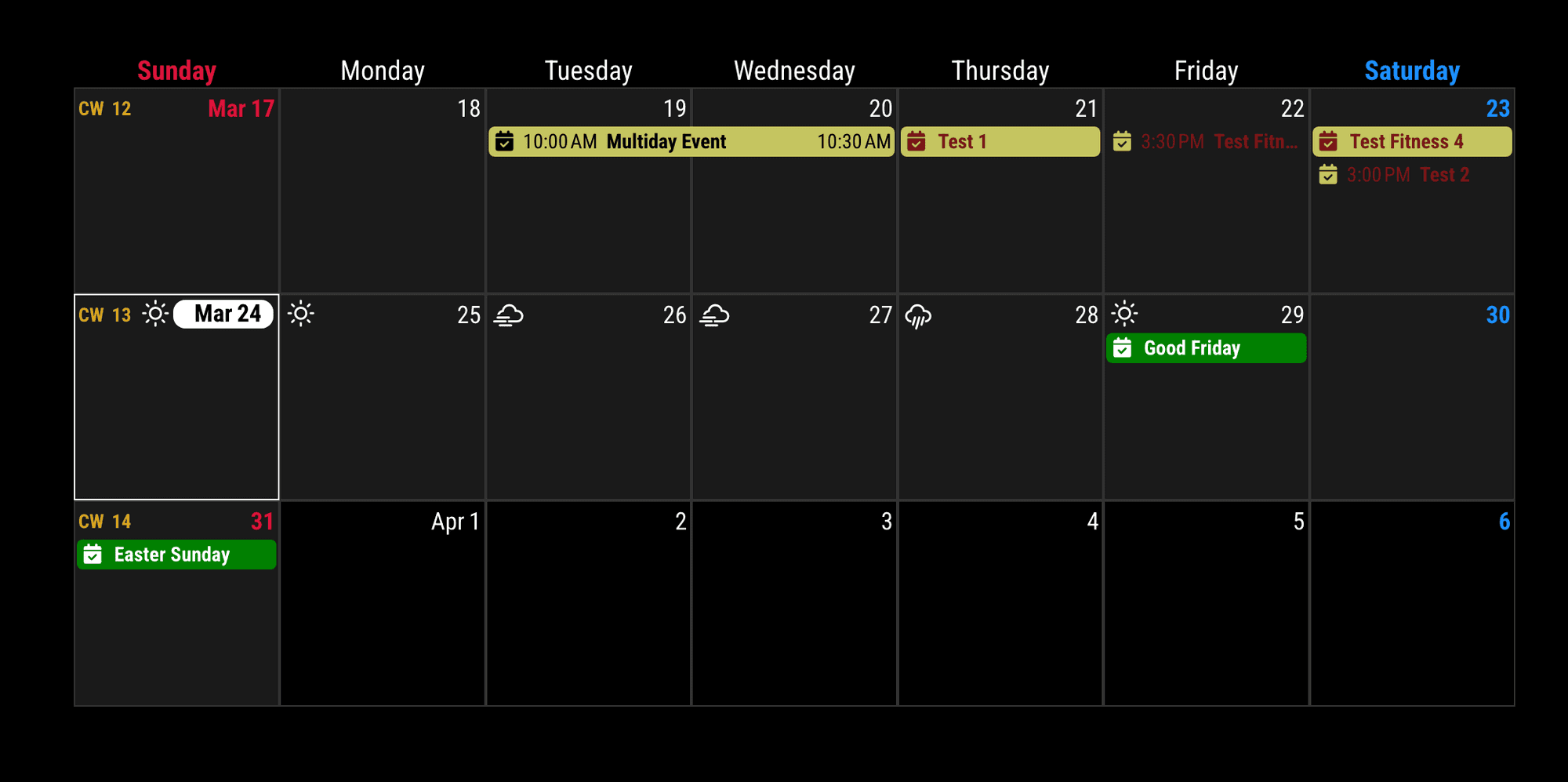
      eec51aa4-49de-4412-8a2c-c1a0d1289f60-image.png

      /* in your config.js */
      {
      	module: "MMM-CalendarExt3",
      	position: "bottom_bar",
      	config: {
      		eventTransformer: (ev) => {
      			if (ev.title.search('Test') > -1) {
      				ev.class = 'test'
      			}
      			return ev
      		},
      	}
      },
      
      /* in your css/custom.css */
      .CX3 .event.test {
        color: red;
      }

      
      posted in Troubleshooting
      M
      MMRIZE
    • RE: MMM-CalendarExt3 not syncing automatically with icloud

      @lightfixer2000
      Nothing seems wrong. It seems just a sync timing issue. I don’t think it is the kind of issue to fix, but…
      Your vdirsyncer may sync calendars at some point, and the calendar module fetches the change at another point (repeatedly in 10 minutes). CX3 will refresh itself at the other point (by default, every 10 minutes).
      So when you change an event at some point, vdirsyncer may not have synced that event yet, or even if vdirsyncer synced successfully, the calendar module may not have fetched the event yet.
      In the worst case, I think at least 20 minutes may be needed to reflect the change of event. It takes 2 cycles of CX3’s defaults.

      Should it be the problem? I don’t think so. Calendar events are usually very stable and not frequently changed. Just waiting 20 ~ 30 minutes is an acceptable time for daily usage.

      However, if you want a more urgent reflection of the change, shorten the period of sync/fetch/refresh of the 3 related programs(vdirsync, calendar module, CX3). But 99% of the process would be wasted with unchanged, same events,

      posted in Troubleshooting
      M
      MMRIZE
    • RE: Developer Wanted To Modify Default Newsfeed Module

      @greedyvegan
      3012a074-f8a4-4150-a59a-fe5369347a32-image.png
      Even though MMM-AnotherNewsFeed was not updated for 2 years, it still works.

      {
      	module: "MMM-anotherNewsFeed",
      	header: "ANOTHER News Feed",
      	position: "bottom_bar",
      	config: {
      		feeds: [
      			{
      				title: "New York Times",
      				url: "https://rss.nytimes.com/services/xml/rss/nyt/HomePage.xml",
      			},
      			{
      				title: "CBC World",
      				url: "https://www.cbc.ca/webfeed/rss/rss-world",
      			},
      			{
      				title: "BBC World News",
      				url: "https://feeds.bbci.co.uk/news/world/rss.xml",
      			}
      		],
      		showImage: true,
      	}
      },
      
      posted in Requests
      M
      MMRIZE
    • RE: MMM-CalendarExt3 Search description of event to trigger event color change.

      @Hobbit
      Show me your parts of config. You probably miss ‘return’ statements.

      posted in Troubleshooting
      M
      MMRIZE
    • RE: MMM-CalendarExt3 Search description of event to trigger event color change.

      @Hobbit
      .description instead of the .title
      https://github.com/MMRIZE/MMM-CalendarExt3?tab=readme-ov-file#handling-events

      posted in Troubleshooting
      M
      MMRIZE
    • RE: Developer Wanted To Modify Default Newsfeed Module

      @greedyvegan
      Give me your target feed. I’ll check

      posted in Requests
      M
      MMRIZE
    • RE: MMM-CalendarExt3

      @princemaxwell
      You did a simple mistake. Configuration parameters of the module should be placed inside of the module’s config:{}.

      posted in Utilities
      M
      MMRIZE
    • RE: MMM-CalendarExt3

      @princemaxwell
      waitFetch will be applied only to the very first broadcast notification. If you set waitFetch: 120000, this sequence will happen (I’ll assume the calendar module is described before CX3 in config.js)

      1. the calendar module starts the parsing of calendars.
      2. CX3 module starts. Library is loaded and the DOM is prepared. It is now ready to receive the events.
      3. The first calendars might complete its fetching. then calendar module will broadcast the events at that moment.
      4. CX3 receive the first broadcasted events. Wait 120000ms(2 minute) from that moment to get other lazy broadcasting coming.
      5. Other calendars might be fetched. But some might still need to be completed.
      6. Anyway, after 120000ms from the first broadcast, CX3 will draw the events that have arrived till then. (It means the view of CX3 is shown for the first time after at least 2 minutes from the boot)
      7. Then after 10minutes(refreshInterval), CX3 will refresh again. Maybe until then, all calendars would have been fetched.(I hope.)

      Anyway your log was showing the 1st calendar fetching as below;

      [20.03.2024 15:28.57.729] [INFO]  Calendar-Fetcher: Broadcasting 2 events from ...
      

      And the 8th fetching ;

      [20.03.2024 15:30.30.417] [INFO]  Calendar-Fetcher: Broadcasting 12 events from ...
      

      It takes 93 seconds to complete. So I think waitFetch: 120000 (120 seconds) would be enough; however, if there are still missing events, the possible reasons would be;

      1. It takes more than 120 seconds at that moment randomly to complete fetching of all calendars since first fetching,
      2. some calendars were too fast-fetched before CX3 was ready. so they were missed. (all modules are loaded and starts sequentially, so if you have certain number of modules, CX3 may not be ready until that moment.)

      Of course, you can adjust the order of modules in config, assign needed values of waitFetch and refreshInterval to show the entire events properly on the first boot time.

      But, my suggestion is,
      Just leave them and do nothing.
      After 10 minutes from the first bootup, everything will be OK. Your MM might be rebooted at midnight or in the morning on real-life usage. MM would stay turned on all day or for several days. So literally, nobody will care, even realize there had been some missing events on the bootup time. You don’t have to make an effort to solve this unworthy issue.

      posted in Utilities
      M
      MMRIZE
    • RE: MMM-CalendarExt3

      @princemaxwell
      Now I know what happens. Your symptom is not related with any errors.
      Let me explain the process.

      1. Each calendar parsing/fetching in the calendar module will take some time, a few seconds or some dozen seconds. How long will it take is unpredictable.
      2. The default calendar module will refresh itself and broadcast accumulated events on any calendar fetched. So, in some unlucky cases, the module may flicker due to too-short-term refreshing.
      3. CX3’s view is very complex and heavy for redrawing frequently. To avoid that flickering, CX3 will wait some time after any broadcasted event arrives (waitFetch: 5000ms by default) to check whether the following broadcasting will arrive in the short term. If no other followed broadcasting happens, stop waiting and process collected events at that moment and draw the view.
      4. This means that if you have 8 calendars and 5 calendars complete fetching in 4 seconds and the other 3 calendars may take over 10 seconds, only the events from the earlier 5 calendars will be collected and prepared to show before the first rendering time(waitFetch 5000ms).
      5. After the first rendering, the remaining 3 calendars may complete fetching. CX3 receives those events but does not render them instantly to avoid flickering. The rendering will be done every refreshInterval (by default 10 minutes) with stocked events that are received during that period.
      6. That is the reason why some of your calendars will be shown the first time, but others are applied after 10 minutes.

      So, you may have these options.

      1. Do nothing. Just wait 10 minutes; the lazy events will normally be applied to CX3 from the second refreshing cycle. Calendar events are not regarded as needing urgent, instant reflection. Your MM may stay on for a long time. Ten minutes after the first bootup will not be a big issue, and your family will not care.

      2. Or Give enough long waitFetch. Your log showed that almost 2 minute is needed to complete fetching 8 calendars entirely. waitFetch: 1000 * 60 * 2 may work. (The default value is 5000ms, not 300000) (This means you need 2 minutes before drawing the CX3 view at first time.)

      3. Or Give shorter refreshInterval to redraw and reflect the change of events. The default value is 1000 * 60 * 10 (10 minutes) But you can assign shorter. But 99.99% of refreshing will deal unchanged same events. So I think it is a kind of waste. Anyway, if you want instant reflection, give it shorter value.

      posted in Utilities
      M
      MMRIZE
    • RE: MMM-CalendarExt3

      @sdetweil said in MMM-CalendarExt3:

      @MMRIZE calendar uses built in fetch to get the ics file. we do not have node-ical fetch it for us ( the prior ical lib did not provide fetch)

      If so, this is really weird where the undici module is used.

      posted in Utilities
      M
      MMRIZE
    • RE: MMM-CalendarExt3

      @princemaxwell
      CX3*s do not use nodeJS at all, so they are not related to your error messages. The modules are executed on the browser level, not on the server-side node environment, so they could not affect server-side processes like calendar fetching.
      Your error message (UND_ERR_SOCKET) is caused by the undici node module; it may be used inside of the default calendar module to connect through HTTP/1.1. That error usually happens when the connection is closed by long waits or prior preemption.
      There is a weird thing. As far as I know, the default calendar module depends on node-ical, which uses axios instead of undici. So I wonder why and from where this error message comes.

      To make things simple clearly;

      1. Backup your current config.js in the safe area.
      2. Create a new config.js, and remove all other not-releated modules like MMM-Planetarium, MMM-soccer, … Leave only clock, calendar and MMM-CalendarExt3 modules.
      3. Begin with one or two calendars, not all the calendars.
      4. Try to execute MM again, and let’s see what happens.
      5. After confirmation that a small qty of calendars has no issue, add more calendars.
      6. After confirmation that there is no issue with the calendars, try adding more modules one by one.

      (A possible reason, I guess, is that your modules are racing to use the network/dest-server severely. For example, your calendars look being rescanned every minutes. You may need to rearrange the interval of the schedule.)

      posted in Utilities
      M
      MMRIZE
    • RE: MMM-CalendarExt3

      @princemaxwell
      CX3 doesn’t connect or fetch calendar server. That error probably has been caused by default calendar module.

      posted in Utilities
      M
      MMRIZE
    • RE: custom css for module question

      @greedyvegan
      Anyway I just show whether it is possible. (Yes, everything is possible… even though I hate this kind of looks…)
      37864055-7ae2-4915-9b81-c8b251594d2e-image.png

      But… Is it really useful or pretty?

      /* css/custom.css */
      .CX3A .cellHeader {
        width: fit-content;
      }
      
      .CX3A .cellFooter {
        display: none;
      }
      
      .CX3A .cell[data-events-counts="1"] {
        display: flex;
        justify-content: space-between;
      }
      
      .CX3A .cell[data-events-counts="1"] .cellBody .fullday .event {
        max-width: 100%;
      }
      
      posted in Custom CSS
      M
      MMRIZE
    • RE: custom css for module question

      @greedyvegan said in custom css for module question:

      with the red paint, I’ve tried

      border-radius:15px;

      It needs some tricks. ;)

      /* css/custom.css */
      .CX3A .miniMonth .weeks.thisWeek {
        background-color: darkolivegreen; /* I've put the color to show clearly */
      }
      
      .CX3A .miniMonth .weeks.thisWeek td:first-child {
        /* left border round */
        border-radius: 10px 0 0 10px;
      }
      
      .CX3A .miniMonth .weeks.thisWeek td:last-child {
        /* right border round */
        border-radius: 0 10px 10px 0;
      }
      

      8c18abc8-9d84-46be-86dc-0848ee9ce802-image.png

      For your blue/red directions. If it is possible or not, this module has not been designed for this. So I can’t help about it.
      I recommend hiding empty cells to save some unnecessary (empty) lines.

      /* css/custom.css */
      .CX3A .cell[data-events-counts="0"] {
        display: none;
      }
      

      original
      efa5acaf-b73e-4dea-a8b9-bfd8fa5d4afc-image.png

      transformed
      b21c56b8-4531-47e2-a087-c68a438f821d-image.png

      posted in Custom CSS
      M
      MMRIZE
    • RE: custom css for module question

      @greedyvegan said in custom css for module question:

      1 - multi-day or single event, can I move that to the right
      to make the row narrower ? “Tuesday, March 19th” is a little redundant because the mini month tells me that.
      I understand IF a day happens to have multiple events it would create multiple rows.

      As you know already, Events could be more than one. So what you want is; if there is only one event, it should be one-liner with the date(or with relative day identifier), but if there are N events, makes multi-rows.
      Maybe if it is possible, it will not be so pretty. And the look would be similar to the default calendar module. If so, use the default calendar module instead.

      2 - this is related but unrelated to the calendar, some modules don’t have the simple {font-size: 12px;color red;} they use classes of bright and dimmed and or use “1em” for the size or “var(–color-text)”

      There is no standard style guide for modules, so every module has it’s own look & feel. You have to override each style by yourself.
      Anyway, some modules respects the style of the default modules. They might use the values those are defined in css/main.css
      You can override some of the default styles in css/custom.css like below;

      /* css/custom.css */
      :root {
        --color-text: darkorange;
        --color-text-dimmed: darkgreen;
        --color-text-bright: crimson;
        --font-size: 16px;
        --font-size-small: 12px;
      }
      

      original
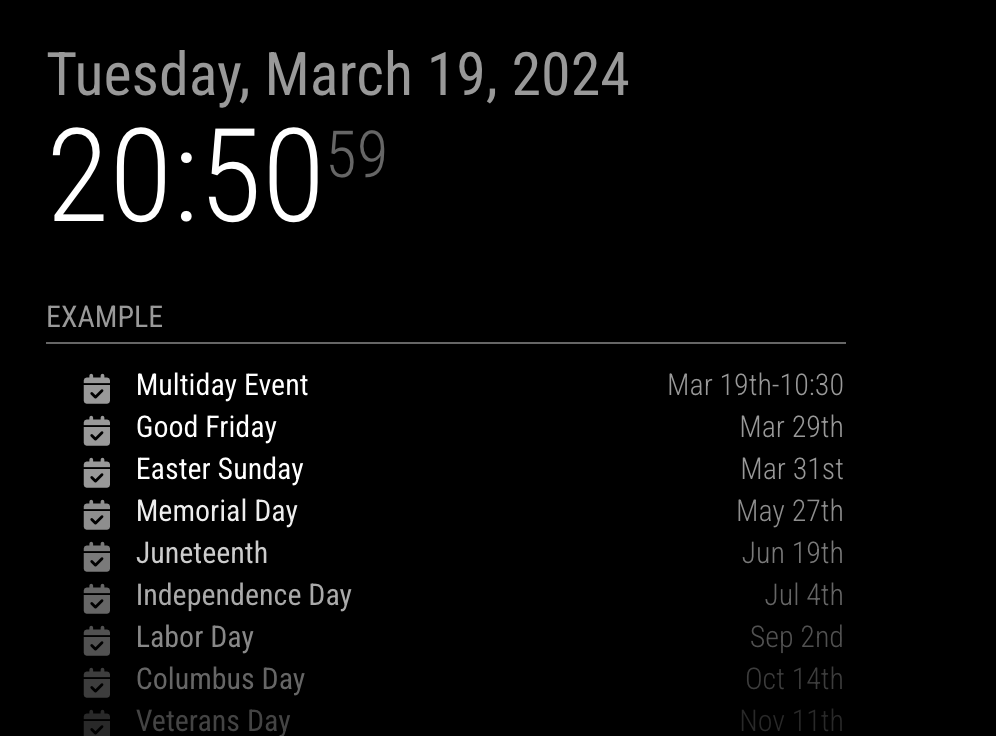
      64fe0f1f-874d-4476-a801-77b68a86981a-image.png

      transformed
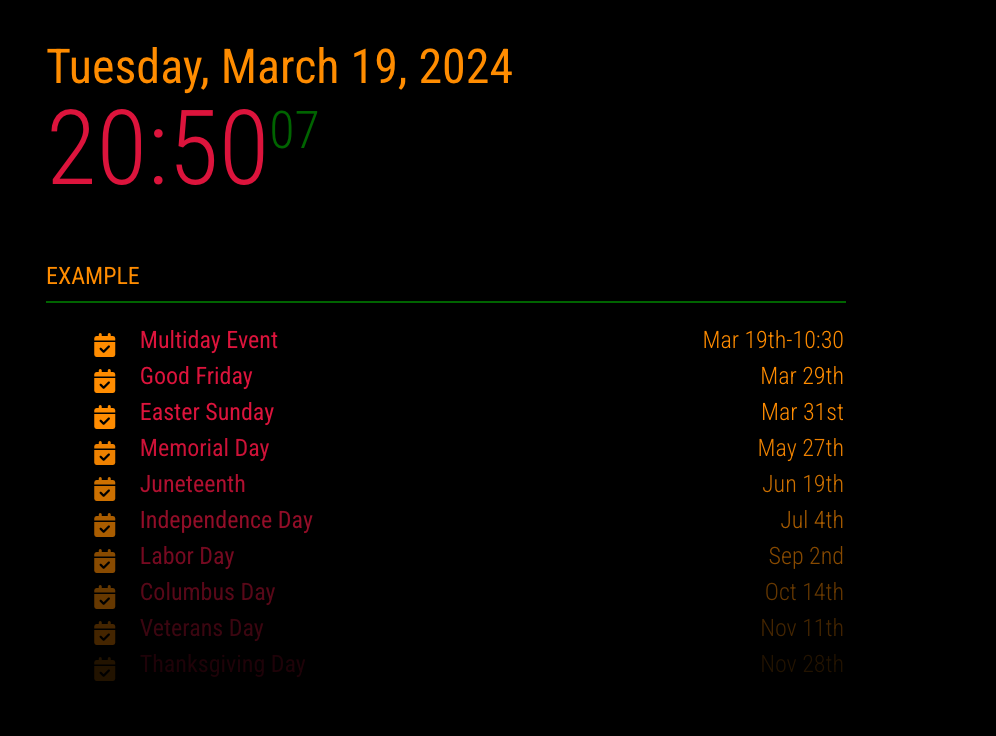
      4d6e2716-8fbd-4ce6-a2d9-da312b0b375a-image.png

      posted in Custom CSS
      M
      MMRIZE
    • RE: custom css for module question

      @greedyvegan

      • move TUE, MAR 19 to the far right
      /* css/custom.css */
      .CX3A .cellHeaderSub {
        display: none;
      }
      
      .CX3A .cellHeaderMain {
        display: flex;
        justify-content: space-between;
        width: 100%;
      }
      

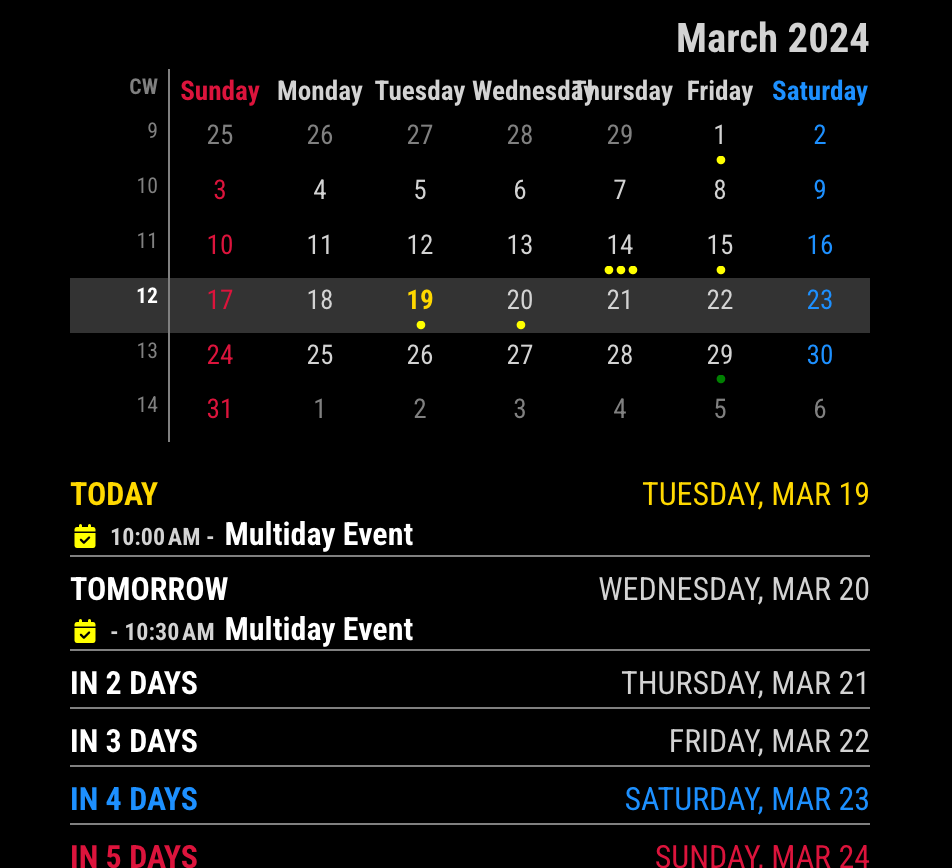
      f6d56f8d-77b2-4809-ac07-153e62c7e61a-image.png

      • OR eliminate “Today, tomorrow, in five days” and leave the date or vice versa
      /* css/custom.css */
      /* Select one of below */
      
      /* To remove `relative day` identifier. */
      .CX3A  .cellHeaderMain .relativeDay {
        display: none;
      }
      
      /* OR */
      
      /* To remove date of the cell */
      .CX3A  .cellHeaderMain .cellDate {
        display: none;
      }
      

      387edc39-8cd1-47ce-9afd-98ab200015b1-image.png
      Of course, you can use more extended selectors like these;

      .CX3A .cell:not(.today) .cellHeaderMain .cellDate { ...
      
      .CX3A .cell.thisMonth .cellHeaderMain .relativeDay { ...
      
      • move event(s) like “Trash day” all the way to the right to make the row narrow
      • add an element to the bright or dimmed class

      I can’t understand what those mean. Have you any example or sketch?

      posted in Custom CSS
      M
      MMRIZE
    • RE: MMM-Scenes2

      @sdetweil

      what could be annoying… they call, you set a flag.

      It may be a relative point of view.

      Let’s assume my module is using a paid API that has a daily quota. To save the consumption API quota on unused time, it would be better to suspend/resume the process of the node_helper(usually node_helper takes a charge to consume API)

      However, some API needs an expensive re-establishment fee for their usage. For example, some Google APIs might have short valid lifetimes of retrieved tokens and data. So, it needs to begin with handshaking again at some point. It may require the additional cost of the connection/auth/indexing process. If some 3rd party module tries to resume/suspend my module in a habitual rapid cycle, It might be another abused waste of consumption and, even worse, unpredictable.
      I said this would be annoying for me.

      Of course, I might also be able to manage the lifecycle of resource consumption, but I think it is not worth it, at least based on my experience with MM modules. (Yup, I’m the one who made most many modules in this scene.)
      I prefer background-alive with silence than suspend/resume modules frequently. It is more stable. (at least for me.)

      posted in System
      M
      MMRIZE
    • RE: MMM-Scenes2

      @mumblebaj
      Usually, implementing the suspend and resume methods of the MM module is useful when your module depends on expensive resources. When your module is inactivated, it would be better to stop consuming resource.
      But that mechanism is somehow annoying for me, so I ignore those methods. :D

      posted in System
      M
      MMRIZE
    • RE: MMM-Scenes2

      @hrmax23
      MMM-MyScoreboard is trying to control Show/Hide by itself. I don’t know why, anyway it does. I guess it doesn’t want to show empty content. However, its code is depending on the old MM’s code.

      https://github.com/jclarke0000/MMM-MyScoreboard/blob/3a07af647c5f667b6f678c0140e0a07d225ae739/MMM-MyScoreboard.js#L557-L568

          /*
            We're using the lockString parameter to play nicely with
            other modules that attempt to show or hide this module,
            e.g.: MMM-Facial-Recognition.  When both use a lockString,
            the module will only be visible when both agree that it
            should be visible.
          */
          if (!anyGames) {
            this.hide(1000, {lockString: this.identifier});
          } else {
            this.show(1000, {lockString: this.identifier});
          }
      

      .hide(duration, options) and .show(duration, options) were changed in a meantime as .hide(duration, callback, options) and .show(duration, callback, options). So that makes those error messages.

      [ERROR] [module.js:395:8] Parameter mismatch in module.show ...
      

      Maybe that prevents other controller module(like MMM-Scenes2)'s working. I guess so.

      posted in System
      M
      MMRIZE
    • RE: custom css for module question

      @greedyvegan
      Like this?
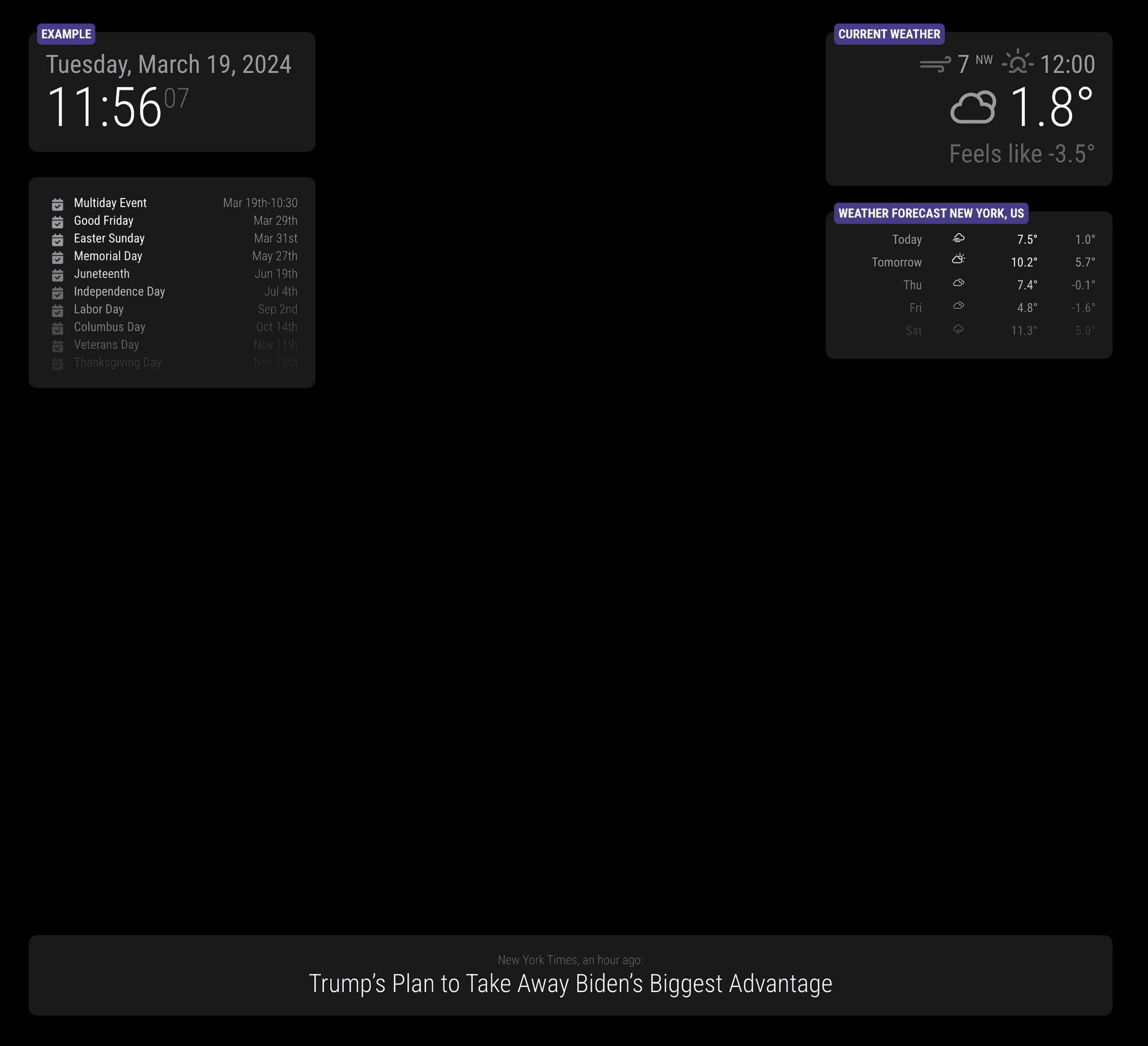
      0f34aeea-496b-4673-97ff-2491fa2e0ca5-image.png

      /* css/custom.css */
      .region .container .module {
        padding: 20px;
        border-radius: 10px;
        background-color: rgba(255 255 255 / 10%);
        min-width: 300px;
        position: relative;
      }
      
      .module-header {
        position: absolute;
        top: -10px;
        left: 10px;
        background-color: darkslateblue;
        color: white;
        font-weight: bold;
        border: none;
        padding: 5px;
        border-radius: 5px;
      }
      
      posted in Custom CSS
      M
      MMRIZE
    • 1
    • 2
    • 10
    • 11
    • 12
    • 13
    • 14
    • 47
    • 48
    • 12 / 48