MagicMirror Forum
    • Recent
    • Tags
    • Unsolved
    • Solved
    • MagicMirror² Repository
    • Documentation
    • 3rd-Party-Modules
    • Donate
    • Discord
    • Register
    • Login
    • Profile
    • Following 0
    • Followers 9
    • Topics 29
    • Posts 952
    • Groups 0
    M Offline
    1. Home
    2. MMRIZE
    3. Posts
    A New Chapter for MagicMirror: The Community Takes the Lead
    Read the statement by Michael Teeuw here.

    Posts

    Recent Best Controversial
    • RE: MMM-CalendarExt3 how do you create multiple events with color css?

      @Sam-0

      Sorry, the Previous version was not tested, I have shown the code only with my brain, not with a real device.

      Here is the tested code.

        eventTransformer: (ev) => {
          if (ev.title.search('Uitje') > -1) ev.color = 'gold'
          if (ev.title.search('Verjaardag') > -1) ev.symbol = ['birthday-cake']
          return ev	
        },
      
      posted in Utilities
      M
      MMRIZE
    • RE: MMM-CalendarExt3 how do you create multiple events with color css?

      @Sam-0 sorry, it would not be ‘icon’, it would be ’ symbol’

      posted in Utilities
      M
      MMRIZE
    • RE: MMM-CalendarExt3 how do you create multiple events with color css?

      @Sam-0
      First,
      You can assign colour or class per each calendar. So check if your events are separated by different calendars. Check it first.

      In case your events are in one calendar and want to distinguish each by title of event, you can do this;

      eventTransformer: (ev) => {
        if (ev.title.search('Uitje') > -1) ev.color = 'blue'
        if (ev.title.search('verjaardag' > -1) ev.icon = 'birthday-cake'
        /* and so on ... */
        return ev
      },
      
      posted in Utilities
      M
      MMRIZE
    • RE: 2 modules side by side

      @sdetweil
      Unfortunately override display:flex into .container is not so easy. Because, MM’s hide/show mechanism depends on container’s display value (none/block) and it is hard-coded in the HTML tag. (I think it would be a bad legacy approach to be fixed in some day.)

      Anyway, without that overriding, It is possible anyhow limitedly.

      
      .region.top.center .container .module {
        float: left;
        max-width: 32%;
      }


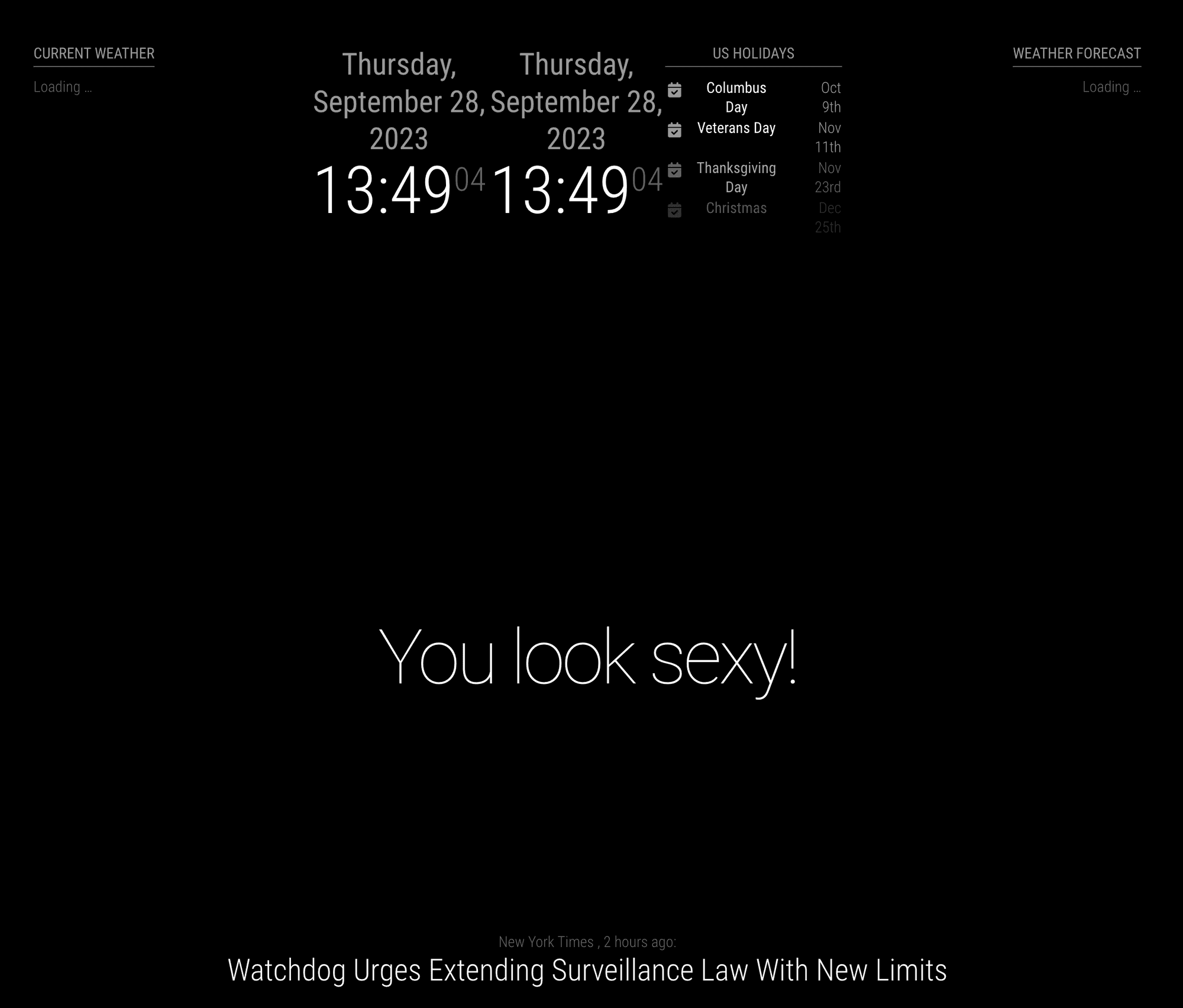
      and I put 3 modules (2 clocks, 1 calendar) in top_center region.
      10f65530-56a8-4377-8a18-69ecc9eb70e3-image.png

      posted in Troubleshooting
      M
      MMRIZE
    • RE: MM in Cubieboard A20

      @rdiharce
      Maybe your armbian has no desktop environment (e.g. Gnome). Is it installed?

      posted in Hardware
      M
      MMRIZE
    • RE: Problem installing new module (beginner), CalendarEXT3 not displaying

      @sdetweil
      Thanks. I’ll do it right now.

      I am so sorry that all the ppl have that issue due to wrong instructions.

      posted in Troubleshooting
      M
      MMRIZE
    • RE: MMM-CalendarExt3

      @Kaisies-0
      Anyway,
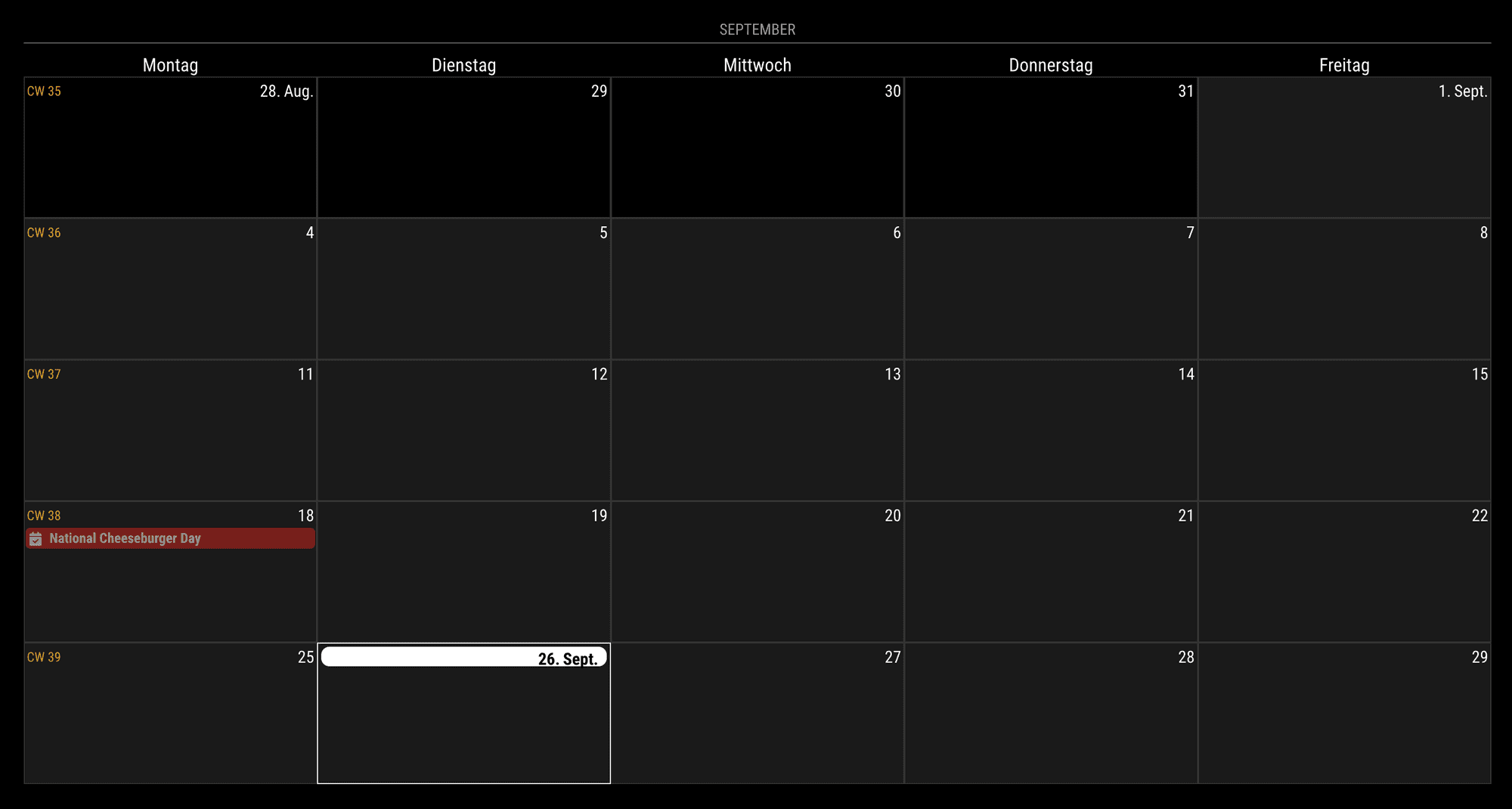
      For the firstDayOfWeek: 1 (Week starts from Monday), It could be achieved like below;

      .CX3 .weekGrid {
        grid-template-columns: repeat(5, [cell-start] 1fr [cell-end]) 0fr 0fr;
      }
      
      .CX3 .weekday.weekday_6,
      .CX3 .weekday.weekday_0 {
        display: none;
      }
      
      .CX3 .cell.weekday_6,
      .CX3 .cell.weekday_0 {
        display: none;
      }
      

      This will work.
      ca91b736-4bef-46da-8af9-93877ca4a0e0-image.png
      But for the firstDayOfWeek:0 or another case, .weekGrid should be adjusted more heavily. And not sure side-effects.

      posted in Utilities
      M
      MMRIZE
    • RE: MMM-CalendarExt3

      @Kaisies-0
      1f6f210b-dd20-4887-b394-f2525233ad7b-image.png

      posted in Utilities
      M
      MMRIZE
    • RE: Adjust individual table column widths?

      @jimmy_382837
      @MMRIZE said in Adjust individual table column widths?:

      I haven’t examined the rendered HTML yet, but hardcoded style attributes in HTML code are prior than CSS.
      In case; You should modify source code of the module to change the result. (Or consider to use monkey-patch)

      The rendered result is not hard-coded, so you can adjust it with only CSS.

      This is an example. (Anyway, your config was not exactly matched with your previous screenshot…)

      
      .MMM-OpenWeatherMapForecast .module-content {
        width: inherit;
        /* I don't know why, but it was defined as 300px, might be an issue when you adjust the dimension. so have to reset */
      }
      
      .MMM-OpenWeatherMapForecast,
      .MMM-OpenWeatherMapForecast .wrapper {
        width: 500px; 
        /* give a custom width to a module */
      }
      
      .MMM-OpenWeatherMapForecast .forecast-item .time {
        /* Some customizing for `time` cell for example.*/
        width: 200px;
        background-color: rgb(127 127 127/ 50%);
        color: white;
        font-weight: bold;
      }
      

      702a0fac-1c29-4e4a-87a6-1fbcda563fa4-image.png

      posted in Custom CSS
      M
      MMRIZE
    • RE: MMM-CalendarExt3

      @nekreg9
      There is a configurable option “waitFetch”.
      But I doubt your real issue would be that. Because, CX3 starts rendering after one calendar which has at least one event have fetched successfully. (and in a “waitFetch”, no more calendar is fetched)
      So if your CX3 starts late, It means your events source provider(usually default calendar module) might have timing issue to fetch calendars(e.g. too frequent fetch cycles or something else)

      posted in Utilities
      M
      MMRIZE
    • RE: Adjust individual table column widths?

      I haven’t examined the rendered HTML yet, but hardcoded style attributes in HTML code are prior than CSS.
      In case; You should modify source code of the module to change the result. (Or consider to use monkey-patch)

      posted in Custom CSS
      M
      MMRIZE
    • RE: Problem installing new module (beginner), CalendarEXT3 not displaying

      @Manino
      You need to stop “pm2” first before try dev mode. This error means just you are executing mm twice(one from pm2 and one from npm run start:dev). That error is not related with your original issue.

      posted in Troubleshooting
      M
      MMRIZE
    • RE: Problem installing new module (beginner), CalendarEXT3 not displaying

      @Manino
      Let’s test things.

      1. Remove all other modules except calendar and MMM-CalendarExt3 then run again.
        1-1) If no issue; Some of other modules might make interference.
        1-2) Still happens; Run MM as dev mode (npm run start:dev) => This will show front-end dev console and there might be some useful console log. (or you can populate dev-console on MM with Ctrl+Shift+i or equivalent shortcut keys by your system)
      2. Just in case, the first rendering takes time so wait a while after running it.
      posted in Troubleshooting
      M
      MMRIZE
    • RE: Google doesn't want to give me my GooglePhohos Credentials

      @lornetw
      (I removed the original post of mine and re-wrote it.)

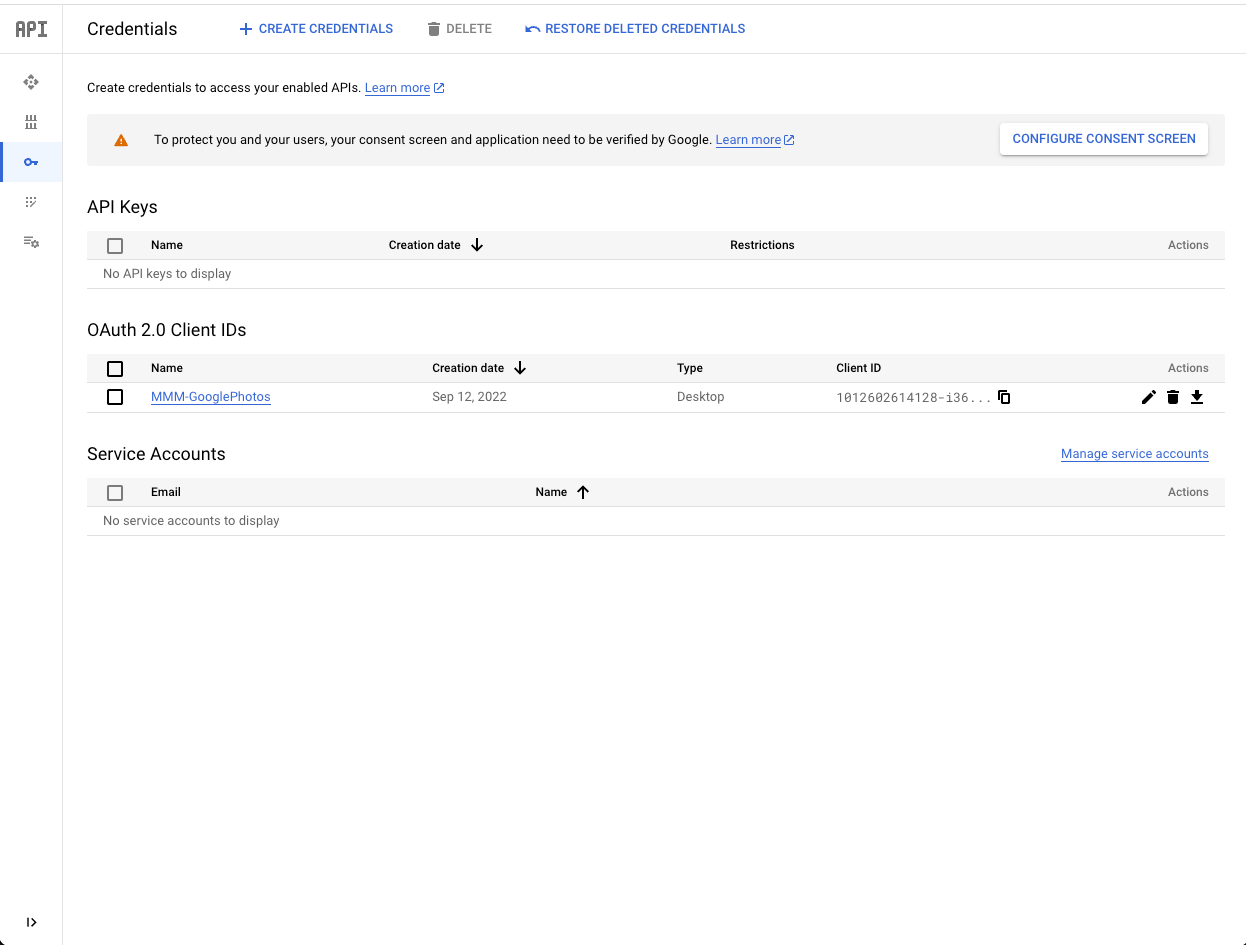
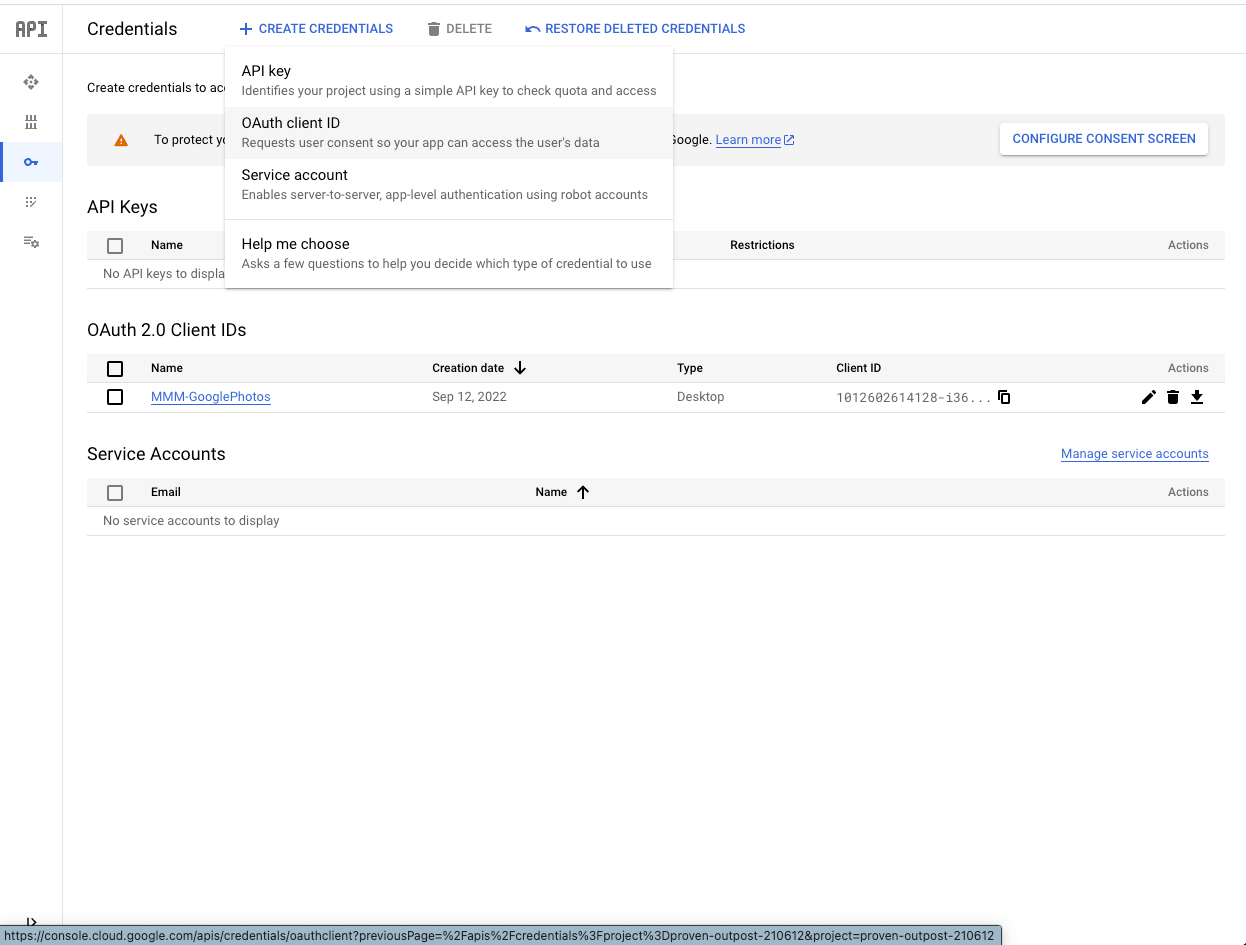
      905783f8-08aa-458f-92bc-7a48765ee7db-image.png
      You can see + CREATE CONFIDENTIALS in upper side.
      You can ignore CONFIGURE CONSENT SCREEN. (Or at least later you can configure it.)

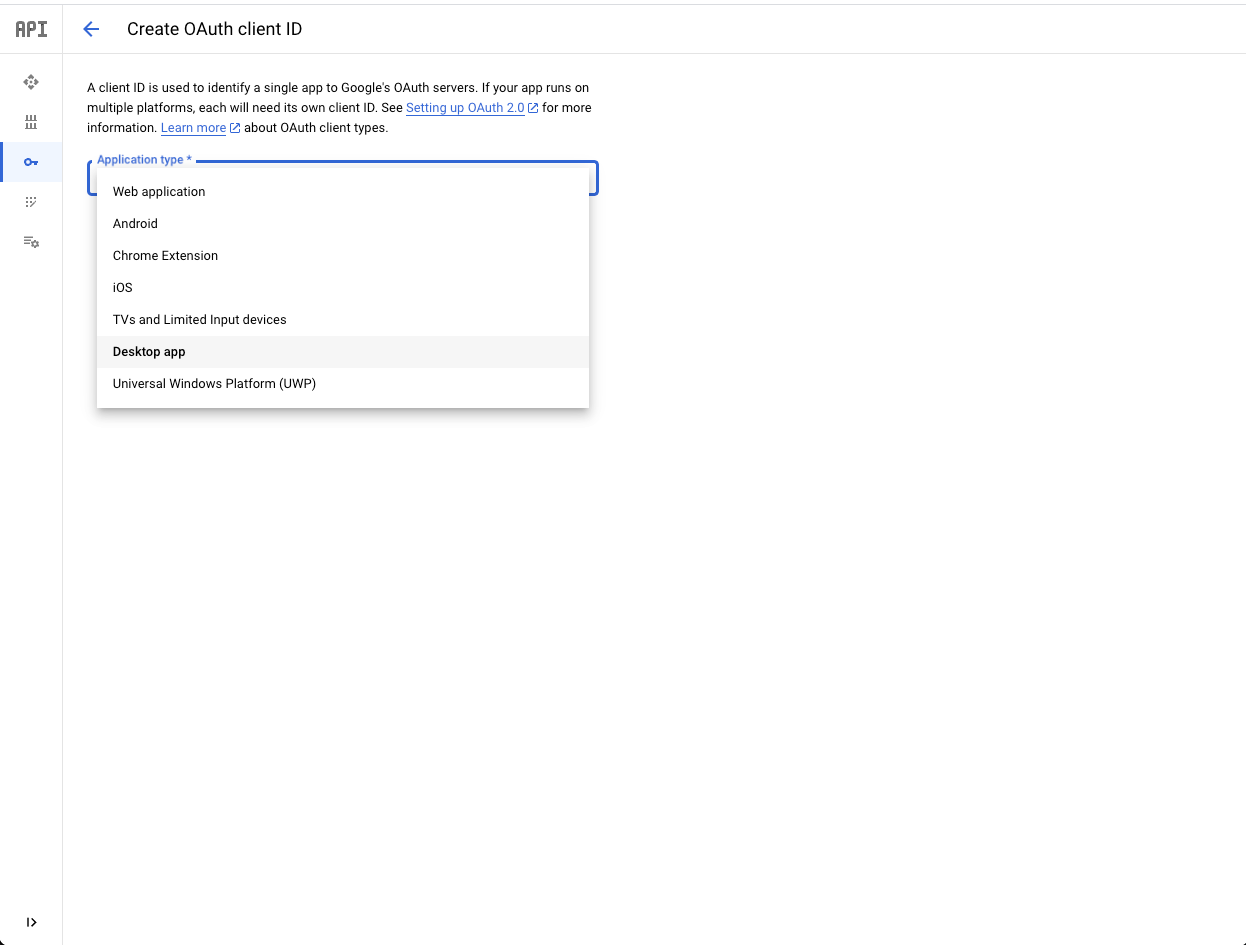
      40d74e9c-9432-47d8-8c7d-33b3c17015f9-image.png
      After click +CREATE CONFIDENTIALS, you will meet the options, you can select OAuth client ID.

      Then you will meet this.
      d477f2b3-c938-48d9-94cb-98a0ff765ebc-image.png

      posted in Troubleshooting
      M
      MMRIZE
    • RE: mmm-googleassistant language support

      https://developers.google.com/assistant/sdk/reference/rpc/languages?hl=en
      As far as I know, Turkish is not supported in Assistant SDK even though Google Assistant itself is supporting Turkish.

      posted in Requests
      M
      MMRIZE
    • RE: Adjust individual table column widths?

      @jimmy_382837
      What is your config now for your result? I cannot guess your configs.

      posted in Custom CSS
      M
      MMRIZE
    • RE: Problem installing new module (beginner), CalendarEXT3 not displaying

      @Manino
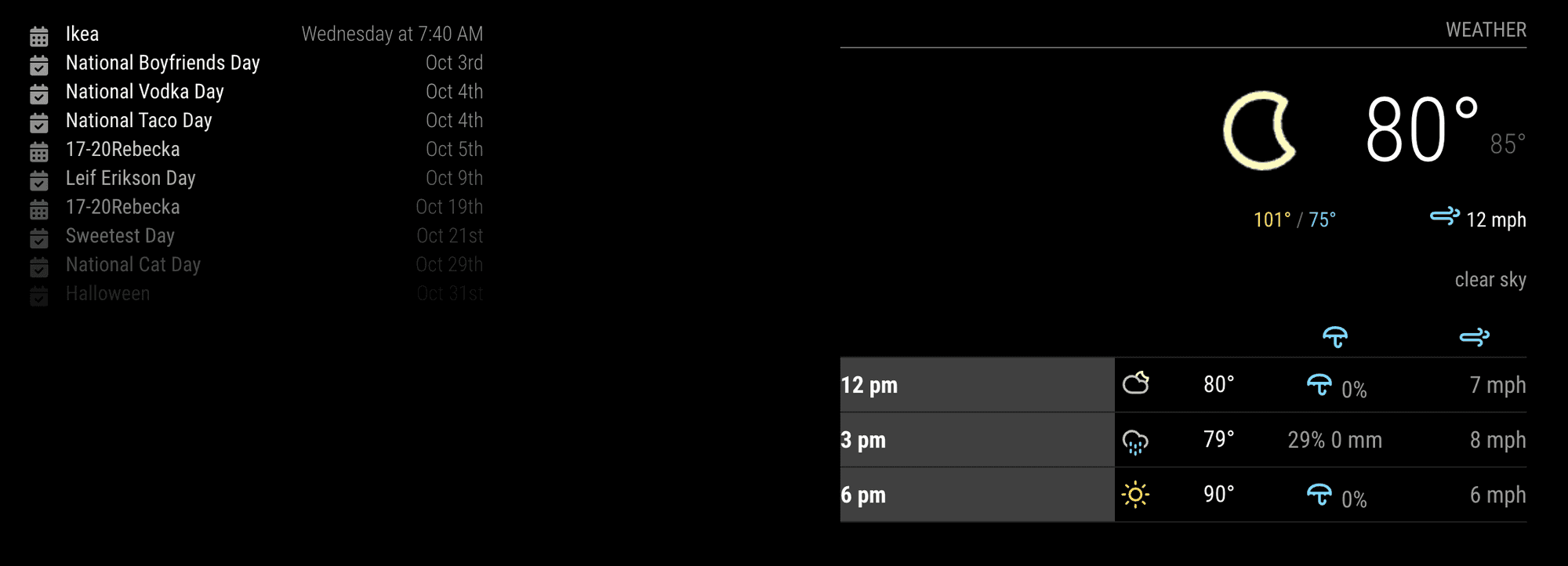
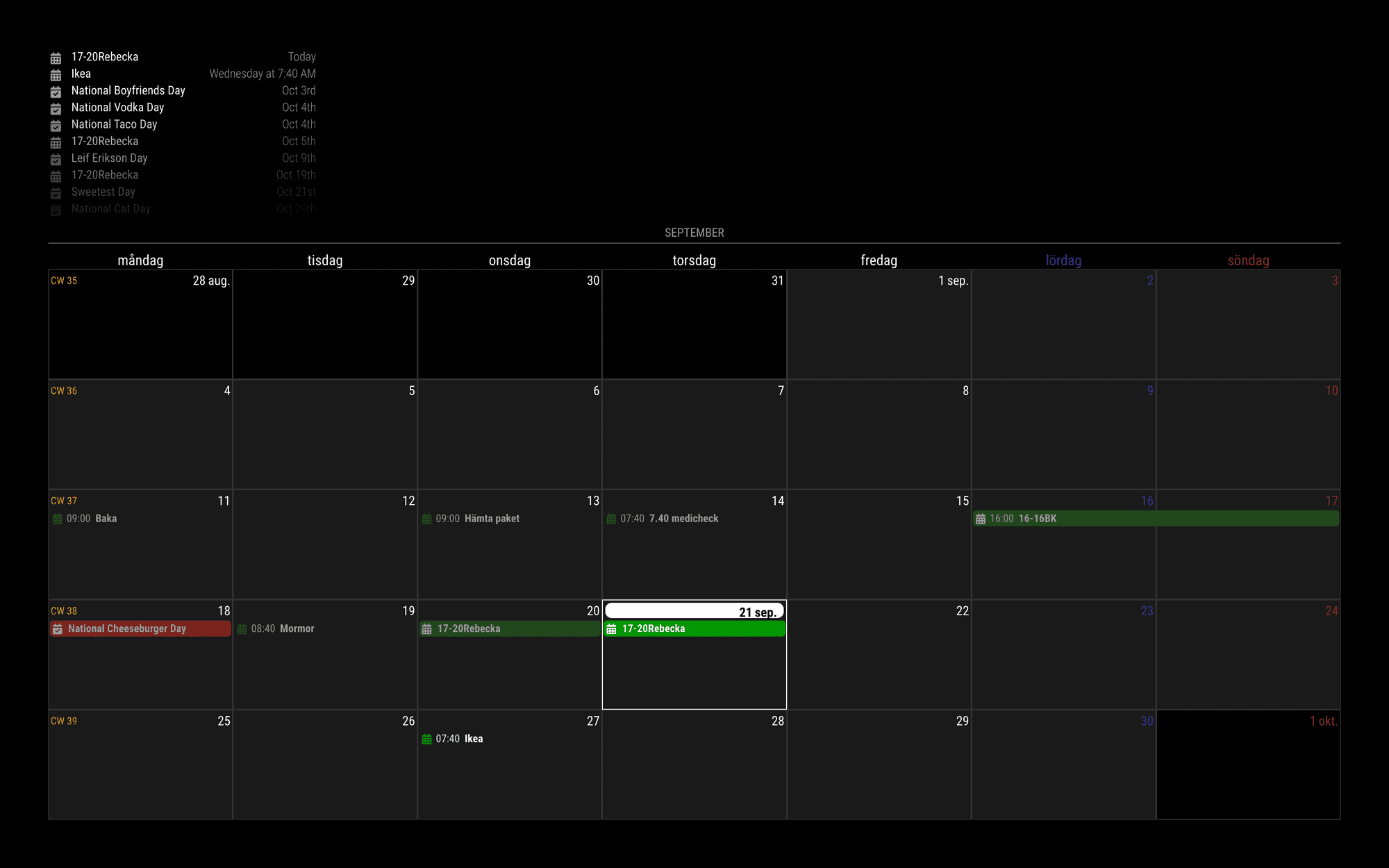
      I tested URL you sent me. (Green is that one. I hope this will not be too privacy things.)

      a226eb3e-ddde-4afc-b27b-f44df2cd26c6-image.png

      {
        module: "MMM-CalendarExt3",
        position: "bottom_bar",
        config: {
          mode: 'month',
          locale: 'sv-SE',
        }
      },
      {
        module: "calendar",
        position: "top_left",
        config: {
          broadcastPastEvents: true,
          calendars: [
            {
              symbol: "calendar-check",
              url: "https://ics.calendarlabs.com/709/45a0bb64/Fun_Holidays.ics",
              color: "red",
            },
            {
              url: "https://calendar.google.com/calendar/ical/7a9...4/basic.ics", // <- Your real iCAL URL
              color: "green",
            },
          ]
        }
      },
      
      posted in Troubleshooting
      M
      MMRIZE
    • RE: Problem installing new module (beginner), CalendarEXT3 not displaying

      @Manino
      But your picture above post shows you have Google Calendar. Could you send me the real URLs of icals? eouia0819@gmail.com
      To represent your symptom, I need real data.

      @sdetweil

      but you could walk from end of list back to before today, and now know forward looking and past looking… keep going back to the start date of the calendar view … this is what I do with a port of your code to another platform…

      AFAIK, without proper maximumNumberOfDays and maximumEntries values, the bunch of broadcasting will be filled with prior events first up to maximumEntries. So the casted payload will not contain recent newer ones.
      Is something changed in default calendar?

      posted in Troubleshooting
      M
      MMRIZE
    • RE: Problem installing new module (beginner), CalendarEXT3 not displaying

      @sdetweil @Manino
      Maybe your 3 calendars might have tons of events(at least 10) since long long ago time(at least 1 year).
      Past events might be too many, so all of the quota for broadcasting was already consumed by the older events.
      To test it, remove 3 calendars, try ‘us-holiday’ calendar of the default config example.

      If so, check maximumNumberOfDays and maximumEntries of the default calendar module.

      I think it is not the bug of that module but unexpected behaviour. Generally, for past events, People will regard newer events than older events as more important. But broadcasting of this calendar module contains older events prior to newer ones.

      posted in Troubleshooting
      M
      MMRIZE
    • RE: MMM-CalendarExt3

      @CurlyQ12391

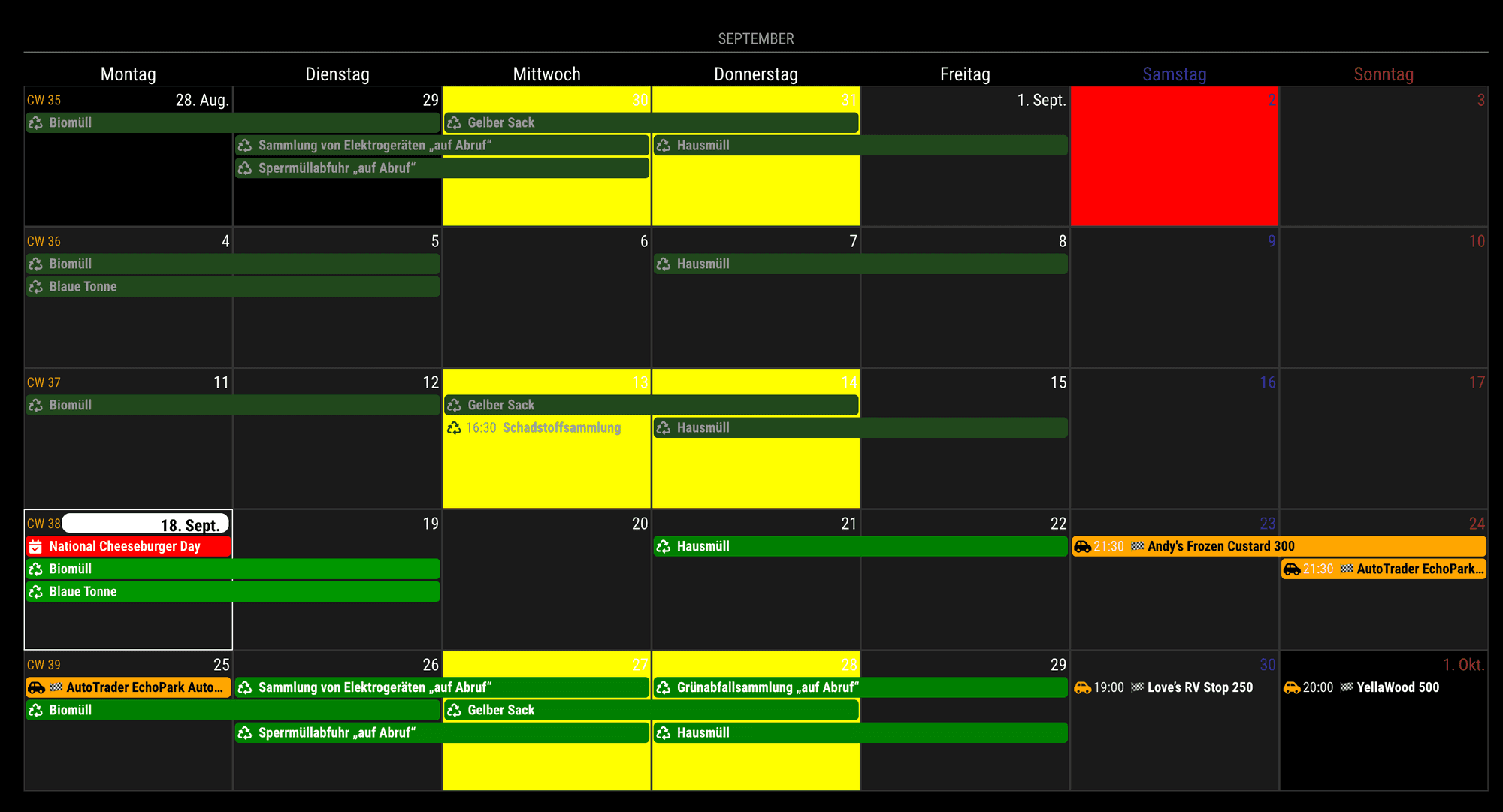
      {
        module: "MMM-CalendarExt3",
        position: "bottom_bar",
        config: {
          mode: 'month',
          manipulateDateCell: (dom, events) => {
            let date = new Date(+dom.dataset.date)
            if (date.getMonth() == 8 && date.getDate() == 2) { // specific cell by absolute date
              dom.classList.add('specialHoliday')
              dom.style.backgroundColor = 'red'
              // do whatever you want.
            }
      
            if (events.some(e => e.title.search("Gelber") > -1)){ // specific cell by event
              dom.classList.add('specialEvent')
              dom.style.backgroundColor = 'yellow'
              // do whatever you want.
            }
          }
        }
      },
      

      107e15de-2d5a-4b38-bab6-0eb97f9dbe53-image.png

      posted in Utilities
      M
      MMRIZE
    • 1 / 1