MagicMirror Forum
    • Recent
    • Tags
    • Unsolved
    • Solved
    • MagicMirror² Repository
    • Documentation
    • 3rd-Party-Modules
    • Donate
    • Discord
    • Register
    • Login
    1. Home
    2. mongo116
    3. Posts
    A New Chapter for MagicMirror: The Community Takes the Lead
    Read the statement by Michael Teeuw here.
    M
    Offline
    • Profile
    • Following 0
    • Followers 1
    • Topics 9
    • Posts 65
    • Groups 1

    Posts

    Recent Best Controversial
    • RE: MMM-Hive

      @randomnoise I’m still waiting for my 2-way acrylic to arrive, so to be honest I haven’t run the module for any real length of time. Most I’ve really done is run it for a few hours. While the pi is still in bits waiting to be fitted into a frame, I will run MM and the module on my Windows desktop over night and see what’s occurring. Funnily enough, I have just started MM up and got the following error which I’ve not seen before

      Whoops! There was an uncaught exception...
      TypeError: Cannot read property 'name' of undefined
          at D:\MagicMirror\modules\default\updatenotification\node_helper.js:35:43
          at D:\MagicMirror\node_modules\simple-git\src\git.js:721:18
          at Git. (D:\MagicMirror\node_modules\simple-git\src\git.js:761:18)
      

      What are the config settings you are using for the module? What’s the updateInterval set as?

      Thanks…
      posted in Utilities
      M
      mongo116
    • RE: Show temperatures from zipabox controller

      Looks like someone had already started writing a module for Zipato
      https://github.com/poketcalulator/MMM-Zipato

      posted in Requests
      M
      mongo116
    • RE: Show temperatures from zipabox controller

      @andyb said in Show temperatures from zipabox controller:

      zipabox z-wave controller

      Hi, you could take the MMM-Hive module I created and modify it to your needs, It looks as though the api documentation is available here. I’ve only had a quick look, but it uses JSON so shouldn’t be too hard to change.

      posted in Requests
      M
      mongo116
    • RE: MMM-Hive

      @randomnoise Doh! That’s the curse of copy / paste! Thanks for pointing this out - fixed the settings in the readme.

      posted in Utilities
      M
      mongo116
    • RE: MMM-Hive

      @randomnoise Cheers :) That’s great it’s working - you can never be too sure, when I’ve only got my own Hive to test on.
      Let me know whether you find any issues with it though. And I wouldn’t worry about having any knowledge, I certainly didn’t!

      posted in Utilities
      M
      mongo116
    • RE: Hive current room temperature

      I’ve only gone and bloody done it!!

      https://forum.magicmirror.builders/topic/4576/mmm-hive

      [card:flick116/MMM-Hive]

      Please be gentle with the critique!

      posted in Requests
      M
      mongo116
    • MMM-Hive

      Description:

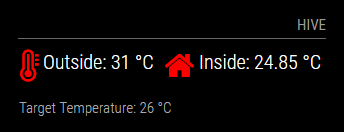
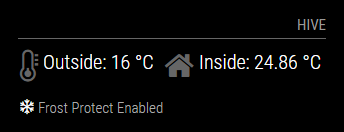
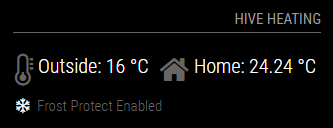
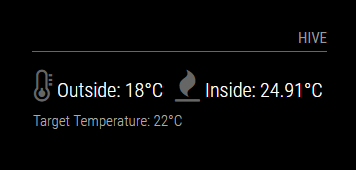
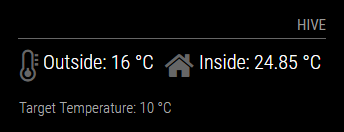
      This module will display the inside and outside temperature from your British Gas Hive heating. It is fairly configurable, with some of the text and the inside icon able to be changed. The thermometer is dynamic based on the current outside temperature, and the inside icon will go red when the heating is on. The Target Temperature row will also change if the target temperature of the Hive system is 1°C or lower (I couldn’t find a specific flag for frost protect enabled, so this was the best way I could find to achieve this).

      I’ve never written code before, and this took far longer than it probably should have, but the internet is a great place and there are some great resources and assistance out there, so a massive thanks to anyone that has helped me (directly or indirectly).

      Screenshots:

      Default:
      0_1501318540374_hive1.png

      Outside temp exceeding highestTemp value, and heating on
      1_1501318540375_hive2.png

      Target temperature 1°C or lower
      4_1501318540375_hive5.png

      Text and icon changed in config.js to alternate values
      3_1501318540375_hive4.png

      Download:

      [card:flick116/MMM-Hive]

      Version 1

      • Initial Release
      posted in Utilities
      M
      mongo116
    • RE: [Solved] Data layout - icon and text in same cell with spacing

      I’ve been ‘googling’ since posting and have found the solution (may not be the best solution, but it is now working).

      I’ll put it here as it may help someone, or someone else may have a better suggestion:

      targetTemperatureCell.insertBefore(frostCell, targetTemperatureCell.firstChild);
      
      posted in Troubleshooting
      M
      mongo116
    • [Solved] Data layout - icon and text in same cell with spacing

      Hi,

      I’m nearly finished with my MMM-Hive module, but just have one issue that I cannot get my head around.

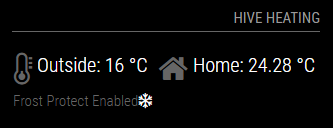
      With the current code, the layout looks like this:
      0_1501308995994_frost_protect1.png

      Notice the snowflake icon is right next to the Frost Protect Enabled text.

      I would like it to look like this (proper icon spacing next to the text and also in line with the icon above) :
      0_1501309041342_frost_protect2.png

      This is the relevant code:

      		var targetTemperatureRow = document.createElement("tr");
      		if (this.config.showNext == true) {
      		var targetTemperatureCell = document.createElement("td");
      		targetTemperatureCell.colSpan = 5;	
      			if (this.insideTarget >= 1) {
      					targetTemperatureCell.innerHTML = "Frost Protect Enabled";
      					targetTemperatureCell.className = "light dimmed xsmall";
      					var frostCell = document.createElement("span");
      					frostCell.setAttribute("aria-hidden","true");
      					frostCell.className = "fa fa-snowflake-o";
      					frostCell.style.cssText="color:white;";
      					targetTemperatureCell.appendChild(frostCell);
      					targetTemperatureRow.appendChild(targetTemperatureCell);
      					}
      			else {	
      				targetTemperatureCell.innerHTML = this.config.targetTempText + " " + this.insideTarget + this.config.temperatureSuffix;
      				targetTemperatureCell.className = "light xsmall";
      				targetTemperatureRow.appendChild(targetTemperatureCell);
      				}}
      
      		table.appendChild(temperatureRow);
      		table.appendChild(targetTemperatureRow);
      

      I was looking at using flexbox, but I’m loathe to spend another x amount of hours and just want to get this module finished now :)

      If anyone has any ideas on the above, it will be greatly appreciated, and might prevent me from pulling any more hair out!

      Thanks

      posted in Troubleshooting
      M
      mongo116
    • RE: Hive current room temperature

      No code uploaded yet, but I have started on the readme!
      MMM-Hive

      posted in Requests
      M
      mongo116
    • RE: Hive current room temperature

      @Eunanibus I’m probably more worried about people reviewing my crappy code :) I will definitely put it up though.

      posted in Requests
      M
      mongo116
    • RE: Hive current room temperature

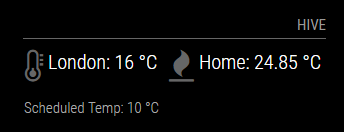
      I’ve spent some time on this (well all of my spare time really since I posted my request!) seeing if I could bodge something together, and have come up with the following:

      0_1501186410475_hive.png

      I would imagine it’s totally unoptimised, but it pulls the temperature back from the hive server, which is the main thing! The thermometer also changes depending on the temperature, and the flame changes to white when the heating is on. Need to spend some more time tidying it up and will then probably submit it here.

      posted in Requests
      M
      mongo116
    • RE: Passing variable from one request to another

      @strawberry-3.141 Fantastic - just needed to be nested. That now works like a charm - thank you so much :)

      posted in Troubleshooting
      M
      mongo116
    • RE: Passing variable from one request to another

      This is from node_helper.js:

      	request({
      		url: "https://api-prod.bgchprod.info:443/omnia/auth/sessions",
      		headers: {
      				'Content-Type': 'application/vnd.alertme.zoo-6.1+json',
      				'Accept': 'application/vnd.alertme.zoo-6.1+json',
      				'X-Omnia-Client': 'Hive Web Dashboard',
      				'cache-control': "no-cache",
      				 },
      		method: "POST",
      		body: JSON.stringify(body),
      	}, function (error, response, body) {
      		if (!error && response.statusCode == 200) {
      			var responseJson = JSON.parse(body);
      		}
      	});
      	
      	request({
      		url: "https://api-prod.bgchprod.info:443/omnia/nodes",
      		headers: {
      				'Content-Type': 'application/vnd.alertme.zoo-6.1+json',
      				'Accept': 'application/vnd.alertme.zoo-6.1+json',
      				'X-Omnia-Client': 'Hive Web Dashboard',
      				'cache-control': "no-cache",
      				'X-Omnia-Access-Token': ,
      				 },
      		method: "GET",
      	}, function (error, response, body) {
      		if (!error && response.statusCode == 200) {
      			var responseJson = JSON.parse(body);
      		}
      	});
      

      The Session ID is part of the JSON response from the first request (responseJson.sessions[0].sessionId). Session ID needs to be put into the ‘X-Omnia-Access-Token’: , of the second request.

      Thanks

      posted in Troubleshooting
      M
      mongo116
    • RE: Passing variable from one request to another

      Thanks for the reply. Sorry to be a pain, but any chance of you putting a simple example of both on here.

      posted in Troubleshooting
      M
      mongo116
    • Passing variable from one request to another

      Hi,
      Hopefully a simple question.

      I am trying to pull data for my heating system, which requires two requests be made. The first request gets the sessionID, and the second logs in using the sessionID and pulls back the JSON data.

      I can see the SessionID in the first request, but how do I have this value available to the second request?

      Thanks

      posted in Troubleshooting
      M
      mongo116
    • RE: Motion Detector

      @reaper81 I had the following in my config.js:

                    {
                      module: 'motiondetector',
                      config: {
                      timeout: 5*60*1000
                         }
                     },
      

      You will need to ensure that the 3 files are located in the modules/motiondetector folder.

      I ended up using a different method for motion detection though, as tvservice kept stopping working.

      posted in Utilities
      M
      mongo116
    • RE: Motion Detector

      @strawberry-3.141 Thanks for that. I’ve amended this slightly so will keep an eye on it. Might also have a look at putting on some heatsinks to see if that helps.

      One (hopefully!) final question. When the monitor is turned off, is there a way to ‘freeze’ the other modules, so they stop running for the duration that the monitor is off? This would hopefully help with performance, in that the other modules are no longer running.

      posted in Utilities
      M
      mongo116
    • RE: Motion Detector

      I’ve got the motion detection now working - had to add bcm2835-v4l2 to \etc\modules - restarted and screen now turns off after defined period and on when motion is detected. This is really great, and I’m nearly there - but… Now when the motiondetector is running, the RPi3 temp just goes up and up and up, until it eventually crashes/freezes and I have to pull the power as RPi is completely unresponsive. If I remove motiondetector from MagicMirror, temperature stays stable and no crashing. Is there something I can change in the config to sort out this performance issue?

      posted in Utilities
      M
      mongo116
    • RE: Motion Detector

      Just to add to this, I have checked that the camera is working and motion is detected by testing with https://github.com/pageauc/motion-track. All appears to be working as expected. No motion is detected unless I move in front of the camera.

      posted in Utilities
      M
      mongo116
    • 1 / 1