
MagicMirror Forum
    • Recent
    • Tags
    • Unsolved
    • Solved
    • MagicMirror² Repository
    • Documentation
    • 3rd-Party-Modules
    • Donate
    • Discord
    • Register
    • Login
    1. Home
    2. mpires
    3. Posts
    A New Chapter for MagicMirror: The Community Takes the Lead
    Read the statement by Michael Teeuw here.
    Offline
    • Profile
    • Following 0
    • Followers 0
    • Topics 2
    • Posts 16
    • Groups 0

    Posts

    Recent Best Controversial
    • TeamViewer for PI

      I have been running teamviewer on my PI, and is works very well, i was afraid that TeamViewer would consume a lot of resources, but for what i see almost non, so until now is ok, the only problem i have is that TeamViewer will pop-up a window on every PI reboot, and the problem is that will appear over my MM.

      I have try few solution by googling, to minimize teamviewer window, but non did work…

      Any suggestion?

      I usually do everything by SSH, but i would like to have this option enable just in case, i know i can use VNC, but i prefer teamviewer.

      posted in General Discussion
      mpiresM
      mpires
    • RE: How do you turn Off/On the monitor if not in use - Be Green

      @Steff ty Steff, i did order today my PIR.

      posted in General Discussion
      mpiresM
      mpires
    • RE: How do you turn Off/On the monitor if not in use - Be Green

      @Steff Sure Steff, post the Scheduler configuration.

      posted in General Discussion
      mpiresM
      mpires
    • RE: MagicMirror does not work at startup

      Yes that is correct, you will always see the desktop for few seconds, then should open MM.
      I think will happen the same with any other option you find to auto boot MM.

      posted in Troubleshooting
      mpiresM
      mpires
    • RE: How do you turn Off/On the monitor if not in use - Be Green

      @broberg

      The test i did with my LG monitor, was using remote module i did turn Monitor OFF, and my monitor will enter in standby after 2 sec, so i think that i can set the PIR to once detect movement will trigger the monitor to ON, and after X sec, if no movement is detect turn monitor OFF.

      posted in General Discussion
      mpiresM
      mpires
    • RE: How do you turn Off/On the monitor if not in use - Be Green

      @yawns said in How do you turn Off/On the monitor if not in use - Be Green:

      art. In

      I agree, but the other problem i see with relay, is that you will be able to cut the energy, but once you order to power on, monitor will need human action to press power button :(

      posted in General Discussion
      mpiresM
      mpires
    • How do you turn Off/On the monitor if not in use - Be Green

      alt text

      So after read so many post, i would like know how you turn Off/On your monitor when you are not using.

      I can’t decide what is the best way to do this, after all i think we must be green and save some energy ;)

      My idea is to active MM once someone get in front of the MM, then turn off the monitor to save some power, for this i think that PIR is the way to go, by power on/off the HDMI.
      ( was the solution i found on the forum that seems to work ok. )

      Be free to tell how did you became green with your MM, i’m sure this is a topic that most of us are interested.

      posted in General Discussion
      mpiresM
      mpires
    • RE: MagicMirror does not work at startup

      @cassidycaid yup is the same, i just show visual way, because is more simple for some ppl to understand.

      posted in Troubleshooting
      mpiresM
      mpires
    • RE: MagicMirror does not work at startup

      Another happy person :D

      posted in Troubleshooting
      mpiresM
      mpires
    • RE: MagicMirror does not work at startup

      no just put " pm2 start.sh "

      0_1488758016035_upload-7c9f1bfc-ddec-48c9-9879-941288a3005a

      posted in Troubleshooting
      mpiresM
      mpires
    • RE: MagicMirror does not work at startup

      You have Pm2 install?

      posted in Troubleshooting
      mpiresM
      mpires
    • RE: MagicMirror does not work at startup

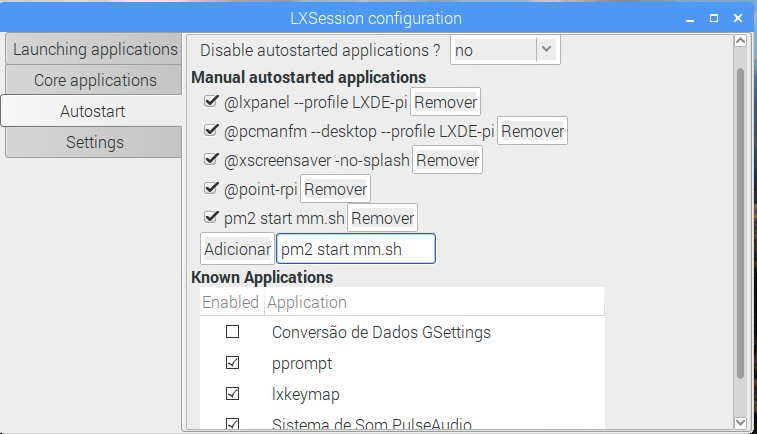
      I have the script working, but the only way to start mm on boot, was set

      pm2 start mm
      

      on LXSession, but yes now once i boot my Pi, mm start without any problem.

      posted in Troubleshooting
      mpiresM
      mpires
    • RE: MagicMirror does not work at startup

      I have the same issue, i did put java scrip on startup, i did look on the forum and #sebzx10r, suggest the same solution.

      https://forum.magicmirror.builders/topic/1094/pm2-mm2-not-starting-on-start-up/15

      In Raspian click Menu,Preferences,Main Menu Editor
      Click Preferences and check Default applications for LXSession
      Click OK and close main menu editor
      Now click Menu and Under Preferences click on Default applications for LXSession
      LXSession configuration opens
      Click Autostart
      Under Manual autostarted applications paste in your java command line
      click add
      close the LXSession configuration application and reboot your pi
      your java app should run after reboot
      

      Hope this help.
      Cheers,

      posted in Troubleshooting
      mpiresM
      mpires
    • RE: Total n00b and can't get this thing to work. Please help!

      :D after fresh install the mirror did came to life :P

      posted in Troubleshooting
      mpiresM
      mpires
    • RE: Total n00b and can't get this thing to work. Please help!

      Hi, same issue over here :(

      Tony, did you wipe the SDcard and start all over? i’m about to do that, i have try a butch of things and i can’t pass this same error.

      posted in Troubleshooting
      mpiresM
      mpires
    • 1 / 1