@mwm341 I get the following error when I run with the same config as you:

I had to rename the folder but I am getting some other weird errors. I am not too sure if this module still works. Seems like the developer last looked at it 5 years ago.
 Offline
@mwm341 I get the following error when I run with the same config as you:
I had to rename the folder but I am getting some other weird errors. I am not too sure if this module still works. Seems like the developer last looked at it 5 years ago.
@mwm341 Can you share the link to the github repo for the module? I want to test it out and see.
@mwm341 which password are you using? You have to generate a password by following these steps:
Go to your Google Account.
Select Security.
Under list item “Signing in to Google,” select App Passwords. You may need to sign in.
At the bottom, choose Select app and choose the app you using
Select device and choose the device you’re using. …
Follow the instructions to enter the App Password. …
Tap Done.
@swvalenti MMM-News can be cloned from the following repo:
I have made a change to MMM-NewsAPI which resolves CSS conflicts and it should now work when running MMM-News at the same time.
@swvalenti I will have a look shortly. It is running just fine on my mirror. Will start another instance and see
@contactmike1 Hi. Not what I meant. When you start your mirror, do you start it with PM2 or NPM? If you start it with NPM are there any errors in the console? If you start with PM2 you can do pm2 logs --lines=100 to get the last 100 lines and see if there are any errors. For the developer Window you can press Ctrl + i which would open the developer window. In the console tab look for any errors related to the module.
@lmd1220 You could try and set the font-size in the custom.css file located /MagicMirror/css/ folder.
.globe {
 font-size: 6pt;
}
The current font-size is set to 8pt.
@swvalenti said in MMM-NewsAPI:
The issue is with sources “Fox News”. That is not a valid source. Remove it and it should work fine with just the domain of foxnews.com
@swvalenti You can clone the module from here:
MMM-News
The config should still work.
@bugsounet I can’t seem to find it nor can I see any notifications for it to accept.
@cdanielgallegos You can change the icons as well. They have their own individual classes.
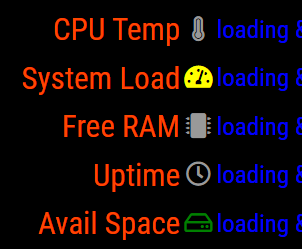
Open the Developer console, select the Elements tab and find the MMM-SystemStats module and check them out. You can set their individual colors from there in the custom.css using their class names.
@bugsounet Thanks Bugs. You can transfer. I will dig through the code and try to make sense of all your awesome work. I am humbled. :person_bowing:
@sdetweil Yeah, I didn’t want to advise that for exactly that reason.
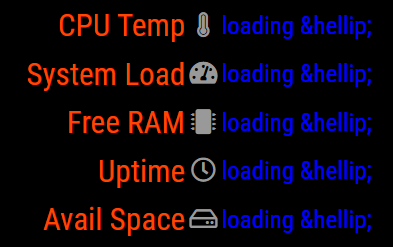
@cdanielgallegos The module does not have a stylesheet and runs off the main.css. You could set the following in the custom.css but it will change the color for all the rows as they all have a class of “title” and the values have a class of “value”. That is about as much as I could get with it.
.MMM-SystemStats .title {
 font-size: 25px;
 color: orangered;
}

.MMM-SystemStats .vlue {
color: blue;
}
@bira Unfortunately it is defined in the MMM-weatherforecast.js when the table is built.
@levon Awesome. Glad you found the issue. The code uses the npm module strava-v3. It looks like the method used does not return walking.
@contactmike1 Are there any errors in the NPM or PM2 logs or in the developer console?