MagicMirror Forum
    • Recent
    • Tags
    • Unsolved
    • Solved
    • MagicMirror² Repository
    • Documentation
    • 3rd-Party-Modules
    • Donate
    • Discord
    • Register
    • Login
    1. Home
    2. mvrlogins
    3. Posts
    A New Chapter for MagicMirror: The Community Takes the Lead
    Read the statement by Michael Teeuw here.
    M
    Offline
    • Profile
    • Following 0
    • Followers 0
    • Topics 7
    • Posts 27
    • Groups 0

    Posts

    Recent Best Controversial
    • RE: MMM-pages - how to know which page index my module has?

      @sdetweil said in MMM-pages - how to know which page index my module has?:

      git clone https://github.com/sdetweil/MMM-MPlayer

      Did as you suggested

      The video appears only on page index 0 and not on the hidden page

      See the 2 video images on the attached screenshot - both are over the weather module

      The header for the MPlayer appears on the hidden page

      I can change to the hidden page with Remote Control, no problem

          {
              module: "MMM-pages",
              config: {
                  rotationTime: 1000 * 86400, // rotate every 20 seconds
                  modules: [
      	
                      ["page1"],           // class name for page 1
               //       ["page2"],           // class name for page 2
              //        ["page3"],           // class name for page 3
                  ],
                  fixed: ["fixed_page"],
                  hiddenPages: {
                      "Doorbell": ["doorbell_page"],
                 
                  }
              }
          },
      
      {
      	module: 'MMM-MPlayer',
              classes: "doorbell_page",
              disabled: false,
              position: "top_left",
              header: "MPlayer",
      	config: {
      	  useTwoWindows: true,
      	  layout: 'column',
      	  monitorAspect: 0,
      	  rotate: -1,
      	  windowSize: { width: 640, height: 360 },
      	  windowPosition: { x: 5, y: 225 },
      	  streamInterval: 30000,
      	  streams: {
      		window1: [
      		  'rtsp://10.0.1.1:7447/gv9eHrB9yZyPhgvN',
      		],
      		window2: [
      		  'rtsp://10.0.1.1:7447/D89zTJyDwN8YtKix',
      		  
      		]
      	  }
      	}
      },
      

      ScreenFloat Shot of Preview at 20 Feb 2025 at 16_57_07.jpg

      posted in Development
      M
      mvrlogins
    • RE: MMM-pages - how to know which page index my module has?

      @sdetweil said in MMM-pages - how to know which page index my module has?:

      @mvrlogins hm, that makes no sense as the MagicMirror operations are the same

      Maybe something to do with mplayer itself, not the module MMM-Mplayer?

      posted in Development
      M
      mvrlogins
    • RE: MMM-pages - how to know which page index my module has?

      @sdetweil said in MMM-pages - how to know which page index my module has?:

      @mvrlogins i believe so. but you should have been able to send the notification for the named hidden page

      “SHOW_HIDDEN_PAGE”, “Doorbell”

      right?!

      Yes, the notification works fine.

      But mplayer does not show up on the hidden page, only on the main page

      posted in Development
      M
      mvrlogins
    • RE: MMM-pages - how to know which page index my module has?

      Only thing I can think of right now is to put the video on page0 and the rest on page1

      and then use a combination of the PAGE_CHANGED and PAUSE_ROTATION notifications to get what I want

      Or is there a way to permanently pause rotation?

      Then I can only use the PAGE_CHANGED call to get to the page I want

      would the below disable rotation?

      rotationTime: 1000 * 0,

      posted in Development
      M
      mvrlogins
    • RE: MMM-pages - how to know which page index my module has?

      @sdetweil

      I’m using MMM-Remote Control

      The issue is that the video is shown all the time on page0.

      I have 2 pages set up with MMM-Pages

      • 1 page to be shown all the time
      • 1 hidden page to be shown only when called.

      The video needs to be on the hidden page. If I put classes : “hidden_page” under MMM-Player, the video feed shows on the page0 regardless.

      The hidden page, when called, shows only the header fro MMM-Player and is otherwise blank

      The page calling works fine with MMM-RemoteControl

       {
              module: "MMM-pages",
              config: {
                  rotationTime: 1000 * 20, // rotate every 20 seconds
                  modules: [
                      ["page1"],           // class name for page 1
                  ],
                  fixed: ["fixed_page"],
                  hiddenPages: {
                      "Doorbell": ["doorbell_page"],
                 
                  }
              }
          },


      and

      {
      	module: 'MMM-MPlayer',
              classes: "doorbell_page",
              disabled: false,
              position: "top_left",
              header: "MPlayer",
      	config: {
      	  useTwoWindows: true,
      	  layout: 'column',
      	  monitorAspect: 0,
      	  rotate: -1,
      	  windowSize: { width: 640, height: 480 },
      	  windowPosition: { x: 5, y: 225 },
      	  streamInterval: 30000,
      	  streams: {
      		window1: [
      		  'rtsp://10.0.1.1:7447/gv9eHrB9yZyPhgvN',
      		],
      		window2: [
      		  'rtsp://10.0.1.1:7447/D89zTJyDwN8YtKix',
      		  
      		]
      	  }
      	}
      },
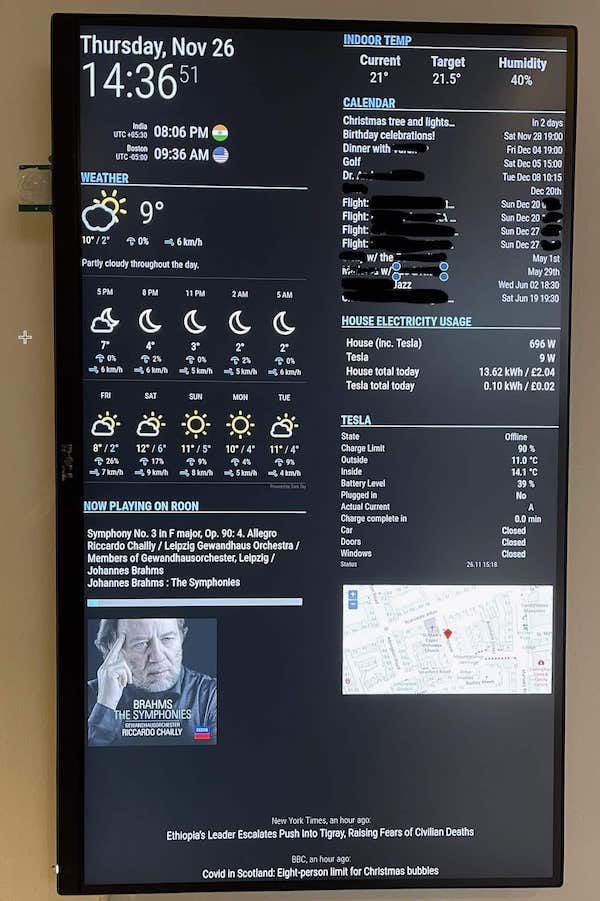
      
      posted in Development
      M
      mvrlogins
    • RE: MMM-pages - how to know which page index my module has?

      @evroom said in MMM-pages - how to know which page index my module has?:

      As a workaround, I will make it a requirement to put the MMM-Player on the first page (page index 0).
      When I receive 0, then I will start streaming, otherwise I will stop streaming.
      That seems to work.

      Hi

      Trying to use the mmm-mplayer module with mmm-pages, and it works fine, as you say, when the page index is 0.

      However, I’d like to use it to only show video when called via notification

      I have a single main page (without mplayer) - that shows all the time - and a single hidden page (with mplayer) to be shown when called via notification and then return the the main page with another notification.

      I can’t currently implement this. Any ideas?

      Thanks very much

      posted in Development
      M
      mvrlogins
    • change pages using webhook (POST or GET)?

      I have MMM-pages setup with 2 pages

      1 page shows all the time.

      I’d like to show the second page only when called using a HTTP POST or GET from another device. (doorbell camera video , when someone rings the doorbell)

      And then only show page 2 for a short, fixed amount of time before reverting back to page 1

      Any help/suggestions will be most gratefully received.

      Thanks

      posted in Troubleshooting
      M
      mvrlogins
    • RE: 4k Dashboard

      @N6NG

      Sorry for the late reply - missed your post

      Following is my calendar config in config.sys

            module: 'calendar',
            position: 'top_right',
            header: 'CALENDAR',
            config: {
             
              maximumEntries: 21,
              maxTitleLength: 25,
              fade: false,
              displaySymbol: false,
              timeFormat: 'relative',
              nextDaysRelative: true,
              dateFormat: 'ddd MMM DD HH:mm',
              fullDayEventDateFormat: 'ddd MMM DD',
              calendars: [
                {
               
                  symbol: 'home',
                  url: 'webcal://p49-caldav.icloud.com/published/2/abcdefghijkl......mnopqrs',
                  maximumEntries: 19
                },


      Hope that helps

      posted in Show your Mirror
      M
      mvrlogins
    • RE: Monitor not awaking from sleep

      @sdetweil said in Monitor not awaking from sleep:

      @mvrlogins I had a display like that, if no input, it would turn off, even if I was hiding modules.

      I had to make a change to one of my modules to wake up mm for 1 second every 14 minutes to keep it from going into shutdown

      May I ask how you did that?

      Thanks

      posted in Troubleshooting
      M
      mvrlogins
    • Monitor not awaking from sleep

      I’m running a RPi4 with the latest MM release and using MMM-Screen-Powersave-Notification and MMM-GPIO-Notifications along with a motion sensor.

       {                   
      	module: 'MMM-Screen-Powersave-Notification',
      	config: {                 
              delay: 60
      	}
          },
      
      
          { 
      	module: 'MMM-GPIO-Notifications',
      	config: {
      	    '4': {
      		    gpio_state: 1,
      		    gpio_debounce: 0,
                  delay: 30000,
      		    notifications: [
      		        { 
      				    notification: 'SCREEN_ON', 
      		            payload: { 'forced': false }
      		        },
                      {
      
                      }
      		    ]
      	    }
      	}
          },
      

      I had this setup on a Dell monitor and it worked perfectly.

      I just installed a new monitor - a Lenovo Thinkvision P32p-20

      After starting the sensor works as it’s supposed to, waking the monitor when someone passes by and sleeping after 60 seconds of inactivity.

      But after a while, the monitor does not wake from sleep. The MM instance is running fine (I can look at the dispaly from a remote browser).

      The monitor is in powersave mode (amber LED)

      The only way to wake the monitor is to touch a button on the monitor’s control panel.

      The monitor has no configuration options for powersave or sleep.

      Any suggestions on how to fix this?

      posted in Troubleshooting
      M
      mvrlogins
    • 1
    • 2
    • 3
    • 2 / 3
