@yawns said in New module breaks magicmirror:
Great, we all were at this point. Enjoy your mirror
Amen to that brother! :-)
Enjoy your mirror. :-)
 M
Offline
M
Offline
@yawns said in New module breaks magicmirror:
Great, we all were at this point. Enjoy your mirror
Amen to that brother! :-)
Enjoy your mirror. :-)
@scott5532 said in MMM-SORT:
Please can anyone help.
Hi,
Your config entry above is not complete. I completed it and tested it. The module fires right up. You can see both the static and rotating options running in my screenshot.
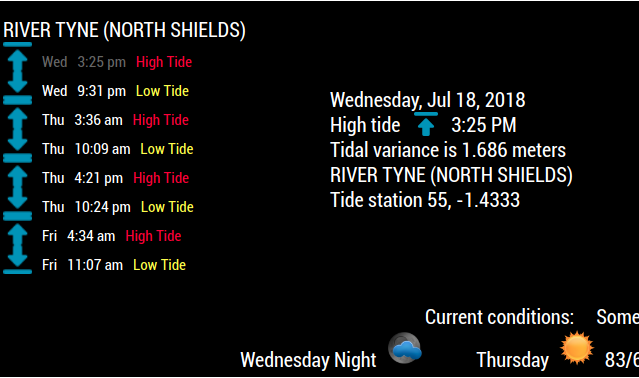
Your complete config entry should look like this:
{
disabled: false,
	module: "MMM-SORT",
	position: "bottom_left",
	config: {
		apiKey: "YOUR API KEY GOES HERE",
		lat: "54.992562",           // your latitude
		lon: "-1.451674",          // your longitude
		mode: "rotating",             // static or rotating
		LowText: "Low Tide",             // Low tide text. Whatever you want or nothing "",
		HighText: "High Tide",           // High tide text. Whatever you want or nothing "",
		height: "m",               // ft = feet, m = meters (When mode: is rotating)
		useHeader: false,           // false if you don't want a header
		header: "",                 // Change in config file. useHeader must be true
		maxWidth: "300px",
		animationSpeed: 3000,       // fade speed
		rotateInterval: 20 * 1000,  // seconds (When mode: is rotating)
	}
},
I also see that you made changes to the MMM-SORT.js file. That’s not recommended unless you absolutely know what you want to accomplish there.
I suggest you delete what you have and re-install the module from the repo. Use the config entry that I posted above and I’m sure you will be successful, unless you’ve made other changes that I am not aware of.
https://github.com/mykle1/MMM-SORT
P.S. You should keep your API keys private
I’m pretty sure that these type of quotes “MMM-rainfc”will cause syntax errors. Notice the difference between those and these "MMM-rainfc"
Edit: Nevermind! :-)
I use ubuntu 16.04 LTS exclusively. I wipe the machine so that there is nothing on it except ubuntu. I fully update ubuntu and then install node like this:
curl -sL https://deb.nodesource.com/setup_6.x | sudo -E bash -
The OS should ask you if you want to install curl at this point. Do so. If you have to repeat the curl command above, do so. Now on to the installation of MM.
I like to do manual installations, meaning, I download the MM zip file instead of using the install command. I drag the MM folder to home and remove the “-master” from the name of the folder, leaving only MagicMirror as the name. Then, in the terminal, cd MagicMirror and then npm install
I’ve never had a problem doing it this way. Good luck.
You could try this for ON
if (something) {
exec("/opt/vc/bin/tvservice -o", null); }
And this for OFF
{ exec("/opt/vc/bin/tvservice --preferred && sudo chvt 6 && sudo chvt 7", null); }
Or
{ exec('xset dpms force on', null); }
{ exec('xset dpms force off', null); }
@dazza120 said in How to start MM with a module as default hidden:
not sure why @Mykle1 hasn’t recommend Lucy it seems the best one for what you want to achieve
I don’t want to “sell” Hello-Lucy to anyone and there are other voice modules that he may want to consider so that’s why I worded my answer that way. Lucy does exactly what I want “her” to do but it may be more complicated for some users
@Mykle1 said in Want to turn off my monitor:
{ exec(‘xset dpms force on’, null); }
{ exec(‘xset dpms force off’, null); }
These commands do work. I just tested them on my desktop machine with a monitor connected through DVI and a laptop. Displays are immediately turned off (standby) and on. Here’s the laptop.
@09succotash said in Need help with MM-Google Assistant Mk2:
Thanks, but i already figured it out. Appreciate the help
For the benefit of other users you could post what the problem was and how you solved it.
Just a thought. :-)
Rotating the screen requires that you edit the /boot/config.txt file.
You simply need to add the following line to that file and save.
display_rotate=1
Reboot.
@shgmongohh said in MMM-Lunartic only a picture when static:
No other option is working.
animation and static are both working. I just tested them both.
DayNight is out of order until the API resumes normal operation (April)
current will work if you replace the MMM-Lunartic.js file with the one that is in the temporary fix folder that is inside the MMM-Lunartic folder. (But the other three won’t until the API resumes normal operation in April)
@sdetweil - Don’t say you told me so! :-)
Or simply, open a terminal,
type cd MagicMirror and Enter
and then type
npm start and Enter.
{
	disabled: false,
		module: "newsfeed",
		position: "bottom_bar",
		config: {
			updateInterval: 28 * 1000,
			feeds: [
				{
					title: "New York Times",
					url: "http://www.nytimes.com/services/xml/rss/nyt/HomePage.xml"
				},
				{
					title: "ANOTHER NEWSFEED HERE - CHANGE THE URL BELOW",
					url: "http://www.nytimes.com/services/xml/rss/nyt/HomePage.xml"
				},
				{
					title: "ANOTHER NEWSFEED HERE - and so on and so forth",
					url: "http://www.nytimes.com/services/xml/rss/nyt/HomePage.xml"
				},
				],
				showSourceTitle: true,
				showPublishDate: true
			}
		},
If you simply want a background picture on your mirror this little module will do the trick.
https://github.com/mykle1/MMM-EasyBack
The directions are pretty straightforward in the repo. There is one background picture included. All you have to do is use the config entry from the readme and fire up your mirror.
If you have any questions you can come back here and ask.
Peace
@Damian said in Messed up CSS between Portrait and Landscape monitors:
your keyboard shortcuts worked a treat, but when reloading, everything reverted again
Then I suspect that you’ve changed something along the way that is overriding that. Your idea of a fresh install is not a bad idea, seeing as you don’t even remember the changes that you’ve made.
Another suggestion: Don’t trash your current installation. Simply rename the MagicMirror folder to something else. Do your new installation. Transfer your modules (1 by 1) into the new MagicMirror folder
Thanks ninja. I was a little tied up last night with yesterday’s Nor’Easter slamming NYC late into the evening. If you don’t mind, I’ll just incorporate that into the module when I get home from work. :-)
Peace!
That’s me after talking to my wife on the phone
@MagicMirrorAid said in Move Module to Side of screen:
any ideas on how to order them?
First entry to appear in the config.js will appear first in the region. So, move your entry below the clock entry in the config.js and it will appear below on your display. :-)
That goes for all entries in any region.