@Fookes Yes, but how are you opening your config.js to paste in your options/configuration? There is an app/program that opens and interprets the file, then saves it again. Whatever you’re using, it is permitting MacOS to change your quotes, thereby breaking the file.
N
Offline
A New Chapter for MagicMirror: The Community Takes the Lead
Read the statement by Michael Teeuw here.
Read the statement by Michael Teeuw here.
Posts
-
RE: Modules assistance for MM newbie! Help!
-
RE: fs.stat SyntaxError: Unexpected token
@pepebc It may depend on what precedes that snippet (if anything). Try copy/pasting the whole file into JSHint, it may give you a better idea. Also, doesn’t
fs.stat()take apathas the first argument? -
RE: Improve updatenotification module (to be module selective)
@E3V3A But also means you lose the metadata stored in
.gitto manage (incl. update later) via.gitwithout renaming the folder.Why not have
updatenotificationiterate over/skip modules on the blacklist? Something like changing this line innode_helper.js:if (defaultModules.indexOf(moduleName) < 0) {To the following?
if (defaultModules.indexOf(moduleName) < 0 &&
this.config.ignoreModules.indexOf(moduleName) < 0){
This means if the module is either (1) in
defaultModulesor (2) in the (new)ignoreModulesit gets skipped.Remember to also add
ignoreModules: []todefaultsinupdatenotification. You can then avoid altering the filesystem whatsoever. -
RE: Modules assistance for MM newbie! Help!
Sorry @Fookes, when @yawns mentioned MacOS and you didn’t say you weren’t using a Mac, I assumed that to be the case (given the quotes problem). Did you install Atom on your own computer or the RPi? Are you editing your files on the RPi itself (via a keyboard, in Terminal) or are you connecting remotely from other computer (typically
ssh)?As a command-line text editor,
nanorespects quotes and should not cause a problem, although I typically avoid pasting code blocks – I find oversshthat the paste buffers and encodings can get weird. -
RE: Input field forces restart instead of update
@joncedimov If it’s the [enter] causing problems, you may need to override/disable the
onsubmitevent listener for the form. It may be that you’re submitting the form, MM has no idea what to do with that data, and so simply displays (reloads) the same page. -
RE: Get JSON data stuck behind CAPTCHA click???? i.e. US Gas Prices
@hsukup1 It’s not an easy problem. The crowdsourced solutions are not good, and the private solutions are not cheap. There’s MyGasFeed, but like GasBuddy it relies on crowdsourced data. Do you need station-specific data? AAA has state and municipal data available on their website.
It looks like Geico also offers prices via the mobile app. You could install it, perform the search, and inspect the traffic and query. It could very well be making unobfuscated calls to the API. Just keep in mind that relying on that method, it may eventually break (especially if you attract attention with abuse of the API).
-
RE: MMM-cryptocurrency side by side top bar
Hi @StacheEnthusiast, in
getDom()atMMM-cryptocurrency.js:164it creates the layout for the module in atable. It loops through, and for each currency creates atr(table row) andtd(table cell).It looks a bit like this:
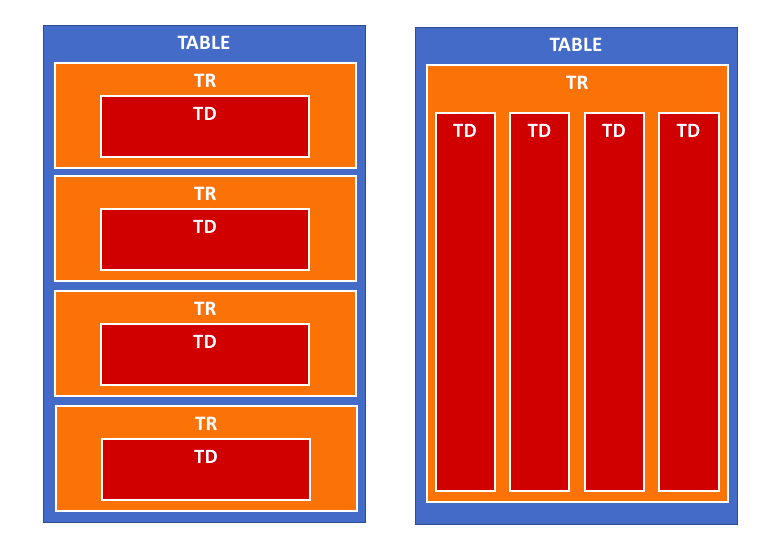
So I think if you take the
trcreation outside of the loop, it should work:getDom: function() { if (this.config.displayType == 'logo' || this.config.displayType == 'logoWithChanges') { this.folder = (this.config.coloredLogos ? 'colored/' : 'black-white/') return this.buildIconView(this.result, this.config.displayType) } var data = this.result var wrapper = document.createElement('table') wrapper.className = 'small mmm-cryptocurrency' var tableHeader = document.createElement('tr') tableHeader.className = 'header-row' var tableHeaderValues = [ this.translate('CURRENCY'), this.translate('PRICE') ] if (this.config.headers.indexOf('change1h') > -1) { tableHeaderValues.push(this.translate('CHANGE') + ' (1h)') } if (this.config.headers.indexOf('change24h') > -1) { tableHeaderValues.push(this.translate('CHANGE') + ' (24h)') } if (this.config.headers.indexOf('change7d') > -1) { tableHeaderValues.push(this.translate('CHANGE') + ' (7d)') } for (var i = 0; i < tableHeaderValues.length; i++) { var tableHeadSetup = document.createElement('th') tableHeadSetup.innerHTML = tableHeaderValues[i] tableHeader.appendChild(tableHeadSetup) } wrapper.appendChild(tableHeader) var trWrapper = document.createElement('tr') // moved from below trWrapper.className = 'currency' // moved from below for (i = 0; i < data.length; i++) { var currentCurrency = data[i] // var trWrapper = document.createElement('tr') // trWrapper.className = 'currency' var name if (this.config.displayLongNames) { name = currentCurrency.name } else { name = currentCurrency.symbol } var tdValues = [ name, currentCurrency.price, ] if (this.config.headers.indexOf('change1h') > -1) { tdValues.push(currentCurrency.percent_change_1h + '%') } if (this.config.headers.indexOf('change24h') > -1) { tdValues.push(currentCurrency.percent_change_24h + '%') } if (this.config.headers.indexOf('change7d') > -1) { tdValues.push(currentCurrency.percent_change_7d + '%') } for (var j = 0; j < tdValues.length; j++) { var tdWrapper = document.createElement('td') var currValue = tdValues[j] // If I am showing value then set color if (currValue.includes('%')) { tdWrapper.style.color = this.colorizeChange(currValue.slice(0,-1)) } tdWrapper.innerHTML = currValue trWrapper.appendChild(tdWrapper) } // wrapper.appendChild(trWrapper) } wrapper.appendChild(trWrapper) // moved from above return wrapper },I’ve not run this code, as I don’t use
MMM-cryptocurrency, but I think it should work. Just be careful when modifying yourMMM-cryptocurrency.jsto only replace thegetDom()function. I also don’t think this should break any of the module’s functionality or styling.Worst case, you can always use
git checkout MMM-cryptocurrency.jsto revert to the original version. -
RE: Messed up CSS between Portrait and Landscape monitors
Hi @Damian,
I’m on my phone atm, so will try to look in more detail later. It depends on the screen resolution, but also (as I’m sure you realize) you can fit less vertically with a landscape display.
You’re is a complicated question. I recommend a combination of repositioning and resizing.
First, you may want to see what (else) you can move to
top_centerandbottom_centerto make more room. Alternatively, if you don’t want to use those, you could make.region.leftand.region.rightwider (say, 50%). But you don’t have any text “wrapping” to new lines in your module, so in your case won’t help much.Second, you can resize by changing the
font-sizefor the entire page (in yourcustom.css) like this:body { font-size: 73%; }This value will then be inherited by (or “cascade to”, hence CSS) by all other elements in the DOM (i.e. on the page). You can also change the
font-sizeof a specific module; your “family home” calendar seems like a great contender.Finally, you may also want to limit the width of your newsfeed.
I think this should put you on the right course. Post any questions, let us know how you fare. I’ll check in later to help if I can.
-
RE: Changing the length of the line under the header
@MadScientist I’ve always liked W3Schools. It’s very concise, but introduces each concept and lets you play with it.
There are also learning/coursework sites like CodeAcademy, Code School, udemy, etc.
Groups like Ladies Learning Code also have slides and sample code available to walk you through.
There is CSS, but there are also media queries, CSS animations, layout frameworks, CSS extensions/preprocessors like Sass & LESS, among other things. Let alone different limitations, workarounds, and other peculiarities for different desktop and mobile browsers.
Finally, the best way to learn and retain is often to apply it. Building things will often reinforce whatever you learn through the sites and materials above.
-
RE: MMM-cryptocurrency side by side top bar
@StacheEnthusiast You’re right. Tables don’t take styling very well; table rows (
tr) insist on taking their own line, so there’s no easy way to move them beside each other. The proposed solution above should circumvent this, putting all the cells (td) into a single row. -
RE: show integer logs from python script as diagram in MM ?
@cruunnerr @doubleT It would certainly be more easily handled in JSON or even a CSV (easiest to append readings). You can then set up
crontorsyncthe file to your mirror, load the file with annpmpackage likecsvorfast-csv, and display inMMM-Chart(I would modifyMMM-Chartto load the CSV directly). -
RE: Messed up CSS between Portrait and Landscape monitors
@Damian Does this work?
.module.compliments { font-size: 73%; } -
RE: Can i remove the Logo of Magic Mirror In start?
@postremalone Fastest way to show MM is to have the RPi already running, then simply turn on the the display. Check out this thread here for use with a PIR or other sensor/button. Apparently, because it already draws such little power, there is no desire to implement suspend on RPi.
As for speeding up boot, as @lavolp3 said, the issue is not the logo, but booting the OS. You can strip down the Raspbian boot for speed, but it will never be instantaneous (sub 1 sec). You can apparently get down to 10 seconds with a stripped down distro and Class 10 SD card.
-
RE: This Day in History ticker?
@cowboysdude Agreed, I meant if @xela is looking to find code examples to construct a single module. Sorry if that wasn’t clear; best to keep in a single module.
-
RE: Messed up CSS between Portrait and Landscape monitors
@Damian Inspect the element, and share a screenshot of the
div.module.complimentselement styles. At this point, either (1) your CSS is not being applied, or (2) those aren’t the right classes to use to target that element. I suspect the latter. -
RE: Need help to install a script that makes pixel shift, to avoid static screen burn
@kj3rra Not sure that @strawberry-3.141 will agree with the approach, but you can actually achieve the same thing with just CSS animations (and avoid creating a module).
Try either the following in your
css/custom.cssfile:/* this will cause the image to fade out for about 2 seconds every 2 minutes */ body{ animation: fading 60s infinite alternate; } @keyframes fading { 0%, 98% { opacity: 1; } 100% { opacity: 0; } }- or -
 /* this will cause the image to slide down, across 10px after 30 seconds, for 30 seconds, then back up */
body{ animation: slide 60s linear infinite alternate;}
@keyframes slide {
  0%, 49% { transform: translate(0, 0); }
  50%, 100% { transform: translate(10px, 10px); }
}
You can adjust the time value (i.e.
60s) to more/less as you like (but be careful, 2% of one hour is over 2 minutes). You can also adjust the percentages, and use decimal percents, like0.5%if needed. CSS 2D transforms should not take too much memory or cause issues on an RPi. I assume that Chromium/Electron supports CSS 3 animations. YMMV. -
RE: Schedule Module with XML/Feed source
@kruemel You can make a mashup of
MMM-WeeklySchedulefor display andMMM-HTTPRequestDisplayto fetch data which handles an XML response. -
RE: Messed up CSS between Portrait and Landscape monitors
@Damian You don’t need to download anything. Use your mouse on the MagicMirror. Right-click the compliments module, and select “Inspect element”. Or, stop MM, then run
npm start devwhich will start in development mode with Chromium’s developer tools already open. You then just need to navigate the DOM to find the.complimentselement. Follow these instructions to take a screenshot on an RPi. -
RE: Request a Twitterfeed
@mediathreat
newsfeedwill refresh the feeds based on theupdateinterval, so it depends on whether (and how often) TwitRSS refreshes the feeds. -
RE: Messed up CSS between Portrait and Landscape monitors
@Damian I was hoping you wouldn’t have to resort to it, but you can use CSS
transform: scale():body { transform: scale(0.8); /* for 80% */ }Some CSS transforms are processor intensive, although without animation should be fine on an RPi.