@sdetweil
Well I removed the package.json and packagelock.json from the folder MagicMirror sets in and ran your upgrade script and my MM loaded a whole lot faster and only time will tell if it is totally fixed or not…
I appreciate your patients dealing with this issue.
I will definitely add it to my saved stuff.
I would like to try to use a different browser and see if it fixes a few other issues since I am using a 32 bit OS.
 P
Offline
P
Offline
A New Chapter for MagicMirror: The Community Takes the Lead
Read the statement by Michael Teeuw here.
Read the statement by Michael Teeuw here.
Posts
-
RE: MM loading all modules is taking 2-3 minutes.
-
RE: MM loading all modules is taking 2-3 minutes.
@sdetweil
Which one of the package.json files the one before MagicMirror folder or the one in the MagicMirror folder? -
RE: MM loading all modules is taking 2-3 minutes.
@sdetweil
Can I load the 64bit version without reloading all my MagicMirror modules ect?
I tried this :cd ~/MagicMirror export external_browser=midori export ELECTRON_DISABLE_GPU=1 DISPLAY=:0 npm start -
RE: MM loading all modules is taking 2-3 minutes.
@sdetweil
Sorry it is buster, it is the last one that allows the rstp modules I like so much…
Linux MM 5.10.103-v7l+ #1529 SMP Tue Mar 8 12:24:00 GMT 2022 armv7l GNU/Linux -
RE: MM loading all modules is taking 2-3 minutes.
@sdetweil
I am still on 2.24 so I can use MMM-RTSPStream, also still on Jesse for the same reason.
Should I run this to remove swap file?
sudo swapoff -a -v
sudo rm /swapfile -
RE: MM loading all modules is taking 2-3 minutes.
@sdetweil
Ok this may be my problem : failed to open kms_swrast
I have seen reference to this before but am either brain dead or my google search is failing me.
0|mm | MESA-LOADER: failed to open kms_swrast (search paths /usr/lib/arm-linux-gnueabihf/dri:$${ORIGIN}/dri:/usr/lib/dri)
0|mm | failed to load driver: kms_swrast
0|mm | MESA-LOADER: failed to open swrast (search paths /usr/lib/arm-linux-gnueabihf/dri:$${ORIGIN}/dri:/usr/lib/dri)
0|mm | failed to load swrast driver
0|mm | [875:0114/170050.541663:ERROR:gl_surface_presentation_helper.cc(260)] GetVSyncParametersIfAvailable() failed for 1 times!
0|mm | [875:0114/170113.661954:ERROR:gl_surface_presentation_helper.cc(260)] GetVSyncParametersIfAvailable() failed for 2 times!
0|mm | [875:0114/170115.296236:ERROR:gl_surface_presentation_helper.cc(260)] GetVSyncParametersIfAvailable() failed for 3 times!
0|mm | [778:0114/170757.084668:ERROR:object_proxy.cc(590)] Failed to call method: org.freedesktop.NetworkManager.GetDevices: object_path= /org/freedesktop/NetworkManager: org.freedesktop.DBus.Error.ServiceUnknown: The name org.freedesktop.NetworkManager was not provided by any .service files -
RE: MM loading all modules is taking 2-3 minutes.
@sdetweil
Do not know how to post the top part it keeps changing.
Only lets me copy part of it.PID USER PR NI VIRT RES SHR S %CPU %MEM TIME+ COMMAND 884 pi 20 0 494048 193120 87580 S 58.3 2.4 11:53.37 electron 875 pi 20 0 745824 472024 434912 S 35.1 5.9 3:47.87 electron 909 pi 20 0 345508 114484 78316 R 22.5 1.4 1:44.53 electron 879 pi 20 0 298500 63208 49584 S 21.5 0.8 4:18.07 electron 778 pi 20 0 731340 236804 108916 S 19.2 2.9 4:03.12 electron 1034 pi 20 0 194140 29260 20112 S 6.3 0.4 0:42.24 omxplayer.bin 590 root 20 0 124324 47660 32436 S 6.0 0.6 0:30.80 Xorg 436 root 20 0 0 0 0 I 5.3 0.0 0:12.04 kworker/u8:3-ext4-rsv-conversion 1393 root 20 0 0 0 0 I 4.6 0.0 0:06.66 kworker/u8:1-brcmf_wq/mmc1:0001:1 1033 pi 20 0 194036 28920 20056 S 4.3 0.4 0:37.70 omxplayer.bin 85 root 20 0 0 0 0 I 3.6 0.0 0:08.36 kworker/0:4-events 250 root -2 0 0 0 0 S 1.0 0.0 0:05.17 v3d_bin 251 root -2 0 0 0 0 S 1.0 0.0 0:04.87 v3d_render 80 root 1 -19 0 0 0 S 0.7 0.0 0:04.30 vchiq-slot/0 1345 pi 20 0 10444 3000 2572 R 0.7 0.0 0:11.28 top 7 root 20 0 0 0 0 I 0.3 0.0 0:19.99 kworker/u8:0-brcmf_wq/mmc1:0001:1 11 root 20 0 0 0 0 S 0.3 0.0 0:00.56 ksoftirqd/0 12 root 20 0 0 0 0 I 0.3 0.0 0:02.51 rcu_sched 89 root -51 0 0 0 0 S 0.3 0.0 0:02.53 irq/47-mmc0 94 root 20 0 0 0 0 S 0.3 0.0 0:01.11 jbd2/sda2-8 252 root -2 0 0 0 0 S 0.3 0.0 0:01.25 v3d_tfu 1363 root 20 0 0 0 0 I 0.3 0.0 0:12.62 kworker/u8:4-brcmf_wq/mmc1:0001:1 1377 root 20 0 0 0 0 I 0.3 0.0 0:00.70 kworker/3:1-events 1392 root 20 0 0 0 0 I 0.3 0.0 0:00.09 kworker/1:3-events 1408 root 20 0 0 0 0 I 0.3 0.0 0:00.41 kworker/0:2-events 1 root 20 0 33708 8296 6680 S 0.0 0.1 0:05.23 systemd 2 root 20 0 0 0 0 S 0.0 0.0 0:00.01 kthreadd 3 root 0 -20 0 0 0 I 0.0 0.0 0:00.00 rcu_gp 4 root 0 -20 0 0 0 I 0.0 0.0 0:00.00 rcu_par_gp 6 root 0 -20 0 0 0 I 0.0 0.0 0:00.00 kworker/0:0H-events_highpri 8 root 0 -20 0 0 0 I 0.0 0.0 0:00.00 mm_percpu_wq 9 root 20 0 0 0 0 S 0.0 0.0 0:00.00 rcu_tasks_rude_ 10 root 20 0 0 0 0 S 0.0 0.0 0:00.00 rcu_tasks_trace 13 root rt 0 0 0 0 S 0.0 0.0 0:00.01 migration/0 14 root 20 0 0 0 0 S 0.0 0.0 0:00.00 cpuhp/0 15 root 20 0 0 0 0 S 0.0 0.0 0:00.00 cpuhp/1 16 root rt 0 0 0 0 S 0.0 0.0 0:00.02 migration/1 17 root 20 0 0 0 0 S 0.0 0.0 0:00.48 ksoftirqd/1 19 root 0 -20 0 0 0 I 0.0 0.0 0:00.00 kworker/1:0H-kblockd 20 root 20 0 0 0 0 S 0.0 0.0 0:00.00 cpuhp/2 21 root rt 0 0 0 0 S 0.0 0.0 0:00.02 migration/2 22 root 20 0 0 0 0 S 0.0 0.0 0:00.35 ksoftirqd/2 24 root 0 -20 0 0 0 I 0.0 0.0 0:00.00 kworker/2:0H-kblockd 25 root 20 0 0 0 0 S 0.0 0.0 0:00.00 cpuhp/3 26 root rt 0 0 0 0 S 0.0 0.0 0:00.01 migration/3 -
RE: MM loading all modules is taking 2-3 minutes.
@sdetweil
I do have a swp file.
Do I need to get rid of it and if so, how?
total used free shared buff/cache available
Mem: 7846 535 6374 230 936 6862
Swap: 99 0 99 -
RE: MM loading all modules is taking 2-3 minutes.
Which browser should I use?
Chromium, Midori, Firefox, Surf or is there a better one to help with the load on the RaspberryPi 4-8gb version?
Since I am running so many modules on one pi under MagicMirror 2.24 -
RE: MM loading all modules is taking 2-3 minutes.
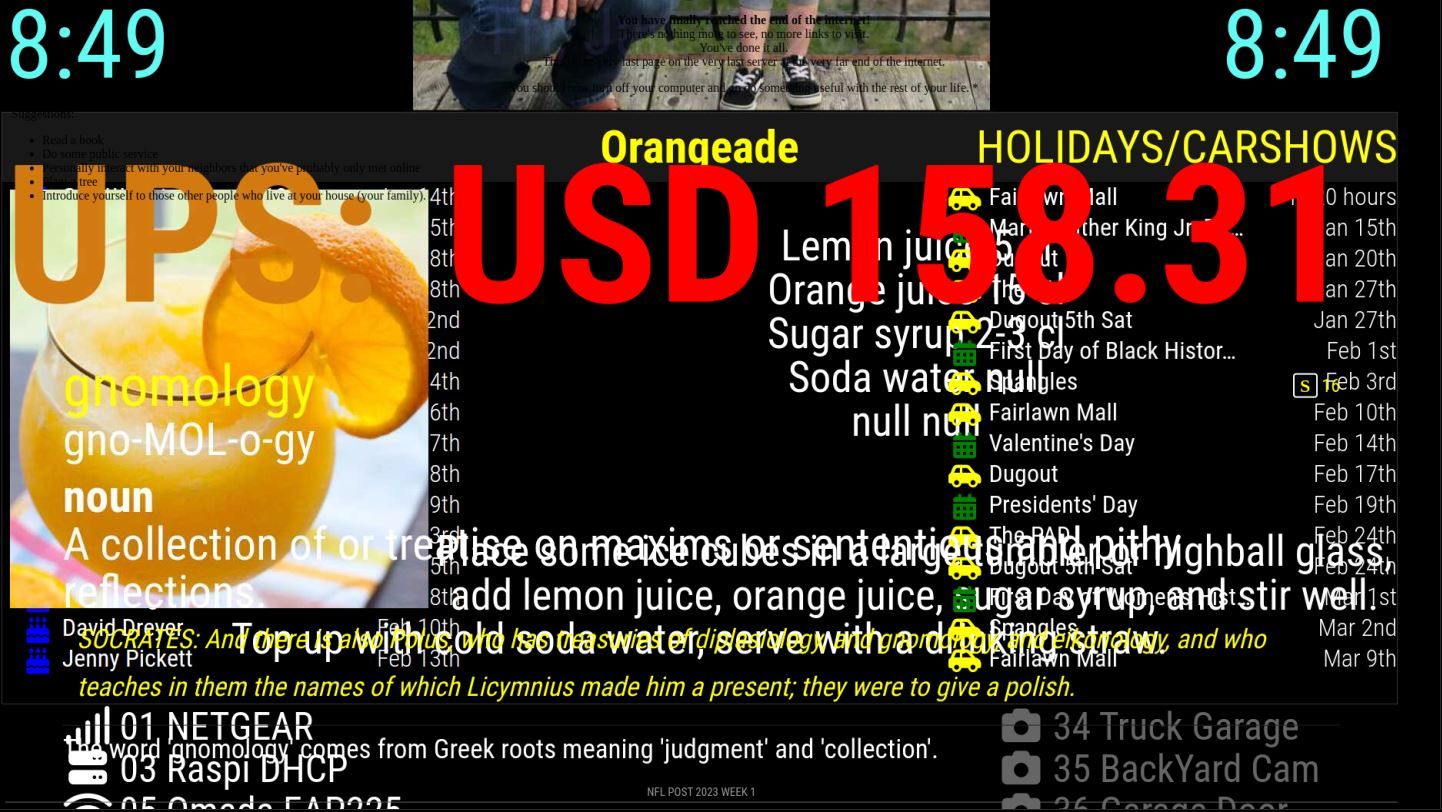
These are the modules I am running under MMM-Carousel.
MMM-CalendarExt3 calendar facts iFrame
MMM-ATM MMM-Bored MMM-CalvinAndHobbes MMM-CloneWarsQuotes
MMM-RTSPStream MMM-Cocktails MMM-DailyQuote MMM-DateCounter
MMM-Dogs MMM-EmbedURL MMM-Evil MMM-EyeCandy //flying Calvin
MMM-RTSPStream2 MMM-Fuel MMM-Globe MMM-GmailFeed MMM-History
MMM-icanhazdadjoke MMM-iFrame-GSlides MMM-ImagesPhotos
MMM-Jast //ups stock MMM-MyWordOfTheDay MMM-NetworkScanner
MMM-NFL MMM-Oneliner MMM-RTSPStream4 MMM-OpenWeatherForecast
MMM-quote-of-the-day MMM-RAIN-MAP MMM-rfacts MMM-SimpleLogo
MMM-TrivialAbyss MMM-WebView MMM-WiFiPassword random_quotes
MMM-RTSPStream5 -
MM loading all modules is taking 2-3 minutes.
I am having a new to me weird issue where when i restart mm it takes 2-3 minutes to load. During that time it is loading all the modules under mmm-carousel module. Eventually they will all load and work as they should. Any Ideas what causes this?
-
RE: Dumbass Cat Facts
@KristjanESPERANTO
Yes that is the one.
It was just working a couple weeks ago.
When did the API go down?
Thanks I will remove it.
Then I get to find something else for that spot. Darn it. -
Dumbass Cat Facts
I just get “Meow” on the screen, never loads a fact.
I changed line 100 per @sdetweil from this.facts = data.body.all;
to this this.facts = data.body; and that worked for a while but now it is back to just the “Meow” on the screen. Any Ideas? -
RE: MM doesn't start after last update
Ok thanks for the honest answer.
You the man. -
RE: MM doesn't start after last update
@sdetweil > git tag -l
Sam,
I am running MM 2.24.0 if I update to 2.26 Do you think it will break MMM-RTSPStream? I have 4 different instances of it running in carousel. We love the way it works showing us video of all 4 sides of our house outside. -
RE: MMM-Fuel
@sdetweil
Found it
MMM-DumbAssCatFacts.js
change line 100,from
this.facts = data.body.all;to this
this.facts = data.body;Sam
-
RE: MMM-Fuel
@sdetweil
And you would think I would remember that tip.
I haven’t added anything new to my mirror in a very long time.
It just does its thing. Dumbass Cats is not showing up again it just says MEOW. But that is for another day. I am looking for the fix you gave me sometime ago to see it that is the problem again. -
RE: MMM-Fuel
{ module: "MMM-Fuel", position: "middle_center", config: { api_key: "my super secret key", provider: "autoblog", //"gasbuddy", lat: "38.82", lng: "-95.68", zip: "66414", types: ["regular", "unl88"], fade: "false", radius: 20, max: 14, } }, -
MMM-Fuel
Can’t get the fade to stop in MMM-Fuel.
fade: false,
Doesn’t Work. -
RE: MMM-SingleStock
0|mm  | MESA-LOADER: failed to retrieve device information
0|mm  | MESA-LOADER: failed to retrieve device information
0|mm  | MESA-LOADER: failed to retrieve device information
0|mm  | MESA-LOADER: failed to open kms_swrast (search paths /usr/lib/arm-linux-gnueabihf/dri:\$${ORIGIN}/dri:/usr/lib/dri)
0|mm  | failed to load driver: kms_swrast
0|mm  | MESA-LOADER: failed to open swrast (search paths /usr/lib/arm-linux-gnueabihf/dri:\$${ORIGIN}/dri:/usr/lib/dri)
0|mm  | failed to load swrast driver
0|mm  | [1969:0731/182543.028972:ERROR:gl_surface_presentation_helper.cc(260)] GetVSyncParametersIfAvailable() failed for 1 times!