@shbatm Do you think it could be possible to run this on another plateform, like pine64 with armbian where omxplayer is not available?
The npm install part is not working as omxplayer is not available…
@shbatm Do you think it could be possible to run this on another plateform, like pine64 with armbian where omxplayer is not available?
The npm install part is not working as omxplayer is not available…
@strawberry-3-141 not sure if it’s related to the latest MM update but since a little while, notification from the syslog, only show the “type” and nothing for the message itself…
@strawberry-3.141 I finally installed the second screen this weekend!
The thing also, not sure I want to have the same config on both screen (not the same size) The first screen is a 42" 1920x1080 and the second one, 32" at 1280x720…
It will be more useful to be able to have a “centralize” data and that each screen fetch only the data it need…
I currently have a raspberry pi that only have Grafana on it to log all kind of data for graph that I display under MM using iFrame. Maybe we can send all the data there with a MM running in server mode only having ONLY syslog as a module and use it to send data on other with some filtering ?
Maybe we can filter on the “info/warning/critical”…
Hey guys…
Would like to do some custom CSS for the clock module, but just for the time.
Currently HH and MM are the same size and SS is smaller! I would like to have the MM bigger than the HH!
@strawberry-3-141 hey mate… do you think it can be possible to have a way to replicate/centralize the syslog data…
Currently I have one installation of MM in the house, but currently building a couple more. And would need to be able to share the syslog data…
Maybe a config in syslog module to “send” data to “slave” ?
I think I found the problem… the MMM-Sounds module is crashing under the latest version of MM2
Since I update this morning with git pull and npm install using v2.1.1
MM refuse to start and crash!
Starting MagicMirror: v2.1.1
Loading config ...
Loading module helpers ...
No helper found for module: MMM-ProfileSwitcher.
Initializing new module helper ...
Module helper loaded: MMM-LoginAction
Initializing new module helper ...
Module helper loaded: MMM-Buttons
Initializing new module helper ...
Module helper loaded: MMM-Mobile
Initializing new module helper ...
WARNING! Could not load config file. Starting with default configuration. Error found: TypeError: m.loaded is not a function
Loading module helpers ...
No helper found for module: MMM-ProfileSwitcher.
Initializing new module helper ...
Module helper loaded: MMM-LoginAction
Initializing new module helper ...
Module helper loaded: MMM-Buttons
Initializing new module helper ...
Module helper loaded: MMM-Mobile
Initializing new module helper ...
App threw an error during load
TypeError: m.loaded is not a function
    at loadModule (/home/pi/MagicMirror/js/app.js:144:6)
    at loadNextModule (/home/pi/MagicMirror/js/app.js:161:5)
    at /home/pi/MagicMirror/js/app.js:163:6
    at Class.loaded (/home/pi/MagicMirror/modules/node_modules/node_helper/index.js:19:3)
    at loadModule (/home/pi/MagicMirror/js/app.js:144:6)
    at loadNextModule (/home/pi/MagicMirror/js/app.js:161:5)
    at /home/pi/MagicMirror/js/app.js:163:6
    at Class.loaded (/home/pi/MagicMirror/modules/node_modules/node_helper/index.js:19:3)
    at loadModule (/home/pi/MagicMirror/js/app.js:144:6)
    at loadNextModule (/home/pi/MagicMirror/js/app.js:161:5)
Whoops! There was an uncaught exception...
TypeError: m.loaded is not a function
    at loadModule (/home/pi/MagicMirror/js/app.js:144:6)
    at loadNextModule (/home/pi/MagicMirror/js/app.js:161:5)
    at /home/pi/MagicMirror/js/app.js:163:6
    at Class.loaded (/home/pi/MagicMirror/modules/node_modules/node_helper/index.js:19:3)
    at loadModule (/home/pi/MagicMirror/js/app.js:144:6)
    at loadNextModule (/home/pi/MagicMirror/js/app.js:161:5)
    at /home/pi/MagicMirror/js/app.js:163:6
    at Class.loaded (/home/pi/MagicMirror/modules/node_modules/node_helper/index.js:19:3)
    at loadModule (/home/pi/MagicMirror/js/app.js:144:6)
    at loadNextModule (/home/pi/MagicMirror/js/app.js:161:5)
MagicMirror will not quit, but it might be a good idea to check why this happened. Maybe no internet connection?
If you think this really is an issue, please open an issue on GitHub: https://github.com/MichMich/MagicMirror/issues
Hey guys…
Is it me or having this module + ProfileSwitcher + Facial are not working well together.
I have no issue using the buttons + ProfileSwitcher as I can toggle between profile! Facial recognize me but switch to nothing…
@feedparakeet I disable the authentication in Grafana so I can use direct link to a graph without a username/password!
In grafana, you can “export” a graph and it will give you a direct URL that you can use directly in an iFrame!
For datasource, currently I’m using a module in my home automation that already send data to grafana!
I need to work later on some unix script to send data directly in grafana!
Anyone have an example of a switching profile using Buttons + ProfileSwitcher ?
I’m using http request in my LUA like that
local status,result = luup.inet.wget(“http://10.99.99.15:8080/TESTING”")
I also have a URLENCODE function to convert my string…
function urlencode(str)
   if (str) then
      str = string.gsub (str, "\n", "\r\n")
      str = string.gsub (str, "([^%w ])",
         function (c) return string.format ("%%%02X", string.byte(c)) end)
      str = string.gsub (str, " ", "%%20")
   end
   return str
end
I’m using a bunch of graph already… why not using Grafana to record the data and the iFrame module to display them in your MM ?
I got some momentary push button… which pin I need to connect the other cable from the button If I’m using pin 24 ?
EDIT: Should I need to enable something else under raspi-config / interfacing options ?
EDIT2: Make it working fine with one button!
If I’m using more than 1 button, like 24 and 25… can I use the same GND for both ?
@Le-Belge Le mieux est d’aller chercher des RSS dans ta region avec la langue que tu veux!
@ostfilinchen Already did my git pull this morning…
Got the same issue…
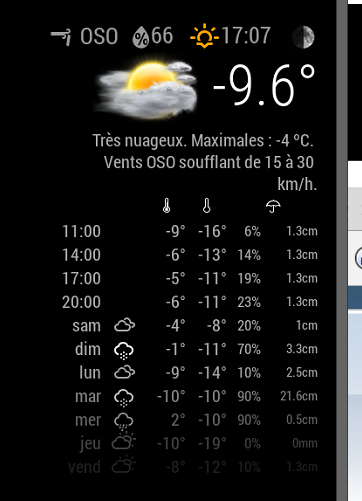
The first 4 got no icons…
I think I found a little bug… using coloricon: true, the main icon is in color, but not the small ones… and the first 3 row got no icons…
Pour mettre en FR, tu as juste a mettre
language: ‘fr’,
Dans ton config.js
@izanbard said in Display modules in a carousel:
@PointPubMedia yes you can, but you do it by position. Read the config above and see if you can work out in the positional settings you ignore modules per position. Hint it is between enabled and overrideTransitionInterval.
Working fine ;)
That’s perfect!
thanks mate!