@Mykle1 pleasse don’t Sir me. That’s not needed :)
And yes, I have seen that post. One of the reasons why I went for Ubuntu since I had a decent computer for testing.
@Mykle1 pleasse don’t Sir me. That’s not needed :)
And yes, I have seen that post. One of the reasons why I went for Ubuntu since I had a decent computer for testing.
After the 4’th re-install of the Ubuntu I’ve decided to go with ded.nodesource setup 8.x. Installed that and waited again for some time for a failure. This time I got a good error message regarding some permissions. There was even a commandline suggestuion on how to fix this. Done the required fix and suddenly the install of MM went onwards.
So yes … now it runs fine. I wanted to test the Globe module and place all our branches on it. That works. Now showing my boss to placed this at the reception desk as an eye-catcher :)
Now I have some small problems regarding the correct display on MMM Globe module. I can’t get the default pins to go away and only leave the ones I have set in the config file.
Hi everybody,
Since 2 day’s I try to install Magic mirror on an clean install Ubuntu 16.04. Also tried the 19.x.
I keep running in the same problem.
When doing the “npm install” i got stuck on “extract rxjs@^6.4.0…” It stops there and nothing happens.
What ever I try to do, I’m alway’s stuck on the “npm install” part.
Anyone knows what’s going on or is this a known issue?
So it would be possible to have some webspace and build a DB there and then connect the MM to that website using API? Would it then be possible to browse that website looking for the recipe you would like using a kind of filter?
For exapmle: “Main Dish” - “Pasta” and then you’ll have some Pasta Dishes to chose from?
I’m not a programming geek, but I have some space I could use and a DB I could build.
This would mean that you could browse the DB with some criteria from your MM. Is this in any way possible?
Hi all,
I didn’t find it in the search so I’ll ask here. Is there a module that could be used as a recipes database? One that can be updated in an easy way (not via smart mirror) so we can add newly created recipes and browse in the DB looking for a suitable dinner for that time?
Maybe even have category like “Main Dish”, “appetizers”, “desserts” and so on? And maybe from there submenu’s? Is such possible? Already there?
Done the update and now email is “Loading”. Nothing more than this.
Anyone knows why?
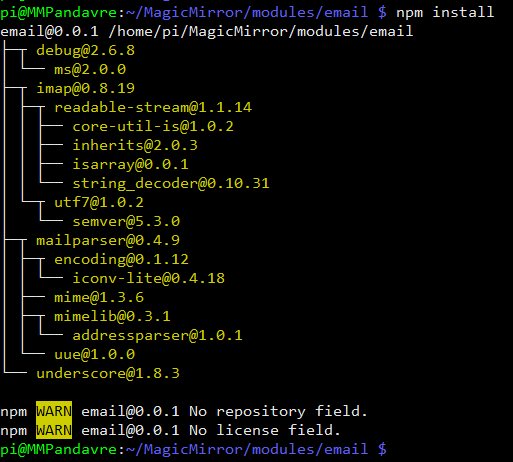
The bottom error I got after the “npm install”.
Is it possible to make a kind of “Radio Stations” list to select from. Or do we just add the module a couple of times with on each line another radio station?
I’m Stéphane from Belgium (Flemmish part). Noob in RPi and MM but willing to learn. :) My job is end user support for a international company, mainly Windows machines. Not building a Magic “Mirror” but it will be more something like a kiosk at home with some info for all house members (The Misses, the almost 3 year old girl and myself[47 years “old”). Still in discovery phase and looking at all modules that I could use. The spare time is filled with some nice motorbike rides in BE, NL or GER :)
@cowboysdude Is that “show list” already available?
@KnottyCord Don’t you have to add your mm.sh in the start command? I’m also new at this, so I could be very wrong at this.
Hi all,
That magic mirror thing doesn’t let me go. :)
Got some questions.
I have a wireless remote control that I would like to use for magic mirror. this one
Now I was wondering if I could do multiple things with it. Things like:
1: Change profiles (the misses and me have different taste of modules)
2: Control music that is playing + volume control
3: When screen goes dark, just use the touchpad to wake up screen
It won’t be a Mirror as such but mote a kiosk kinda thingie.
Now my testing is still on the raspberry and a monitor. Nothing hardware build yet. First I want to get the magic mirror as I would like it and then start building the hardware around it.
(Additional speakers, versatile border around screen in some kind of cork material so we can pin pictures on it and maybe control LED lights installed behind the frame)
Kind regards
Default News app display question.
Is there a way to have the latest 5 or so items in a list.
So it would look more like the calendar with some headline in a list rather then 1 line changing every X seconds.
Kind regards
Preve
@yawns Finally found a way to get in the browser. I’m quite happy with the new weather module. So I stop this thread and mark it as solved in some kind of.
Thank you all for all efforts.
Now the search begins to have a good MP3/radio station player. I would like to build in some speakers I have in my garage and give them a new function in this project.
@broberg But when the API-key is wrong or maybe too soon used, wouldn’t you get any kind of loading error? In my case there was nothing showing on my screen.
The strange thing… I install another weather module MMM_Wunderground, get an API key and it works. Just copy pasted in the config.js and changed the API and pws. restarted MM and got directly what I needed. Strange. very strange.
0|mm | No helper found for module: currentweather.
0|mm | No helper found for module: weatherforecast.
0|mm | Initializing new module helper …
0|mm | All module helpers loaded.
0|mm | Starting server op port 8080 …
0|mm | Server started …
0|mm | Connecting socket for: updatenotification
0|mm | Connecting socket for: calendar
0|mm | Starting node helper for: calendar
0|mm | Connecting socket for: newsfeed
0|mm | Starting module: newsfeed
0|mm | Sockets connected & modules started …
0|mm | Launching application.
0|mm | Create new calendar fetcher for url: XXXXXXXXXXXXXXXXXXXXXXXX - Interval: 300000
0|mm | Create new news fetcher for url: http://www.hln.be/rss.xml - Interval: 300000
That’s in the mm-out-0.log.
The mm-error-0.log is empty
Isn’t there a log file I can check?
Registerd to the site, asked an API and that API shows in “my api” folder on the website. Already removed it and re-entered it.
How do I get there? Sorry for noobish question. It runs full screen.