MagicMirror Forum
    • Recent
    • Tags
    • Unsolved
    • Solved
    • MagicMirror² Repository
    • Documentation
    • 3rd-Party-Modules
    • Donate
    • Discord
    • Register
    • Login
    A New Chapter for MagicMirror: The Community Takes the Lead
    Read the statement by Michael Teeuw here.

    Default Weather module not loading and no error showing.

    Scheduled Pinned Locked Moved Troubleshooting
    31 Posts 9 Posters 42.7k Views 8 Watching
    Loading More Posts
    • Oldest to Newest
    • Newest to Oldest
    • Most Votes
    Reply
    • Reply as topic
    Log in to reply
    This topic has been deleted. Only users with topic management privileges can see it.
    • yawnsY Offline
      yawns Moderator
      last edited by

      And console of your browser does not show a single error?

      1 Reply Last reply Reply Quote 0
      • P Offline
        Preve
        last edited by

        How do I get there? Sorry for noobish question. It runs full screen.

        1 Reply Last reply Reply Quote 0
        • yawnsY Offline
          yawns Moderator
          last edited by

          If you press F12 in your browser you should see a development interface, one is called console and should show information, warnings and - maybe - errors

          1 Reply Last reply Reply Quote 0
          • yawnsY Offline
            yawns Moderator
            last edited by

            I just tried your currentweather settings with my appid and instantly see the current weather. Did you check your appid again?

            1 Reply Last reply Reply Quote 0
            • P Offline
              Preve
              last edited by

              Registerd to the site, asked an API and that API shows in “my api” folder on the website. Already removed it and re-entered it.

              1 Reply Last reply Reply Quote 0
              • P Offline
                Preve
                last edited by

                Isn’t there a log file I can check?

                yawnsY 1 Reply Last reply Reply Quote 0
                • yawnsY Offline
                  yawns Moderator
                  last edited by

                  would you send me your api key by private message/chat?

                  1 Reply Last reply Reply Quote 0
                  • yawnsY Offline
                    yawns Moderator @Preve
                    last edited by

                    @Preve said in Default Weather module not loading and no error showing.:

                    Isn’t there a log file I can check?

                    Yes, there is.
                    If you are starting your magicmirror with pm2 you can run pm2 logs mm to check for errors. And you can check the browser console

                    1 Reply Last reply Reply Quote 0
                    • P Offline
                      Preve
                      last edited by

                      0|mm | No helper found for module: currentweather.
                      0|mm | No helper found for module: weatherforecast.
                      0|mm | Initializing new module helper …
                      0|mm | All module helpers loaded.
                      0|mm | Starting server op port 8080 …
                      0|mm | Server started …
                      0|mm | Connecting socket for: updatenotification
                      0|mm | Connecting socket for: calendar
                      0|mm | Starting node helper for: calendar
                      0|mm | Connecting socket for: newsfeed
                      0|mm | Starting module: newsfeed
                      0|mm | Sockets connected & modules started …
                      0|mm | Launching application.
                      0|mm | Create new calendar fetcher for url: XXXXXXXXXXXXXXXXXXXXXXXX - Interval: 300000
                      0|mm | Create new news fetcher for url: http://www.hln.be/rss.xml - Interval: 300000

                      That’s in the mm-out-0.log.
                      The mm-error-0.log is empty

                      1 Reply Last reply Reply Quote 0
                      • P Offline
                        Preve
                        last edited by

                        The strange thing… I install another weather module MMM_Wunderground, get an API key and it works. Just copy pasted in the config.js and changed the API and pws. restarted MM and got directly what I needed. Strange. very strange.

                        strawberry 3.141S 1 Reply Last reply Reply Quote 0
                        • brobergB Offline
                          broberg Project Sponsor
                          last edited by

                          I’ve had it malfunction a couple of time to, but it usually starts working again after a couple of hours/next day. Seems to me that i’s a connection issue since I don’t change anything for it to work again.

                          P 1 Reply Last reply Reply Quote 0
                          • strawberry 3.141S Offline
                            strawberry 3.141 Project Sponsor Module Developer @Preve
                            last edited by

                            @Preve when I applied for the API Key it wasn’t working for a while as well. I had to wait until it was ready to use in their system.

                            Please create a github issue if you need help, so I can keep track

                            1 Reply Last reply Reply Quote 0
                            • P Offline
                              Preve @broberg
                              last edited by

                              @broberg But when the API-key is wrong or maybe too soon used, wouldn’t you get any kind of loading error? In my case there was nothing showing on my screen.

                              yawnsY 1 Reply Last reply Reply Quote 0
                              • yawnsY Offline
                                yawns Moderator @Preve
                                last edited by

                                @Preve said in Default Weather module not loading and no error showing.:

                                @broberg But when the API-key is wrong or maybe too soon used, wouldn’t you get any kind of loading error? In my case there was nothing showing on my screen.

                                Yes, it does show this alert. As I said … Press F12, change to console and look for errors. I removed one character in my appid, and this is what happens:
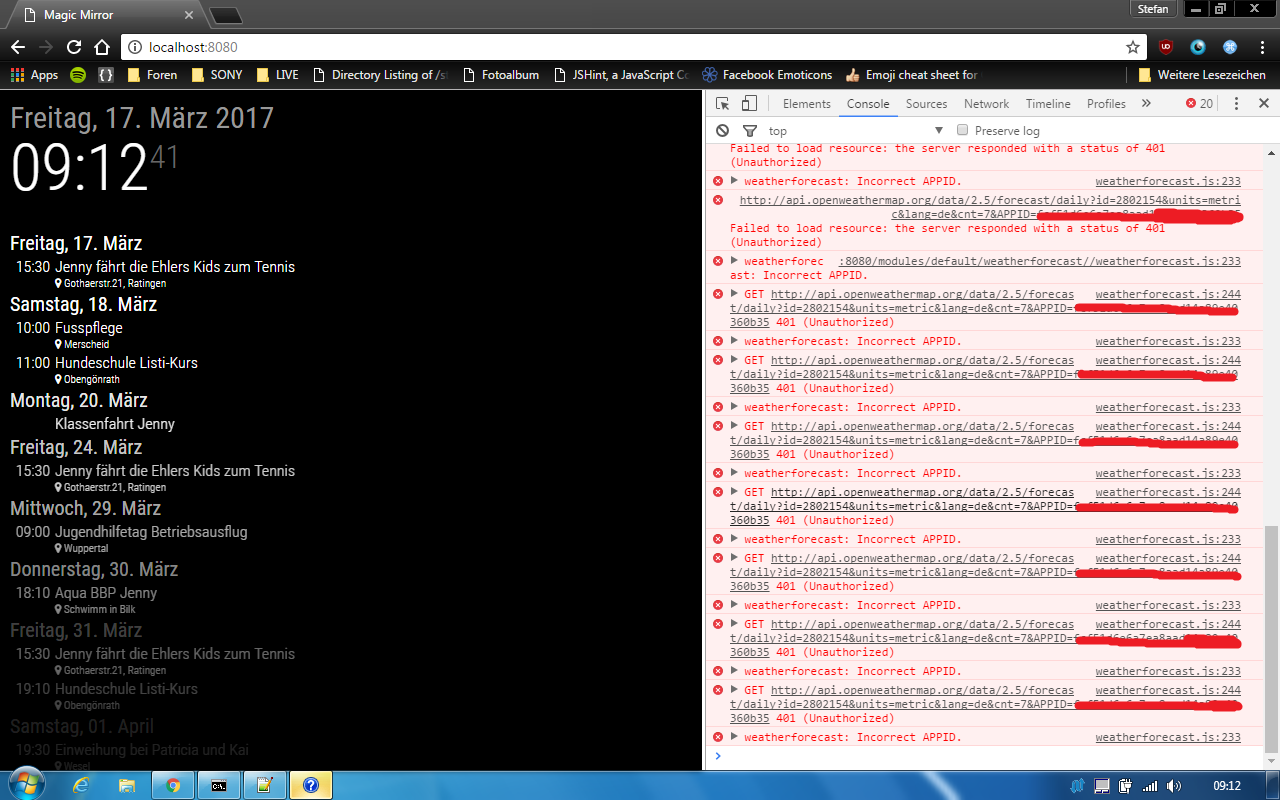

                                0_1489738672860_incorrect appid.png

                                P 1 Reply Last reply Reply Quote 0
                                • P Offline
                                  Preve @yawns
                                  last edited by

                                  @yawns Finally found a way to get in the browser. I’m quite happy with the new weather module. So I stop this thread and mark it as solved in some kind of.
                                  Thank you all for all efforts.
                                  Now the search begins to have a good MP3/radio station player. I would like to build in some speakers I have in my garage and give them a new function in this project.

                                  G 1 Reply Last reply Reply Quote 0
                                  • P Offline
                                    Pran
                                    last edited by

                                    Hi,
                                    I am having the same problem right now. I was previously using the default weather module and it was working perfectly fine. However, due to some reasons, I had to uninstall everything on my Pi and start working with a fresh install of OS to everything else.
                                    I installed MM2 again, made necessary changes in config but somehow the weather module is not showing up.
                                    I even tried looking at logs but there is no error there. Even in the browser console.
                                    It would be really appreciated if someone could help me with this.

                                    1 Reply Last reply Reply Quote 0
                                    • G Offline
                                      gznoble @Preve
                                      last edited by

                                      @Preve Could you post the solution you found?

                                      Mykle1M 1 Reply Last reply Reply Quote 0
                                      • Mykle1M Offline
                                        Mykle1 Project Sponsor Module Developer @gznoble
                                        last edited by

                                        @gznoble said in Default Weather module not loading and no error showing.:

                                        Could you post the solution you found?

                                        Your default weather is not working? Post your config entry for weather here using this guide. We’ll try to get you sorted.

                                        Create a working config
                                        How to add modules

                                        1 Reply Last reply Reply Quote 0
                                        • B Offline
                                          BlackTalon
                                          last edited by BlackTalon

                                          My config for weatherforecast is not working. The odd thing is that current weather is. I can not see the console with F12. I thought this was a keyboard config issue but I have tried several settings and F12 is not bringing up the console.

                                          My config for weatherforecast is

                                          B 1 Reply Last reply Reply Quote 0
                                          • B Offline
                                            BlackTalon @BlackTalon
                                            last edited by

                                            This post is deleted!
                                            Mykle1M 1 Reply Last reply Reply Quote 0

                                            Hello! It looks like you're interested in this conversation, but you don't have an account yet.

                                            Getting fed up of having to scroll through the same posts each visit? When you register for an account, you'll always come back to exactly where you were before, and choose to be notified of new replies (either via email, or push notification). You'll also be able to save bookmarks and upvote posts to show your appreciation to other community members.

                                            With your input, this post could be even better 💗

                                            Register Login

                                            • 1
                                            • 2
                                            • 1 / 2
                                            • First post
                                              Last post
                                            Enjoying MagicMirror? Please consider a donation!
                                            MagicMirror created by Michael Teeuw.
                                            Forum managed by Sam, technical setup by Karsten.
                                            This forum is using NodeBB as its core | Contributors
                                            Contact | Privacy Policy

