MagicMirror Forum
    • Recent
    • Tags
    • Unsolved
    • Solved
    • MagicMirror² Repository
    • Documentation
    • 3rd-Party-Modules
    • Donate
    • Discord
    • Register
    • Login
    1. Home
    2. qu1que
    3. Posts
    A New Chapter for MagicMirror: The Community Takes the Lead
    Read the statement by Michael Teeuw here.
    Offline
    • Profile
    • Following 0
    • Followers 2
    • Topics 11
    • Posts 129
    • Groups 1

    Posts

    Recent Best Controversial
    • RE: Clean installation of MM 2.9.0 on an Orange Pi PC sbc, armbian buster

      @sdetweil

      Not exactly, that board has ethernet connection and so, internet connection. The problem is that when I run the command bash -c “$(curl -sL https://www.dropbox.com/s/rlh710ng0zwv3vp/raspberry.sh?dl=0)” it shows me an error similar like this (I don’t remember exactly):

      #!/bin/bash not found (or something similar)

      posted in Tutorials
      qu1queQ
      qu1que
    • RE: Clean installation of MM 2.9.0 on an Orange Pi PC sbc, armbian buster

      @sdetweil

      Hi! Finally I’ve get working the MM installation on “La Frite” board using your script. The only issue is that I’ve had to download your raspberry.sh script from the dropbox link and copy on home folder of that board, give execution permissions and execute it. Works fine!! (only basic installation, no modules).

      Thanks again for your work

      posted in Tutorials
      qu1queQ
      qu1que
    • RE: Pi keeps crashing

      Hello, I do not know what your problem is due to, but I recommend that you do not use NOOBS, use better only raspbian. You can download it here: https://www.raspberrypi.org/downloads/raspbian/

      I recommend you the raspbian image with desktop (not the one with recommended software)

      posted in General Discussion
      qu1queQ
      qu1que
    • RE: Can you have two instances of one module running independently from each other?

      Take a look at this post. Maybe it can help you:

      https://forum.magicmirror.builders/topic/10982/how-to-run-two-instances-of-one-module

      posted in General Discussion
      qu1queQ
      qu1que
    • RE: PIR-sensor and 7 inch touch LCD display for Raspberry-Pi

      @Serimner

      In this link explains how to do it for that screen:
      https://www.raspberrypi.org/forums/viewtopic.php?f=108&t=120968&start=25

      posted in Troubleshooting
      qu1queQ
      qu1que
    • RE: PIR-sensor and 7 inch touch LCD display for Raspberry-Pi

      @Serimner Some time ago, when I was making my mirrors, I’d tried some PIR modules, and I could not make it work any of them. So, I’d write this python script and works perfect. Hope it helps:

      #!/usr/bin/python3
      
      # PACKAGES NEEDED TO WORK:  sudo apt install python3 python3-rpi.gpio
      
      # My screen has an USB port, that turns on when screen is on, and off when screen is off.
      # So, I made a voltage divider with a few resistors to get 3 volts, to activate pin 6 (BCM) 
      # on the raspberry Pi. In this way, the script can 'know' if Screen is ON or OFF.
      
      import RPi.GPIO as GPIO
      import time
      import subprocess
      from subprocess import call
      
      GPIO.setmode(GPIO.BCM)
      GPIO.setup(22, GPIO.IN)		                  # PIR's output
      GPIO.setup(6, GPIO.IN)                            # Screen power detector
      GPIO.setup(25, GPIO.OUT)	                  # Relay Input
      GPIO.setwarnings(False)
      
      while (GPIO.input(6) == 0):                       # IF SCREEN IS ON
          if (GPIO.input(22) == 1):                     # PIR DETECTS MOTION
              call(('/opt/vc/bin/vcgencmd', ' display_power', '1'))
              GPIO.output(25, GPIO.HIGH)                # RELAY ACTIVATION
              time.sleep(3)
              GPIO.output(25, GPIO.LOW)
              time.sleep(60)                            # THE TIME WE WANT THE SCREEN TO STAY ON
              if (GPIO.input(22) == 1):                 # IF PIR DETECTS A NEW MOVEMENT, 
                  time.sleep(60)                        # ACTIVATES THE MIRROR ANOTHER AMOUNT OF SECONDS
              else:
                  GPIO.output(25, GPIO.HIGH)           # WITH THIS LINE, THE SCREEN POWERS OFF TO SAVE ENERGY
                  time.sleep(3)
                  GPIO.output(25, GPIO.LOW)	
          else:
              GPIO.output(25, GPIO.LOW)
      
      while (GPIO.input(6) == 1):                       # IF SCREEN IS OFF
          if (GPIO.input(22) == 1):                     # PIR DETECTS MOTION
              call(('/opt/vc/bin/vcgencmd', ' display_power', '1'))
              GPIO.output(25, GPIO.LOW)               # SAME AS ABOVE, BUT THIS TIME DON'T ACTIVATE THE RELAY
              time.sleep(60)
              if (GPIO.input(22) == 1):
                  time.sleep(60)
              else:
                  GPIO.output(25, GPIO.HIGH)      # WITH THIS LINE, THE SCREEN POWERS OFF TO SAVE ENERGY, AGAIN
                  time.sleep(3)
                  GPIO.output(25, GPIO.LOW)
          else:
              GPIO.output(25, GPIO.LOW)
      
      call(('/usr/bin/python3', '/home/pi/SCRIPTS/pir.py'))
      

      Here you can take a look at one of my projects:
      https://forum.magicmirror.builders/topic/7263/my-first-smart-mirror-in-a-frame-of-40-x-30-cm-with-raspberry-pi-zero-w/2

      posted in Troubleshooting
      qu1queQ
      qu1que
    • RE: Clean installation of MM 2.9.0 on an Orange Pi PC sbc, armbian buster

      @sdetweil I’m not at home now, but yes, it’s ARM. Take a look at the specifications:

      http://wiki.loverpi.com/specs:sbc:libre-aml-s805x-specs-libre-computer-specification

      posted in Tutorials
      qu1queQ
      qu1que
    • RE: Clean installation of MM 2.9.0 on an Orange Pi PC sbc, armbian buster

      @sdetweil I have another sbc called “La Frite” (http://wiki.loverpi.com/sbc:libre-computer-aml-s805x-ac), I could try your script on it too. When I’ve find some free time. I’ll tell you when I can

      posted in Tutorials
      qu1queQ
      qu1que
    • RE: Clean installation of MM 2.9.0 on an Orange Pi PC sbc, armbian buster

      @sdetweil yes, On installation scirpt last step, I’ve disabled screensaver. It’s a good idea to include that option.

      posted in Tutorials
      qu1queQ
      qu1que
    • RE: updated installer script available for testing

      Hi. I’ve just installed MM on an Orange Pi PC board using this script. Works fine, and no errors. Thanks for your work @sdetweil

      posted in Troubleshooting
      qu1queQ
      qu1que
    • RE: Clean installation of MM 2.9.0 on an Orange Pi PC sbc, armbian buster

      Well. MM installed Perfect with @sdetweil script on an Orange Pi PC board.
      Very good Job!

      posted in Tutorials
      qu1queQ
      qu1que
    • RE: Clean installation of MM 2.9.0 on an Orange Pi PC sbc, armbian buster

      @sdetweil I’m going to try your installation script on the Orange Pi PC.

      Do I only have to launch this command?

      bash -c “$(curl -sL https://www.dropbox.com/s/rlh710ng0zwv3vp/raspberry.sh?dl=0)”

      posted in Tutorials
      qu1queQ
      qu1que
    • RE: Clean installation of MM 2.9.0 on an Orange Pi PC sbc, armbian buster

      @sdetweil

      Oh! I’ve forgot to turn off screen saver…:anguished_face:

      Maybe tomorrow I can try your script and tell if it works too on this board.

      posted in Tutorials
      qu1queQ
      qu1que
    • RE: Clean installation of MM 2.9.0 on an Orange Pi PC sbc, armbian buster

      @sdetweil your process is for raspberry? I’ve just follow these steps on orange pi PC:

      • Donwload buster server image from armbian web
      • Update & Upgrade, configure locales, etc.
      • Install full desktop from armbian-config
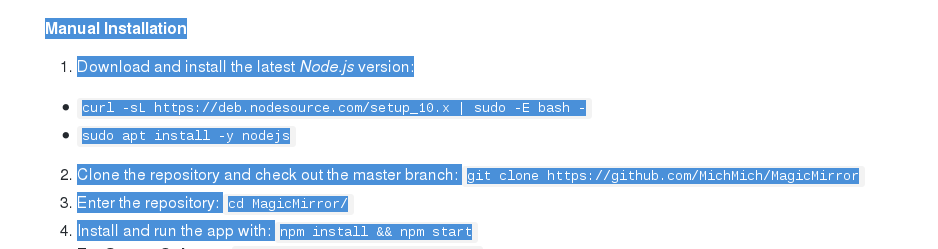
      • I’ve followed these steps from MM github:

      0_1570662353756_Sen titulo.png

      • Finally rename ~/MagicMirror/config/config.js.sample to config.js

      That’s all.

      posted in Tutorials
      qu1queQ
      qu1que
    • Clean installation of MM 2.9.0 on an Orange Pi PC sbc, armbian buster

      Hi!

      I’ve just installed Magic Mirror (v. 2.9.0) on an Orange Pi PC sbc with latest armbian buster. It’s a clean installation with only the default modules, WITHOUT any module added to greater (whoever installs and configures as needed).

      If you wanna try it, here is the image file:

      https://www.dropbox.com/sh/udma3rp5ha8eg28/AACOeQR-gPDSnt2fNHo93LNfa?dl=0

      Hope it helps

      posted in Tutorials
      qu1queQ
      qu1que
    • RE: Want to buy smart mirror

      @Almly said in Want to buy smart mirror:

      Will the steam from my shower damage the mirror?

      Hi, I’ve made the smart mirror and placed it in the bathroom. I also thought that steam and humidity could damage the circuits. I’ve been with it for over a year now and never had any problems.

      You can see it here:

      my bathroom smart mirror

      Also I have to say that I have put in different points of the circuitry, some bags of silica gel like these to absorb the humidity:

      0_1568666273744_silica-gel-desiccant---packet---sachet.jpg

      I also have to say that all the electronic part is inside the frame that holds the whole structure, so it is not in direct contact with moisture.

      I hope it helps.

      Regards.

      posted in Show your Mirror
      qu1queQ
      qu1que
    • RE: Screen switching to blank

      thanks @sdetweil

      @micksel

      Did you try this?

      https://github.com/MichMich/MagicMirror/wiki/Configuring-the-Raspberry-Pi#disabling-the-screensaver

      posted in Troubleshooting
      qu1queQ
      qu1que
    • RE: 24 inch monitor?

      Hi! I’ve made my MM project with a second-hand 24" LG LCD TV and it looks great. I’ve spent less than 100 € last year.

      Hope it helps you.

      If you want to take a look of it:

      https://forum.magicmirror.builders/topic/8815/my-bathroom-smart-mirror

      posted in Hardware
      qu1queQ
      qu1que
    • RE: Screen switching to blank

      @micksel said in Screen switching to blank:

      med

      What means med setup?

      posted in Troubleshooting
      qu1queQ
      qu1que
    • RE: How to run two instances of one module?

      @Mykle1

      Thanks! Now it works perfect!!

      posted in Troubleshooting
      qu1queQ
      qu1que
    • 1 / 1