@dvbit
Nice. Can you tell me how have you managed to get the portrait display on your mirror? I am struggling with my monitor to be detected by Raspbian and to flip the display.
Thanks
R
Offline
A New Chapter for MagicMirror: The Community Takes the Lead
Read the statement by Michael Teeuw here.
Read the statement by Michael Teeuw here.
Posts
-
RE: Wooden Vertical Magic Mirror
-
RE: MMM-Moon, See the moon phases and rise/set times!
@enderflop
Okay, so i tried it out and it is working fine. Nice effort. However, You have forgotten to add the sample config.js entries, though you have given the configuration options. Is there a way to enlarge the size of the image in the configuration file?
Thanks -
Portrait Mode Acer Monitor HA240Y
I recently bought an ACER HA240Y monitor (https://www.displayspecifications.com/en/model/8d8f1615)
for my Magic Mirror. I wanted to install the monitor in my frame in portrait mode. However, The display settings of the Pi OS are unable to identify the monitor and i am unable to find the drivers for the monitor in the Raspberry Pi OS. I am not able to proceed further to flip the display from landscape to portrait. Is there any way in which this can be resolved.
Thanks -
RE: MMM-OpenAI
@MMRIZE
It’s possible that the error is caused by using optional chaining in a JavaScript version that doesn’t support it.I modified the code as below, rewriting the code without using optional chaining.
postProcessing: function(helper, resp) {
let choice = resp.response ? resp.response.choices[0] : undefined;
if (choice) {
let message = choice.message ? choice.message.content.choice.text : undefined;
if (message) {
helper.sendNotification(‘TTS_SAY’, message);
}
}I am not getting any syntax error now. However, there is some issue with Google TTS (unrelated I think) , as it is sending a notification as TTS_Say_Error. Google TTS API hopefully is configured correctly as no errors are thrown up during starting MM. How should i go about resolving it.
-
RE: MMM-Openai with EXT-TelegramBot
@Rags Okay i reinstalled MMM-TelegramBot and now everything works. So apparently there are issues in EXT-TelegramBot, which maybe someone can resolve.
-
RE: MMM-Openai with EXT-TelegramBot
@MMRIZE
Sorry about that. But i haven’t understood why “MMM-TelegramBot” worked and “EXT- TelegramBot” isnt working, though It seems to be okay for all telegram commands like before.
Do i need to revert back and reinstall MMM-TelegramBot? provided someone can share the old repositories that worked. Please provide a solution. After having installed Openai if the Telegram interface is not useable then it would be such a colossal waste of effort. -
MMM-Openai with EXT-TelegramBot
@MMRIZE I had to reinstall MMM-TelegramBot today as it had an issue. I have installed EXT-TelegramBot as MMM-TelegramBot is End of Life. After reconfiguring the config.js file i managed to get the EXT-TelegramBot up and running. However, the MMM-Openai is having an issue . I am getting an error “Sorry that command is not registered.” I tried adding the Openai commands in the module of config.js file (/chatai, /txtai etc) but the error still persists. Any pointers to solve this issue.
Thanks -
RE: MMM-TelegramBot End of Life
@swvalenti said in MMM-TelegramBot End of Life:
just uninstall, disable or delete MMM-TelegramBot
install `EXT-TelegramBot and compare each configuration (old and new configuration) and replace all needed values on the new plugin
create new config from wiki (EXT-TeklegramBot)
delete, disable or delete old config (MMM-TelegramBot)
Thaaanks !!
I must have missed this migration and update.
Well i reinstalled it as EXT-TelegramBot and reconfigured it in the config.js. Had to set telecast as true. So it works now. I am having an issue with MMM-Openai as the commands of this module are not executing. It says sorry that command is not registered. It was working ok with MMM-TelegramBot. Again seems to be a minor issue , need to check whats missing. Any pointers will help. -
MMM-TelegramBot End of Life
What happened here?? I had an issue with MMM-Telegrambot module today and i had to reinstall it. It is not working now, it says it is “End Of Life” and it no longer works. I get a prompt in Telegram app that “you are not allowed to command me Ask to my Admin”. The display region on the MM page displays the title of the Module and no messages are displayed. Has this module been killed??
I recently also installed MMM-Openai and was really excited to use it with TelegramBot. Even this is not working now.
Please someone explain what happened.
Thanks -
RE: MMM-OpenAI
@MMRIZE said in MMM-OpenAI:
@Rags
Speech example: Conjunction with MMM-GoogleTTS, now it can speak.postProcessing: (helper, resp) => { let choice = resp.response?.choices[0] if (choice) helper.sendNotification('TTS_SAY', choice?.message?.content ?? choice?.text) }I am getting a syntax error in these lines can you please check.
Thanks -
RE: Chatgpt+google STT + elevenlabs api
@sdmydbr9
Hey Sudhamoy, Its fantastic man. Congratulations.
Do you realise what you have achieved. Great going. Waiting for the finished module. -
RE: MMM-OpenAI
-
RE: MMM-OpenAI
Great. Installed it and it is up and running with absolutely no effort. Thanks for this module. However, i am facing an issue of an error message “Something is wrong see the log”. So this error pops up randomly when i initiate a /chatai or a /txtai or /imgai, and i am unsure why. Is the heavy traffic of ChatGPT the reason. Also where do i check the logs.?
Thanks -
RE: Smart TV versus Computer monitor as a display
@sdetweil said in Smart TV versus Computer monitor as a display:
@Rags I have a smart TV ( 43 in) as one of my mm displays, and not smart(55 in) as other. same thing, remote change source… voila.
the 55 has 4 different mm as input
I did because get higher resolution at cheaper price.
check power on/off process of wanting to turn off when no one is around…
@sdetweil Great.
So I have a motion sensor (RCWL-0516) that controls the switching on and off of the monitor. Will it also work for the Smart TV seamlessly? -
Smart TV versus Computer monitor as a display
Hello everyone,
My Magic Mirror build will complete two and a half years soon. I have used a Samsung LCD monitor 18inch for my initial build, I now want to upgrade the display. The real estate in my Magic Mirror wooden frame can accommodate a larger screen if i install it vertically. I was wondering if I can use a smart TV instead of a monitor. Currently, I am getting a 32 inch smart android TV (XIAOMI) at a price lesser than a 24 inch Samsung monitor.
The advantages are that the Magic mirror can also double up as a a smart TV with the flick of the remote button.
I am curious to know the pros and cons.
Thanks -
RE: Default Calendar: Display Birthdays, Anniversaries
@sdetweil
I used the export option on google calendar to download the file.
The downloaded file looks like this;
Birthdays_addressbook#contacts@group.v.calendar.google.com.ics
The config file looks like this;
'http://localhost:8080/modules/default/calendar/Birthdays_addressbook#contacts@group.v.calendar.google.com.icsI get a display of “an error in the calendar module, check log for more details”
the Module is unable to read this format. What needs to be done? -
RE: Default Calendar: Display Birthdays, Anniversaries
@sdetweil Ok but newer entries to contacts will not show up.
Could you guide me on how.? to configure the config.js entry pointing to the downloaded file. ALso, -
Default Calendar: Display Birthdays, Anniversaries
Is it possible to integrate Google Birthday, Anniversary calendar(Calendar ID: addressbook#contacts@group.v.calendar.google.com) in MM config without using public ical url? This calendar does not have a secret ical url.
-
RE: MMM_Alexa Control: Alexa Command words
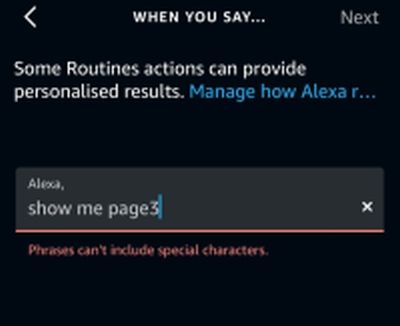
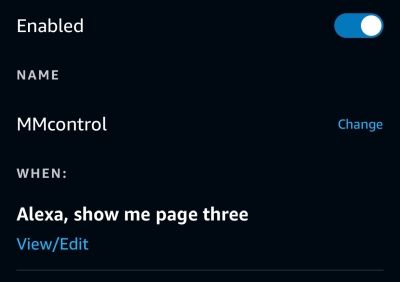
@sdetweil Ok Thanks. Got it going. Only thing is Alexa does not accept numerals in command so had to write in as words.