@ian1266 lot you can do without shiny glass
Same here, Sam – originally I wanted the whole shiny mirror thing, but not using a mirror suits my needs better.
I’m about to build my 4th MagicMirror and not a single one actually uses a mirror.
@ian1266 lot you can do without shiny glass
Same here, Sam – originally I wanted the whole shiny mirror thing, but not using a mirror suits my needs better.
I’m about to build my 4th MagicMirror and not a single one actually uses a mirror.
Thanks for the node-fetch advice @kristjanesperanto , Ill look to refactor in the near future
@rmonkey What would that look like for you? Would you want to put the gamertags into the config to only select those particular profiles? I believe I could get that implemented
I think you have the right idea. Say I have a hundred people in my XBL friends list, but maybe only 5 that I’d want the status on. “Ah, iamktothek is playing Power Wash Simulator, lemme jump on and join him.”
Ideally, I could tell it to filter to those 5, and maybe even hide the module entirely if no one on the filter list is on.
This is in the “Would Be Nice If Robot Monkey Had Everything Personalized To Him” category – there’s nothing wrong with the already great module you shared.
Fun module – I tried it out and it works!
I’m curious if you’re thinking about any customization. Like what if I only care about the status of 3-4 friends?
Out of curiosity, I backed up my image and then started with a fresh, up-todate install.
It works just fine now! No clue why, but it does.
I do have a follow-up formatting question – if you look at the screenshot below, you can see I turned off the table header (I like a more compact look).
But now the rain percentage isn’t obvious to someone looking at it. I want to add the little umbrella icon to the right of the rain percentage on every day row.
Could someone point me to the right place for that? And if there’s a way to figure this out on my own, please let me know.
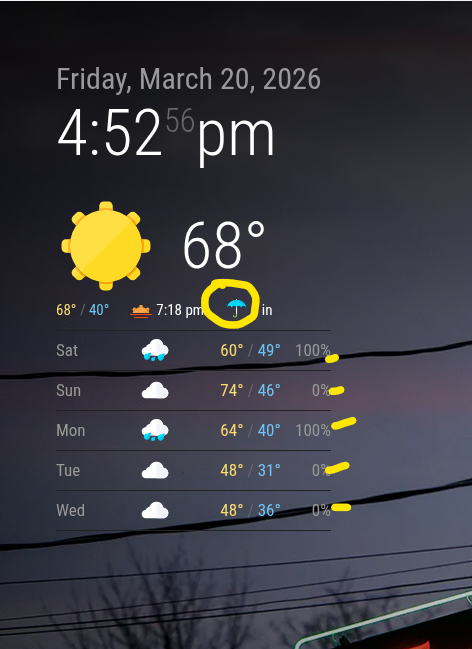
Ok, I commented out forecastLayout: No change.
I renamed the custom.css – No change.
I’m pretty stumped.
Did something change in mirror versions? I set mine up maybe 2-3 years ago and it’s chugged along with no problems. – so I haven’t updated anything.
I shouldn’t still be surprised by how actively helpful you folks are, but here I am. Thank you!
I got in late and will try all the things and provide any info I can tomorrow. Just wanted to take a second to say I appreciate you all.
Sure thing, Sam:
{
    module: "MMM-OpenWeatherForecast",
    disabled: true,
    position: "top_left",
    header: "MMM-OpenWeatherForecast",
    config: {
      // apiBaseURL: "https://api.openweathermap.org/data/3.0/onecall?",
      apikey: "XXXX", // only string here
      latitude: "39.214510",            // number works here
      longitude: "-76.875990",          // so does a string
      iconset: "4c",
      forecastLayout: "table",
      showSummary: false,
    }
  },
(The disabled: true is temporary for now)
Oops, the screenshot didn’t take, here it is:
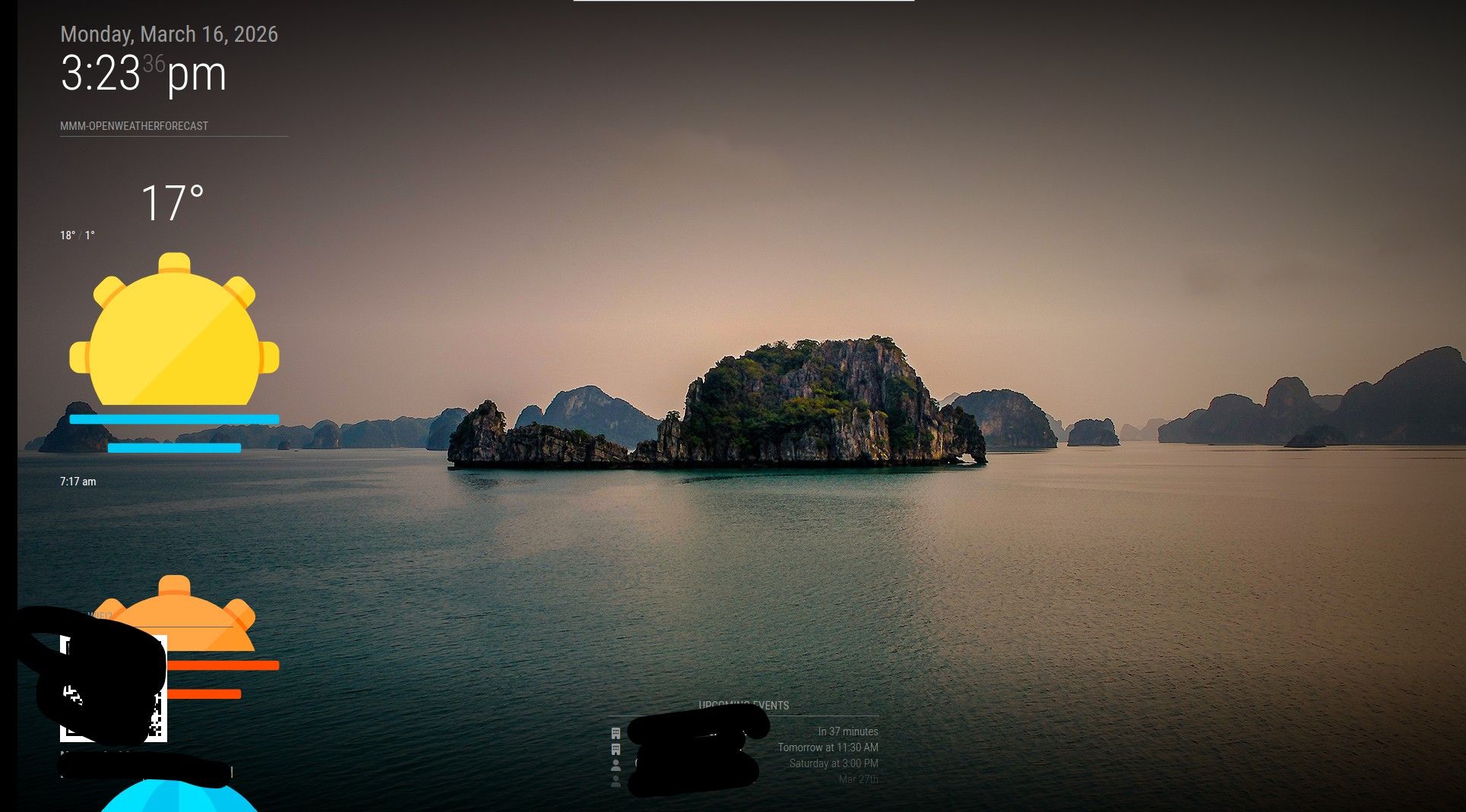
MMM-OpenWeatherForecast looks like the weather module I want to use.
But I’m getting a strange formatting thing – look at the attached screenshot. The icons are giant and the module runs off the screen.
Any ideas? It’s installed per the insrtuctions and up-to-date.
Aboslutely outstanding!
I did a similar build (down to the recessed outlet and french cleat).
I used a PiZero2 to keep things as thin as possible, but I see your build uses a full-sized Pi and looks great – the thickness looks prportionate.
I bet your guests say ‘whoa!’ everytime they see it.
I loved the first two games and enjoyed the show; great idea!
Can I make a few suggestions?
Add the PipBoy logo giving a thumbs up somewhere.
Maybe add a module for air quality or pollen count? Then rename the header to “Daily Radiation Count” or something similar.
Use a custom compliments module and make the compliments fake news headlines apropos to the Fallout universe:
“Cooper Howard Movie Marathon this Friday in Vault 32”
“Brotherhood of Steel now hiring shitters”
“Lost: Gross head with a chip in it. Reward offered, no questions asked”
Love this creativity I keep seeing with MagicMirror; congrats!
All good – I rebooted instead of reload and got the info to link.
Thanks for the great module and your help!
I’m afraid I’m stumped – I just have a spinning circle where the module loads. No instructions on the MM screen. I checked with “ls -l” and the user is set as the owner.
I’m a little dense today – where do I find the API code to authorize?
@jbat66, that’s fantastic. I’ll experiment with that when I do a refresh of the whole deal. Thank you!
@rrslssr , I took the monitor to Michaels and asked for a custom frame and matte. I told them I wanted a 2.5" mat out to the frame (make sure to specify the display only, not display plus bezels).
Then I picked a frame that I liked that met the minimum depth requirements for the Pi Zero 2.
I also made sure I got gallery glass, which has an antireflective coating.
They kept messing up the matte and I ended up going to Hobby Lobby. They recut the matte correctly and even cut the foam core used to hold everything in place.
One other thing – it looks like @rrslssr is running a similar approach specifically for travel photos – and I want to share a tip.
My mirror runs a combination of some of my own travel photos and places I’ve been from Unsplash.
To make the modules more legible and pop better, I made a photoshop template. The top layer is a very light transparent to black (from the center) radial gradient. My backgrounds are the lower layer.
This applies a very light vignetting that is consistent among all the background images. I experimented until I found the gradient settings for the top layer that were perfect to my eyes.
I’m sure there are easier or smarter ways to add vignetting, but this works for me.
I want to do the exact same thing down the road when I need a new project to tinker with.
Love it and thank you for posting the question and thank you to Sam for working through the solution.