The example runs on different ports (10000, 10001 I think) but I don’t know why Alexa wouldn’t find the devices. There must be something with your network or firewall causing an issue.
The module may not be starting properly because it has a minimum MM version of 2.5.0. If you don’t want to upgrade, you can try changing line 21 in MMM-AlexaOnOff.js to match your version.
About MMM-Remote-Control: see https://github.com/Jopyth/MMM-Remote-Control#list-of-actions for more details. The IDs are created by MM when it starts, and yes it should match the order in your config. The easiest way I’ve found to get these is to open the remote.html page on your computer, go to Edit View, and right-click > Inspect Element on one of the menu items. You’ll get something like this:
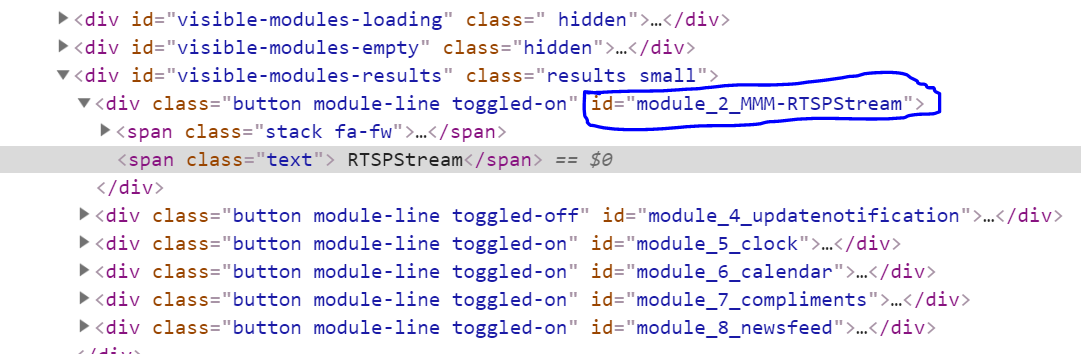
I have a Pull Request for MMM-Remote-Control pending that will let you use the names directly, but it hasn’t been incorporated yet.