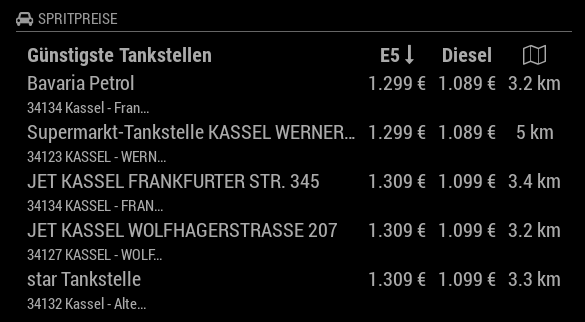
@zeular Yeah, that’s the way I did it too.
S
Offline
A New Chapter for MagicMirror: The Community Takes the Lead
Read the statement by Michael Teeuw here.
Read the statement by Michael Teeuw here.
Posts
-
RE: Adding new region positions top_center1 and top_center2
-
RE: MMM-Departures - Public transport departures based on Oeffi data
@BenGig You find the output below. It’s allways the same. :slight_smile:
MMM-Departures error: null MMM-Departures error: null MMM-Departures error: null MMM-Departures error: null MMM-Departures error: null MMM-Departures error: null -
RE: MMM-Departures - Public transport departures based on Oeffi data
@BenGig Ok, I understand. At the moment I have two other issues.
The first is, that even, if I switch off the debug mode, I get dozen of messages in the terminal, where I start the mirror. I suppose the parameter is not handled properly.
The second is, that the time values for the relative time display flickers for maybe a tenth of a second to another value.
Can you evaluate this?
-
RE: MMM-Departures - Public transport departures based on Oeffi data
@BenGig Yeah, here the same, it works now. Thanks to you. Just for curiosity, what did you change? What was the problem I have no idea in javascript programming and would like to learn something about it.
-
RE: MMM-Departures - Public transport departures based on Oeffi data
@BenGig Find out, that the error only occurs if I set
absoluteTime: false,If the parameter is set to true or the parameter is commented out the module works fine. Before the updates this setting works fine.
-
RE: MMM-Departures - Public transport departures based on Oeffi data
@BenGig I tried the debug mode. The only things I get is
Module helper loaded: MMM-Departureand
Connecting socket for: MMM-Departure
nothing else to see. Sorry! :disappointed_relieved: -
RE: MMM-Departures - Public transport departures based on Oeffi data
@BenGig No, there are no messages belonging your module.
-
RE: MMM-Departures - Public transport departures based on Oeffi data
After updating of MM to 2.1.1 and updating your module I get no data anymore. I get only the information “Lade” means load or wait. Any idea why this happens?
Both was installed with
git hub && npm install
Anything I have to do? -
RE: Solved: Station Monitor for NVV Kassel
In between, I found the module MMM-Departures from BenGig. It fulfill all my wishes.
-
RE: MMM-Departures - Public transport departures based on Oeffi data
@BenGig I know the repository from Andreas, if your module use this code, I suppose his changes will also work on your module. In between, I installed your module and it works perfect for my home town, what else could I need. It’s great.
-
RE: MMM-Departures - Public transport departures based on Oeffi data
@BenGig Great thing, you did. Was also trying to program a module based on the code the Andreas Schildbach provide. But to say the truth, this job is much more, as I can do. So I’m very happy to find your anouncement.
I haven’t installed the module, but still have a question. I have no idea, how you implement the module, but Andreas often provide updates in his “Oeffi” to support changes in the APIs of the integrated data provider. So my question is, do your module take automatically advantage of his changes or do you have to reimplement it in your code?
-
Solved: Station Monitor for NVV Kassel
As other people here in the forum I would like to use a module which shows the departure time for the station next to me. The only thing, maybe different is, that my home town is Kassel.
At the moment there I have two difficulties. First, I have no experience in javascript programming and I found no usable API for getting data. I suppose it is based on the Hafas software.
What I have, is a base url https://auskunft.nvv.de/auskunft/bin/jp/ which probably provide the wanted data.
My hope is, if I have a API which is simliar to other APIs, used in other modules, that I can take one of this module as a base for the application case I want to realize.
So maybe, there’s somebody out there with informations about the API and/or the programming of javascript?
-
RE: MMM-Fuel
@strawberry-3.141 That’s what I was afraid of. I will try to correct it.
-
RE: MMM-Fuel
@strawberry-3.141 Ok, I did it now. I’m not sure if I did right. Please inform me if something was wrong. I’m a little bit surprised, to get the possibility to merge my changes.
-
RE: MMM-Fuel
Hi, I made a change in my MM-Fuel.js to implement an additional parameter for shortening the address of a gas station. It is not a big thing, but I would like if it would be integrated in the repository. The point is, I never have done it before. In between I got an account at github, but know? Can somebody give me a link where I can find belonging infos?
-
RE: Adding new region positions top_center1 and top_center2
@yawns : Thanks a lot, that’s it. Now it works.
-
Adding new region positions top_center1 and top_center2
I use my magic mirror in landscape format. And I two place four modules side by side. My idea was to divide the top_center position in two.
Therefore I added new region definitions in the custom.css:
.region.top.center1 {
  left: 33%;
  -moz-transform: translateX(-33%);
  -o-transform: translateX(-33%);
  -webkit-transform: translateX(-33%);
  -ms-transform: translateX(-33%);
  transform: translateX(-33%);
}

.region.top.center2 {
  left: 60%;
  -moz-transform: translateX(-33%);
  -o-transform: translateX(-33%);
  -webkit-transform: translateX(-33%);
  -ms-transform: translateX(-33%);
  transform: translateX(-33%);
}

.region.top.center1,
.region.top.center2 {
  top: 100%;
}
And use in the config.js
module: 'MMM-Fuel',
position: 'top_center1',
config: {
Of course, this doesn’t work. I read something, about a region class definition. But I didn’t found, what else I have to do. Any ideas what is missing?
-
RE: MMM-Fuel
@strawberry-3.141 Sorry, I’m a complete newbie and can’t see how to send a private message. I tried it over the chat button. I hope you meant this.
-
RE: MMM-Fuel
Hi, have an issue with the shortenText parameter. When I use it, the address is max shorter(in px) then the name of the gas station. That’s a little bit anoying if more then one station is shown from the big companies and I can’t see the complete address, even if there is still enough place. Any idea, how I can change it? In the custom.css for example.