@Chloe282 Thank you for mentioning. I am glad if I could help with my work as inspiration.
Grüße
Sepp
 S
Offline
S
Offline
A New Chapter for MagicMirror: The Community Takes the Lead
Read the statement by Michael Teeuw here.
Read the statement by Michael Teeuw here.
Posts
-
RE: Frameless Bathroom Magic Mirror (Hue-controlled)
-
RE: [MMM-JaST] Just another Stock Ticker (new: version 2.x)
@Jalibu - A reboot of the Raspberry brought success. Everything is OK again. Sorry that I was too impatient.
Greetings and thanks for your work! -
RE: [MMM-JaST] Just another Stock Ticker (new: version 2.x)
@Jalibu - Thanks for the update of the development branch . Unfortunately I can’t manage to update to the new version. I have already tried
git pullThis updated 7 files and so on …
Von https://github.com/jalibu/MMM-Jast
   0412891..463571c  development -> origin/development
Aktualisiere 0412891..463571c
Fast-forward
 MMM-Jast.js                       |  2 +-
 README.md                         | 12 ++++++------
 package.json                      |  2 +-
 src/frontend/JastFrontendUtils.ts |  7 +++++--
 templates/TableStockList.njk      | 14 +++++++-------
 translations/de.json              |  5 ++++-
 translations/en.json              |  5 ++++-
 7 files changed, 28 insertions(+), 19 deletions(-)
afterwards I executed
- npm install --only=production
- npm install
without success. The stock values are no longer displayed
git checkout developmentreturns:
Already on 'development' Your branch is at the same level as 'origin/development'.I am grateful for any help
-
RE: [MMM-JaST] Just another Stock Ticker (new: version 2.x)
@Jalibu
thank you very much. For me it works now -
RE: [MMM-JaST] Just another Stock Ticker (new: version 2.x)
@Jalibu
Please forgive me for not getting back to you in so long. I just have too many projects in parallel and the MagicMirror had to wait for a while now :-)I wanted to try the new display now. Unfortunately I am a github and git layman. Therefore I need your help.
How can I switch from the master branch to the development branch and then do a git pull to get the new version?
Unfortunately google didn’t really get me anywhere. I have tried many things, unfortunately without success so farThanks a lot!
Greetings
Sepp -
RE: [MMM-JaST] Just another Stock Ticker (new: version 2.x)
@Jalibu
Thank you very much for these variants. I’m on the road and unfortunately won’t be able to test live in the next days.I don’t really have much room for the stocks on the mirror unfortunately. Three lines at the bottom is all I can use. So the Views I posted initially was my very favorite.
Suggestion 1: expand the ticker format to show each stock in two lines
Share 1                                 Share 2                               Share 3 ...
current price  current performace       current price current performace      current price current performace ...
purchase price purchase performace      purchase price purchase performace    purchase price purchase performace ...
Suggestion 2: Ticker to switch off
Suggestion 3: gladly also your new ticker view, then however options whether the respective values are to be faded in.
regards
Josef -
RE: [MMM-JaST] Just another Stock Ticker (new: version 2.x)
Hi @Jalibu
I don’t think it’s really a problem to understand the values even without appropriate tags. It’s not like there are hundreds of unknown and untrained people looking at such a MagicMirror. It is rather family or smaller teams that look at the displays. And those who are interested in shares quickly know what means what. That’s how it is in my proposal. On MagicMirror, the color of the values is usually enough for me to decide whether to trade. Everything else happens on the trading platform.I use many models in different views on my different MagicMirrors. With almost all modules, the different views also offer different functionalities. That’s kind of the point of a view - a different look at the same raw data. so I wouldn’t have a problem with that.
And as already said, I would like to help. Unfortunately I lack the knowledge of the programming language used and the appropriate development environment.
Many greetings and happy coding
Sepp -
RE: [MMM-JaST] Just another Stock Ticker (new: version 2.x)
Hi Jan @Jalibu
Thank you very much for this great Stocks module. The beer is already on the way. It’s best to choose Bavarian! :-)
I have contributed a bit to the MMM-AVStock module (https://github.com/lavolp3/MMM-AVStock). Unfortunately TypeScript is not one of my languages, so I can help less there.
You have already recorded the number of existing stocks. If we could add the purchase price, then a display like in MMM-AVStock would be possible. In addition to the current prices and their development, the own portfolio is then also shown in the development.
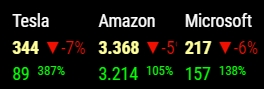
If I can help you in any way, please let me know.
And another suggestion. I would like to have the representation like the horizontal ticker, only without ticker. So the display would be shown horizontally. But there is nothing running through.
Thanks again
Many greetings
Sepp
-
RE: calendar module - format today events with time
@sdetweil Thanks a lot for your help! I’ll try it in this way
-
RE: calendar module - format today events with time
@sdetweil Thanks again for your answer. But that unfortunately still does not do the whole job
config:
maxTitleLength: 21,
wrapEvents: false,
dateFormat: "ddd, D.MMM, HH:mm",
fullDayEventDateFormat: "ddd, D.MMM",
timeFormat: "relative",
getRelative: 12,
urgency: 1,
showEnd: false,
maximumEntries: 6,
fade: false,
hidePrivate: false,
nextDaysRelative: true,
sliceMultiDayEvents: false,
showTimeToday: false,
result:
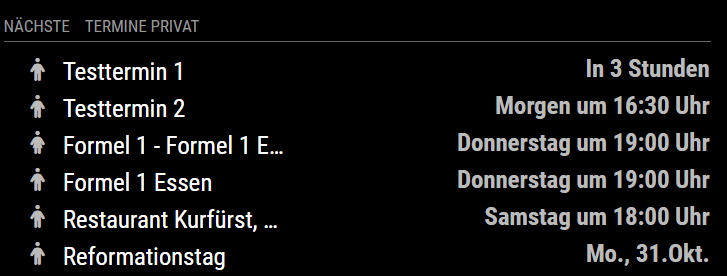
I actually just want the display like with timeformat: “absolute”. Only that with the current day simply “Today” is indicated and the same perhaps also with “Tomorrow”.
desired result:
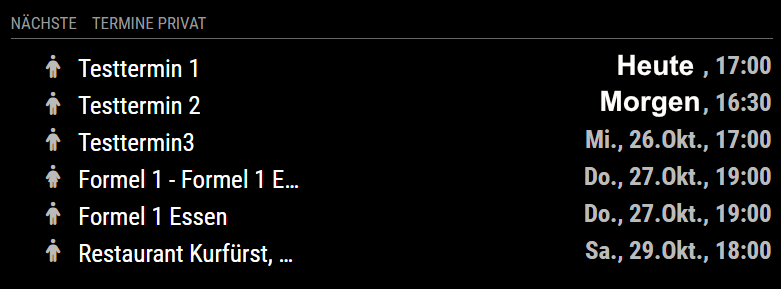
Unfortunately I am too little experienced in coding the MagicMirror programs. Otherwise I would suggest a change for this, if the behavior is not achievable with the current settings.
Could you, dear @sdetweil, do that? Thanks a lot
Josef
-
RE: calendar module - format today events with time
@sdetweil Thank you for the quick reply.
IfI seturgency: 1then an appointment for today is displayed like this
Test appointment in 4 hoursbut I would like to have the display
Test appointment today, 17:00how can I achieve this?
thanks
Josef -
calendar module - format today events with time
Hi,
I would like to format the calendar events of today and tomorrow relatively with time. All other events should be formatted in the form “ddd, D.MMM, HH:mm”.
In the new version there is a new config option showTimeToday with which I should be able to do this. But I don’t get along with it and need help.
The events should be displayed like this for example:appointment-1 Heute, 18:00 appointment-2 Morgen, 14:00 appointment-3 Mo, 30.Okt, 09:00my config is
{
		module: "calendar",
		header: "Nächste Termine ",
		position: "top_left",
		config: {
			fetchInterval: 600000, // 10 Minuten
			calendars: [
				{
					/* Kalender Paula */
					symbol: "female",
					url: "....ics"
				},
				{
					/* Kalender Sepp */
					symbol: "male",
					url: "....ics"
				},
			],
			maxTitleLength: 21,
			wrapEvents: false,
			dateFormat: "ddd, D.MMM, HH:mm",
			fullDayEventDateFormat: "ddd, D.MMM",
			timeFormat: "absolute",
			getRelative: 12,
			urgency: 0,
			showEnd: false,
			maximumEntries: 6,
			fade: false,
			hidePrivate: false,
			nextDaysRelative: true,
			sliceMultiDayEvents: false,
			showTimeToday: true,
		}
	},
Many thanks for any help.
Many greetings
Sepp -
RE: Moment Timezone / Invalid time value
@sdetweil I am sorry, I don’t know anymore what the bad tz was.i believe it was undefined, but I don’t know… Sorry
-
RE: Moment Timezone / Invalid time value
… solved for me now …
I have just deleted one of my oldest serial appointments. It had one of the above tzid (unfortunately I don’t know which one) and the error messages have disappeared …
-
RE: Moment Timezone / Invalid time value
@sdetweil yes, of course I did. I work exclusively via ssh. But the command above seems to try to open a window. Unfortunately, this then breaks off with
/home/pi/MagicMirror/node_modules/electron/dist/electron exited with signal SIGTRAPi found these tzid
"tzid":"W. Europe Standard Time"
"tzid":"undefined"
"tzid":"Customized Time Zone"
The first one is my time zone.
I try to identify the outlook calender entries, so that i can probably fix this there. I’m just wondering why this suddenly occurs. So it must be a newly added appointment that is causing the problem. I just can’t remember which appointments I have recently added :worried_face: -
RE: Moment Timezone / Invalid time value
Hi,
I have now also received this error message. Unfortunately, my mirror is “deeply” integrated so that I cannot connect a keyboard and mouse. So I cannot easily create the log file as described above without removing the mirror from the wall.Is it possible to recognise the wrong time zone from the data excerpt you posted here?
@thger1312 said in Moment Timezone / Invalid time value:
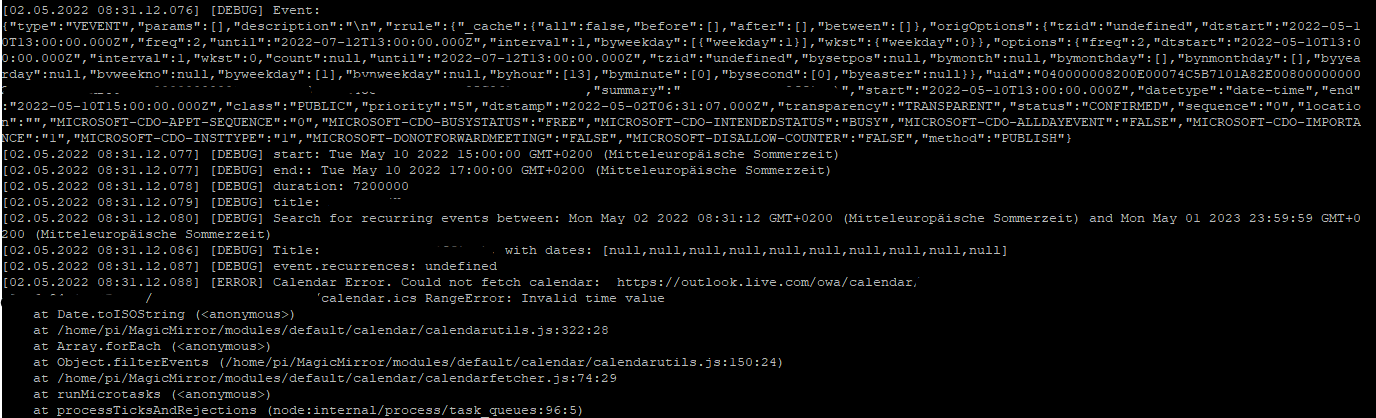
I couldn’t find anything suspicious at the moment. What have I overlooked?
Thank you
Sepp -
RE: CORS Policy Issue - different at electron and remote Chrome Browser
@karsten13 wow, thank you a lot. it works now. That was easy …
-
CORS Policy Issue - different at electron and remote Chrome Browser
Hi,
I have recently integrated the module octomirror-module. This module accesses the API of octoprint, a controller for 3D printers, and displays the status of the same.But now no data is displayed on the mirror in the module.
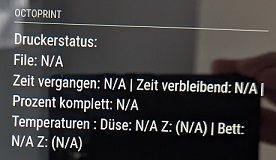
An analysis on the MagicMirror browser showed the following error
Access to XMLHttpRequest at 'http://192.168.178.157:5000/api/files' 0.0.0.0/:1 from origin 'http://0.0.0.8080' has been blocked by CORS policy. The request client is not a secure context and the resource is in more -private address space 'private'.However, when I call MagicMirror remotely with the Chrome browser, the module data is displayed correctly.
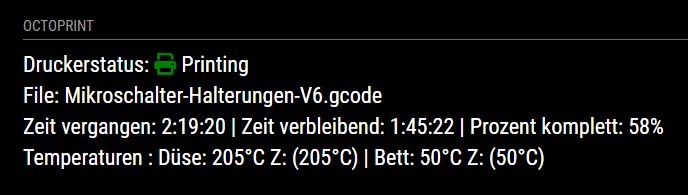
I’m not a specialist, but it seems that the MagicMirror browser makes the difference here.
Is there any way to fix this?
Many greetings
Sepp
-
RE: MMM-Hue CORS Policy Issue
@CarstenD said in MMM-Hue CORS Policy Issue:
There is now a new version available for MMM-Homematic that also works w/o changing the config.
Hi @CarstenD ,
where can I find this new version? At https://github.com/Sickboy78/MMM-Homematic is still the old version.
Sorry, but i don’t get it
Regards
Josef -
RE: [ERROR] Moment Timezone has no data for Customized Time Zone
Thanks a lot @sdetweil
ok, then i have to erase the log files often, so that the file system doesn’t crash … :-)