An offline text-to-speech module
[card:fewieden/MMM-TTS]
For developers:
this.sendNotification('MMM-TTS', 'This is a text to read. Hello World!');
 S
Offline
S
Offline
An offline text-to-speech module
[card:fewieden/MMM-TTS]
For developers:
this.sendNotification('MMM-TTS', 'This is a text to read. Hello World!');
i will have a look into this and create a module after the weekend
Olympic Games Module for MagicMirror2
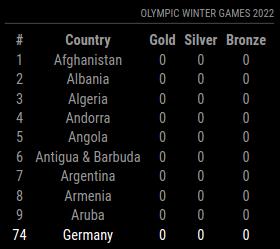
[card:fewieden/MMM-OlympicGames]
@gndimitro when you install a dependency with npm it’s not in your module folder, instead it will be in jarvis/node_modules/annyang/annyang.js
getScripts: function() {
    return [this.file("node_modules/annyang/annyang.js")];
}
do you mean something like that?
config: {
    layouts: {
        '192.168.2.1': 'big',
        '192.168.2.2': 'small'
    }
}
i think it will be handy if the creator of a topic can edit the first post unlimited to add updates, at least in the showcase section
because there is only on instance running, we can’t make a configurable option, but I thought about creating media querys in custom.css to hide all other modules on the small screens
i just published an update, which allows to focus_on also TOP, BOTTOM and support for coming features, you’re already able to set this per league
did you copy all the node_modules directories? if so this is propably the issue go to the module remove the directories and run npm install
@Bangee never had such an issue before, did a clean install instead of copying images on sdcard, is there a reason why you copied an old image?
@Bangee depending on your other post about this problem in a different thread I assume you have a newer node version installed as you had on your old sd card, so maybe this will help you https://docs.npmjs.com/cli/rebuild
especially have a look at the following lines https://github.com/fewieden/MMM-soccer/blob/046346597ca7b1429b0a1f6e6c55c8f0624373a7/MMM-soccer.js#L169
@Beh do you want something like this? 
then you can have a look in here, credits go to @ianperrin
@Bangee go into the directory of your new module e.g. ~/MagicMirror/modules/MMM-Temperature/ and type npm init and follow the instructions, after that type npm install --save node-dht-sensor
@MichMich I was thinking about doing this, but couldn’t find a proper free api yet :(
you can just put .module { margin-top: 10px;} in the custom.css this should work
@d3r https://github.com/MichMich/MagicMirror/tree/master/modules
if you have questions you can ask here, there several people who can help if you’re facing problems