MagicMirror Forum
    • Recent
    • Tags
    • Unsolved
    • Solved
    • MagicMirror² Repository
    • Documentation
    • 3rd-Party-Modules
    • Donate
    • Discord
    • Register
    • Login
    1. Home
    2. thgmirror
    3. Posts
    A New Chapter for MagicMirror: The Community Takes the Lead
    Read the statement by Michael Teeuw here.
    Offline
    • Profile
    • Following 0
    • Followers 1
    • Topics 12
    • Posts 135
    • Groups 0

    Posts

    Recent Best Controversial
    • RE: Deutsche Anleitung MagicMirror auf RaspberryPi 3

      Hallo @35110

      das sollte jetzt ungefähr so aussehen bei Dir:

      //#################################################################################
      		{
      			disabled: false,
      			module: "weather",
      			position: "top_right",
      			header: "Wettervorhersage",
      			config: {
      				location: "Bonn",
      				locationID: "2946447",
      				apiKey: "Hier kommt Dein Key rein",
      				showWindDirectionAsArrow: true,
      				showHumidity: true,
      				showFeelsLike: false
      				}
      		},
      //#################################################################################


      Da das ziemlich genau so aussieht wie zuvor, könntest Du einfach den Modulnamen anpassen, aber ACHTUNG: es heißt jetzt “apiKey”!!! Groß- und Kleinschreibung beachten. Der Key selbst sollte noch funktionieren.

      …und übrigens, das weather-modul ist schon da, es ist eins der Default-Module.

      Thomas

      posted in General Discussion
      thgmirrorT
      thgmirror
    • RE: MMM-CovidStats

      @mumblebaj
      Hey, works like a charm!!!

      Is it possible, to exclude a column? For example “Recovered”…not every country (Peru, Norway) seems to send the data.
      And it would save some space:-)

      But thank you for the nice module.
      Thomas

      posted in Health
      thgmirrorT
      thgmirror
    • RE: Eufy doorbell

      @mgluchgit
      Do you have a stream to a smartphone-app or can you also see it on a PC?

      posted in Requests
      thgmirrorT
      thgmirror
    • RE: Python outputs

      Hi @sakliadem,

      I do a very similar task, my approach is to send in Python a notification like

      	if uebergabetext.find("wdr5")             != -1:
      		url = 'http://192.168.nnn.nnn:8080/remote?action=NOTIFICATION&notification=SENDER&payload=1'
      		requests.get(url)
      		return
      	if uebergabetext.find("deutschlandradio") != -1:
      		url = 'http://192.168.nnn.nnn:8080/remote?action=NOTIFICATION&notification=SENDER&payload=2'
      		requests.get(url)
      		return
      	if uebergabetext.find("deutschlandfunk")  != -1:
      		url = 'http://192.168.nnn.nnn:8080/remote?action=NOTIFICATION&notification=SENDER&payload=3'
      		requests.get(url)
      		return
      

      I added at MMM-pages.js the following:

       notificationReceived: function (notification, payload) {
        Log.log('[Pages]: received a notification ' + notification);
          switch (notification) {
            case 'SENDER':
              Log.log('[Pages]: received a SENDER notification with payload ' + payload);
      // do what ever you like
              break;
      

      Now open the developer-console and watch the upcoming messages when you send a notification.

      posted in Troubleshooting
      thgmirrorT
      thgmirror
    • RE: Change Folder of Logs of PM2 and NPM

      @sdetweil and where is the PM2 start?
      Of course it must be persistant, but I don’t want to change the location of the PM2-configuration.

      posted in Development
      thgmirrorT
      thgmirror
    • RE: Change Folder of Logs of PM2 and NPM

      @sdetweil but you know, a RAMDisk is volatile, I can’t copy something to a RAMDisk in forehand…it is gone after a reboot.

      posted in Development
      thgmirrorT
      thgmirror
    • RE: Change Folder of Logs of PM2 and NPM

      @sdetweil Ah, OK, I will give it a try:-)

      posted in Development
      thgmirrorT
      thgmirror
    • RE: Change Folder of Logs of PM2 and NPM

      @sdetweil Thank you for your reply, but I prefer to store the log-files physically at var/log.
      I currently use var/log as a RAMDisk, because I normally don’t need log-files. So I avoid a lot of write access to the SD-card, it is faster and safer for the SD…and after a reboot, everything is fine:-)
      My attempt is, to do this for npm and PM2-logs, too.
      As far as I know, I can start PM2 with parameters -o and -e and the new foldernames, but they destroyed my installation. Btw., how do you start PM2 in your script? I would like to add the parameters so it is automatically connected after reboot.
      Thomas

      posted in Development
      thgmirrorT
      thgmirror
    • Change Folder of Logs of PM2 and NPM

      Hi,

      Does anybody know how to change the location of the above mentioned folders? I would like to move them to var/log/

      Thank you in advance
      Thomas

      posted in Development
      thgmirrorT
      thgmirror
    • CPU-Temperature as a graph with RRDtool

      I added a graph about the progress of the CPU-temperture of my RPI3 to my MM via RRDtool:
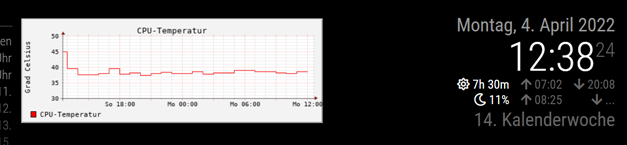
      3b90bc2e-76cd-4e30-a2c4-5434cb843638-image.png
      It looks a little bit nerdy, but the temperature is a nerdy hardware characteristic. OK, it is not so beautiful like grafana…but much easier to use.
      Therefor, it needs only a few steps to realize it:

      sudo apt-get install rrdtool
      

      will install it.
      Only one time create the database in the terminal session:

      rrdtool create cputemp.rrd --step 300 DS:temp:GAUGE:600:-20:90 RRA:AVERAGE:0.5:12:24 RRA:AVERAGE:0.5:288:31
      

      Add two tasks to crontab:

      2-57/5 * * * * rrdtool update cputemp.rrd N:$(vcgencmd measure_temp | cut -c "6-9")
      

      moves every 5 minutes the temperature to the database established above.

      0 * * * * rrdtool graph /home/pi/MagicMirror/modules/cputemp.gif --start -24h --title "CPU-Temperatur" --vertical-label "Grad Celsius" --disable-rrdtool-tag DEF:cputemperatur=cputemp.rrd:temp:AVERAGE LINE1:cputemperatur#ff0000:"CPU-Temperatur" ;
      

      generates once in an hour a graph which will be displayed later. If you like, you can adjust the map legend (“CPU-Temperatur” and “Grad Celsius”) with descriptions in your language.

      Now create a file named cputemp.html in the modules-folder of your MM:

      <HTML>
      <HEAD>
      <TITLE>CPU Temperatur</TITLE>
      </HEAD>
      <body bgcolor=#000000>
      	<img src="cputemp.gif"/>
      </body>
      </HTML>
      

      and use MMM-SmartWebDisplay in your config.js to show it:

      //#################################################################################
      		{
      			disabled: false,
      			module: 'MMM-SmartWebDisplay',
      			position: 'top_center',
      			config: {
      				logDebug: false,
      				height: "180",
      				width:"500",
      				updateInterval: 0,
      				NextURLInterval: 0,
      				displayLastUpdate: false,
      				url: ["/modules/cputemp.html"],
      				}
      		},
      //#################################################################################
      

      Based on these steps, some more modifications of the appearance are possible. Please use your favorite search-engine for more.

      posted in Utilities
      thgmirrorT
      thgmirror
    • RE: Any modules that could display a livestream

      @tanvir586 the DIV-tags in the html-file are working like a passe-partout to see only a region of a given website.
      Do you have an example how it looks now?
      Greetings from Germany

      posted in Requests
      thgmirrorT
      thgmirror
    • RE: Any modules that could display a livestream

      @tanvir586
      The positions are sometimes a little bit tricky…if you have two or more at the same place, they are sorted by appearance in the config.js.

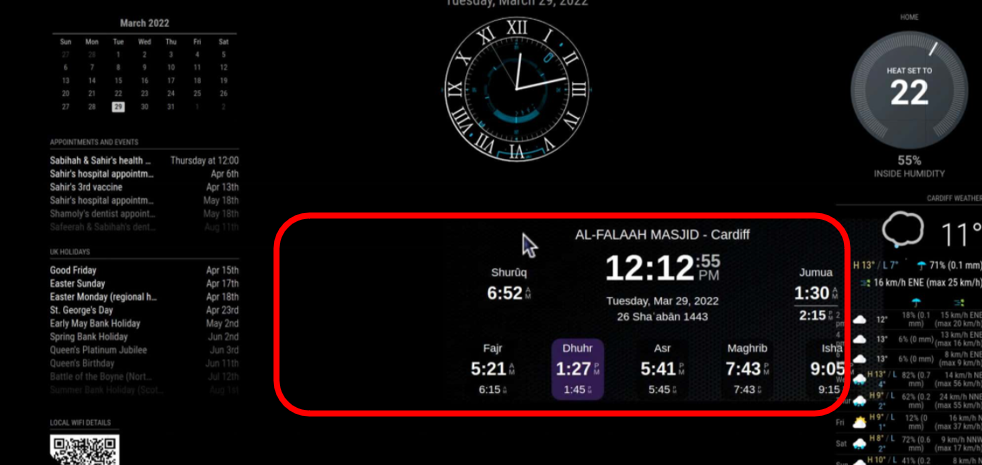
      You should try to reduce the width and height of the SmartWebDisplay as small as possible.
      58b7e9d5-8524-4b4c-9004-3395485fdfb5-image.png
      May be, your widget is in real as wide as red-marked in this screenshot, so you wasted a lot of space. First, you can temporarly change the background-color of the html-file (body bgcolor=#123456) to see the needed space at a glance. Change there the amount of pixels and percentages. Additionally change the height and width in SmartWebDisplay.
      If nothing helps, start with your Widget and add one by one your other modules.

      posted in Requests
      thgmirrorT
      thgmirror
    • RE: Any modules that could display a livestream

      @tanvir586
      I used MMM-SmartWebDisplay…
      This in config.js

      //#################################################################################
      		{
      			disabled: false,
      			module: 'MMM-SmartWebDisplay',
      			position: 'top_left',
      			config: {
      				// See 'Configuration options' for more information.
      				logDebug: false, 
      				height: "1300", 
      				width:"355%", 
                 	                updateInterval: 0, 
                                      NextURLInterval: 0, 
       				displayLastUpdate: false,
                                      url: ["/modules/widget.html"],
      				}
      		},
      //#################################################################################
      

      leads to
      e0ba9ad1-67ca-4c10-97aa-5061ab9cd8b6-image.png

      Eventually play around with the height and width-parameter in config.js and also in the html-file to get the best results.

      posted in Requests
      thgmirrorT
      thgmirror
    • RE: Any modules that could display a livestream

      @tanvir586 second try:-)

      <HTML>
      <HEAD>
      <TITLE>YYYYY</TITLE>
      </HEAD>
      <body bgcolor=#000000>
      
      <div style="border: none; overflow: hidden; max-width: 900px; max-height: 370px">
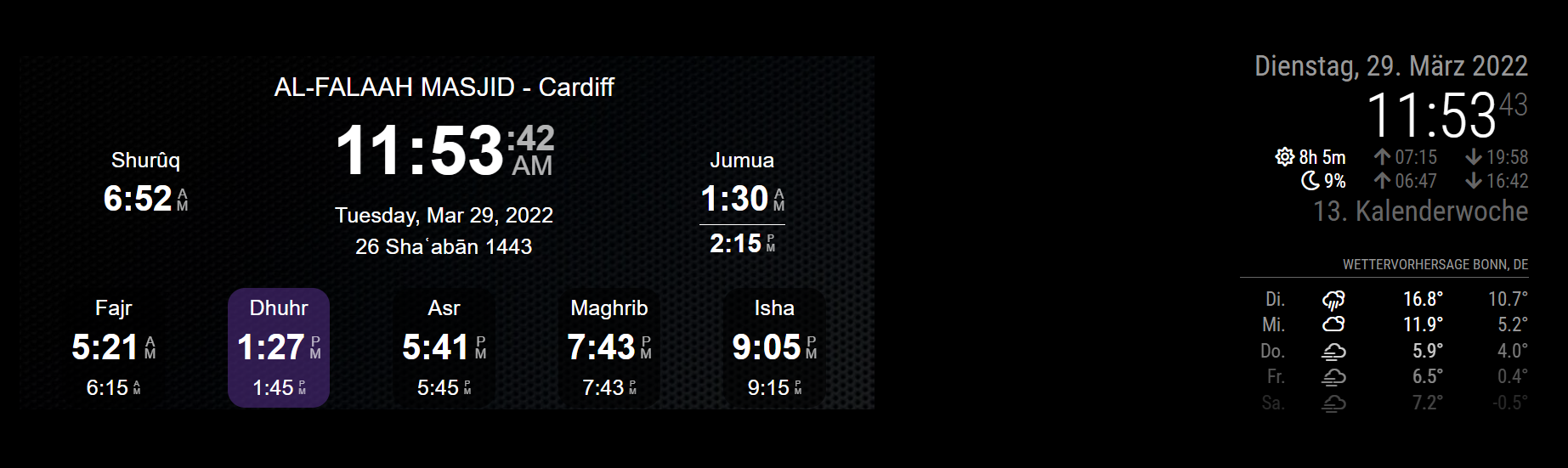
      <iframe scrolling="no" src="https://mawaqit.net/en/w/al-falah-centre-cardiff?showOnly5PrayerTimes=0" 
      style="border: none;  margin-top: 0px; margin-left: -6px; height: 1200px; width: 900px">
      </iframe>
      </div>
      
      </body>
      </HTML>
      

      Store this as a local html-file and add it as url to you prefered module. I hide the cookie-question outside the visible region. So it is still there but it will not bother you. Good luck!!!
      Thomas

      posted in Requests
      thgmirrorT
      thgmirror
    • RE: Any modules that could display a livestream

      @tanvir586 OK, no chance with my way…your webside prohibits to display it in an iframe…

      posted in Requests
      thgmirrorT
      thgmirror
    • RE: Any modules that could display a livestream

      @tanvir586 Can you please post the https://maga… link here…it will be easier to check it:-)

      posted in Requests
      thgmirrorT
      thgmirror
    • RE: Any modules that could display a livestream

      @tanvir586 another idea: have a look at my old post https://forum.magicmirror.builders/topic/14422/solved-displaying-part-of-a-website-google-sheets-graph/2?_=1648325230070 and align it to your needs.
      Thomas

      posted in Requests
      thgmirrorT
      thgmirror
    • RE: Every few hours I get "ERROR:network_service_instance_impl.cc(916)] Network service crashed, restarting service"

      @TvE That is my experimental setup:

      333da9b0-4678-404c-88eb-5b5ae9c65ba4-image.png

      posted in Troubleshooting
      thgmirrorT
      thgmirror
    • RE: Sending Notification to html-file!?!?

      @sdetweil yes, and that is my question…if there is a way to call functions in an html.

      posted in Development
      thgmirrorT
      thgmirror
    • Sending Notification to html-file!?!?

      Hi,
      Is it possible, to send notifications to a html?
      I would like to use this nice methode to call javascript-functions in a local-stored html-file.
      If possibel, an example would be helpful.

      posted in Development
      thgmirrorT
      thgmirror
    • 1 / 1