MagicMirror Forum
    • Recent
    • Tags
    • Unsolved
    • Solved
    • MagicMirror² Repository
    • Documentation
    • 3rd-Party-Modules
    • Donate
    • Discord
    • Register
    • Login
    1. Home
    2. yo-less
    3. Best
    A New Chapter for MagicMirror: The Community Takes the Lead
    Read the statement by Michael Teeuw here.
    Offline
    • Profile
    • Following 0
    • Followers 2
    • Topics 8
    • Posts 92
    • Groups 1

    Posts

    Recent Best Controversial
    • RE: PIR sensor behind glass?

      Alright, everyone. I said I would start experimenting with the PIR sensor and experiment I did.
      So first of all we started drilling a hole of diameter 8mm into one side of a piece of wood
      (we went 5mm deep as this corresponds with the height of the cylindrical sensor):

      0_1472843356492_sensor2.png

      This is not all we did, as you can see, we also drilled a hole of diameter 3mm on the other side,
      but this time we made sure it went all the way through:

      0_1472844079617_sensor4.png

      Next, we removed the Fresnel lens from the sensor:
      0_1472844126023_sensor3.png

      After that, we put the sensor in the bigger hole which perfectly houses the whole cylinder:
      0_1472844139302_sensor3.5.png

      Then we waited to see whether the mirror would turn itself on if we moved past the piece of wood.
      And, hooray, it did!

      Emboldened by this discovery, we started all over again, but this time with smaller holes on the other side,
      so we ended up with this setup:

      0_1472844320166_sensor1.png

      Simply ignore the rubber band, it’s there to hold the circuit board in place :)

      Anyway, here’s the good news: The mirror recognizes somebody walking by if the hole is as small as 2 millimeters in diameter.
      It did not work with a 1mm hole, but hey, are we living in a perfect world? :D

      Anyway, this solution is good enough for me, we will drill a 2mm hole in the bottom center area of the mirror frame and hide the sensor behind it.
      I’m thinking we might even be able to make the hole less apparent by choosing a piece of wood similar to the one above
      with some nice-looking wood grain and / or knots.
      posted in Hardware
      yo-lessY
      yo-less
    • RE: Building mirror without programing

      Hi man. You can run the magic mirror on a Windows system if you install node.js, which is at the heart of the mirror:
      https://nodejs.org/en/download/

      I’m running a version of the MM on my desktop PC to build my modules, as it is much faster than my Raspberry Pi 1.
      What takes forever to load on my Pi is instantly shown on my desktop PC.

      I’m not sure if I can still remember how to set up the environment correctly, but try this:

      1. Download node.js - https://nodejs.org/en/download/
      2. Install it on your Windows 10 PC
      3. Go to https://github.com/MichMich/MagicMirror, click on “Clone or download”, then “Download ZIP”
      4. Extract the ZIP into a folder, e.g. D:\MagicMirror
      5. Go to the config folder on your PC and configure your mirror via the config.js file
      6. Open a Windows command prompt (Press WIN+R, type in “cmd”, hit ENTER)
      7. Navigate to your MagicMirror folder (In my example: cd “D:\MagicMirror”)
      8. Type “npm install” and hit ENTER
      9. Type “node serveronly” and hit ENTER
      10. Go to a browser of your choice (in W10 Edge is preinstalled and works) and in the address bar type in “localhost:8080” and hit ENTER

      If you want to stop the mirror from running, either close the command prompt window (where you entered “node serveronly”) or press CTRL+C if the command prompt is your active window.

      posted in Troubleshooting
      yo-lessY
      yo-less
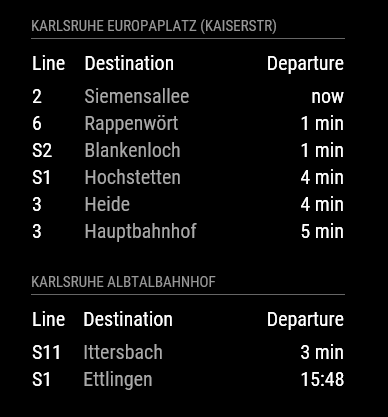
    • MMM-KVV - Local Karlsruhe transport (KVV) departure times

      First of all, a big shout out to @ronny3050 for his impressive helpfulness in getting me started. I came across a really weird problem when I started developing this module and his willingness to help a newbie right away, made me feel very welcome here :).

      Secondly, I want to thank @MichMich for his willingness to share his work and ideas. Trying to find a nice bathroom mirror and quite unhappy with the mirrors that are available on the market, I came across your project by chance and immediately fell in love with your invention. You could have easily used your idea to make a lot of money with your mirror, but instead you chose to share the fruits of your labor with the world. I hope that many, many others will follow your lead in the years to come :).

      I only code in my spare time and have so far mostly worked on some simple web pages, but this project has pushed me to try and acquire a lot of new skills in a very short span of time. Github, npm, node.js, … . For the first few days I felt like I was drowning in a sea of information I couldn’t, for the life of me, get a grasp on, but now my first JavaScript modules are done, and I couldn’t be prouder :). So thanks to all of you for your great attitude and help.

      Anyway, here’s my first module:

      [card:yo-less/MMM-KVV]

      0_1472139897715_screenshot_en.png

      MMM-KVV shows departures times for any given stop of the Karlruhe local transport network on your mirror.

      It is pretty customizable and I have tried to explain its installation and configuration on the Github page. Even though there may not be that many users here from the Karlsruhe area (if any), I look forward to hearing from you, should you come across any bugs or problems or should you find this module useful.

      posted in Transport
      yo-lessY
      yo-less
    • RE: PIR sensor behind glass?

      @cowboysdude I’m just not comfortable with the idea of a camera in my bathroom (or any other room, for that matter). Raspbian is a pretty open platform and I don’t want others to take control of any cameras I might have installed in my home. And it’s not like all sorts of people wouldn’t be interested in spying on other people.

      Have started experimenting with the PIR sensor, it’s looking good so far, will let you guys know about my progress.

      posted in Hardware
      yo-lessY
      yo-less
    • RE: Building mirror without programing

      Glad to see I could help you :). The community spirit is what I love about this place…

      If you want to automate your setup so that the laptop boots to the mirror on startup, you would probably have to run a batch file at startup which both runs the “node serveronly” command as well as starts up a browser in fullscreen mode. Haven’t looked into it, but do share your setup, should you get that to work as well.

      And make sure to showcase your mirror once it’s done ;)
      https://forum.magicmirror.builders/category/12/show-your-mirror

      Have fun piecing it together ^^

      posted in Troubleshooting
      yo-lessY
      yo-less
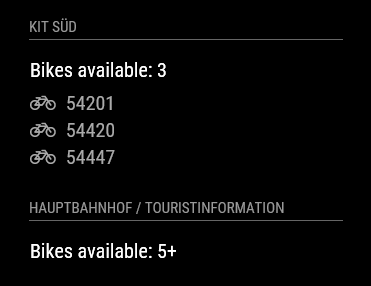
    • MMM-nextbike - Are any bikes available at your local nextbike station?

      [card:yo-less/MMM-nextbike]

      If, like me, you love the idea of using a bike-sharing service, you might appreciate this module :).
      It shows the amount of available bikes at any given “nextbike” station and lists the bike numbers of up to five available bikes.

      0_1472140805153_screenshot_en.png

      posted in Transport
      yo-lessY
      yo-less
    • RE: PIR sensor behind glass?

      @cowboysdude We might just drill a tiny hole into the frame of the mirror and put the PIR behind it without its Fresnel cover. Will experiment with that idea some more.

      posted in Hardware
      yo-lessY
      yo-less
    • RE: custom.css

      @ianperrin Thanks for the clarification. I could swear I tried using “.compliments .xlarge” before posting as my own module css files use the same syntax and it looked like it didn’t work, but I’ve just tried it again and it’s working as it should :). Great to know.

      posted in Troubleshooting
      yo-lessY
      yo-less
    • RE: Calendar time - capitalize first letters

      I have found another detail that bothered me. If the calendar is set to ‘relative, 6 hours before an event occurs the calendar would start showing the time in relative terms (for example: “In 5 hours” - but then it would stay that way until it would switch to “In 4 hours” an hour later, which is pretty confusing as far as I’m concerned. If I’'m not mistaken, it stays pretty vague until 45 minutes before the event when the countdown truly starts).

      I found this behavior rather counter-intuitive, as I might want to check the mirror to find out the exact time when an event starts. This is why I have introduced a tag getRelative, which can take any value between 0 and 48 hours. So if a user configures their calendar like this:

      modules: [
      ...
          {
              module: 'calendar',
              position: 'top_left',   
              config: {
                     getRelative: 0.5
                }
              }
          },
      ...


      their events start getting relative half an hour before the event (“In 30 minutes”), if they decide they don’t like relative times at all, they can set it like this: getRelative: 0. This way, it is easier for users to customize the calendar’s relative behavior to their needs.

      This is now included in my pull request.

      On a related note: Can anybody tell me why there is a timeFormat: absolute option? I set my calendar to absolute but didn’t notice any difference.

      posted in Feature Requests
      yo-lessY
      yo-less
    • Adjusting monitor brigthtness level via software

      Now that I’ve got my mirror running software-wise and I’m about to make an actual mirror out of it, I was wondering about how to make sure the screen background isn’t visible at night. My monitor supports DDC/CI but from the little information I could gather online, it seems the Pi doesn’t support controlling an external monitor via DDC/CI (yet?).

      There’s ddccontrol, but at least on my Pi 1 it didn’t work when I tried to use it, but I also have no idea what I’m doing, as I’ve only recently started experimenting with my Pi and I’m lacking the background on how a computer communicates with the monitor. It seems that most linux distributions allow for a change of the brightness level via /sys/class/backlight, but the Pi’s backlight folder is empty.

      Ideally I would like to attach a light sensor to my Pi that could automatically reduce screen brightness as soon as it gets dark inside a room, but to have that happen, I would have to find a way to adjust screen brightness using the Pi rather than my monitor’s OSD.

      Any help is appreciated :)

      posted in Hardware
      yo-lessY
      yo-less
    • RE: Changing moment.js behavior

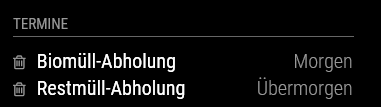
      As the calender.js file takes over the days “TODAY” and “TOMORROW” it was actually quite easy to add another definition to take over the “DAYAFTERTOMORROW”.

      I’ve changed the ‘calender.js’ code to look like this:

      ...
      if (event.fullDayEvent) {
      	if (event.today) {
      		timeWrapper.innerHTML = this.translate("TODAY");
      	} else if (event.startDate - now < one_day && event.startDate - now > 0) {
      		timeWrapper.innerHTML = this.translate("TOMORROW");
      	} else if (event.startDate - now < 2*one_day && event.startDate - now > 0) {
      		timeWrapper.innerHTML = this.translate("DAYAFTERTOMORROW");
      	} else {
      ...
      

      And I’ve adjusted /MagicMirror/translations/de.json to look like this

      ...
      	"TOMORROW": "Morgen",
      	"DAYAFTERTOMORROW": "Übermorgen",
      	"RUNNING": "noch",
      ...
      

      Which led to this:
      0_1472593100725_termine.png

      Great, just what I needed… :)

      I’m aware that this will be overwritten by any update I might perform, but I can’t think of any other way to implement this feature.

      posted in Troubleshooting
      yo-lessY
      yo-less
    • RE: Website Launched

      Wow, great work!
      This kind of production quality is normally only found in projects that try to sell you something :). Well, I’m sold, keep up the outstanding work.

      posted in Announcements
      yo-lessY
      yo-less
    • RE: Adjusting monitor brigthtness level via software

      @KirAsh4 Sorry to hear that. All the best for you.

      posted in Hardware
      yo-lessY
      yo-less
    • RE: Auto-disable module

      @ronny3050 Impressive response, thank you!

      posted in Development
      yo-lessY
      yo-less
    • RE: Changing moment.js behavior

      @MichMich Well, I sort of assumed that a change that somehow breaks the calendar for any other language than German would probably not be merged into the develop branch ^^. But I can have it depend on an if-condition and we can take a look at whether it makes sense to include it in the calendar, will submit a pull request and we’ll take it from there.

      posted in Troubleshooting
      yo-lessY
      yo-less
    • RE: PIR sensor behind glass?

      @dmcinnes It’s great to hear that they’re working on an external 5v power supply, this means it should be possible to use them on the Pi. It would be really nice if you could try hooking them up to the Pi to see if they’re acting up once attached to the Pi’s pins. I’ll probably try to get one as well if you can confirm they’re working on the Pi as well.

      posted in Hardware
      yo-lessY
      yo-less
    • RE: Schedule a function in a module.

      Hey @veryaner, I’m currently working on a module that implements node-cron and it’s running fine. If you’re still looking for an answer, let me know.

      posted in Development
      yo-lessY
      yo-less
    • RE: cant get magicmirror to show up on screen

      Then you’re not experiencing the same problem. What you are describing is normal behavior.

      If you use SSH, the Pi doesn’t know what monitor it should use, since you’re sitting in front of another monitor, so your command should be:

      DISPLAY=:0 npm start
      

      Try that, it should work without problems.

      Everything is also explained here .

      Why aren’t you using PM2 to run the mirror?

      posted in Troubleshooting
      yo-lessY
      yo-less
    • RE: cant get magicmirror to show up on screen

      @kula Great to know it’s working for you. Use PM2, it makes sure your mirror stays up and running and doesn’t stop at some stage. It also provides logs that can help troubleshoot potential mirror problems.

      posted in Troubleshooting
      yo-lessY
      yo-less
    • 1 / 1