A New Chapter for MagicMirror: The Community Takes the Lead
Read the statement by Michael Teeuw here.
  • Importing the Google calendar authentication and password.

    5
    0 Votes
    5 Posts
    2k Views
    C
    @sdetweil Great thanks for the advice I will follow it.
  • IAM: MMM-Face-Reco-DNN + MMM-Profil

    1
    0 Votes
    1 Posts
    324 Views
    G
    Hello, I would like to set up an identity management system in Magic Mirror. For this it is necessary to use the module “MMM-Face-Reco-DNN” for facial recognition and the module “MMM-Profile” to define the parameters and the configuration of the profile (user) identified. The “MMM-Face-Reco-DNN” module identifies the user in the “classes” variable. Is it possible to place an “if” in the file to check who the user is in “classes” and read the code corresponding only to the user? If yes, how ? Is it possible to include the configuration of a user’s profile in a single file? If yes, how to integrate it in the conf file? Thanks in advance, Regards
  • How would I remove tmperature info from weather forecast module?

    1
    0 Votes
    1 Posts
    246 Views
    M
    How would I remove tmperature info from weather forecast module?
  • MMM-pages - modules with same name on different pages

    22
    0 Votes
    22 Posts
    8k Views
    P
    Your most welcome ! :slightly_smiling_face: Greeting from INDIA too! Prakhar
  • MMM-EFA Config

    Unsolved
    6
    0 Votes
    6 Posts
    1k Views
    R
    @lavolp3 said in MMM-EFA Config: @rxlDavid You have config errors in the respective lines. You should use your preferred editor (e.g. nano) and fix them nano config/config.js Or post your config.js here but delete every sensitive information! At least post the first few lines. /* Magic Mirror Config Sample * * By Michael Teeuw http://michaelteeuw.nl * MIT Licensed. * * For more information on how you can configure this file * See https://github.com/MichMich/MagicMirror#configuration * */ var config = { address: "localhost", // Address to listen on, can be: // - "localhost", "127.0.0.1", "::1" to listen on loopback interface // - another specific IPv4/6 to listen on a specific interface // - "0.0.0.0", "::" to listen on any interface // Default, when address config is left out or empty, is "localhost" port: 8080, ipWhitelist: ["127.0.0.1", "::ffff:127.0.0.1", "::1"], // Set [] to allow all IP addresses // or add a specific IPv4 of 192.168.1.5 : // ["127.0.0.1", "::ffff:127.0.0.1", "::1", "::ffff:192.168.1.5"], // or IPv4 range of 192.168.3.0 --> 192.168.3.15 use CIDR format : // ["127.0.0.1", "::ffff:127.0.0.1", "::1", "::ffff:192.168.3.0/28"], useHttps: false, // Support HTTPS or not, default "false" will use HTTP httpsPrivateKey: "", // HTTPS private key path, only require when useHttps is true httpsCertificate: "", // HTTPS Certificate path, only require when useHttps is true language: "de", timeFormat: 24, units: "metric", // serverOnly: true/false/"local" , // local for armv6l processors, default // starts serveronly and then starts chrome browser // false, default for all NON-armv6l devices // true, force serveronly mode, because you want to.. no UI on this device modules: [ { module: "alert", }, { module: "updatenotification", position: "top_bar" }, { module: "clock", position: "top_left" }, { module: "calendar", header: "Kalender", position: "top_left", config: { calendars: [ { symbol: "calendar-check", url: "XXXXXXX" } ] } }, { module: "compliments", position: "lower_third" }, { module: "currentweather", position: "top_right", config: { location: "XXXXXX", locationID: "28XXXX", //ID from http://bulk.openweathermap.org/sample/city.list.json.gz; unzip the gz file and find your city appid: "XXXXXX" } }, { module: "weatherforecast", position: "top_right", header: "Weather Forecast", config: { location: "XXXXXX", locationID: "XXXXXX", //ID from http://bulk.openweathermap.org/sample/city.list.json.gz; unzip the gz file and find your city appid: "XXXXXX" } }, { module: "newsfeed", position: "bottom_bar", config: { feeds: [ { title: "Tagesschau", url: "http://www.tagesschau.de/xml/rss2" } ], showSourceTitle: true, showPublishDate: true, broadcastNewsFeeds: true, broadcastNewsUpdates: true } }, { module: 'MMM-Mail', position: 'bottom_left', header: 'Email', config:{ user: 'XXXXXX', pass: 'XXXXXX', host: 'XXXXXX', port: 993, numberOfEmails: 5, fade: true, subjectlength: 50 } }, { module: 'MMM-EFA-departures', position: 'upper_third', config: { efaUrl: "http://www2.vvs.de/vvs/XSLT_DM_REQUEST", stopID: "XXXXXX", stopName: "MMM-EFA is loading", lines: ['all'], reload: 60000, realDepTime: true, relativeDepTime: true, toggleDepTime: true, toggleDepTimePerReload: 6, fade: true, fadePoint: 0.25, maxDepartures: 4 } }, ] }; /*************** DO NOT EDIT THE LINE BELOW ***************/ if (typeof module !== "undefined") {module.exports = config;} i edit the config via nano…

  • This topic is deleted!

    1
    0 Votes
    1 Posts
    8 Views
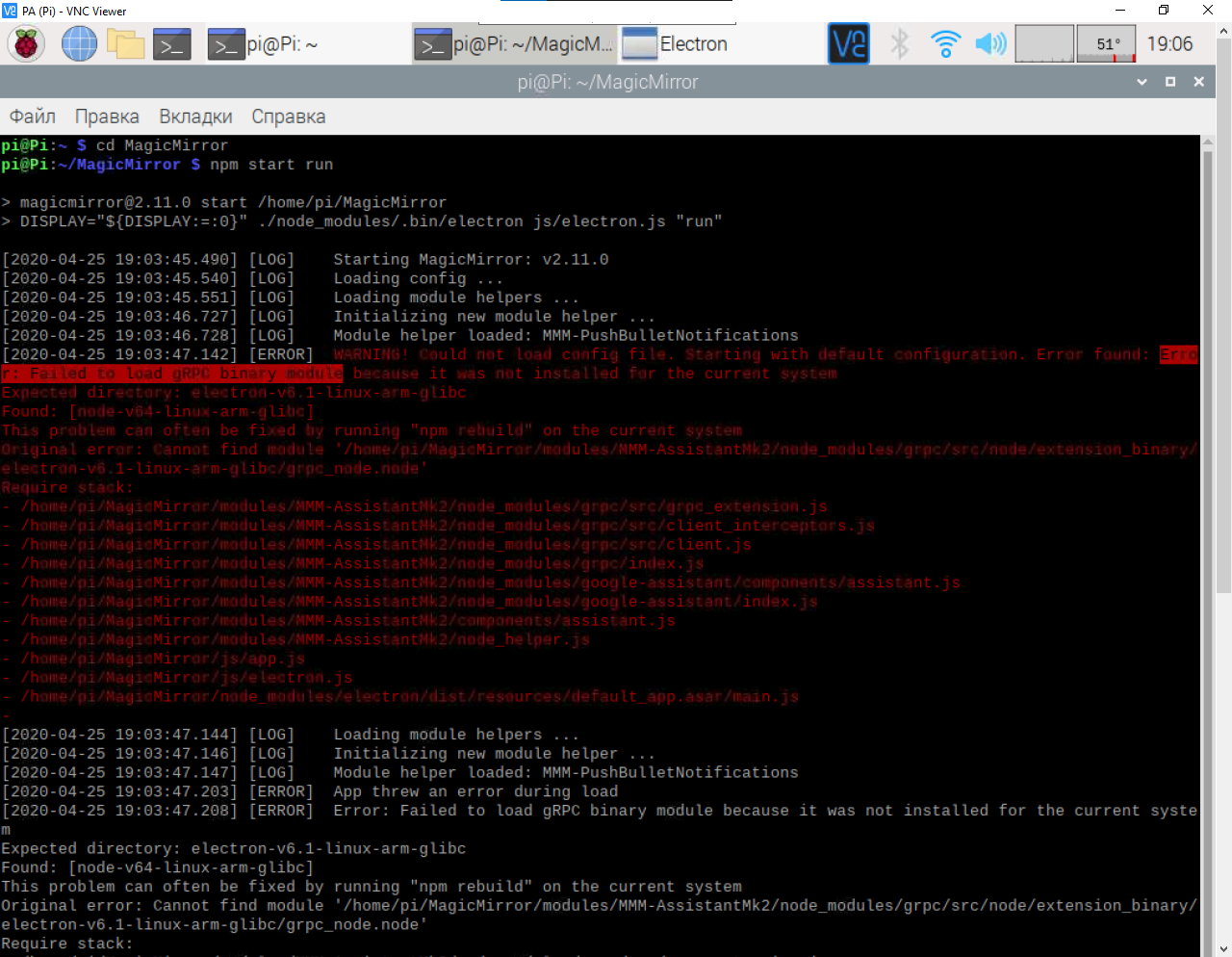
  • Error: Failed to load gRPC binary module

    9
    1
    0 Votes
    9 Posts
    590 Views
    S
    @Bugsounet I knew that!.. thx for the wave of the wand!
  • Use voice control to change pages

    5
    0 Votes
    5 Posts
    1k Views
    R
    @sdetweil sounds good! Thank you
  • This topic is deleted!

    1
    8
    0 Votes
    1 Posts
    13 Views
  • 0 Votes
    2 Posts
    269 Views
    S
    u have it already git clone https://github.com/MichMich/MagicMirror cd ~/MagicMirror git checkout tags/v2.10.1 to see the list of versions/tags git tags -l
  • MMM-Sonos by CFenner and Sonos API problems

    8
    0 Votes
    8 Posts
    2k Views
    S
    oh I thought that was the same link. Thanks for your help @Fozi
  • current weather

    3
    0 Votes
    3 Posts
    702 Views
    PerlchampP
    the apikey took more time then i expected. now it works, but looks not so good i hoped …
  • MMM-NowPlayingOnSpotify

    1
    0 Votes
    1 Posts
    287 Views
    T
    Hello everyone! I recently added the MMM-NowPlayingOnSpotify to my magic mirror. It works but I want to try to make the pause icon functional. I binded a eventListener click to the icon but here is the problem. Because of the fact (if I got this right) that the Dom is recreated every second (Every second the module asks the new data from spotify) the click event listener does not work properly. Sometimes the event is not triggerd because of the fact that the icon is not ready or binded. Sometimes I trigger it, sometimes I don’t. Someone who knows how to solve it? I thought to update the dom every second instead of recreating it but that is a lot of adjustments I have to make. If you have a idea, let me know please. Thanks! ps: I know the module is meant to have a non-functional pause button but I would like to be able to pause music by touching the button on my mirror just because of the fact I don’t know if i’m going to implement voice control.
  • MMM-Carousel config.js Help Please

    10
    0 Votes
    10 Posts
    2k Views
    S
    @aecandroid no idea. haven’t used this module. a module needs an npm install ONLY IF is contains a package.json file
  • GREAT MODULE - works like a charm

    Moved
    1
    1
    0 Votes
    1 Posts
    282 Views
    C
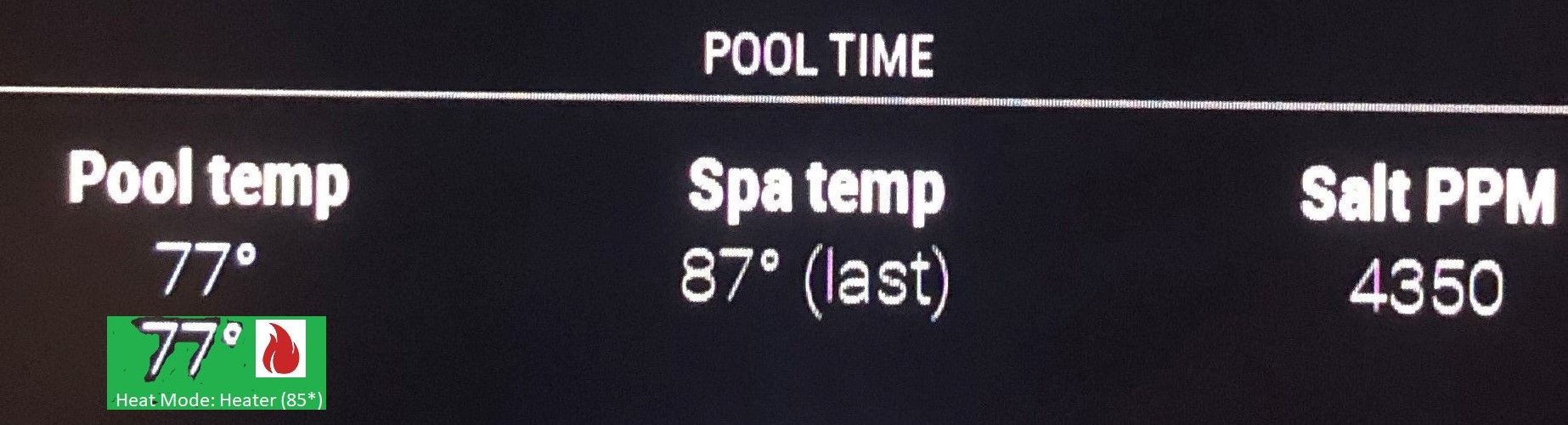
    Re: MMM-ScreenLogic - see data from your Pentair pool equipment I just reactivated my MM and installed your ScreenLogic Module. I love it and worked out of the box. If I could be so bold to make a few enhancement requests? I dont have a touch screen MM so i dont show controls, its more just a status board for me. For the Pool Temp and Spa Temp status, perhaps turn the background green when on (Like the Nest turns blue). Add a little flame to the right of the temp to show heater on. below temp show: Heat Mode: Heater (85*) I’ll try to upload a pic but it keeps erroring out. Anyway love the module and stay safe in this pandemic. [image: 1587650219800-mmm-sl.jpg]
  • This topic is deleted!

    3
    0 Votes
    3 Posts
    20 Views
  • MMM-SmartWebDisplay - Setting Absolute Position not working

    1
    0 Votes
    1 Posts
    397 Views
    S
    Can anyone help me figure out how to get MMM-SmartWebDisplay to change absolute position? I tried the following CSS (which works for all my other modules) without success .MMM-SmartWebDisplay{ position: absolute; left : 100px; top : 50px; }
  • .MMM-GoogleCast hide:true

    Moved
    2
    0 Votes
    2 Posts
    370 Views
    K
    Good morning all, here is my config and yet the module still appears when no music is playing! can you help me? thank you module: 'MMM-GoogleCast', position: "bottom_right", classes: "default everyone", header: "Google Mini_Nest", hide: true, animationSpeed: 3000, showDeviceStatus: true, showAlbumArtist: true, config: { device: "XXXXXXXXXXXXXXXXXXX", } },
  • MMM-Mycalendar

    1
    0 Votes
    1 Posts
    272 Views
    M
    I add US holiday calendar to mine and it shows with 2 lines. The holiday name and United States as the word below. Is there a way to remove the word “united states” so that it only shows 1 row with just the holiday name? Thanks.
  • Remote-Control shows but does not respond

    10
    1 Votes
    10 Posts
    2k Views
    sekodilemoS
    I had previously tried that to no avail. I will give it another look tomorrow Fool that I am !! Changing to // Private Methods self.socket = io(“/” + self.moduleName); was the fix right enough When I initially tried it I added , at the end of the line instead of ; I’m kicking myself