MagicMirror Forum
    • Recent
    • Tags
    • Unsolved
    • Solved
    • MagicMirror² Repository
    • Documentation
    • 3rd-Party-Modules
    • Donate
    • Discord
    • Register
    • Login
    A New Chapter for MagicMirror: The Community Takes the Lead
    Read the statement by Michael Teeuw here.

    MMM-OpenWeatherMapForecast stuck on Loading....

    Scheduled Pinned Locked Moved Utilities
    63 Posts 16 Posters 45.6k Views 18 Watching
    Loading More Posts
    • Oldest to Newest
    • Newest to Oldest
    • Most Votes
    Reply
    • Reply as topic
    Log in to reply
    This topic has been deleted. Only users with topic management privileges can see it.
    • B Offline
      bassin12
      last edited by

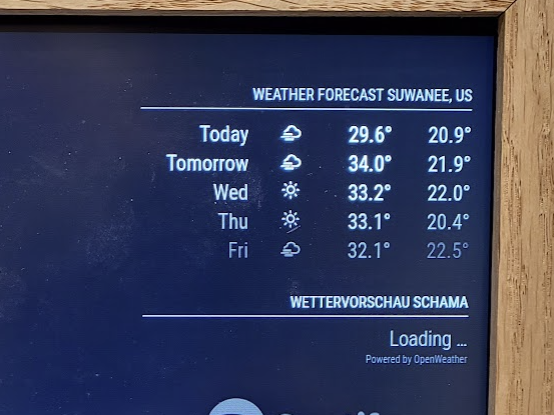
      I’m having some hard time too, I cannot get it to work and get this error, I’m using the same key for the default weather module

      [LOG] [MMM-OpenWeatherForecast] 29-Aug-22 07:50 ** ERROR ** Error: Request failed with status code 401

      Not sure what I’m doing wrong.

      {
      module: “weather”,
      position: “top_right”,
      header: “Weather Forecast”,
      config: {
      weatherProvider: “openweathermap”,
      type: “forecast”,
      location: “Suwanee”,
      locationID: “4225309”,
      apiKey: “working key”
      }
      },

      {
      module: “MMM-OpenWeatherForecast”,
      position: “top_right”,
      header: “Wettervorschau Schama”,
      config: {
      apikey: “same key as above”, //SUPER SECRET
      latitude: 49.039349,
      longitude: 11.847070,
      units: “metric”,
      iconset: “4c”,
      colored: true,
      concise: true
      }
      },
      c75dfb5f-01d8-4351-8967-2a92a8b9c1f6-image.png

      S 3 Replies Last reply Reply Quote 0
      • S Do not disturb
        sdetweil @bassin12
        last edited by

        @bassin12 said in MMM-OpenWeatherMapForecast stuck on Loading....:

        401

        well, that is

        http error 401 unauthorized
        

        so, that looks like there is some error in your apiKey

        Sam

        How to add modules

        learning how to use browser developers window for css changes

        S 1 Reply Last reply Reply Quote 0
        • S Do not disturb
          sdetweil @bassin12
          last edited by sdetweil

          @bassin12 said in MMM-OpenWeatherMapForecast stuck on Loading....:

          module: “MMM-OpenWeatherForecast”,

          also, this is a different module than we are discussing

          MMM-OpenWeatherMapForecast

          Sam

          How to add modules

          learning how to use browser developers window for css changes

          1 Reply Last reply Reply Quote 0
          • S Do not disturb
            sdetweil @sdetweil
            last edited by

            @bassin12 your config works perfectly with my apikey

            Sam

            How to add modules

            learning how to use browser developers window for css changes

            1 Reply Last reply Reply Quote 0
            • S Do not disturb
              sdetweil @bassin12
              last edited by

              @bassin12 also, please enclose all config and code sections in a code block

              copy paste the text into the new message
              select the text
              and the hit the button </> above the editor

              Sam

              How to add modules

              learning how to use browser developers window for css changes

              1 Reply Last reply Reply Quote 0
              • B Offline
                bassin12
                last edited by bassin12

                This is really funny, I downloaded the right module now, tested with my key, and now it is saying the key is invalid, this is the code I’m using

                {
                                       module: "weather",
                                       position: "top_right",
                                       header: "Weather Forecast",
                                       config: {
                                               weatherProvider: "openweathermap",
                                               type: "forecast",
                                               location: "Suwanee",
                                               locationID: "4225309",
                                               apiKey: "Mykey"
                                       }
                               },
                
                
                               {
                                 module: "MMM-OpenWeatherMapForecast",
                                 header: "Weather",
                                 position: "top_right",
                                 classes: "default everyone",
                                 disabled: false,
                                 config: {
                                   apiKey: "Mykey",
                                   latitude: 51.506130,
                                   longitude: -0.090270,
                                   iconset: "4c",
                                   concise: false,
                                   forecastLayout: "table"
                                 }
                               },
                

                This is the error I get

                [29.08.2022 09:07.47.834] [LOG] [MMM-OpenWeatherMapForecast] 29-Aug-22 09:07 ** ERROR ** No API key configured. Get an API key at https://openweathermap.org/api/one-call-api

                I tried the Latitude and Longitude with and without quotes.

                S 1 Reply Last reply Reply Quote 0
                • S Do not disturb
                  sdetweil @bassin12
                  last edited by

                  @bassin12 this module uses all lowercase for the key name field

                  apikey:

                  this system is case sensitive

                  Sam

                  How to add modules

                  learning how to use browser developers window for css changes

                  1 Reply Last reply Reply Quote 0
                  • B Offline
                    bassin12
                    last edited by bassin12

                    I did the code change in node_helpe.js, and the system now reports this error

                    [29.08.2022 10:34.06.199] [LOG] [MMM-OpenWeatherMapForecast] 29-Aug-22 10:34 ** bad status ** 401

                    my full config.js is this:

                    /* MagicMirror² Config Sample
                     *
                     * By Michael Teeuw https://michaelteeuw.nl
                     * MIT Licensed.
                     *
                     * For more information on how you can configure this file
                     * see https://docs.magicmirror.builders/configuration/introduction.html
                     * and https://docs.magicmirror.builders/modules/configuration.html
                     */
                    let config = {
                    	address: "localhost", 	// Address to listen on, can be:
                    							// - "localhost", "127.0.0.1", "::1" to listen on loopback interface
                    							// - another specific IPv4/6 to listen on a specific interface
                    							// - "0.0.0.0", "::" to listen on any interface
                    							// Default, when address config is left out or empty, is "localhost"
                    	port: 8080,
                    	basePath: "/", 	// The URL path where MagicMirror² is hosted. If you are using a Reverse proxy
                    					// you must set the sub path here. basePath must end with a /
                    	ipWhitelist: ["127.0.0.1", "::ffff:127.0.0.1", "::1"], 	// Set [] to allow all IP addresses
                    															// or add a specific IPv4 of 192.168.1.5 :
                    															// ["127.0.0.1", "::ffff:127.0.0.1", "::1", "::ffff:192.168.1.5"],
                    															// or IPv4 range of 192.168.3.0 --> 192.168.3.15 use CIDR format :
                    															// ["127.0.0.1", "::ffff:127.0.0.1", "::1", "::ffff:192.168.3.0/28"],
                    
                    	useHttps: false, 		// Support HTTPS or not, default "false" will use HTTP
                    	httpsPrivateKey: "", 	// HTTPS private key path, only require when useHttps is true
                    	httpsCertificate: "", 	// HTTPS Certificate path, only require when useHttps is true
                    
                    	language: "en",
                    	locale: "en-US",
                    	logLevel: ["INFO", "LOG", "WARN", "ERROR"], // Add "DEBUG" for even more logging
                    	timeFormat: 24,
                    	units: "metric",
                    	// serverOnly:  true/false/"local" ,
                    	// local for armv6l processors, default
                    	//   starts serveronly and then starts chrome browser
                    	// false, default for all NON-armv6l devices
                    	// true, force serveronly mode, because you want to.. no UI on this device
                    
                    	modules: [
                    	
                    		{
                    			module: "weather",
                    			position: "top_right",
                    			header: "Weather Forecast",
                    			config: {
                    				weatherProvider: "openweathermap",
                    				type: "forecast",
                    				location: "Suwanee",
                    				locationID: "4225309",
                    				apiKey: "45fe452eea1fcfe3589cd5e8aa3f3f93" 
                    			}
                    		},
                    
                    
                              {
                                            module: "MMM-OpenWeatherMapForecast",
                                            header: "Weather",
                                            position: "top_left",
                                            classes: "default everyone",
                                            disabled: false,
                                            config: {
                                                    apikey: "45fe452eea1fcfe3589cd5e8aa3f3f93",
                                                    latitude: "51.506130",
                                                    longitude: "-0.090270",
                                                    iconset: "4c",
                                                    concise: false,
                                                    forecastLayout: "table"
                                            }
                                    },	  	
                    	]
                    };
                    
                    /*************** DO NOT EDIT THE LINE BELOW ***************/
                    if (typeof module !== "undefined") {module.exports = config;}
                    
                    S 4 Replies Last reply Reply Quote 0
                    • S Do not disturb
                      sdetweil @bassin12
                      last edited by

                      @bassin12 yep… something…
                      both work for me…

                      Sam

                      How to add modules

                      learning how to use browser developers window for css changes

                      1 Reply Last reply Reply Quote 0
                      • S Do not disturb
                        sdetweil @bassin12
                        last edited by

                        @bassin12

                        hm… I created a new key…

                        seems OpenWeatherForecast has a bug

                        in its node_helper.js
                        ’
                        change

                                  "&units=" + payload.units +
                        

                        to (same as openWeatherMapForecast

                                            (payload.units !== "" ? "&units=" + payload.units : "") +
                        

                        can’t pass in junk

                        Sam

                        How to add modules

                        learning how to use browser developers window for css changes

                        1 Reply Last reply Reply Quote 0
                        • S Do not disturb
                          sdetweil @bassin12
                          last edited by sdetweil

                          @bassin12 if the apikey is valid, I get 401 as well…

                          using my (new) apikey… all ok…

                          Sam

                          How to add modules

                          learning how to use browser developers window for css changes

                          1 Reply Last reply Reply Quote 0
                          • S Do not disturb
                            sdetweil @bassin12
                            last edited by

                            @bassin12 with that api key data is coming back, but its in the wrong format

                            i switch to my apikey and all is good

                            Sam

                            How to add modules

                            learning how to use browser developers window for css changes

                            1 Reply Last reply Reply Quote 0
                            • A Offline
                              ally @sdetweil
                              last edited by

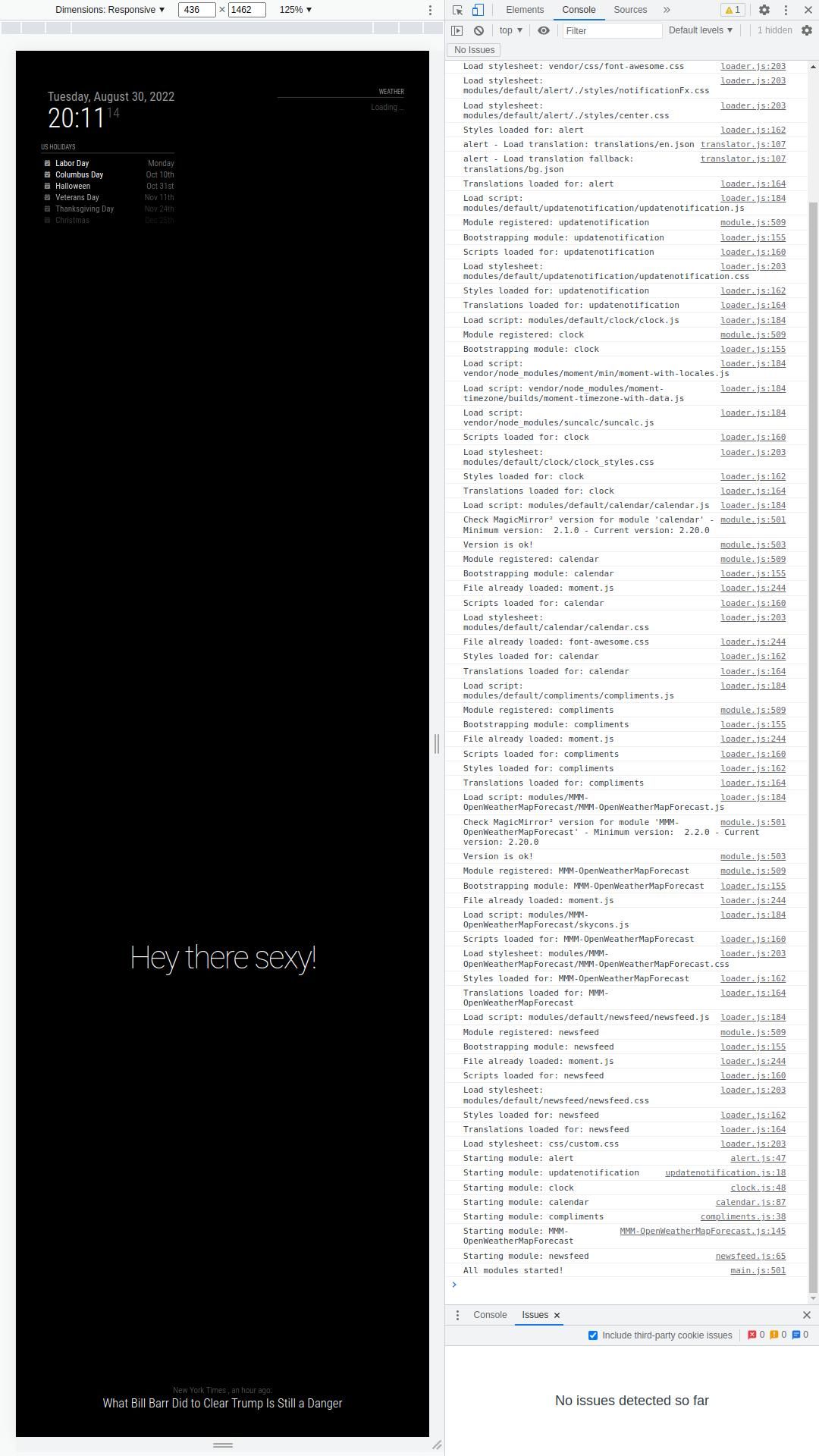
                              @sdetweil I deleted the MMM-OpenWeatherMapForecast and reinstalled it as per the instructions. Results below, no change.

                              /home/pi/.pm2/logs/MagicMirror-out.log last 50 lines:
                              0|MagicMir | [30.08.2022 18:29.44.705] [INFO]  Calendar-Fetcher: Broadcasting 6 events.
                              0|MagicMir | [30.08.2022 18:32.45.422] [INFO]  Newsfeed-Fetcher: Broadcasting 35 items.
                              0|MagicMir | [30.08.2022 18:34.45.902] [INFO]  Calendar-Fetcher: Broadcasting 6 events.
                              0|MagicMir | [30.08.2022 18:37.19.673] [LOG]   [MMM-OpenWeatherMapForecast] 30-Aug-22 18:37 ** ERROR ** null
                              0|MagicMir | [30.08.2022 18:37.45.605] [INFO]  Newsfeed-Fetcher: Broadcasting 35 items.
                              0|MagicMir | [30.08.2022 18:39.47.120] [INFO]  Calendar-Fetcher: Broadcasting 6 events.
                              0|MagicMir | [30.08.2022 18:42.45.793] [INFO]  Newsfeed-Fetcher: Broadcasting 35 items.
                              0|MagicMir | [30.08.2022 18:44.48.354] [INFO]  Calendar-Fetcher: Broadcasting 6 events.
                              0|MagicMir | [30.08.2022 18:47.19.775] [LOG]   [MMM-OpenWeatherMapForecast] 30-Aug-22 18:47 ** ERROR ** null
                              0|MagicMir | [30.08.2022 18:47.45.968] [INFO]  Newsfeed-Fetcher: Broadcasting 35 items.
                              0|MagicMir | [30.08.2022 18:49.49.561] [INFO]  Calendar-Fetcher: Broadcasting 6 events.
                              0|MagicMir | [30.08.2022 18:52.46.128] [INFO]  Newsfeed-Fetcher: Broadcasting 35 items.
                              0|MagicMir | [30.08.2022 18:54.50.794] [INFO]  Calendar-Fetcher: Broadcasting 6 events.
                              0|MagicMir | [30.08.2022 18:57.19.667] [LOG]   [MMM-OpenWeatherMapForecast] 30-Aug-22 18:57 ** ERROR ** null
                              0|MagicMir | [30.08.2022 18:57.46.299] [INFO]  Newsfeed-Fetcher: Broadcasting 35 items.
                              0|MagicMir | [30.08.2022 18:59.52.001] [INFO]  Calendar-Fetcher: Broadcasting 6 events.
                              0|MagicMir | [30.08.2022 19:02.46.483] [INFO]  Newsfeed-Fetcher: Broadcasting 35 items.
                              0|MagicMir | [30.08.2022 19:04.53.188] [INFO]  Calendar-Fetcher: Broadcasting 6 events.


                              MM_004.jpg

                              Am I doing anything wrong?

                              Ally

                              S 1 Reply Last reply Reply Quote 0
                              • B Offline
                                bassin12
                                last edited by

                                I think I was able to get to the bottom of this, you need to subscribe to the API giving your credit card information, also API 2.5 is deprecated for new users, I entered in contact with Open Weather and they have sent me this information.

                                Hope this helps people in the future.

                                A 1 Reply Last reply Reply Quote 1
                                • S Do not disturb
                                  sdetweil @ally
                                  last edited by

                                  @ally what instructions?

                                  unless the author changed the code, nothing will change

                                  Sam

                                  How to add modules

                                  learning how to use browser developers window for css changes

                                  1 Reply Last reply Reply Quote 0
                                  • A Offline
                                    ally @bassin12
                                    last edited by

                                    @bassin12 said in MMM-OpenWeatherMapForecast stuck on Loading....:

                                    I think I was able to get to the bottom of this, you need to subscribe to the API giving your credit card information, also API 2.5 is deprecated for new users, I entered in contact with Open Weather and they have sent me this information.

                                    Hope this helps people in the future.

                                    What service did you subscribe to, as that looks like the only way to enter your credit card info.

                                    Ally

                                    E 1 Reply Last reply Reply Quote 0
                                    • E Offline
                                      elorand @ally
                                      last edited by

                                      Hey @ally, I recently ran into the same problem like you.
                                      I followed all instructions given to you from @sdetweil and finally figured out, what the problem was: openweathermap updated its api to version 3.0!
                                      Even if you have a free subscription (limiting to 1000 api-calls a day, which is fine unless you stay above a refreshrate of every 3 minutes), you need to edit the link in node_helper.js from

                                      var url = "https://api.openweathermap.org/data/2.5/onecall" +
                                      

                                      to

                                      var url = "https://api.openweathermap.org/data/3.0/onecall" +
                                      

                                      For the free subscription on API-Version 3.0, you need to provide your credit card information, but you can set the maximum of possible API-calls to 1000, so that you will never ever ran into any costs.

                                      S A L 3 Replies Last reply Reply Quote 1
                                      • S Do not disturb
                                        sdetweil @elorand
                                        last edited by

                                        @elorand the default weather module still uses 2.5 and it works

                                        Sam

                                        How to add modules

                                        learning how to use browser developers window for css changes

                                        karsten13K 1 Reply Last reply Reply Quote 0
                                        • C Offline
                                          chief
                                          last edited by

                                          Just following up on this thread - I also am on the “free tier” 2.5 API version and when I try to use MMM-OpenWeatherForecast, it is stuck on “Loading”.

                                          Any advice?

                                          E 1 Reply Last reply Reply Quote 0
                                          • E Offline
                                            elorand @chief
                                            last edited by

                                            @sdetweil I couldn’t choose the old 2.5 API when I registered as new user to OpenWeatherMap. Therefore I had no other chance than to go with the 3.0 API.

                                            @chief depending on the API you are subscribed to, you need to edit the node_helper.js (as mentioned in my previous post). After editing you should restart your magicmirror.

                                            1 Reply Last reply Reply Quote 1

                                            Hello! It looks like you're interested in this conversation, but you don't have an account yet.

                                            Getting fed up of having to scroll through the same posts each visit? When you register for an account, you'll always come back to exactly where you were before, and choose to be notified of new replies (either via email, or push notification). You'll also be able to save bookmarks and upvote posts to show your appreciation to other community members.

                                            With your input, this post could be even better 💗

                                            Register Login

                                            • 1
                                            • 2
                                            • 3
                                            • 4
                                            • 2 / 4
                                            • First post
                                              Last post
                                            Enjoying MagicMirror? Please consider a donation!
                                            MagicMirror created by Michael Teeuw.
                                            Forum managed by Sam, technical setup by Karsten.
                                            This forum is using NodeBB as its core | Contributors
                                            Contact | Privacy Policy