Read the statement by Michael Teeuw here.
My Magic "Mirror" Desk Display
-
@Ashaman Thank you! I was trying to figure out the best way to do organize them. I have some other modules configured too, but currently have them disabled for various reasons. For example, MMM-NFL is enabled only during American Football season. MMM-CivitAI was used on page 9 instead of MMM-PenPlotter, but that one appears to be having API issues, so I had to come up with a replacement.
I enjoy checking every week or so for new modules to add. Definitely a fun project and super helpful community!
-
@BerkSmash1984 I’m in the process of setting up mine, and seeing how you organized yours gave me lots of ideas! 👍
Mine takes time though, because so far I’ve only added custom modules I make myself. 😅
Need to start implementing more premade modules. 😂Is MMM-Pages working for you?
I tried to use it the first week I was new to MM and had problems, so I’m currently using MMM-Carousel. -
@Ashaman see my Pages fork readme for an easier way(IMHO) to define the pages (no code change)
-
@Ashaman … custom modules you made yourself? Elitist! 🤣🤣🤣
-
Hi @BerkSmash1984 and congratulations for the MM and for the organization of the pages!
I have a question for you: could you share the config for the “MMM-ISS-Map” module? I tried reading the developer’s instructions but I didn’t understand much…
Thanks!
-
@BKeyport Why? I needed to display data from my own datasets and API not supported in existing modules, kinda had to make them myself then? I do it to learn more coding.
-
@Ashaman I was just teasing. In fact, every module I built myself is for that exact reason…
-
That’s really cool, you’ve inspired me to do something similar in my office as there’s things only I care about (my wife would kill me if she saw my Strava info 🤣).
-
-
@Egnos You bet, here you go!
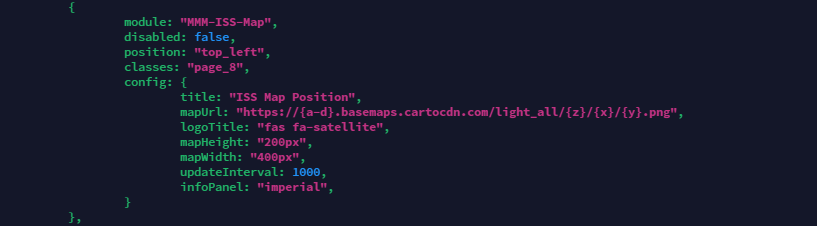
-
@BerkSmash1984 my MMM-Pages fork only updates the doc… didn’t change any code
-
-
@BerkSmash1984
One question: in “mapUrl” excluding the (x, y) coordinates, how did you compose the url?Many thanks!
-
@Egnos I did not, that is from the module itself, but is a configurable item. Take a look at the MMM-ISS-Map-src.js file located in /MagicMirror/modules/MMM-ISS-Map:
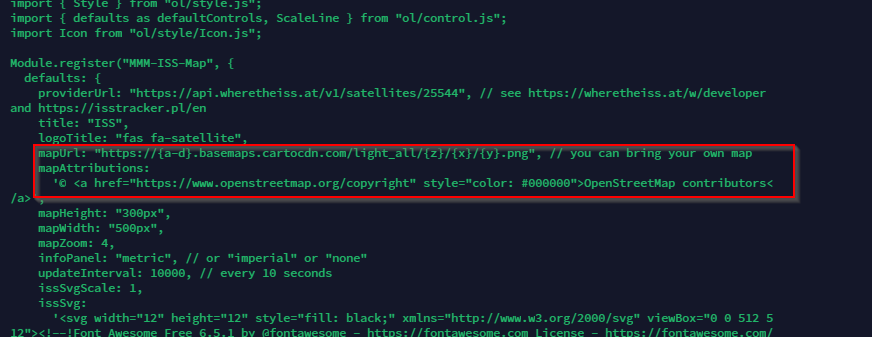
Note that you can change “light_all” and other configurable style options to those supported by CARTO basemaps.
See:
https://github.com/CartoDB/basemap-styles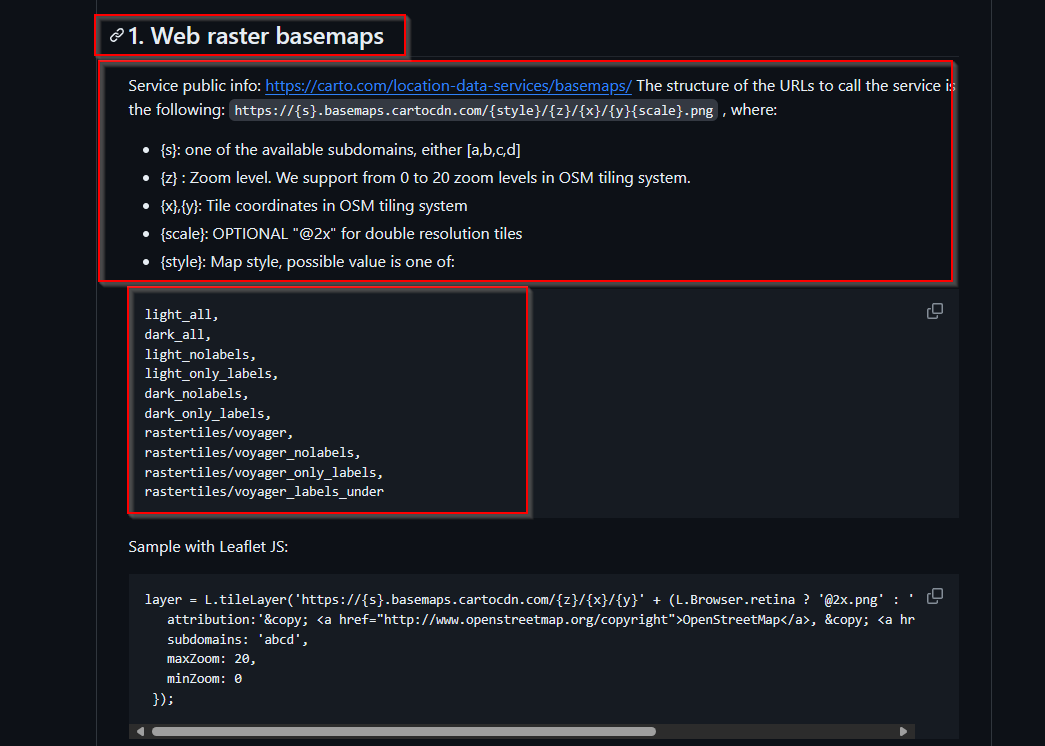
In my testing with my MagicMirror setup, “light_all” looks best, but def check out the other styles to see what meets your needs!
-
Thanks @BerkSmash1984 for the detailed information!
Which version of Raspbian do you run in your RPI? -
@Egnos Bullseye Release 11
-
 B BerkSmash1984 referenced this topic on

Hello! It looks like you're interested in this conversation, but you don't have an account yet.
Getting fed up of having to scroll through the same posts each visit? When you register for an account, you'll always come back to exactly where you were before, and choose to be notified of new replies (either via email, or push notification). You'll also be able to save bookmarks and upvote posts to show your appreciation to other community members.
With your input, this post could be even better 💗
Register Login