MagicMirror Forum
    • Recent
    • Tags
    • Unsolved
    • Solved
    • MagicMirror² Repository
    • Documentation
    • 3rd-Party-Modules
    • Donate
    • Discord
    • Register
    • Login
    A New Chapter for MagicMirror: The Community Takes the Lead
    Read the statement by Michael Teeuw here.

    Show calendar based on IP Address accessed

    Scheduled Pinned Locked Moved Development
    68 Posts 3 Posters 28.4k Views 3 Watching
    Loading More Posts
    • Oldest to Newest
    • Newest to Oldest
    • Most Votes
    Reply
    • Reply as topic
    Log in to reply
    This topic has been deleted. Only users with topic management privileges can see it.
    • M Offline
      MMRIZE @sdetweil
      last edited by MMRIZE

      @sdetweil said in Show calendar based on IP Address accessed:

      @MMRIZE said in Show calendar based on IP Address accessed:

      (You don’t have to modify the original source code for future-proof.)

      BUT you are fetching cal for system not going to use it… SOME cals are 1000’s of entries especially old
      that have to be processed… this is a bad waste of resources…

      and this exposes a cal problem, as if u fetch http://xyz on client 1 and client 2 and client 3, we fetch it 3 times. also bad
      this could also lead to different clients showing different data between fetchIntervals…

      Well, if that is the issue, we need a new “calendar” module that can ignore duplicated feed on addCalendar.
      Regardless of my code, the original calendar module will fetch a same feed multiply on multi clients. It’s MM’s limitation.

      S 1 Reply Last reply Reply Quote 0
      • S Do not disturb
        sdetweil @MMRIZE
        last edited by sdetweil

        @MMRIZE yes

        @Spinster

        see later post

        Sam

        How to add modules

        learning how to use browser developers window for css changes

        S 1 Reply Last reply Reply Quote 0
        • S Do not disturb
          sdetweil @MMRIZE
          last edited by

          @MMRIZE said in Show calendar based on IP Address accessed:

          My code is just small injection that does filtering out calendars by condition on socketNotificationReceived. No additional fetching is needed.

          AFTER fetching… so throw away data, which we fetched , knowing we wouldn’t use it…

          Sam

          How to add modules

          learning how to use browser developers window for css changes

          M 1 Reply Last reply Reply Quote 0
          • S Offline
            Spinster @MMRIZE
            last edited by

            @MMRIZE I tried it, but it is still showing the calendar even if there is no calendar defined for the ip. I edited only the config.js file and added your code. Modified the calendars to suite mine. I could see even if there is no calendar defined for a particular ip. Please advice

            M 1 Reply Last reply Reply Quote 0
            • S Offline
              Spinster @sdetweil
              last edited by

              @sdetweil Is this working? Should I try it, please advice

              S 1 Reply Last reply Reply Quote 0
              • M Offline
                MMRIZE @sdetweil
                last edited by MMRIZE

                @sdetweil
                Still I can’t catch you.

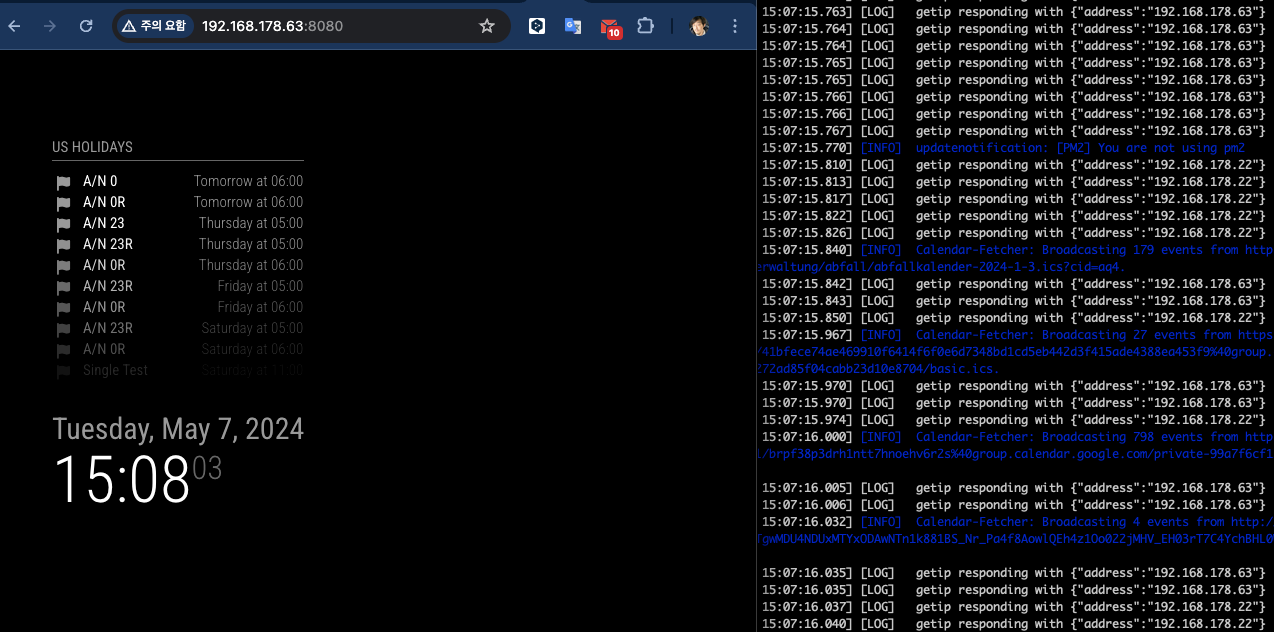
                [2024-05-07 15:03:33.741] [LOG]   Use existing calendarfetcher for url: https://ics.calendarlabs.com/76/mm3137/US_Holidays.ics
                

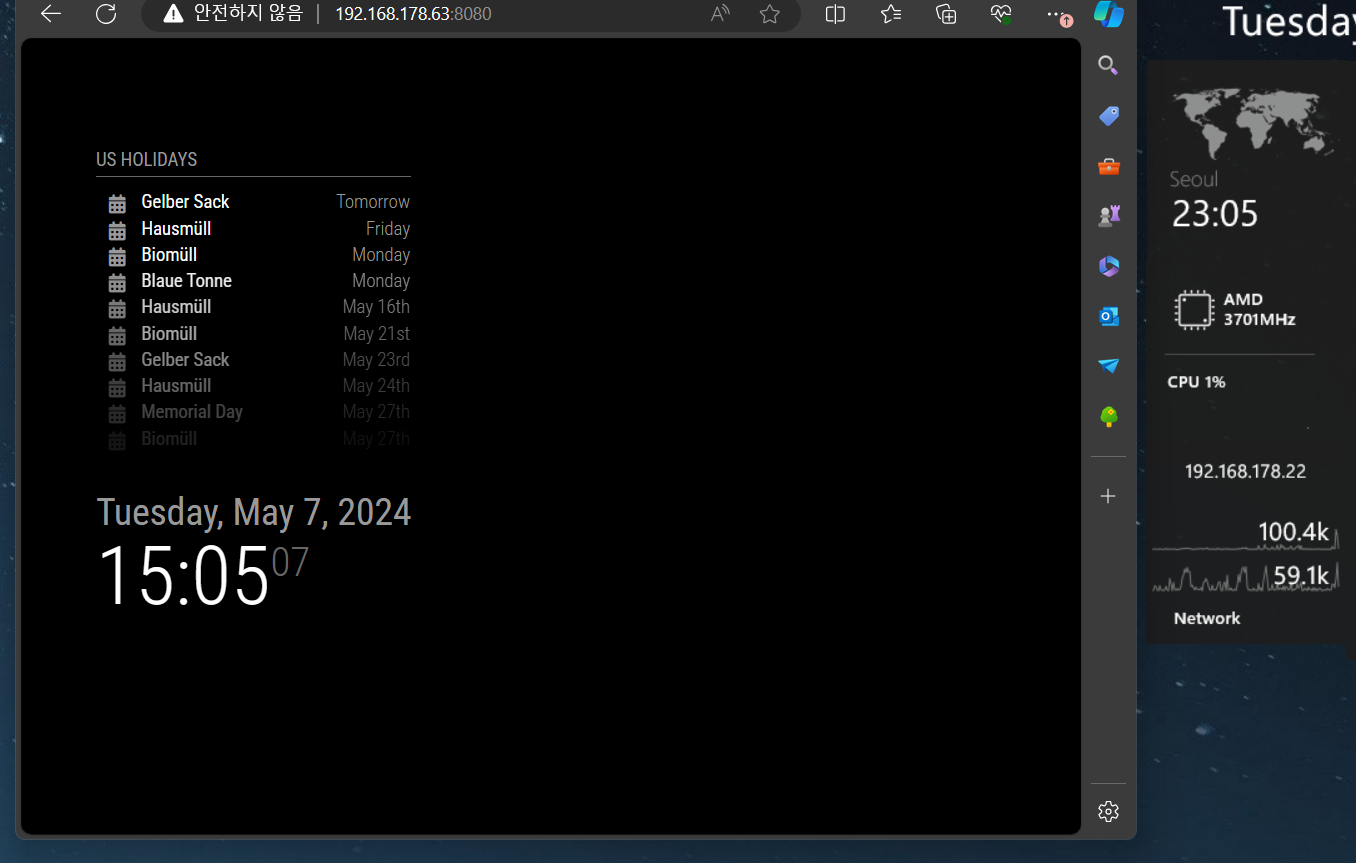
                The log shows, duplicated URL would be integrated into existing fetcher, So unlike your words, 3 clients doesn’t make 3 duplicated wasted fetcher.

                If clientA needs cal1, cal2, cal3 and clientB needs cal1, cal4, cal5. In this case server should fetch 5 calendars anyway. User may need cal1 ~ cal5 even on 1 screen or 2 screens, ther server’s burden would be the same.

                The only aspect that could be considered a waste is the transmission of unusing event data for cal4 and cal5 to clientA, but unless it’s a performance issue with the data parsing algorithm, simply having large data size being transmitted isn’t particularly problematic. Moreover, since the data is dropped in my code as soon as the notification is received, it can’t be deemed a significant memory issue. If the data size itself becomes problematic, it implies there’s already a problem with the original calendar module using cal1, cal2, cal3, cal4, and cal5.

                Too skeptic.

                1 Reply Last reply Reply Quote 0
                • M Offline
                  MMRIZE @Spinster
                  last edited by MMRIZE

                  @Spinster said in Show calendar based on IP Address accessed:

                  Modified the calendars to suite mine. I could see even if there is no calendar defined for a particular ip. Please advice

                  in the calendar config, I added clientMap.

                  {
                  	module: "calendar",
                  	header: "US Holidays",
                  	position: "top_left",
                  	config: {
                  		clientMap: {
                  			"192.168.178.63": [ "cal1", "cal2", "cal3" ],
                  			"192.168.178.22": [ "cal3", "cal4", "cal5" ]
                  		},
                  		calendars: [
                  			{
                  				url: "...",
                  				name: "cal1",
                  			},
                  
                  ...
                  
                  S 3 Replies Last reply Reply Quote 0
                  • S Do not disturb
                    sdetweil @Spinster
                    last edited by

                    @Spinster yes, the two pieces together

                    ipaddress:“…”
                    at each cal url block… only does one ipaddress per url

                    Sam

                    How to add modules

                    learning how to use browser developers window for css changes

                    S 1 Reply Last reply Reply Quote 0
                    • S Offline
                      Spinster @MMRIZE
                      last edited by

                      @MMRIZE
                      Here is my config

                      	{
                      		module: "alert",
                      	},
                      
                      	/*
                      	{
                      		module: "updatenotification",
                      		position: "top_bar"
                      	},*/
                      	{
                      		module: "clock",
                      		position: "top_left"
                      	},
                      	{
                      		module: "MMM-ModuleMonkeyPatch",
                      		config: {
                      			patches: [
                      				{
                      					module: "calendar",
                      					method: "socketNotificationReceived",
                      					patch: async function (original, args) {
                      						const [ notification, payload ] = args
                      						if (notification === "CALENDAR_EVENTS") {
                      							const calendarName = this.config.calendars.find((cal) => cal.url === payload?.url)?.name
                      							const r = await fetch('http://10.5.11.1:8080/modules/getip')
                      							const ip = JSON.parse(await r.text())?.[ 'address' ] ?? null
                      							console.log(ip)
                      							if (!this.config.clientMap?.[ ip ]?.includes(calendarName)) {
                      								return original(notification, { ...payload, events: [] })
                      							}
                      						}
                      						return original(notification, payload)
                      					}
                      				}
                      			]
                      		}
                      	},
                      	{
                      		module: "getip",
                      	},
                      	{
                      		module: "calendar",
                      		header: "Home Cal",
                      		position: "top_left",
                      		config: {
                      			clientMap: {
                      				"10.5.11.5": [ "cal1" ],
                      				"10.5.11.6": ["cal2"]
                      			},
                      			calendars: [
                      				{
                      					fetchInterval: 10 * 60 * 1000,
                      					symbol: "calendar-check",
                      					url: "https://homecals/xEzboFt7Kr3Yfiys?export",
                      					name: "cal1",
                      
                      				}
                      			]
                      		}
                      	}
                      

                      This is showing both 10.5.11.5 and 10.5.11.6 the same calendar. Though 10.5.11.6 should not have any calendar since it is not defined. Even I tried without an entry of 10.5.11.6 in calendar map but it still showing the calendar. What am I doing wrong. Please advice

                      1 Reply Last reply Reply Quote 0
                      • S Offline
                        Spinster @MMRIZE
                        last edited by

                        @MMRIZE I even added the calendarmap, I hope you seen my config.js sent earlier

                        S 1 Reply Last reply Reply Quote 0
                        • S Offline
                          Spinster @Spinster
                          last edited by

                          @Spinster said in Show calendar based on IP Address accessed:

                          @MMRIZE I even added the calendarmap, I hope you seen my config.js sent earlier

                          Sorry, i think I have not installed Monkey module, will install and check again

                          1 Reply Last reply Reply Quote 0
                          • S Offline
                            Spinster @sdetweil
                            last edited by

                            @sdetweil

                            Should I use your earlier code and this? Please advise

                            S 1 Reply Last reply Reply Quote 0
                            • S Do not disturb
                              sdetweil @Spinster
                              last edited by

                              @Spinster yes you need both

                              I am away from my system for another couple hours

                              will collapse to one post then

                              Sam

                              How to add modules

                              learning how to use browser developers window for css changes

                              S 1 Reply Last reply Reply Quote 0
                              • S Do not disturb
                                sdetweil @sdetweil
                                last edited by sdetweil

                                @Spinster ok, here is the final

                                in calendar.js

                                add these variables

                                		updateOnFetch: true,
                                		useIPAddress: false     // add config var
                                	},
                                	timerHandle:null,                 // add this
                                	ourIPAddress:null,              // add this 
                                	requiresVersion: "2.1.0",


                                change this

                                	// Override start method.
                                	start () {
                                

                                to
                                this

                                	// Override start method.
                                	startup () {
                                

                                add this code

                                			let ip_match = false;
                                			if(this.config.useIPAddress){
                                			 const client_ip_for_this_calendar = this.getCalendarProperty(calendar.url, "ipaddress", null)
                                			 if(this.ourIPAddress)
                                			 	  ip_match = client_ip_for_this_calendar.includes(this.ourIPAddress)
                                			}
                                			if(this.config.useIPAddress == false || ip_match==true)
                                			  this.addCalendar(calendar.url, calendar.auth, calendarConfig);   // old original   line 
                                

                                and add this routine somewhere

                                  notificationReceived(notification,payload){
                                  	if(notification === 'ALL_MODULES_STARTED'){
                                  		// if we are using ip address checking
                                  		if(this.config.useIPAddress){
                                  			// loop thru all the modules
                                  			let m = MM.getModules().withClass("getip");
                                  			if(m.length){
                                  				// if getip is configured and not disabled
                                  				if((m[0].disabled== undefined || (m[0].disabled != undefined && m[0].disabled == false)) ){
                                  					// start a timer to wait for getip to finish
                                  					this.timerHandle = setInterval(()=>{
                                  						// get its dom content
                                  						let client_ip = document.getElementById("getip_address")
                                  						// if we found id
                                  						if(client_ip !== null){
                                  							// stop the timer
                                  							clearInterval(this.timerHandle)
                                  							// save our IP address, only need to look it up once
                                  							this.ourIPAddress=client_ip.innerText
                                  							// call startup
                                  							this.startup()
                                  						}
                                  					}, 500)
                                  				}
                                  			}
                                  			// thru the loop, didn't start a timer, module not found
                                			  if(this.timerHandle === null){
                                					// didn't find getip
                                					// module not found, can't do this later either
                                					this.config.useIPAddress = false;
                                					this.startup()
                                				}
                                			}
                                  		// use default
                                  		else
                                  			this.startup()
                                  	} 
                                  	else if (notification === "FETCH_CALENDAR") {
                                			this.sendSocketNotification(notification, { url: payload.url, id: this.identifier+(this.ourIPAddress?'_'+this.ourIPAddress:'') });
                                		}
                                  },


                                and in the socketNotificationReceived routine
                                change this

                                	socketNotificationReceived (notification, payload) {
                                		if (notification === "FETCH_CALENDAR") {
                                			this.sendSocketNotification(notification, { url: payload.url, id: this.identifier });
                                		}
                                
                                		if (this.identifier !== payload.id) {
                                			return;
                                		}
                                

                                to this

                                	socketNotificationReceived (notification, payload) {
                                
                                		if (this.identifier+(this.ourIPAddress?'_'+this.ourIPAddress:'') !== payload.id) {
                                			return;
                                		}
                                

                                and in the addCalendar routine
                                change this

                                		id: this.identifier,
                                

                                to this

                                		id: this.identifier+(this.ourIPAddress?'_'+this.ourIPAddress:''),
                                

                                to use

                                add the getip module to config.js, anywhere
                                add property to calendar above the calendars list (but still inside the config:{}{ section)

                                useIPAddress:true,
                                

                                in any cal url block you want to be sensitive to IP address add property

                                    ipaddress:"xxx yyy zzz",  // space separated list of client ipaddresses this calendar can be displayed on
                                

                                andhow

                                Sam

                                How to add modules

                                learning how to use browser developers window for css changes

                                S 2 Replies Last reply Reply Quote 0
                                • S Offline
                                  Spinster @MMRIZE
                                  last edited by

                                  @MMRIZE

                                  After installing MonkeyPatch and adding the patch you have mentioned, I get the following error message when I run , npm run config:check
                                  [2024-05-07 23:32:55.179] [INFO] Checking file… /home/vjkings/MagicMirror/config/config.js
                                  [2024-05-07 23:32:55.222] [ERROR] Your configuration file contains syntax errors :(
                                  [2024-05-07 23:32:55.223] [ERROR] Line 56 column 20: Parsing error: Unexpected token function

                                  As per config.js, Line 56 is this

                                  patch: async function (original, args) {

                                  Whole section of patch as follows
                                  patch: async function (original, args) {
                                  const [ notification, payload ] = args
                                  if (notification === “CALENDAR_EVENTS”) {
                                  const calendarName = this.config.calendars.find((cal) => cal.url === payload?.url)?.name
                                  const r = await fetch(‘http://192.168.1.4:8080/modules/getip’)
                                  const ip = JSON.parse(await r.text())?.[ ‘address’ ] ?? null
                                  if (!this.config.clientMap?.[ ip ]?.includes(calendarName)) {
                                  return original(notification, { …payload, events: [] })
                                  }
                                  }
                                  return original(notification, payload)
                                  }

                                  If I ignore the error and run the server, I don’t get any calendar and it just says Loading… in the mirror page
                                  What is the reason for the error. Please advice

                                  1 Reply Last reply Reply Quote 0
                                  • S Offline
                                    Spinster @sdetweil
                                    last edited by

                                    @sdetweil

                                    Wow, Clear, will try it and provide feedback please.

                                    1 Reply Last reply Reply Quote 0
                                    • S Offline
                                      Spinster @sdetweil
                                      last edited by

                                      @sdetweil

                                      Hi,
                                      I made all the changes you have mentioned, it is working!!!. Thank you so much for the efforts.
                                      However, following are the observation,
                                      When I add the config.js with useIPAddress: true (calendar.js has the entry of useIPAddress:false in its default), there is no effect, however in calendar.js if I set the useIPAddress: true, it is working, I don’t understand why the configuration settings are not taken.

                                      I clearly added the useIPAddress: true before the calendars declared as part of the module configuration. Please advice how to fix this.

                                      I also have doubt on when we override the start to startup, how the notificationreceived is called. What happens when there is no start in the module.

                                      In fact this is the first time, I have added code without understanding of anything :).

                                      Please help me with configuration settings (config.js) to get it effected than hardcoding it to calendar.js

                                      S 1 Reply Last reply Reply Quote 0
                                      • S Do not disturb
                                        sdetweil @Spinster
                                        last edited by sdetweil

                                        @Spinster can you show the calendar config, you can leave out the calendars:[] list entries

                                        start is optional. but only called once
                                        getip has not placed its content yet.

                                        the notification ALL_MODULES_STARTED is sent be the system when all the
                                        modules start methods have been called

                                        from the module development doc
                                        1000025904.jpg

                                        Sam

                                        How to add modules

                                        learning how to use browser developers window for css changes

                                        S 1 Reply Last reply Reply Quote 0
                                        • S Offline
                                          Spinster @sdetweil
                                          last edited by

                                          @sdetweil
                                          Thank you for the details.

                                          As required, my calendar config as follows

                                          	{
                                          		module: "getip",
                                          		position:"bottom_left"
                                          	},
                                          	{
                                          		module: "calendar",
                                          		useIPAddress: true,
                                          		header: "My Calendars",
                                          		position: "top_left",
                                          		config: {
                                          			calendars: [
                                          				{
                                          					name: "cal01",
                                          					fetchInterval: 5 * 60 * 1000,
                                          					symbol: "calendar-check",
                                          					url: "https://mycalendar/xEzboFt7Kr3Yfiys?export",
                                          					ipaddress: "10.5.18.252 127.0.0.1 10.5.14.104",
                                          
                                          				},
                                          				{
                                          					name: "cal02",
                                          					fetchInterval: 10 * 60 * 1000,
                                          					//useIPAddress: true,
                                          					symbol: "calendar-check",
                                          					url: "https://mycalendar/4aK7xZPQkGKz6nCZ?export",
                                          					ipaddress: "10.5.11.5",
                                          
                                          				}
                                          			]
                                          		}
                                          	},
                                          

                                          Please let me know if I have done any mistake

                                          S 1 Reply Last reply Reply Quote 0
                                          • S Do not disturb
                                            sdetweil @Spinster
                                            last edited by sdetweil

                                            @Spinster yes, it has to be inside the
                                            config:{} section

                                            everything outside config are MagicMirror properties about a module
                                            see
                                            https://docs.magicmirror.builders/modules/configuration.html#example

                                            config is properties FOR the module and override what is defined in the module defaults:{} object

                                            Sam

                                            How to add modules

                                            learning how to use browser developers window for css changes

                                            S 1 Reply Last reply Reply Quote 0

                                            Hello! It looks like you're interested in this conversation, but you don't have an account yet.

                                            Getting fed up of having to scroll through the same posts each visit? When you register for an account, you'll always come back to exactly where you were before, and choose to be notified of new replies (either via email, or push notification). You'll also be able to save bookmarks and upvote posts to show your appreciation to other community members.

                                            With your input, this post could be even better 💗

                                            Register Login

                                            • 1
                                            • 2
                                            • 3
                                            • 4
                                            • 2 / 4
                                            • First post
                                              Last post
                                            Enjoying MagicMirror? Please consider a donation!
                                            MagicMirror created by Michael Teeuw.
                                            Forum managed by Sam, technical setup by Karsten.
                                            This forum is using NodeBB as its core | Contributors
                                            Contact | Privacy Policy