MagicMirror Forum
    • Recent
    • Tags
    • Unsolved
    • Solved
    • MagicMirror² Repository
    • Documentation
    • 3rd-Party-Modules
    • Donate
    • Discord
    • Register
    • Login
    A New Chapter for MagicMirror: The Community Takes the Lead
    Read the statement by Michael Teeuw here.

    MMM-OpenWeatherForecast

    Scheduled Pinned Locked Moved Solved Troubleshooting
    92 Posts 14 Posters 49.9k Views 14 Watching
    Loading More Posts
    • Oldest to Newest
    • Newest to Oldest
    • Most Votes
    Reply
    • Reply as topic
    Log in to reply
    This topic has been deleted. Only users with topic management privileges can see it.
    • S Do not disturb
      sdetweil @Ray
      last edited by sdetweil

      @Ray yes, that is the original, now some 3 years old

      from the modules list (linked in the header of the forum),

      Screenshot at 2024-10-02 09-31-14.png

      https://kristjanesperanto.github.io/MagicMirror-3rd-Party-Modules/
      with openweather in the search box

      https://github.com/Tom-Hirschberger/MMM-OpenWeatherForecast

      Sam

      How to add modules

      learning how to use browser developers window for css changes

      R 1 Reply Last reply Reply Quote 0
      • R Offline
        Ray @sdetweil
        last edited by

        @sdetweil
        the one that’s installed on my mirror is
        jclarke0000
        /
        MMM-OpenWeatherForecast

        S 1 Reply Last reply Reply Quote 0
        • S Do not disturb
          sdetweil @Ray
          last edited by

          @Ray i know, that is old, time to migrate to a newer version

          Sam

          How to add modules

          learning how to use browser developers window for css changes

          1 Reply Last reply Reply Quote 0
          • M Offline
            megagprime
            last edited by

            Hi guys, so do we have a definitive fix? I tried new api key, old api key, base url, no base url, still not working.

            S 1 Reply Last reply Reply Quote 0
            • S Do not disturb
              sdetweil @megagprime
              last edited by

              @megagprime IMG_0369.png

              Sam

              How to add modules

              learning how to use browser developers window for css changes

              M 1 Reply Last reply Reply Quote 0
              • M Offline
                megagprime @sdetweil
                last edited by

                @sdetweil yes thank you i have done all that, still doesn’t work. Do i need to update the module?
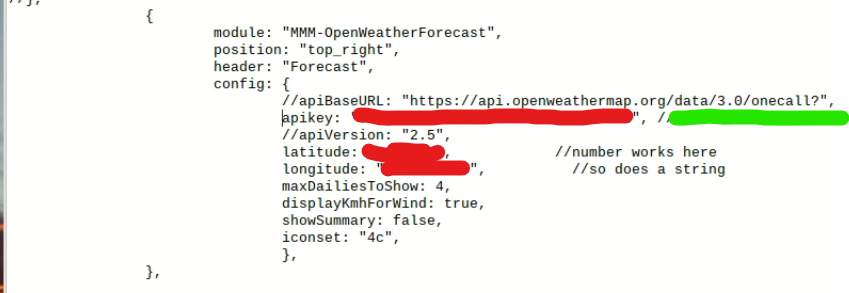
                aa115b30-e668-4f75-aa83-befa410d455d-image.png

                S 2 Replies Last reply Reply Quote 0
                • S Do not disturb
                  sdetweil @megagprime
                  last edited by

                  @megagprime id let the module set the urlbase
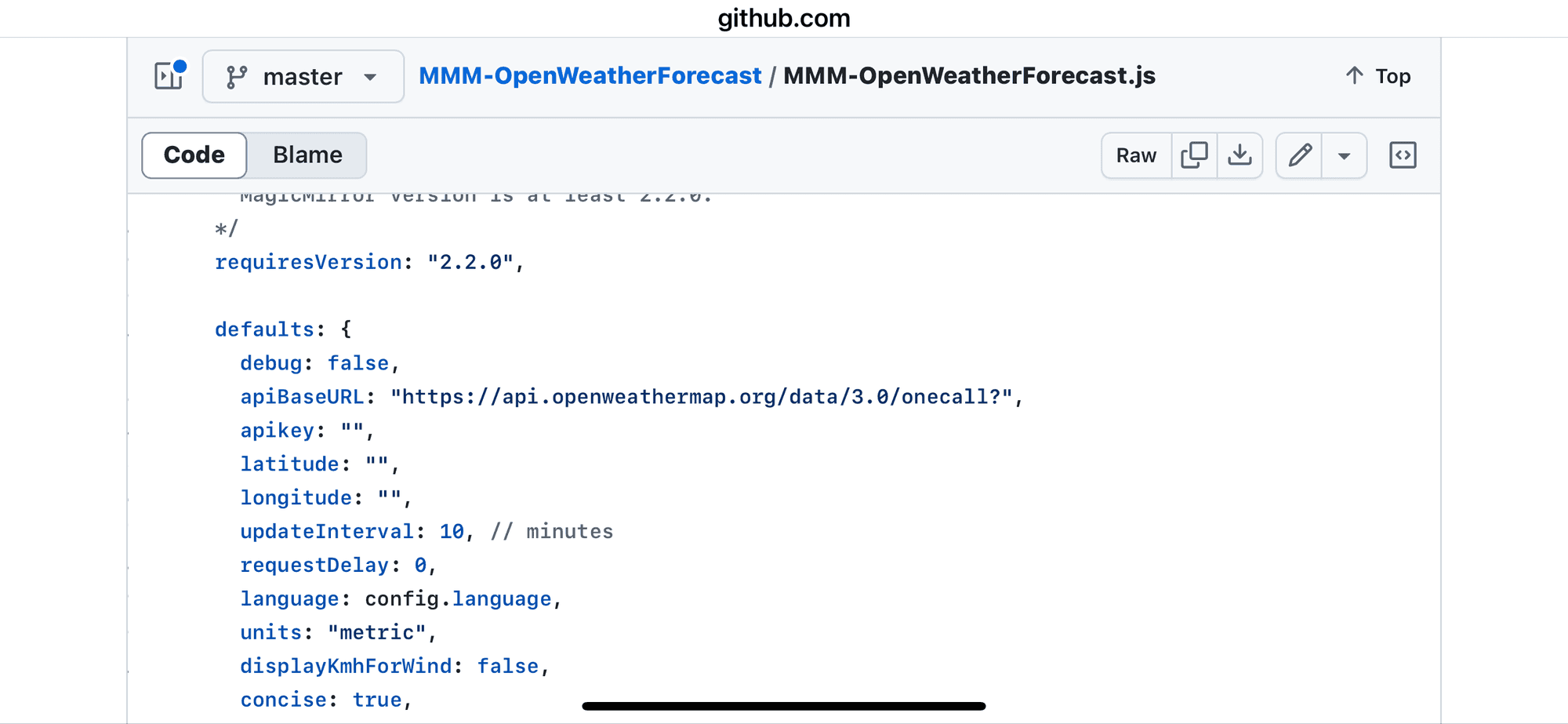
                  IMG_0370.png

                  Sam

                  How to add modules

                  learning how to use browser developers window for css changes

                  M 1 Reply Last reply Reply Quote 0
                  • S Do not disturb
                    sdetweil @megagprime
                    last edited by

                    @megagprime also note the config parms it uses
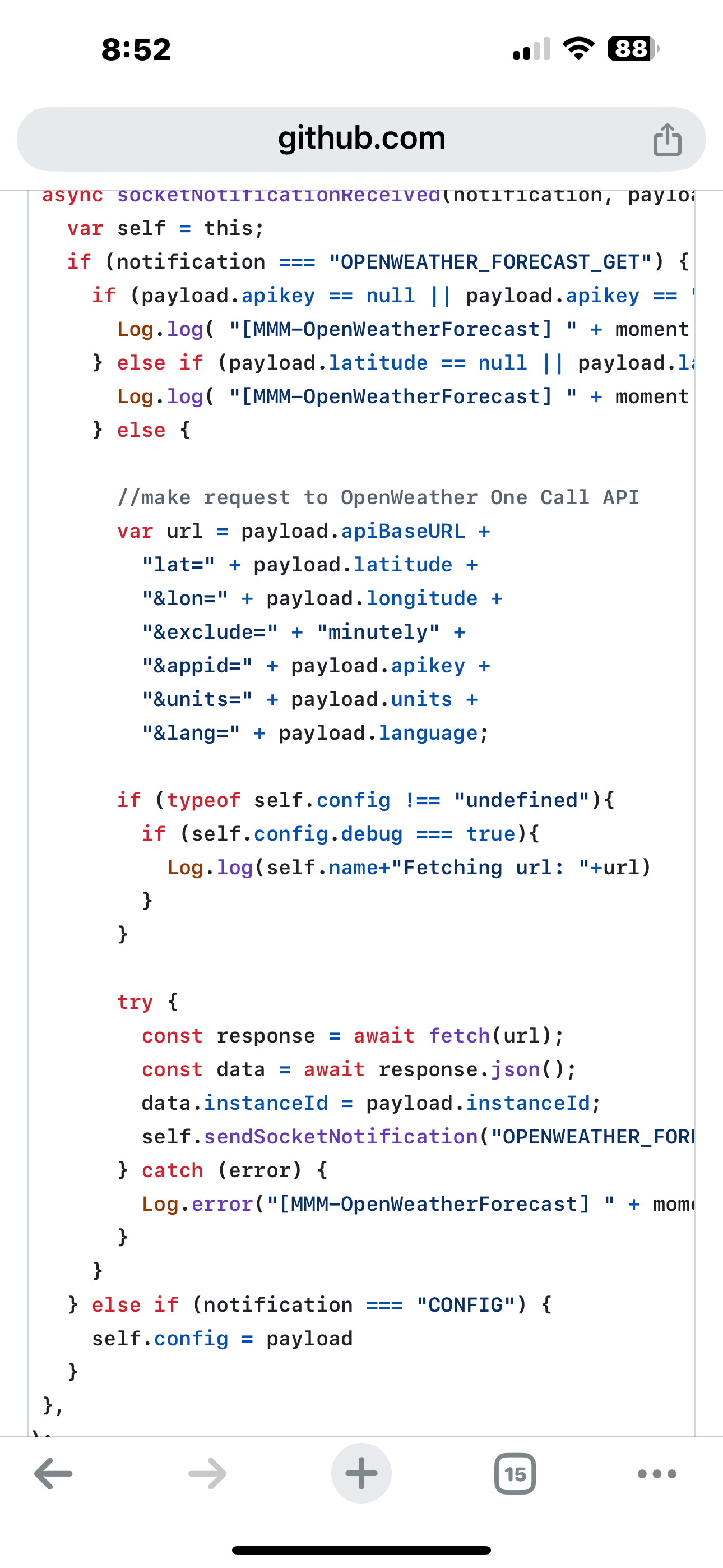
                    IMG_0371.png

                    Sam

                    How to add modules

                    learning how to use browser developers window for css changes

                    1 Reply Last reply Reply Quote 0
                    • M Offline
                      megagprime @sdetweil
                      last edited by

                      @sdetweil i did, i commented out the urlbase. All the other config settings are the same that have been working for years.

                      wishmaster270W 1 Reply Last reply Reply Quote 0
                      • wishmaster270W Offline
                        wishmaster270 Module Developer @megagprime
                        last edited by wishmaster270

                        @megagprime You will need to update to the new fork of the module.
                        It does not matter if the old settings worked for years as the provider shut down the old api and you need to use the new api if you want some information to be displayed again.
                        The original module did not provide a way to change the url the information is fetched of. Even if you add the apiBaseUrl to the settings the old module will ignore it.
                        I released a new version IN MY FORK yesterday which uses the new URL in default. So no need to set the base URL in the settings anymore. The version in my fork before yesterday needed the parameter in the config to work with the new api.

                        So either change to my fork and update with:

                        cd ~/MagicMirror/modules/MMM-OpenWeatherForecast
                        
                        git remote set-url origin https://github.com/Tom-Hirschberger/MMM-OpenWeatherForecast.git
                        
                        git pull
                        
                        rm -rf node_modules package-lock.json
                        
                        npm install
                        

                        Or remove the old module folder and reinstall from this Url:

                        My Fork

                        S 1 Reply Last reply Reply Quote 2
                        • S Do not disturb
                          sdetweil @wishmaster270
                          last edited by

                          @wishmaster270 thanks Tom

                          Sam

                          How to add modules

                          learning how to use browser developers window for css changes

                          1 Reply Last reply Reply Quote 1
                          • butchkemperB Offline
                            butchkemper
                            last edited by

                            Howdy,

                            I am having trouble getting MMM-OpenWeatherForecast to run and have been working my way through the problems.

                            First problem was a typo of “apiKey” which caused this message to flood the .pm2/logs/MagicMirror-out.log. Problem solved by correctly spelling the variable name “apikey” - notice the subtle difference between the “K” and “k”.

                            [2024-10-03 10:22:54.732] [LOG]   [MMM-OpenWeatherForecast] 3-Oct-24 10:22 ** ERROR ** No API key configured. Get an API key at https://darksky.net
                            

                            Once the “apikey” spelling problem was solved, the next error arrived and the log file was flooded with thousands of this message:

                            code_[2024-10-03 12:09:29.002] [LOG]   [MMM-OpenWeatherForecast] 3-Oct-24 12:09 ** ERROR ** Latitude and/or longitude not provided.
                            

                            This error was caused by confusing documentation that made it appear the variables were “lat” and “lon” instead of “latitude” and “longitude”. Correcting the spelling eliminated the error messages.

                            The current problem is this message which is again flooding the pm2 error.log:

                            [2024-10-03 14:10:02.077] ^[[31m[ERROR]^[[39m ^[[31m[MMM-OpenWeatherForecast] 3-Oct-24 14:10 ** ERROR ** TypeError: fetch failed^[[39m
                            

                            I need a hint of where to look or what to do. I sure it is not hard but just me overlooking something.

                            However,the three problems reveal that the Module contains an error that flood the log files with thousands of messages.

                            Here is the portion configuration file relative to the OpenWeatherForecast module:

                                                    module: "MMM-OpenWeatherForecast",
                                                    position: "top_right",
                                                    header: "Current Weather",
                                                    config: {
                                                            weatherProvider: "openweathermap",
                                                            type: "hourly",
                                                            units: "imperial",
                                                            tempUnits: "imperial",
                                                            roundTemp: true,
                                                            timeFormat: 24,
                                                            onlyTemp: false,
                                                            appendLocationNameToHeader: true,
                                                            showSun: true,
                                                            fade: false,
                                                            fadePoint: 1,
                                                            colored: true,
                                                            updateInterval: 900000,      // 15 minutes, 900 seconds
                                                            maxEntries: 10,
                                                            degreeLabel: true,
                                                            lang: "en",
                                                            location: "Sachse,Texas",
                                                            locationID: "4724564", //ID from http://bulk.openweathermap.org/sample/city.list.json.gz;
                                                            latitude: 32.98579,
                                                            longitude: -96.60234,
                                                            apiVersion: "3.0",
                                                            weatherEndpoint: "/onecall",
                                                            apikey: "This is a 3.0 key"
                                                    }
                            

                            I am also confused about the updateInterval value. Previously in this module and in other modules, time intervals are given in milliseconds so 15 minutes is written as 900000.

                            Thank you for reading.

                            Butch

                            Resistance is not Futile!
                            It is voltage divided by current.

                            M 1 Reply Last reply Reply Quote 0
                            • M Offline
                              MarcLandis Module Developer @butchkemper
                              last edited by

                              @butchkemper it seems that you are mixing configuration for the standard weather module and configuration for MMM-OpenWeatherForecast

                              butchkemperB 1 Reply Last reply Reply Quote 0
                              • butchkemperB Offline
                                butchkemper @MarcLandis
                                last edited by

                                @MarcLandis Thank you for the push in the right direction. I took the time to remove all the unused options and corrected the updateInterval. Now everything is back to working.

                                Now I will need to study the new options to see if I need to change anything.

                                Thanks again.

                                Butch

                                Resistance is not Futile!
                                It is voltage divided by current.

                                1 Reply Last reply Reply Quote 0
                                • R Offline
                                  Ray
                                  last edited by

                                  So after getting everything set up with the new version 3.0 at openweathermap.org
                                  I turned on my mirror for the first time this morning and it displayed the weather
                                  and so I went to openweathermap.org just to check how many calls I made it already had me down for 20 calls
                                  am I missing something here

                                  S 1 Reply Last reply Reply Quote 0
                                  • S Do not disturb
                                    sdetweil @Ray
                                    last edited by

                                    @Ray how often is the module fetching the weather ?

                                    Sam

                                    How to add modules

                                    learning how to use browser developers window for css changes

                                    wishmaster270W R 2 Replies Last reply Reply Quote 0
                                    • wishmaster270W Offline
                                      wishmaster270 Module Developer @sdetweil
                                      last edited by wishmaster270

                                      @sdetweil In default the module calls the Api every 10 minutes.

                                      S R 2 Replies Last reply Reply Quote 1
                                      • S Do not disturb
                                        sdetweil @wishmaster270
                                        last edited by sdetweil

                                        @wishmaster270 thanks. i knew i could go look, asking poster to do the same.

                                        Sam

                                        How to add modules

                                        learning how to use browser developers window for css changes

                                        1 Reply Last reply Reply Quote 0
                                        • R Offline
                                          Ray @wishmaster270
                                          last edited by

                                          @wishmaster270 yes I have mine set for 15
                                          but that doesn’t explain why when I turn it on for the first time in the morning they already have 20 calls I don’t get that

                                          M 1 Reply Last reply Reply Quote 0
                                          • R Offline
                                            Ray @sdetweil
                                            last edited by

                                            @sdetweil I have it set for 15 minutes
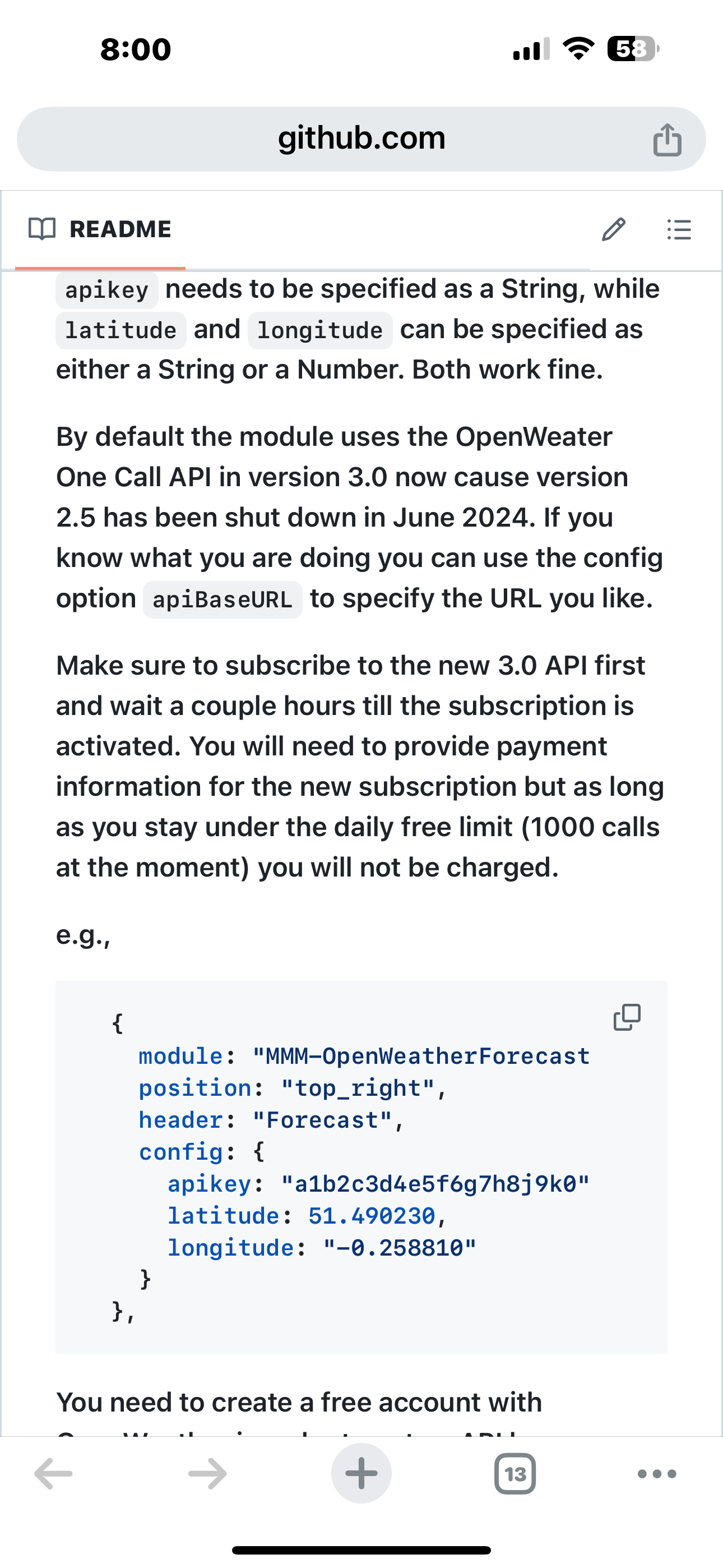
                                            1 Reply Last reply Reply Quote 0

                                            Hello! It looks like you're interested in this conversation, but you don't have an account yet.

                                            Getting fed up of having to scroll through the same posts each visit? When you register for an account, you'll always come back to exactly where you were before, and choose to be notified of new replies (either via email, or push notification). You'll also be able to save bookmarks and upvote posts to show your appreciation to other community members.

                                            With your input, this post could be even better 💗

                                            Register Login

                                            • 1
                                            • 2
                                            • 3
                                            • 4
                                            • 5
                                            • 4 / 5
                                            • First post
                                              Last post
                                            Enjoying MagicMirror? Please consider a donation!
                                            MagicMirror created by Michael Teeuw.
                                            Forum managed by Sam, technical setup by Karsten.
                                            This forum is using NodeBB as its core | Contributors
                                            Contact | Privacy Policy