MagicMirror Forum
    • Recent
    • Tags
    • Unsolved
    • Solved
    • MagicMirror² Repository
    • Documentation
    • 3rd-Party-Modules
    • Donate
    • Discord
    • Register
    • Login
    A New Chapter for MagicMirror: The Community Takes the Lead
    Read the statement by Michael Teeuw here.

    Can´t rotate my display

    Scheduled Pinned Locked Moved Solved Troubleshooting
    20 Posts 4 Posters 5.2k Views 4 Watching
    Loading More Posts
    • Oldest to Newest
    • Newest to Oldest
    • Most Votes
    Reply
    • Reply as topic
    Log in to reply
    This topic has been deleted. Only users with topic management privileges can see it.
    • S Offline
      sdetweil @Klinge
      last edited by

      @Klinge if you use the os desktop menu top left, preferences, last entry i think is display configuration, you can rotate there

      Sam

      How to add modules

      learning how to use browser developers window for css changes

      K R 2 Replies Last reply Reply Quote 1
      • K Offline
        Klinge @sdetweil
        last edited by

        @sdetweil Oh! So simple? It is like at Windows. Only with mouse configuration. I found it under Screen configuration - > orientation
        Thank you again for your help. You are my little hero 😉

        1 Reply Last reply Reply Quote 0
        • K Klinge has marked this topic as solved on
        • R Offline
          robertybob @sdetweil
          last edited by

          @sdetweil Is it still possible to rotate the screen via the command line? Or must it be done using the desktop? (having the same issue, with the same labwc output, so thought best not to start a new topic)

          S R 3 Replies Last reply Reply Quote 0
          • S Offline
            sdetweil @robertybob
            last edited by

            @robertybob i do not know

            Sam

            How to add modules

            learning how to use browser developers window for css changes

            1 Reply Last reply Reply Quote 0
            • S Offline
              sdetweil @robertybob
              last edited by sdetweil

              @robertybob google search found this

              
              To rotate the display using the command line on a Raspberry Pi with the LabWC compositor, you can use the wlr-randr command, specifying the output and desired rotation (e.g., wlr-randr --output HDMI-A-1 --rotate right). 
              Here's a more detailed breakdown:
              1. Identify your output:
              Determine the name of your display output. You can find this using wlr-randr without any arguments, which will list the available outputs.
              Example: wlr-randr
              Look for an output like HDMI-A-1 or DSI-0. 
              2. Rotate the display:
              Use the wlr-randr command with the --output and --rotate options.
              Example (rotate 90 degrees clockwise): wlr-randr --output HDMI-A-1 --rotate right
              Example (rotate 90 degrees counter-clockwise): wlr-randr --output HDMI-A-1 --rotate left
              Example (rotate 180 degrees): wlr-randr --output HDMI-A-1 --rotate 180
              Example (rotate to normal orientation): wlr-randr --output HDMI-A-1 --rotate normal 
              3. Make the rotation permanent (optional):
              You can add the wlr-randr command to an autostart file to make the rotation persistent after a reboot.
              Find the autostart file: ~/.config/labwc/autostart
              Add your command: Open the file in a text editor (e.g., nano ~/.config/labwc/autostart) and add the wlr-randr command at the end of the file.
              Example: @wlr-randr --output HDMI-A-1 --rotate right
              Note: The @ symbol is important for autostart scripts. 
              4. Troubleshooting:
              

              Sam

              How to add modules

              learning how to use browser developers window for css changes

              R 1 Reply Last reply Reply Quote 0
              • R Offline
                rkorell @robertybob
                last edited by rkorell

                @robertybob yes, screen rotation is still possible via CLI/terminal…

                edit “/usr/share/dispsetup.sh”
                eg:

                sudo nano /usr/share/dispsetup.sh
                

                there you will find an if clause at the beginning:

                if ! raspi-config nonint is_pi || raspi-config nonint is_kms ; then
                if xrandr --output HDMI-1 --primary --mode 2560x1440 --rate 59.951 --pos 0x0 --rotate left --dryrun>
                xrandr --output HDMI-1 --primary --mode 2560x1440 --rate 59.951 --pos 0x0 --rotate left
                

                the word after “rotate” defines the rotation :-)

                NO rotation = “normal”, rest is obvious.
                You must change this in both occurances.

                In same statement you define the resolution for the screen, as well - after “mode”(given example 2560x1440)

                HTH

                Regards,
                Ralf

                R 1 Reply Last reply Reply Quote 1
                • R Offline
                  robertybob @rkorell
                  last edited by

                  @rkorell

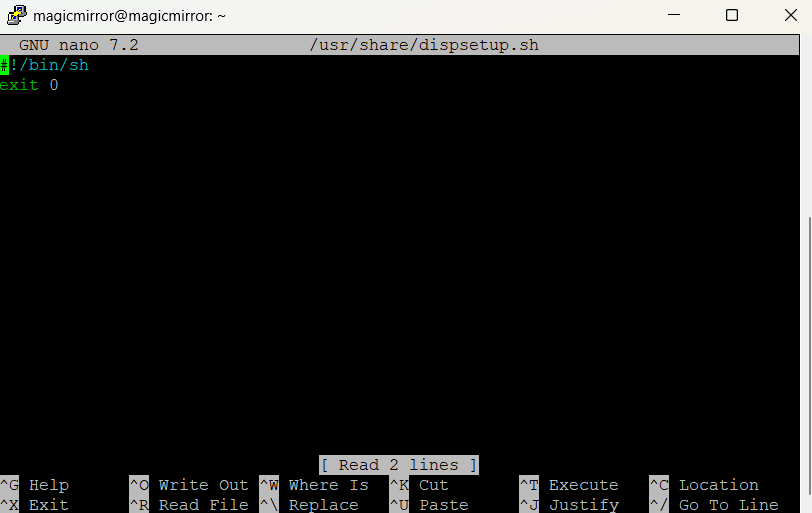
                  Mine looks a little different :(

                  81535995-2f02-4a20-ac9d-a4e0cb391732-image.png

                  R 1 Reply Last reply Reply Quote 1
                  • R Offline
                    robertybob @sdetweil
                    last edited by

                    @sdetweil The code has seemingly changed
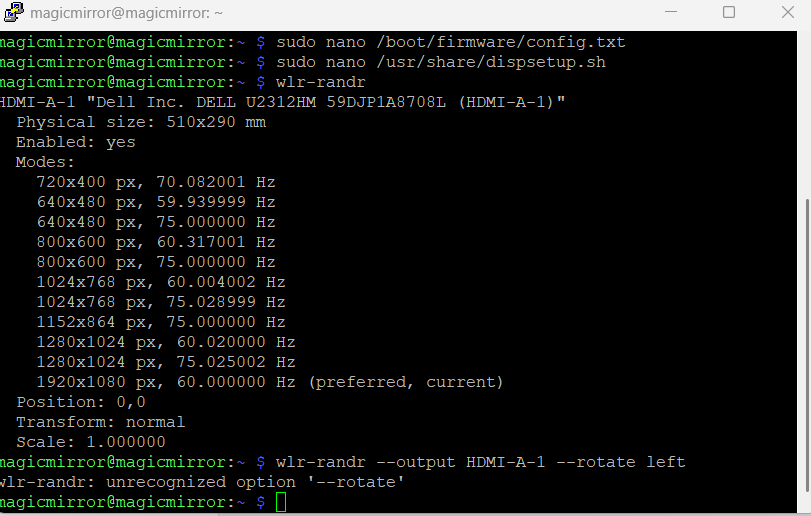
                    6a68cd51-730a-4864-beac-657a67ec9c81-image.png

                    That didn’t work, but

                    wlr-randr --output HDMI-A-1 --transform 90


                    does! Except… when I reboot, the screen goes back to the way it was

                    S 1 Reply Last reply Reply Quote 0
                    • S Offline
                      sdetweil @robertybob
                      last edited by sdetweil

                      @robertybob did you see the section on autostart? as the
                      wlr-randr is not persistent

                      Sam

                      How to add modules

                      learning how to use browser developers window for css changes

                      R 1 Reply Last reply Reply Quote 0
                      • R Offline
                        robertybob @sdetweil
                        last edited by

                        @sdetweil Ah, I couldn’t find the folder as it’s not in /.config/labwc/autostart but instead appears to be /usr/share/labwc

                        I’ll give that a go! Thank you :D

                        S 1 Reply Last reply Reply Quote 0
                        • S Offline
                          sdetweil @robertybob
                          last edited by

                          @robertybob .config is usually in the user folder (note the . in front)

                          Sam

                          How to add modules

                          learning how to use browser developers window for css changes

                          1 Reply Last reply Reply Quote 0
                          • R Offline
                            rkorell @robertybob
                            last edited by rkorell

                            @robertybob said in Can´t rotate my display:

                            Mine looks a little different :(

                            OK, that’s bad…
                            (It’s a Pi5, right?).

                            The complete content of my dispsetup.sh is as follows:

                            #!/bin/sh
                            if ! raspi-config nonint is_pi || raspi-config nonint is_kms ; then
                            if xrandr --output HDMI-1 --primary --mode 2560x1440 --rate 59.951 --pos 0x0 --rotate left --dryrun>
                            xrandr --output HDMI-1 --primary --mode 2560x1440 --rate 59.951 --pos 0x0 --rotate left
                            fi
                            fi
                            if [ -e /usr/share/tssetup.sh ] ; then
                            . /usr/share/tssetup.sh
                            fi
                            if [ -e /usr/share/ovscsetup.sh ] ; then
                            . /usr/share/ovscsetup.sh
                            fi
                            exit 0
                            

                            If I interpret your line correctly, you are using the Wayland-Window-Manager?
                            (wlandr => wayland … ???).
                            My box is a Pi4B, no wayland.
                            I’ve seen elsewhere that the Pi5 can be forced to use X11 again - than the above should work directly.
                            Otherwise you may give it a try to put your code into the dispsetup.sh?

                            Here I found the description of your commandlines above. Unfortunately there is no description how to get this pesistent…

                            In Addition I just found a hint in Raspberry-Forum
                            There a guy stated:

                            sudo nano .config/wayfire.ini
                            
                            -> scrolled down and changed the output section as below:
                            
                            [output:HDMI-A-1]
                            mode = 1920X1080@60000
                            position = 0,0
                            transform = 90
                            

                            May this is the right way with wayland…

                            Regards,
                            Ralf

                            R 1 Reply Last reply Reply Quote 1
                            • R Offline
                              robertybob @rkorell
                              last edited by

                              @rkorell Ah, sorry, I’m using a Raspberry Pi 3 :)
                              Nothing I’ve tried has worked so far, even ChatGPT is failing me :(

                              S R 2 Replies Last reply Reply Quote 0
                              • S Offline
                                sdetweil @robertybob
                                last edited by

                                @robertybob go back the x11 in raspi-config

                                Sam

                                How to add modules

                                learning how to use browser developers window for css changes

                                1 Reply Last reply Reply Quote 0
                                • R Offline
                                  rkorell @robertybob
                                  last edited by

                                  @robertybob said in Can´t rotate my display:

                                  Raspberry Pi 3 :)

                                  May this in combination with bookworm?
                                  Sam acknowledged my assumption a posting above…

                                  • back to X11 …

                                  Regards,
                                  Ralf

                                  1 Reply Last reply Reply Quote 1

                                  Hello! It looks like you're interested in this conversation, but you don't have an account yet.

                                  Getting fed up of having to scroll through the same posts each visit? When you register for an account, you'll always come back to exactly where you were before, and choose to be notified of new replies (either via email, or push notification). You'll also be able to save bookmarks and upvote posts to show your appreciation to other community members.

                                  With your input, this post could be even better 💗

                                  Register Login

                                  • 1 / 1
                                  • First post
                                    Last post
                                  Enjoying MagicMirror? Please consider a donation!
                                  MagicMirror created by Michael Teeuw.
                                  Forum managed by Sam, technical setup by Karsten.
                                  This forum is using NodeBB as its core | Contributors
                                  Contact | Privacy Policy