MagicMirror Forum
    • Recent
    • Tags
    • Unsolved
    • Solved
    • MagicMirror² Repository
    • Documentation
    • 3rd-Party-Modules
    • Donate
    • Discord
    • Register
    • Login
    A New Chapter for MagicMirror: The Community Takes the Lead
    Read the statement by Michael Teeuw here.

    MMM-Carousel Pagination Icons

    Scheduled Pinned Locked Moved Development
    48 Posts 8 Posters 17.6k Views 9 Watching
    Loading More Posts
    • Oldest to Newest
    • Newest to Oldest
    • Most Votes
    Reply
    • Reply as topic
    Log in to reply
    This topic has been deleted. Only users with topic management privileges can see it.
    • S Offline
      sdetweil @mumblebaj
      last edited by

      @mumblebaj i updated my post

      Sam

      How to add modules

      learning how to use browser developers window for css changes

      1 Reply Last reply Reply Quote 1
      • S Offline
        sdetweil @mumblebaj
        last edited by

        @mumblebaj i will say, i think for humans. 0 based is unfriendly

        Sam

        How to add modules

        learning how to use browser developers window for css changes

        mumblebajM 1 Reply Last reply Reply Quote 0
        • mumblebajM Offline
          mumblebaj Module Developer @sdetweil
          last edited by

          @sdetweil Yeah, i would agree. Changing that logic now may have some repercussions for users already using the module.

          Check out my modules at: https://github.com/mumblebaj?tab=repositories
          Check my blog-post: https://mumblebaj.xyz/
          Check my MM Container: https://hub.docker.com/repository/docker/mumblebaj/magicmirror/general

          S 1 Reply Last reply Reply Quote 0
          • S Offline
            sdetweil @mumblebaj
            last edited by

            @mumblebaj page- was never there

            Sam

            How to add modules

            learning how to use browser developers window for css changes

            mumblebajM 2 Replies Last reply Reply Quote 0
            • mumblebajM Offline
              mumblebaj Module Developer @sdetweil
              last edited by mumblebaj

              @sdetweil Yes, that is correct. I added a classname page-${i}. But the standard code was always zero based and I do not want to update that. It is tied in with MMM-pages and seems like it works with others as well.

              start() {
                this.curPage = 0;
                this.mmmPagesDetected = false;
              },
              

              Check out my modules at: https://github.com/mumblebaj?tab=repositories
              Check my blog-post: https://mumblebaj.xyz/
              Check my MM Container: https://hub.docker.com/repository/docker/mumblebaj/magicmirror/general

              1 Reply Last reply Reply Quote 0
              • mumblebajM Offline
                mumblebaj Module Developer @sdetweil
                last edited by mumblebaj

                @sdetweil And just to note, MMM-pages is zero based. This will need to be updated as well. If I understand MMM-Carousel correct, it is also zero based.

                Check out my modules at: https://github.com/mumblebaj?tab=repositories
                Check my blog-post: https://mumblebaj.xyz/
                Check my MM Container: https://hub.docker.com/repository/docker/mumblebaj/magicmirror/general

                S 1 Reply Last reply Reply Quote 0
                • S Offline
                  sdetweil @mumblebaj
                  last edited by

                  @mumblebaj one small step!

                  Sam

                  How to add modules

                  learning how to use browser developers window for css changes

                  1 Reply Last reply Reply Quote 0
                  • C Offline
                    com1cedric @sdetweil
                    last edited by

                    @sdetweil Hello Sam, may I ask you one question about this topic? do you know how it would be possible to show an image stored on the Raspberry or linked from the web, instead of showing an icon from Fontawesome?

                    S 1 Reply Last reply Reply Quote 0
                    • S Offline
                      sdetweil @com1cedric
                      last edited by sdetweil

                      @com1cedric just point the url() to the file

                      url('/folder_in_mm_tree/xxx.jpg/png/gif as appropriate')
                      

                      note the MM web server root is ~/MagicMirror

                      so the files have to be in THAT folder tree
                      you can LINK files/folders outside into the MM tree with the -->ln<-- command

                      so, assume you made a

                      MagicMirror/icons
                      

                      folder and in it is

                      circle.png
                      

                      then you could use

                      url('/icons/circle.png')
                      

                      or

                      url('http://localhost:mm_port/icons/circle.png')  /* not this ONLY works IF the browser is on the SAME MACHINE as MM..*/
                      

                      if not you need the relative(url(‘/…’), OR have to hard code the MM machine address
                      like this

                      url('http://MM_IP_address:mm_port/icons/circle.png')
                      

                      if linked from the web use its complete url path

                      Sam

                      How to add modules

                      learning how to use browser developers window for css changes

                      C 1 Reply Last reply Reply Quote 0
                      • C Offline
                        com1cedric @sdetweil
                        last edited by

                        @sdetweil said in MMM-Carousel Pagination Icons:

                        url(‘/icons/circle.png’)

                        Thank you very much Sam.

                        currently, I have the following command (which works well and shows an icon from FontAwesom) in custom.css:

                        .MMM-page-indicator div.module-content div i:nth-child(7)::after {
                        content: “\f207”;
                        font-family: FontAwesome;
                        color: #FF4433;
                        }

                        After putting an image called “olympic.png” in the “MagicMirror/icons” folder, it still does not appear if I write:

                        .MMM-page-indicator div.module-content div i:nth-child(7)::after {
                        url(‘/icons/olympics.png’);
                        }

                        Do I habe to still use “content:” before or something else?

                        PS. sorry for asking, I am quite new in this CSS topic

                        S 2 Replies Last reply Reply Quote 0
                        • S Offline
                          sdetweil @com1cedric
                          last edited by

                          @com1cedric i will test this out and get back

                          icons are very small images

                          Sam

                          How to add modules

                          learning how to use browser developers window for css changes

                          1 Reply Last reply Reply Quote 0
                          • S Offline
                            sdetweil @com1cedric
                            last edited by

                            @com1cedric see here, this is good info

                            https://forum.magicmirror.builders/post/125833

                            Sam

                            How to add modules

                            learning how to use browser developers window for css changes

                            C 1 Reply Last reply Reply Quote 0
                            • C Offline
                              com1cedric @sdetweil
                              last edited by

                              @sdetweil
                              OK, I looked into it, thank you.

                              Now, I have this images from Fontawesome. It looks nice, but I would like to be able to use other image if needed.

                              Capture d’écran 2025-04-14 à 14.15.41.jpg

                              For example, I would replace the “sun” with a picture “04n.png” in the “icons” forder on my raspberry.
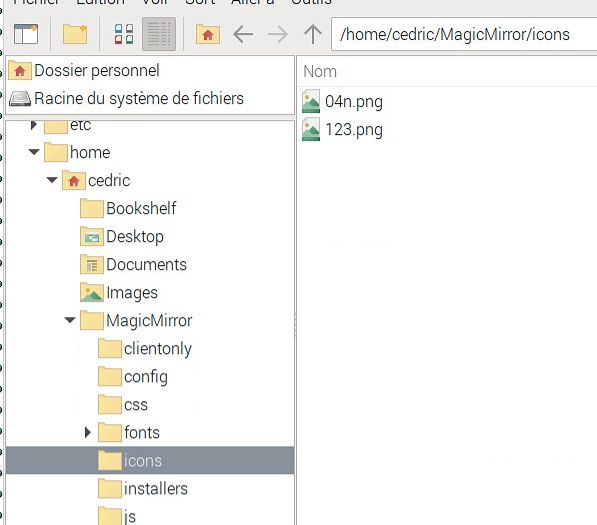
                              Capture d’écran 2025-04-14 à 14.35.10.jpg

                              I tried to change line 251 with 250 in the custom.css file
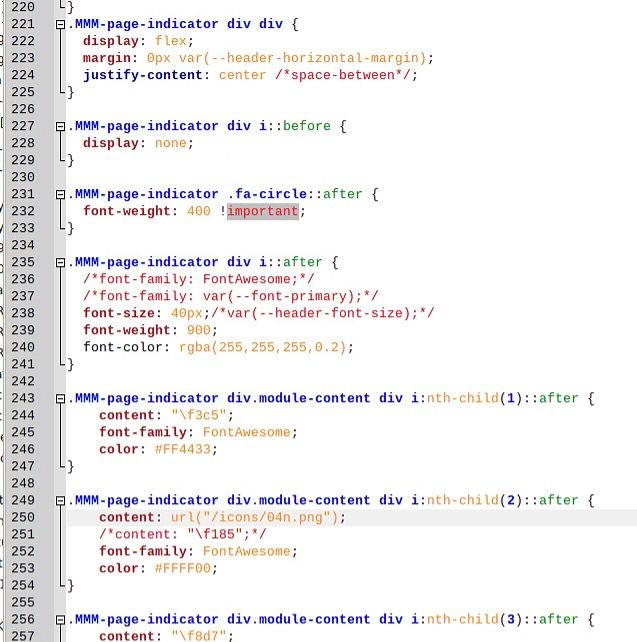
                              Capture d’écran 2025-04-14 à 14.45.08.jpg

                              Now, the result is, that the sun has disappeared (correct), but just has been replaced with a gap.

                              Capture d’écran 2025-04-14 à 14.47.43.jpg

                              do you maybe see a mistake in my custom.css file? the problem is maybe between lines 221 and 240. this is strange…

                              S karsten13K 2 Replies Last reply Reply Quote 0
                              • S Offline
                                sdetweil @com1cedric
                                last edited by

                                @com1cedric can you open the developers window (ctrl-shift-i), select the console tab
                                and put caro in the filter field to limit messages to the carousel module

                                this info might be of help on the image selection
                                https://elfsight.com/blog/svg-png-jpeg-choose-the-image-format-for-your-website/

                                Sam

                                How to add modules

                                learning how to use browser developers window for css changes

                                1 Reply Last reply Reply Quote 0
                                • karsten13K Offline
                                  karsten13 @com1cedric
                                  last edited by

                                  @com1cedric

                                  the /icons subfolder will not work, you have to use one of these

                                  S 1 Reply Last reply Reply Quote 0
                                  • S Offline
                                    sdetweil @karsten13
                                    last edited by

                                    @karsten13 ok, I forgot we are restrictive

                                    Sam

                                    How to add modules

                                    learning how to use browser developers window for css changes

                                    C 1 Reply Last reply Reply Quote 0
                                    • C Offline
                                      com1cedric @sdetweil
                                      last edited by

                                      @sdetweil and @karsten13

                                      thank you for your inputs.

                                      I tried it and put the image (downloaded from flaticon.com) on the CSS file
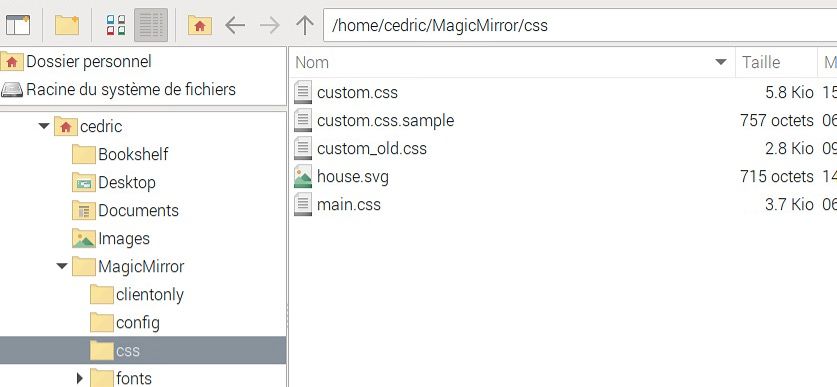
                                      Capture d’écran 2025-04-15 à 10.03.26.jpg

                                      When I search for it in the Chromium browser (to be sure the URL is correct), it works
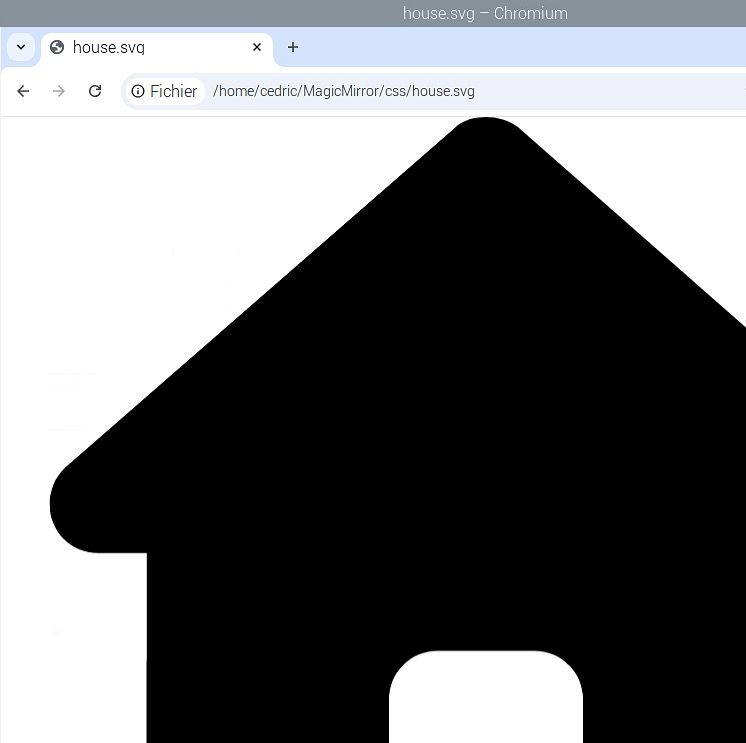
                                      Capture d’écran 2025-04-15 à 10.04.42.jpg

                                      but when I put this path in the custom.css files, with full or shorten path, it does not appear…
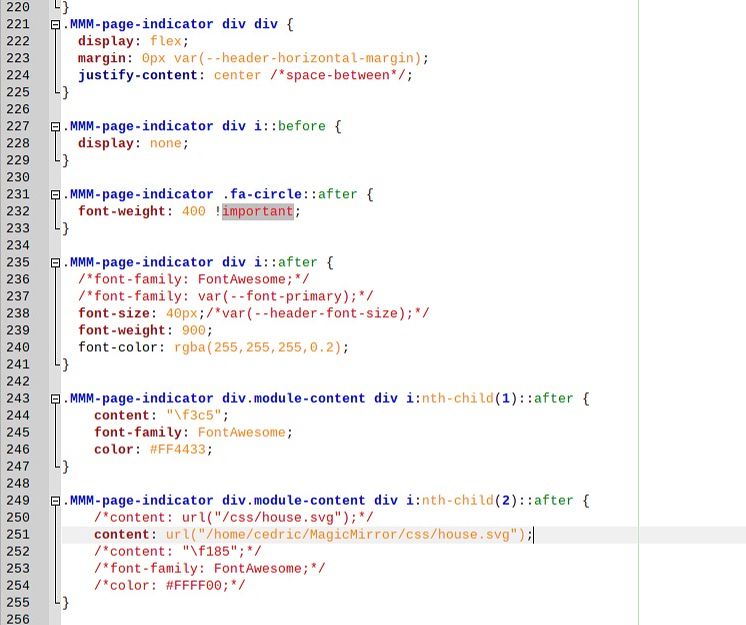
                                      Capture d’écran 2025-04-15 à 10.13.37.jpg

                                      in the console, I do not find anything suspicious (I only use mm-page and mm-page-indicator, and no carrousel).
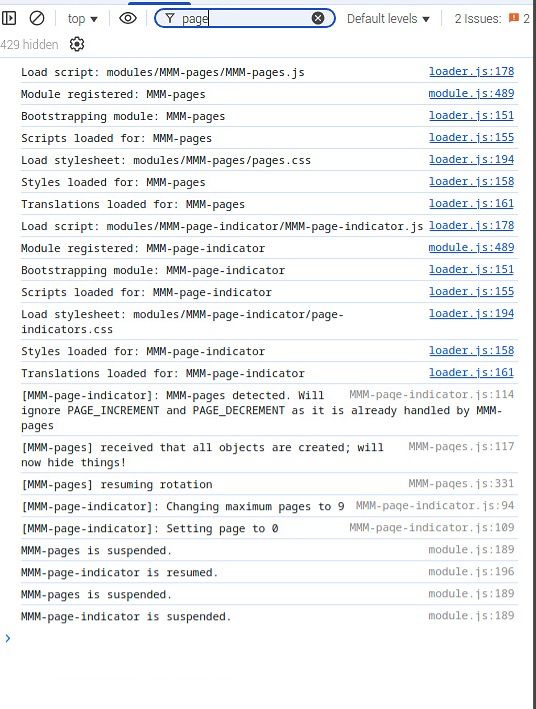
                                      Capture d’écran 2025-04-15 à 10.16.37.jpg

                                      S mumblebajM 2 Replies Last reply Reply Quote 0
                                      • S Offline
                                        sdetweil @com1cedric
                                        last edited by sdetweil

                                        @com1cedric again, we wont load the file path url,

                                        /home/… in not one of out supported folders

                                        it has to be MagicMirror web server based , from the MagicMirror folder as root (/)

                                        url('/css/house.svg')
                                        

                                        Sam

                                        How to add modules

                                        learning how to use browser developers window for css changes

                                        karsten13K 1 Reply Last reply Reply Quote 0
                                        • karsten13K Offline
                                          karsten13 @sdetweil
                                          last edited by

                                          I did a test with default calendar and custom.css:

                                          .calendar div.module-content::after {
                                            content: url("/css/k13.svg");
                                          }
                                          

                                          or

                                          .calendar div.module-content {
                                            content: url("/css/k13.svg");
                                          }
                                          

                                          which works (svg is visible).

                                          So maybe something with your css concerning the child-stuff is wrong (my css knowledge is to bad to help here)

                                          1 Reply Last reply Reply Quote 0
                                          • mumblebajM Offline
                                            mumblebaj Module Developer @com1cedric
                                            last edited by

                                            @com1cedric MMM-page-indicator was updated recently so you do not have to use the nth-child stuff anymore. Checkout the latest version and the readme. I have added some samples of how you can use it. You should reference the svg as either @sdetweil or @karsten13 has shown and it should work.


                                            Check out my modules at: https://github.com/mumblebaj?tab=repositories
                                            Check my blog-post: https://mumblebaj.xyz/
                                            Check my MM Container: https://hub.docker.com/repository/docker/mumblebaj/magicmirror/general

                                            C 1 Reply Last reply Reply Quote 1

                                            Hello! It looks like you're interested in this conversation, but you don't have an account yet.

                                            Getting fed up of having to scroll through the same posts each visit? When you register for an account, you'll always come back to exactly where you were before, and choose to be notified of new replies (either via email, or push notification). You'll also be able to save bookmarks and upvote posts to show your appreciation to other community members.

                                            With your input, this post could be even better 💗

                                            Register Login

                                            • 1
                                            • 2
                                            • 3
                                            • 2 / 3
                                            • First post
                                              Last post
                                            Enjoying MagicMirror? Please consider a donation!
                                            MagicMirror created by Michael Teeuw.
                                            Forum managed by Sam, technical setup by Karsten.
                                            This forum is using NodeBB as its core | Contributors
                                            Contact | Privacy Policy