Read the statement by Michael Teeuw here.
[MMM-GoogleSheets] Display Google Sheets data on your MagicMirror
-
Description:
This module allows you to display any data from Google Sheets directly on your Magic Mirror. It is fully customizable so you can choose which parts you want to mimic exactly and which parts you want to add custom styling to.
Sample use cases:
- Custom dashboard
- Lists or reminders
- Schedules
- Financial data / Personal finance tracking
- Create your own custom MM modules in Google Sheets without having to write the code. If you can get the data into Google Sheets, then you can display it using this module without having to write a new custom module
Features:
- Fully customizable styling options
- Mimic the Google Sheets look exactly or select a subset of styles to mimic
- Write your own custom styling CSS to all the data or just the header row
- Write your own custom styling function for dynamic styles based on the data
- Select a specific range or use a dynamic range based on how much data is in the sheet
- Formulas and functions in the sheet are recalculated each time the module updates
Screenshots:
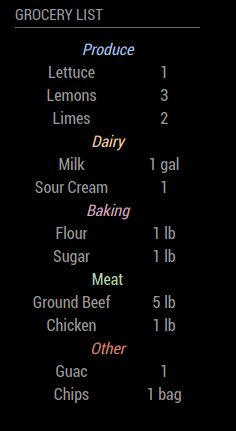
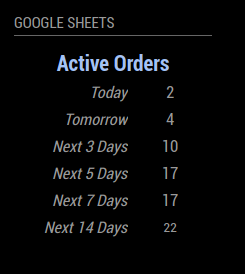
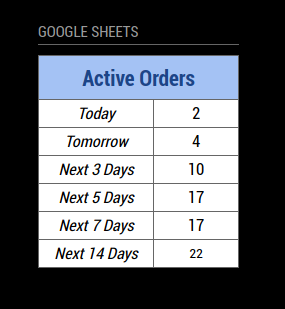
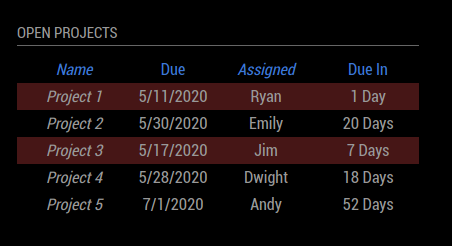

Download:
https://github.com/ryan-d-williams/MMM-GoogleSheets
Version 1
- Import data from Google Sheets
- Custom styling
Version 2 (Aug 2024)
- Auto range detection
- Improved error messaging for invalid requests
- Auto-update formulas each time the module refreshes
Version 3 (November 2024)
- Scrolling Data
Version 4 (February 2026)
- Checkbox/Dropdown support
- Interactive elements (changing the checkbox/dropdown makes the same change in the spreadsheet)
-
I cannot connect the sheet,
logg in webbapp:17 okt. 2024 22:43:07 Fel TypeError: Cannot read properties of undefined (reading ‘parameters’)
at doGet(Code:3:18)
at doGet(Kod:2:26) -
@FallandeGubbe your best bet is to post an issue in the repository.
When you post, I recommend including your current config (minus any sensitive data) so I can help you fix the problem.
-
@ryandwilliams OK, thanks - I will do that
-
UPDATE: Version 3 (November 2024)
- Scrolling data is now supported (you can define how much data to show and customize the scrolling behavior to meet your needs). Check out the README for more info. Gif example:
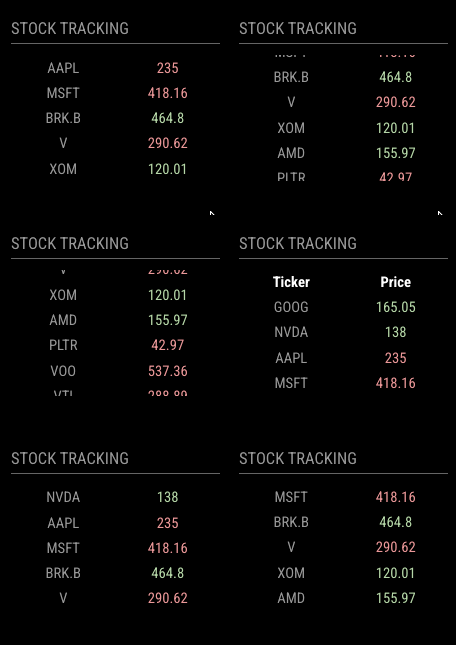
- Scrolling data is now supported (you can define how much data to show and customize the scrolling behavior to meet your needs). Check out the README for more info. Gif example:
-
Sorry, i followed all the necessary step and i’m getting this for the googlesheet
[ERROR] [MMM-Google-Sheets] ERROR There was an error with the request. This URL should work in your browser: https://script.google.com/macros/s/AKfycbxvminqCe-gLNZp6X8VlhNLeVmtefpdDYgZaWIBslM27JYxML3K7fS2tec7BsGB_hSILw/exec?sheet=Sheet1&range=A1:B6
[2025-01-17 18:11:23.273] [ERROR] Full Error Message:
[2025-01-17 18:11:23.298] [ERROR] TypeError: fetch failed
at node:internal/deps/undici/undici:12502:13
at processTicksAndRejections (node:internal/process/task_queues:95:5)
at runNextTicks (node:internal/process/task_queues:64:3)
at listOnTimeout (node:internal/timers:540:9)
at process.processTimers (node:internal/timers:514:7)
at async Class.socketNotificationReceived (/home/omiworld/MagicMirror/modules/MMM-GoogleSheets/node_helper.js:27:24) {
[cause]: AggregateError [ETIMEDOUT]:
at internalConnectMultiple (node:net:1117:18)
at internalConnectMultiple (node:net:1185:5)
at Timeout.internalConnectMultipleTimeout (node:net:1711:5)
at listOnTimeout (node:internal/timers:575:11)
at process.processTimers (node:internal/timers:514:7) {
code: ‘ETIMEDOUT’,
[errors]: [ [Error], [Error] ] -
@santex did you try the link provided in the error info?
-
@sdetweil
YES i did. it gave me thisSorry, unable to open the file at this time.
Please check the address and try again.
Get stuff done with Google Drive
Apps in Google Drive make it easy to create, store and share online documents, spreadsheets, presentations and more.
Learn more at drive.google.com/start/apps.
-
@santex ok, so the link doesn’t work…
did you do the right setup of the sheet name?
-
@sdetweil yes i did
-
@sdetweil
i follow all the steps, as indicated in the module -
@santex see this link
https://forum.magicmirror.builders/post/119206 -
@sdetweil
thank you. i have followed this i dont find the solution -
@santex then the best option is to open an issue on the module github page to engage the author
-
@sdetweil ok, i have also done that
-
UPDATE: Version 4 (February 2026)
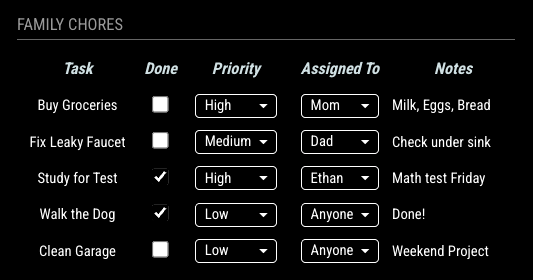
- Checkboxes and dropdowns are now supported. Additionally, they are interactive (if you change a checkbox or dropdown on the mirror, it will make that same change on the spreadsheet. This should allow for fully-customizable self-built modules and advanced spreadsheet interaction!
Check out the README for more info.
Example Image (all of the checkboxes and dropdowns are editable and link back to the spreadsheet):
-
dear @ryandwilliams ,
thanx for updating the module. unfortunately, it breaks the display of my GoogleSheet, i.e. it is not loading anymore. If i go back to commit “25685e9” it works fine again. In the magicmirror logs i cannot find any ERROR or WARNING.
i am happy to support fixing the issue, in this case i would need some instructions which data to provide. -
@wimThoelke thanks for the reply! What steps did you take to update the module? Did you pull the new repo as well as update the Google Apps Script library (currently version 34)?
It’s also worth noting that when you make a big change to Google Apps Script, the time to load can significantly increase the first time you run the module. For example during my testing, when I did an update the module took ~25-30 seconds to load the very first time, but after the first time it only took 2-3 seconds on subsequent refreshes.
If there is no error then I think it may be a loading problem or it may be because you did not update the Google Apps Script. The module should always error if something goes wrong (this might be a special situation I’m happy to help you debug).
I think it might be best to transfer this conversation over to github so I can help you with your problem. Can you open an issue so we can talk about it more?
-
@ryandwilliams
thanx for your quick reply and offer to support.
i did a simple git pull. no touches to Google Apps Script library, since i am not very familiar with it and prefer to go step-by-step to isolate root casues.
i will raise the issue on github, so we can continue there. -
@wimThoelke I responded to you on github, but just in case anyone stumbles on this thread in the future - you need to update both the module (via git pull) and the Google Apps Script library version (instructions in the readme).

Hello! It looks like you're interested in this conversation, but you don't have an account yet.
Getting fed up of having to scroll through the same posts each visit? When you register for an account, you'll always come back to exactly where you were before, and choose to be notified of new replies (either via email, or push notification). You'll also be able to save bookmarks and upvote posts to show your appreciation to other community members.
With your input, this post could be even better 💗
Register Login