MagicMirror Forum
    • Recent
    • Tags
    • Unsolved
    • Solved
    • MagicMirror² Repository
    • Documentation
    • 3rd-Party-Modules
    • Donate
    • Discord
    • Register
    • Login
    A New Chapter for MagicMirror: The Community Takes the Lead
    Read the statement by Michael Teeuw here.

    Garage Door Detectors

    Scheduled Pinned Locked Moved Requests
    22 Posts 6 Posters 17.7k Views 6 Watching
    Loading More Posts
    • Oldest to Newest
    • Newest to Oldest
    • Most Votes
    Reply
    • Reply as topic
    Log in to reply
    This topic has been deleted. Only users with topic management privileges can see it.
    • cowboysdudeC Offline
      cowboysdude Module Developer
      last edited by

      You need more than just a module. The module needs a way of knowing if the door is open or closed. You need a door opener or sensor that can connect over home WiFi or other network to communicate with your mirror. You’ll need a module + hardware solution.

      Those types of sensors do not talk to anything other then the opener itself… and they are generally hardwired.

      1 Reply Last reply Reply Quote 0
      • istepgueuI Offline
        istepgueu
        last edited by istepgueu

        I already installed physical sensor like the picture in the first post.
        I can connect it to the GPIO.

        The whole hardware part is already done. It is currently running on an arduino but I would like to move it on the magic mirror (and therefore have a module that reads if the contact is open or closed on a pin of the GPIO).

        morozgrafixM cowboysdudeC 3 Replies Last reply Reply Quote 1
        • morozgrafixM Offline
          morozgrafix Moderator @istepgueu
          last edited by

          @istepgueu you may find this project relevant and interesting https://github.com/davidgeller/hodor

          1 Reply Last reply Reply Quote 1
          • cowboysdudeC Offline
            cowboysdude Module Developer @istepgueu
            last edited by

            @istepgueu said in Garage Door Detectors:

            I already installed physical sensor like the picture in the first post.
            I can connect it to the GPIO.

            The whole hardware part is already done. It is currently running on an arduino but I would like to move it on the magic mirror (and therefore have a module that reads if the contact is open or closed on a pin of the GPIO).

            Then that sir is a doable thing!!!

            1 Reply Last reply Reply Quote 0
            • morozgrafixM Offline
              morozgrafix Moderator @istepgueu
              last edited by

              @istepgueu Please share your findings and code if possible. I’m looking into modding my garage door and using project that I mentioned above. Would be interested in getting info on sensors hookup and anything that you find while building it.

              1 Reply Last reply Reply Quote 1
              • cowboysdudeC Offline
                cowboysdude Module Developer
                last edited by

                Yes please share! :) Funny things about modules… they can be modified to work with other things!

                1 Reply Last reply Reply Quote 0
                • ooom416354O Offline
                  ooom416354
                  last edited by

                  I have a Chamberlain myq which will send a signal over wifi determining if my garage is open or closed to what i’m guessing is their server. Similar to Nest for the temperature. I wonder if there’s an API I can use to display the status.

                  morozgrafixM 1 Reply Last reply Reply Quote 0
                  • morozgrafixM Offline
                    morozgrafix Moderator @ooom416354
                    last edited by

                    @ooom416354 this may get you started http://docs.unofficialliftmastermyq.apiary.io

                    ooom416354O 1 Reply Last reply Reply Quote 0
                    • ooom416354O Offline
                      ooom416354 @morozgrafix
                      last edited by

                      @morozgrafix wow. this is a great find, thanks!

                      1 Reply Last reply Reply Quote 0
                      • istepgueuI Offline
                        istepgueu
                        last edited by istepgueu

                        Hello.

                        Here is my current “installation”.

                        alt text

                        My 2 door sensors send 1 or 0 if there is contact.

                        Depending on the result, LEDs 1 and 2 light up red or green.
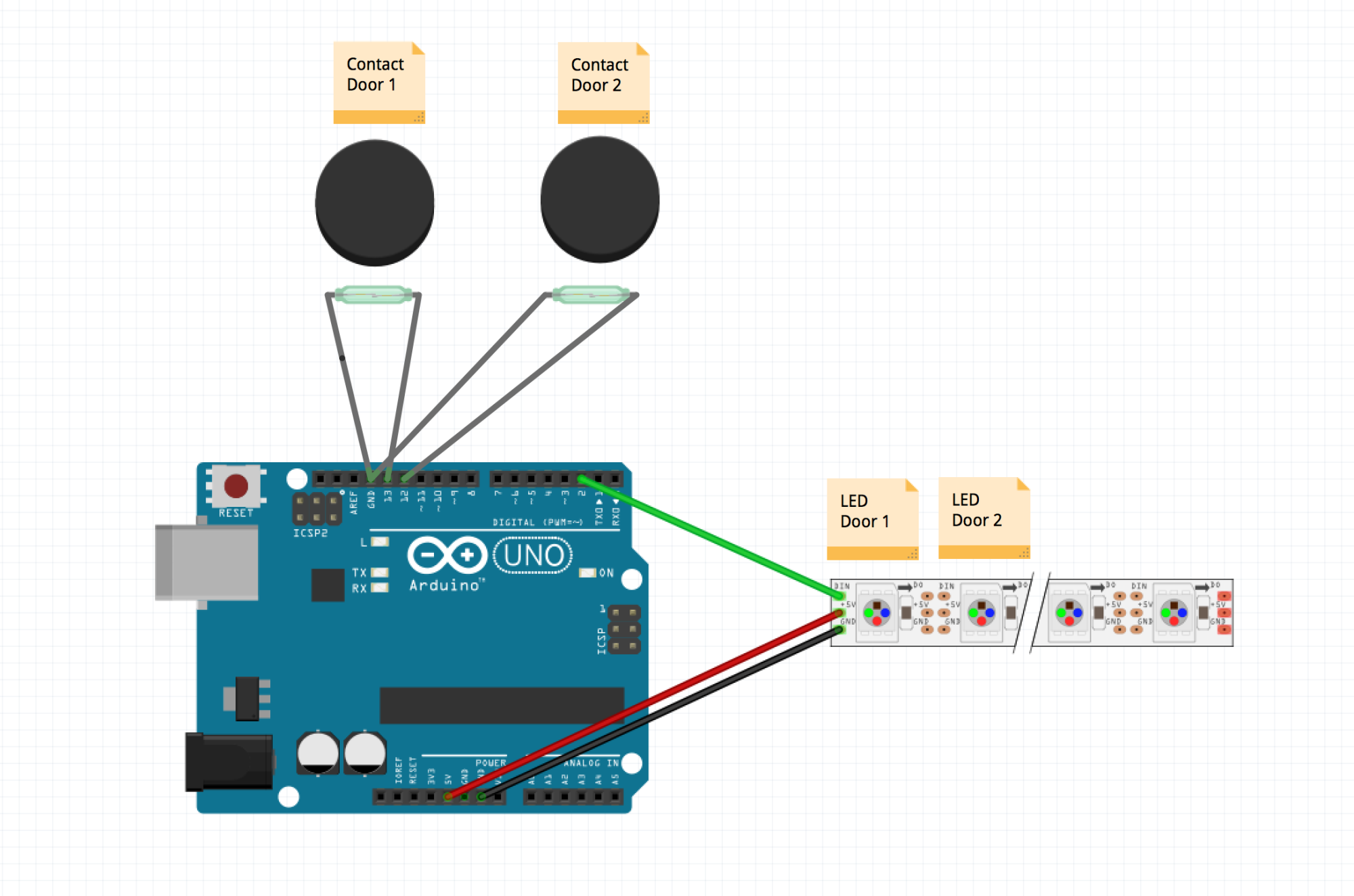
                        0_1486025374805_Capture d’écran 2017-02-02 à 09.37.06.png

                        What I would like is to replace the leds with a logo on the mirror.
                        (I have a door on the street side and a door on the garden side which explains the logos)


                        0_1486025879937_logos-rouge.png
                        1_1486025879938_logo-verts.png

                        Here is the code of my Arduino project.

                        #include   
                        
                        const int  C_buttonPin = 12; // Door 1 
                        const int  H_buttonPin = 13; // Door 2
                        
                        const int ledsPin = 2;
                        const int nombreLeds = 2;
                        const int intervalleTemps = 200;
                        Adafruit_NeoPixel pixels = Adafruit_NeoPixel(nombreLeds, ledsPin);
                        
                        int C_buttonState = 0;         // Etat actuel Door 1
                        int H_buttonState = 0;         // Etat actuel Door 2
                        
                        // the setup routine runs once when you press reset:
                        void setup() {
                          // initialize serial communication at 9600 bits per second:
                          Serial.begin(9600);
                          // make the pushbutton's pin an input:
                          pinMode(12, INPUT_PULLUP);
                          pinMode(13, INPUT_PULLUP);
                          pixels.begin();
                          pixels.show();
                        }
                        
                        // the loop routine runs over and over again forever:
                        void loop() {
                        
                         int sensorValC = digitalRead(12); Serial.println(sensorValC);
                         int sensorValH = digitalRead(13); Serial.println(sensorValH);
                        
                          
                        if (sensorValC == 1) 
                        {
                        pixels.setPixelColor(0, 255,0,0);  
                        }
                        else
                        {
                        pixels.setPixelColor(0, 124,252,0);
                        }
                        
                        if (sensorValH == 1) 
                        {
                        pixels.setPixelColor(1, 255,0,0); 
                        }
                        else
                        {
                        pixels.setPixelColor(1, 124,252,0); 
                        }


                        pixels.show();
                        delay(intervalleTemps);
                        
                        }
                        

                        Ho and sorry for my bad english (i’m from Belgium)

                        morozgrafixM 1 Reply Last reply Reply Quote 1
                        • morozgrafixM Offline
                          morozgrafix Moderator @istepgueu
                          last edited by

                          @istepgueu thanks for the write up. I was just looking for similar sensors for my garage.

                          1 Reply Last reply Reply Quote 1
                          • istepgueuI Offline
                            istepgueu
                            last edited by

                            I think it’s possible to adapt MMM-Buttons for my project.
                            https://github.com/Jopyth/MMM-Buttons

                            I connected my 1 garage sensor to PIN 25 and GND
                            I connected my 2 garage sensor to PIN 24 and GND
                            How can i show a png file when sensor 1 (or 2) is “pressed” ?

                            Thanks a lot ;-)

                            1 Reply Last reply Reply Quote 0
                            • istepgueuI Offline
                              istepgueu
                              last edited by

                              Yes !

                              I have successfuly installed MMM-buttons and connect my first magnetic sensor to pin24

                              When contact is ON, nothing happen.
                              When contact is OFF, I have the notification message and the RPI Shutdown.

                              Now I’m a bit stuck for the rest.
                              I do not see how to display images in a specific place in the mirror.

                              Here is the working code :

                              {
                                  module: 'MMM-Buttons',
                                  config: {
                                      buttons: [
                              
                              {
                                              pin: 24,
                                              name: "power",
                                              longPress: {
                                                  title: "Power off",
                                                  message: "Keep pressed for 3 seconds to shut down",
                                                  imageFA: "power-off",
                                                  notification: "REMOTE_ACTION",
                                                  payload: {action: "SHUTDOWN"}
                                              },
                                              shortPress: undefined
                                          }
                              
                                      ]
                                  }
                              },
                              
                              morozgrafixM 1 Reply Last reply Reply Quote 1
                              • morozgrafixM Offline
                                morozgrafix Moderator @istepgueu
                                last edited by

                                @istepgueu as far as I understand MMM-Buttons only sends notifications when button is triggered (long or short press). Your sensor is acting as a long button press and you got it working so far. What I think you need is a custom module to display status of your garage door(s) that is capable of accepting notification from MMM-buttons and then changing message displayed (or image) on the MM. One thing to keep in mind (as far as i know) is that MMM-buttons assumes that no buttons are pressed when MM starts, in your case you may need some additional logic to account for times when MM starts when your garage door is opened. @Jopyth is the original creator of MMM-buttons and may have some ideas on how to deal with that.

                                istepgueuI 1 Reply Last reply Reply Quote 0
                                • istepgueuI Offline
                                  istepgueu @morozgrafix
                                  last edited by

                                  @morozgrafix Ok I understand the principle. I will try to look at this but I do not have enough skills.

                                  On the way to create a module “MMM-doors-sensor”

                                  1 Reply Last reply Reply Quote 1
                                  • istepgueuI Offline
                                    istepgueu
                                    last edited by

                                    I have create a MMM-door-sensor ‘module’
                                    https://github.com/istepgueu/MMM-door-sensor

                                    The module receive SHOW_ALERT and HIDE_ALERT from MMM-Buttons but I do not know how to show such or such text (Toto/Tata) according to the received notification.

                                    Any help is welcome.
                                    Thank you very much ;)

                                    strawberry 3.141S 1 Reply Last reply Reply Quote 0
                                    • strawberry 3.141S Offline
                                      strawberry 3.141 Project Sponsor Module Developer @istepgueu
                                      last edited by

                                      @istepgueu you need a getDom function where you render your images.

                                      then in the notification received save the state in variables then call updateDom.

                                      in getDom you render the images based on the state

                                      Please create a github issue if you need help, so I can keep track

                                      istepgueuI 1 Reply Last reply Reply Quote 1
                                      • istepgueuI Offline
                                        istepgueu @strawberry 3.141
                                        last edited by

                                        @strawberry-3.141
                                        Thank you for the help !
                                        I understand the principle but not knowing javascript, I have a little trouble with the variables.

                                        This is my (not working) code :

                                        /* global Module */
                                        
                                        /* Magic Mirror
                                         * Module: MMM-door-sensor
                                         *
                                         * By iStepgueu http://www.twitter.com/istepgueu
                                         * MIT Licensed.
                                         */
                                        
                                        Module.register("MMM-door-sensor",{
                                        
                                        	// Default module config.
                                        	defaults: {
                                        		text: "Hello World!"
                                        	},
                                        
                                        
                                        	// Define start sequence.
                                        	start: function() {
                                        		Log.info("Starting module: " + this.name);
                                        
                                        	},


                                        	notificationReceived: function(notification, payload, sender) {
                                        		if (sender) {
                                        			Log.log(this.name + " received a module notification: " + notification + " from sender: " + sender.name);
                                        			if (notification === "REMOTE_ACTION") {
                                        				this.sendSocketNotification(notification, payload);	
                                        
                                        				var door_state = "close.png";			
                                        	
                                        				this.updateDom();				
                                        			
                                        			}
                                        		} else { 
                                        			if (notification === "DOM_OBJECTS_CREATED") {
                                        				this.sendSocketNotification("REQUEST_DEFAULT_SETTINGS");
                                        			
                                        				var door_state = "open.png";
                                        
                                        
                                        				this.updateDom();
                                        
                                        
                                        			}
                                        		}
                                        		
                                        		},
                                        
                                        
                                        		getDom: function() {
                                        
                                        		var wrapper = document.createElement("div");
                                        		return door_state;
                                        		wrapper.innerHTML = '<img src=" + door_state + " />';
                                        		return wrapper;
                                        	}


                                        });
                                        
                                        
                                        strawberry 3.141S 1 Reply Last reply Reply Quote 0
                                        • strawberry 3.141S Offline
                                          strawberry 3.141 Project Sponsor Module Developer @istepgueu
                                          last edited by strawberry 3.141

                                          @istepgueu

                                          Module.register("MMM-door-sensor",{
                                          
                                          	// Default module config.
                                          	defaults: {
                                          		text: "Hello World!"
                                          	},
                                          
                                          	// Define start sequence.
                                          	start: function() {
                                          		Log.info("Starting module: " + this.name);
                                          	},
                                          
                                          	notificationReceived: function(notification, payload, sender) {
                                          		if (sender) {
                                          			Log.log(this.name + " received a module notification: " + notification + " from sender: " + sender.name);
                                          			if (notification === "DOOR_STATE") {
                                          
                                          				this.door_state = payload;			
                                          	
                                          				this.updateDom();				
                                          			
                                          			}
                                          		} 
                                          		
                                          	},
                                          
                                          
                                          	getDom: function() {
                                          
                                          		var wrapper = document.createElement("div");
                                          if(this.door_state){
                                          		wrapper.innerHTML = '<img src=" + this.door_state + " />';
                                          } else {
                                          		wrapper.innerHTML = 'No door state present.';
                                          }
                                          		return wrapper;
                                          	}
                                          });
                                          

                                          config mmm-button

                                          {
                                                          pin: 24,
                                                          name: "power",
                                                          longPress: {
                                                              title: "Power off",
                                                              message: "Keep pressed for 3 seconds to shut down",
                                                              imageFA: "power-off",
                                                              notification: "DOOR_STATE",
                                                              payload: "close.png"
                                                          },
                                                          shortPress: undefined
                                                      }
                                          

                                          you would therefore need a button released to send open.png

                                          Please create a github issue if you need help, so I can keep track

                                          istepgueuI 1 Reply Last reply Reply Quote 3
                                          • istepgueuI Offline
                                            istepgueu @strawberry 3.141
                                            last edited by

                                            @strawberry-3.141 Thank you !! It’s working :-)

                                            1 Reply Last reply Reply Quote 0

                                            Hello! It looks like you're interested in this conversation, but you don't have an account yet.

                                            Getting fed up of having to scroll through the same posts each visit? When you register for an account, you'll always come back to exactly where you were before, and choose to be notified of new replies (either via email, or push notification). You'll also be able to save bookmarks and upvote posts to show your appreciation to other community members.

                                            With your input, this post could be even better 💗

                                            Register Login

                                            • 1
                                            • 2
                                            • 1 / 2
                                            • First post
                                              Last post
                                            Enjoying MagicMirror? Please consider a donation!
                                            MagicMirror created by Michael Teeuw.
                                            Forum managed by Sam, technical setup by Karsten.
                                            This forum is using NodeBB as its core | Contributors
                                            Contact | Privacy Policy

