Read the statement by Michael Teeuw here.
Problem with Weather Underground Forecast
-
Hi Folks, my first Post. Mirror is still in work and i hav a Problem with the module MMM-WunderGround. Each Time I put it in my config.js the mirror will not start. I don´t know what I am doing wrong, I put the Code
modules: [
{
    module: 'MMM-WunderGround',
    position: 'top_right',
    config: {
        apikey: 'xxxxxxxxxxxxx', // private; don't share! Put in my API
        pws: 'pws:IGELDERL219', //culemborg Put in miy pws
        hourly: '1',
        fctext: '1',
        fcdaycount: "5",
        fcdaystart: "0",
        hourlyinterval: "3",
        hourlycount: "2",
        alerttime: 10000,
        alerttruncatestring: "english:",
	roundTmpDecs: 1,
	UseCardinals: 0,
	layout: "horizontal",
	sysstat: 0
    }
};
]
betweeen my Calendar and the Newsfeed, I try it also without modules:[ ], but it will not work, any Idea?
-
This is how it should look like … the
modules : []stuff should be there once only. And you closed the MMM-WunderGround module with a ; which tells javascript there is nothing to add afterwards, the command is complete. Therefore the rest is invalid syntax :)/* Magic Mirror Config Sample * * By Michael Teeuw http://michaelteeuw.nl * MIT Licensed. */ var config = { port: 8080, ipWhitelist: ["127.0.0.1", "::ffff:127.0.0.1", "::1"], // Set [] to allow all IP addresses. language: "en", timeFormat: 24, units: "metric", modules: [ { module: "alert", }, // OTHER MODULES .. blabla { module: 'MMM-WunderGround', position: 'top_right', config: { apikey: 'xxxxxxxxxxxxx', // private; don't share! Put in my API pws: 'pws:IGELDERL219', //culemborg Put in miy pws hourly: '1', fctext: '1', fcdaycount: "5", fcdaystart: "0", hourlyinterval: "3", hourlycount: "2", alerttime: 10000, alerttruncatestring: "english:", roundTmpDecs: 1, UseCardinals: 0, layout: "horizontal", sysstat: 0 } }, // ADDITIONAL MODULES .. { module: "newsfeed", position: "bottom_bar", config: { feeds: [ { title: "New York Times", url: "http://www.nytimes.com/services/xml/rss/nyt/HomePage.xml" } ], showSourceTitle: true, showPublishDate: true } }, ] }; /*************** DO NOT EDIT THE LINE BELOW ***************/ if (typeof module !== "undefined") {module.exports = config;} -
@yawns said in Problem with Weather Underground Forecast:
{
Thank you yawns, that fix the Mirror starts but the module did not show up, the first problem was because I am an absolute NOOB in Javascript,
-
@xeroxu
No worries. So you don’t see anything of this module? -
@yawns , Right I see nottthin, no Cuurent weather no forecast , nothing ,I dont know in the configuration options I´ve read about Locid, but i only find pws in my MMM-WunderGround.js. Is that the error
-
@xeroxu said in Problem with Weather Underground Forecast:
in the configuration options I´ve read about Locid, but i only find pws in my MMM-WunderGround.js. Is that the error
I see the locid reference in the config options, too, but I don’t think that’s your problem. I just used your
pws: 'pws:IGELDERL219',in my WunderGround and it loads and displays just fine. -
@Mykle1 no chance it will no show up :…( where can I check my Weathe Underground API KEY, maybe is soething wrong with tthe API KEY, Whats the difference between API KEY and KEY ID? Sorry for my dumb questions,
-
@xeroxu said in Problem with Weather Underground Forecast:
where can I check my Weathe Underground API KEY, maybe is soething wrong with tthe API KEY,
You can check your API key by going to https://www.wunderground.com/ and signing into your account. Once you’ve signed in, at the bottom of the page is
Weather API. Click that! Your API KEY will be on the right side of the page, about 1/3 of the way down from the top. Copy and paste it into your config.js so it looks like this:
apikey: '1234567891011',
If you manually typed yours in you may have made a mistake and that’s all it takes to get no response from WonderGround. -
@Mykle1 This also not works, I regenerate the Key and with the New One also nothing. Í think I stay on the default weather modules .
-
@Mykle1 There must be something wrong with the apikey. iI try it with the wuforecast module, and here also nothing show up.I have free Membership and choose the anvil plan. Have I to make big changes in the weatherunderground.js? I put in my API and Location pws.
-
@xeroxu said in Problem with Weather Underground Forecast:
There must be something wrong with the apikey. iI try it with the wuforecast module, and here also nothing show up.I have free Membership and choose the anvil plan. Have I to make big changes in the weatherunderground.js? I put in my API and Location pws.
You shouldn’t make any changes in the MMM-WunderGround.js file. Only make changes to the config.js file. If you have made changes to your MMM-WunderGround.js file then I suggest you revert them. If you can’t remember exactly what you changed then it would be easier for you to delete the entire folder and
git clone https://github.com/RedNax67/MMM-WunderGround.gitinto your~/MagicMirror/modules/directory. Then add this to your config.js file, entering your WunderGround API key exactly and your pws{ disabled: false, module: 'MMM-WunderGround', // Just for forecast w/css entry position: 'top_right', config: { apikey: 'YOUR_API_KEY', // private; don't share! pws: 'pws:YOUR_PWS', // Richmondtown Weather Station - Very Cool currentweather: 0, coloricon: true, hourly: '1', fctext: '1', fcdaycount: "10", fcdaystart: "0", hourlyinterval: "2", hourlycount: "1", animationSpeed: 5000, alerttime: 10000, alerttruncatestring: "english:", roundTmpDecs: 0, UseCardinals: 1, layout: "vertical", windunits: "mph", sysstat: "0" } },That should get you this:
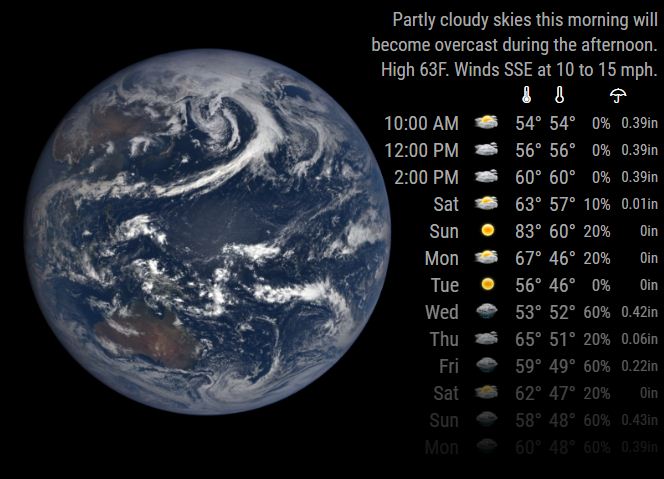
-
@Mykle1 Thank you Mykle1,now it work,now i hve to make the colour and Icon configuration, the Earth did net not show up but thats no bi deal you helped me so much. I stil got a nothe Problem with the startuo I have to Fix , maybe Ill find the Answer here in the Forum.
-
@xeroxu said in Problem with Weather Underground Forecast:
Thank you Mykle1,now it work,now i hve to make the colour and Icon configuration, the Earth did net not show up but thats no bi deal you helped me so much. I stil got a nothe Problem with the startuo I have to Fix , maybe Ill find the Answer here in the Forum.
You’re welcome. You are not going to see the earth as part of WunderGround. That is another module I am working on. It’s giving me some trouble right at the very end and I can’t seem to solve it.
You may also want to change this in your config.js file
currentweather: 0,Change the 0 to 1What is your problem with startup?
-
@Mykle1 Each Time I starr reboot my Rasberry 3 chromium starts and says that he is not been close7 right before shutdown (cant explain it in english) but I found nothing in an atutostart.
-
Are you running MM in Kiosk mode?
-
@Mykle1 where can I see that.sorry I saw it too late that you where on the chat
-
Some people set up chromium to autostart in Kiosk mode. That is why I asked.
-
@Mykle1 Thank you you also ssolve this problem, It I s great to know that here are People that can help you so fast, :clap:
-
@xeroxu
You’re welcome. Glad I could help you. Have fun! :thumbsup_tone1:

Hello! It looks like you're interested in this conversation, but you don't have an account yet.
Getting fed up of having to scroll through the same posts each visit? When you register for an account, you'll always come back to exactly where you were before, and choose to be notified of new replies (either via email, or push notification). You'll also be able to save bookmarks and upvote posts to show your appreciation to other community members.
With your input, this post could be even better 💗
Register Login