MagicMirror Forum
    • Recent
    • Tags
    • Unsolved
    • Solved
    • MagicMirror² Repository
    • Documentation
    • 3rd-Party-Modules
    • Donate
    • Discord
    • Register
    • Login
    A New Chapter for MagicMirror: The Community Takes the Lead
    Read the statement by Michael Teeuw here.

    [MMM-PIR-Sensor] Install failing

    Scheduled Pinned Locked Moved Troubleshooting
    75 Posts 19 Posters 105.5k Views 18 Watching
    Loading More Posts
    • Oldest to Newest
    • Newest to Oldest
    • Most Votes
    Reply
    • Reply as topic
    Log in to reply
    This topic has been deleted. Only users with topic management privileges can see it.
    • johnnyboyJ Offline
      johnnyboy @STEFF92
      last edited by johnnyboy

      This post is deleted!
      S 1 Reply Last reply Reply Quote 0
      • S Offline
        STEFF92 @johnnyboy
        last edited by

        @johnnyboy yes i tried it like this :

                       {
        			module: 'MMM-PIR-Sensor',
        			config: {
        				sensorPIN: 23,
                                        powerSaving: true,
                                        relayPIN: none,
                                        relayOnState: 1
        			}
        		},
        

        But it dosent work. Same problem as before.

        johnnyboyJ strawberry 3.141S 2 Replies Last reply Reply Quote 0
        • johnnyboyJ Offline
          johnnyboy @STEFF92
          last edited by johnnyboy

          This post is deleted!
          1 Reply Last reply Reply Quote 0
          • strawberry 3.141S Offline
            strawberry 3.141 Project Sponsor Module Developer @STEFF92
            last edited by

            @STEFF92 none is not a valid js value either use

            {
              module: 'MMM-PIR-Sensor',
              config: {
                sensorPIN: 23,
                powerSaving: true,
                relayPIN: false,
                relayOnState: 1
              }
            },
            

            or like this, because relayPIN is set to false by default

            {
              module: 'MMM-PIR-Sensor',
              config: {
                sensorPIN: 23,
                powerSaving: true,
                relayOnState: 1
              }
            },
            

            Please create a github issue if you need help, so I can keep track

            S 1 Reply Last reply Reply Quote 1
            • S Offline
              STEFF92 @strawberry 3.141
              last edited by

              @strawberry-3.141 Thanks, now the config file and the magic mirror surface are running but there is no response from the sensor. i have moved the potentiometer but the screen doesnt turn off. Do you know any possible mistake i could have made?

              strawberry 3.141S 1 Reply Last reply Reply Quote 0
              • strawberry 3.141S Offline
                strawberry 3.141 Project Sponsor Module Developer @STEFF92
                last edited by

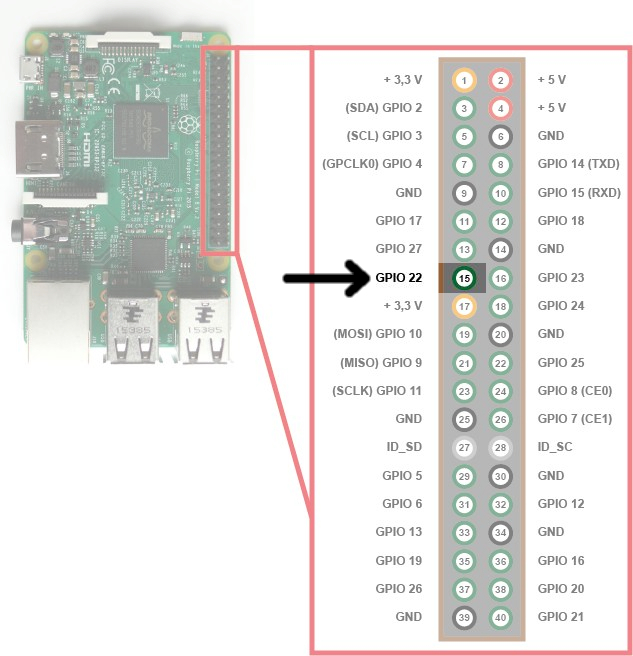
                @STEFF92 I guess you might defined the wrong pin number according on your setup you use gpio23 which is pin 16 in this diagram https://forum.magicmirror.builders/uploads/files/1485851152518-raspberry-pi-15b.jpg, but I never did something with the gpio of the pi

                Please create a github issue if you need help, so I can keep track

                1 Reply Last reply Reply Quote 1
                • O Offline
                  Oliver_Tooth
                  last edited by

                  Hi all,

                  I’ve been trying to instal this module, but i’m bumping into the issue of needing node module 53, as it was compiled with 48. I’ve been at this all day and i’m really struggling. Can anyone offer any advice? Thanks in advance!

                  yawnsY 1 Reply Last reply Reply Quote 0
                  • yawnsY Offline
                    yawns Moderator @Oliver_Tooth
                    last edited by

                    @Oliver_Tooth
                    Please search this forum for “version mismatch”. I’m on my smartphone right now, otherwise I would post the command necessary.
                    You need to rebuild the module with a special command providing the version info related to your system

                    O 1 Reply Last reply Reply Quote 0
                    • O Offline
                      Oliver_Tooth @yawns
                      last edited by

                      @yawns Cheers for this. I’ve had a quick browse but i’m struggling to find anything that works. If your able to post the command whenever you’re able to i’d really appreciate it! thanks.

                      yawnsY 2 Replies Last reply Reply Quote 0
                      • yawnsY Offline
                        yawns Moderator @Oliver_Tooth
                        last edited by

                        @Oliver_Tooth
                        Sure, tomorrow morning

                        1 Reply Last reply Reply Quote 0
                        • yawnsY Offline
                          yawns Moderator @Oliver_Tooth
                          last edited by

                          @Oliver_Tooth

                          all right …

                          Open a terminal and do this:

                          cd ~/MagicMirror
                          npm list | grep electron
                          

                          You will see something like this:

                          ├─┬ electron-prebuilt@1.4.5
                          │ ├─┬ electron-download@3.0.1
                          npm ERR! peer dep missing: grunt@~0.4.0, required by grunt-yamllint@0.2.0
                          

                          Note the version of electron, in this case it is 1.4.5, if it is different for you please replace the version accordingly.
                          Afterwards run this:

                          cd modules/MMM-PIR-Sensor
                          npm rebuild --runtime=electron --target=1.4.5 --disturl=https://atom.io/download/atom-shell --abi=50
                          

                          Now the module should not throw a version mismatch error any more.

                          O 2 Replies Last reply Reply Quote 0
                          • O Offline
                            Oliver_Tooth @yawns
                            last edited by

                            @yawns Hi! my prebuilt version was slightly different, so i changed that in the target= field, does the abi= number need to be 53, not 50? I’ve tried it as 50 and it’s still throwing the error.

                            1 Reply Last reply Reply Quote 0
                            • O Offline
                              Oliver_Tooth @yawns
                              last edited by

                              @yawns I’ve been reading up further on this, and i’ve found that version 53 doesn’t actually exist yet, and 51 is currently the latest. Have you any idea how i’d get this to work with this information? thanks.

                              1 Reply Last reply Reply Quote 0
                              • T Offline
                                thoimi
                                last edited by

                                hi there,

                                finally i had the time to work / finish my magic mirror.
                                Just the PIR-Sensor-Plugin doesn’t work… After I updated the MM to 2.1.1 I did a fresh install of the script which worked without an error. Yay!

                                BUT the script is not turning off my monitor… I connected the sensor to GPIO04 / BCM07 and tried to change the SensorPin-Number (from 4 to 7)

                                I put the sensor in a black box so the display should shut down after starting Magic Mirror, right?

                                1 Reply Last reply Reply Quote 0
                                • R Offline
                                  Richard238
                                  last edited by Richard238

                                  Hmmmm, black screen, and nothing on a browser at http://192.168.n.nn:8080/ either.

                                  		module: 'MMM-PIR-Sensor',
                                  		config: {
                                  		sensorPIN: 22,
                                                  powerSaving: true,
                                                  relayPIN: false,
                                                  powerSavingDelay: 0,
                                                  relayOnState: 1
                                  			// See 'Configuration options' for more information.
                                  		}
                                  	},
                                  
                                  1 Reply Last reply Reply Quote 0
                                  • P Offline
                                    pepemujica
                                    last edited by

                                    Do I need anything else than the raspi, cable and pir sensor?
                                    An arduino for example?

                                    Kind regards

                                    yawnsY 1 Reply Last reply Reply Quote 0
                                    • yawnsY Offline
                                      yawns Moderator @pepemujica
                                      last edited by

                                      @pepemujica
                                      No. You can connect the PIR sensor to the GPIO pins of your raspberry (make sure your wiring is proper) and work with the PIR sensor after installing the specific libraries


                                      1 Reply Last reply Reply Quote 0

                                      Hello! It looks like you're interested in this conversation, but you don't have an account yet.

                                      Getting fed up of having to scroll through the same posts each visit? When you register for an account, you'll always come back to exactly where you were before, and choose to be notified of new replies (either via email, or push notification). You'll also be able to save bookmarks and upvote posts to show your appreciation to other community members.

                                      With your input, this post could be even better 💗

                                      Register Login

                                      • 1
                                      • 2
                                      • 3
                                      • 4
                                      • 4 / 4
                                      • First post
                                        Last post
                                      Enjoying MagicMirror? Please consider a donation!
                                      MagicMirror created by Michael Teeuw.
                                      Forum managed by Sam, technical setup by Karsten.
                                      This forum is using NodeBB as its core | Contributors
                                      Contact | Privacy Policy