Read the statement by Michael Teeuw here.
MMM-cryptocurrency - v1.4
-
Re: MMM-cryptocurrency - v1.1
@matteodanelli great module. I works pretty fine. Thank you for this.At the moment we have 3 options to view the change of the currency in 1h, 24h and 7d.
Can you add an option to view the change since the purchase value?Or how I can do this by myself?
BR
-
@jimador Hi!
Unfortunately, it’s not easy to select a custom starting date, because I use an external service which provides me only that history.
Tracking myself the currency change is expensive and I’ll not do in the next future.
But, if you know some web services able to do that I’m really happy to implement this feature :) -
@matteodanelli Hi have reinstalled the module and keeps showing the same error on the logs:
modules/MMM-cryptocurrency//MMM-cryptocurrency.js @68: TypeError: undefined is not a function (evaluating ‘this.config.headers.includes(‘change1h’)’)
It seems that it can be an issue on line 68 on that file. If I copy and paste the content of the file on JSHint.com, it shows me that there is an error on some lines:
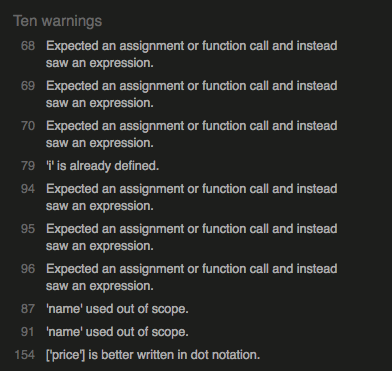
I would love it to have this module on detail mode, but it seems that is only working properly in logo mode for now.
-
@ArkantosArk Hey,
I make a bug fix where you outlined some problems. You can checkout updated code from repository.Now you should have the module working in both configuration.
Let me know.Thank you!
-
@matteodanelli Hi!
I can see your update and now JShint doesn’t find any issues. However I still have the same exact issue as my previous post. Can this be a browser related issue? I am using Midori instead of Chrome (cause I’m implementing everything on a Raspberry pi 1).
Anyway thanks a lot for correcting those bugs, I’m sure that would help somebody with the same issue!
-
@ArkantosArk Yes, midori doesn’t support ES6 and the module makes use of it. Try to run it and access it via a browser on another machine for testing purposes it should probably work.
-
@ArkantosArk As @strawberry-3-141 mentioned, I use ES6 in the module and so some old browsers aren’t working. Midori uses an old version of the web engine, but I know that it’s the best browser on the RPi1.
However, I tried to replace in my module a function which creates a problem. I am not sure to have solved totally the problem because I cannot test on Midori.
I’ve updated the module so you can test it now, hoping that it’s working, or at least it shows less problems :)Let me know!
-
@matteodanelli Now it’s working! thanks a lot for this I feel really privileged!. Thanks for taking the effort to update the module just for this.
-
Thank you for this module.
In order to add a new coin, I’ve added into sparklineIds the id, eg. chainlink: 1975,
ran an nmp install into the MMM-cryptocurrency module, but still no luck,
sparklineId is correct, am I missing something?
Thanks in advance. -
@canadrian said in MMM-cryptocurrency - v1.1:
chainlink: 1975
Hi,
I had configured module to get only top 25 currencies, in order to be more efficient.
Now I’ve updated module in order to get all 100. If you want to check it out last version you should be able to get it. -
@matteodanelli works great, thank you!
-
Hey @matteodanelli ,
thank you for this great module.
I added an alternative display mode to see the changes within the logo view.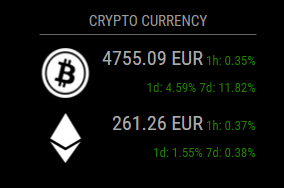
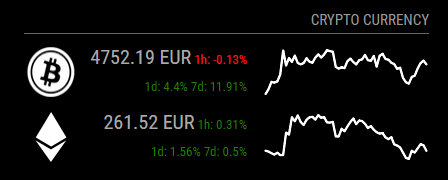
I made a pull request. Here are the changes:
- 1 hour , 1 day and 7days changes can be displayed by adding ‘logoWithChanges’ as display type.
- option and screenshots added to README.md
-
@SvenSommer Thank you! Great additions!
-
Is there a way to add a custom page within the module? I’m specifically looking to add more coins of my own that you don’t include by default, but every time I do it gets overwritten by a pull.
-
@rmeskill Hi, sure! You can contribute to the project if you want :)
You can either create a fork of my repository and develop it with your needs. But you’ll lose my updates.
Else, to keep updated, fork the repository and then make a pull request to merge your fork with my repository.
I’ll accept it and everyone will have your useful work :) -
@SvenSommer Amazing Changes.
Thank you both. My question:
How to change the font size?
I was in MMM-cryptocurrency.css but there is no font.
thanksedit: i found it
.mmm-cryptocurrency-icon > tr > td {
    padding-bottom: 10px;
    text-align: left;
	font-size: 80%;
}
How can i show other graphs?

-
@fox Hi,
About the graphs, you should add your currency inside sparklineIds array (in Js file), which have to be taken directly from coinmarketcap.com.Let me know if it works!
-
@matteodanelli thank you.
But i dont know where the sparkline Id is written in coinmarketcap.
e.g. for IOTA: https://coinmarketcap.com/currencies/iota/#tools ? -
@fox You can find id in the homepage of coinmarketcap. Just get the link of the image of the graph of the desired currency.
EG. For IOTA, link is https://files.coinmarketcap.com/generated/sparklines/1720.png, so id is 1720.
-
@matteodanelli Thank you! It worked and again - what an amazing module. Thank you very much.


Hello! It looks like you're interested in this conversation, but you don't have an account yet.
Getting fed up of having to scroll through the same posts each visit? When you register for an account, you'll always come back to exactly where you were before, and choose to be notified of new replies (either via email, or push notification). You'll also be able to save bookmarks and upvote posts to show your appreciation to other community members.
With your input, this post could be even better 💗
Register Login