MagicMirror Forum
    • Recent
    • Tags
    • Unsolved
    • Solved
    • MagicMirror² Repository
    • Documentation
    • 3rd-Party-Modules
    • Donate
    • Discord
    • Register
    • Login
    A New Chapter for MagicMirror: The Community Takes the Lead
    Read the statement by Michael Teeuw here.

    MMM-FHEM shows values from FHEM devices ...

    Scheduled Pinned Locked Moved Utilities
    40 Posts 14 Posters 41.2k Views 15 Watching
    Loading More Posts
    • Oldest to Newest
    • Newest to Oldest
    • Most Votes
    Reply
    • Reply as topic
    Log in to reply
    This topic has been deleted. Only users with topic management privileges can see it.
    • FistandantilusF Offline
      Fistandantilus
      last edited by

      Hi,

      thx for your module. It exactly meets my requirements! One thing I´m currently struggeling is the alignment. I´m using:

      body {
      margin: 30px;
      height: calc(100% - 60px);
      width: calc(100% - 60px);
      }

      in my custom. css. The FHEM module is located at top_right but it has not the same margin as other modules. I made the border vissible using border-style: solid; to make see if it is the text alignment or something else. Se the attachment to get a better picture of what I´m talking about. Does anybody have an idea how to move it left?

      regards,
      F.
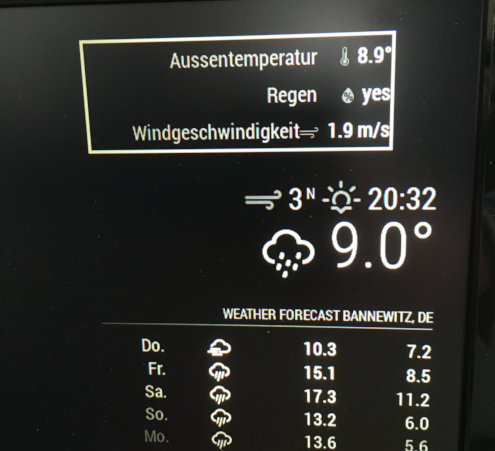
      0_1493908642504_Bildschirmfoto 2017-05-04 um 16.30.28.png

      1 Reply Last reply Reply Quote 0
      • FistandantilusF Offline
        Fistandantilus
        last edited by

        OK, fixed it by myself. Had to remove the max-width: 300px; from fhem.css.

        B 1 Reply Last reply Reply Quote 0
        • B Offline
          BenRoe Module Developer @Fistandantilus
          last edited by

          @Fistandantilus you can edit the fhem.css on your mm and remove it. Seems the simplest way.

          1 Reply Last reply Reply Quote 0
          • FistandantilusF Offline
            Fistandantilus
            last edited by

            Yes, I have done that :)

            1 Reply Last reply Reply Quote 0
            • W Offline
              Woody
              last edited by

              Is it possible to show differend icons depending on the device state like Fhem does it?

              B 1 Reply Last reply Reply Quote 0
              • B Offline
                BenRoe Module Developer @Woody
                last edited by

                @Woody no it’s not possible.

                1 Reply Last reply Reply Quote 0
                • Da-ne-ezyD Offline
                  Da-ne-ezy
                  last edited by

                  Is there any chance of doing an update of this module with FHEM Username and Password?

                  FREE IT-Projects and Raspberry Pi Tutorials on my Website: www.danykilian.com

                  B 2 Replies Last reply Reply Quote 0
                  • D Offline
                    dominic
                    last edited by

                    Hi everyone
                    I’ve tried to install and activate the MMM-FHEM module but with not to much success. There was actually no problem neither with the installation nor the configuration but I can’t get it running.

                    FHEM is running on the Rpi.
                    Here is my config.js.

                    //FHEM
                    		 {
                        module: 'MMM-FHEM',
                        position: 'bottom_bar',
                        config: {
                          host: ['localhost'],
                          port: '8083',
                          https: false,
                          devices: [
                                      { deviceName: 'ESPEasy_ESP_Test_DHT',
                                        deviceReadings: [
                                                          { name: 'Temperatur', icon: 'wi wi-thermometer', suffix: '°' },
                                                          { name: 'sate', icon: 'wi wi-humidity', suffix: 'test%' },
                                                        ],
                                      },
                                     
                                    ],
                        },
                      },


                    	]
                    

                    i hope you can help me.
                    greetings from Germany

                    B 1 Reply Last reply Reply Quote 0
                    • B Offline
                      BenRoe Module Developer @dominic
                      last edited by

                      @dominic remove the squared brackets from the host row.

                      D 1 Reply Last reply Reply Quote 0
                      • B Offline
                        BenRoe Module Developer @Da-ne-ezy
                        last edited by

                        @Da-ne-ezy hi currently i have no time to research how to implement that from nodejs side.
                        If someone has an idea, please do a pull request on github.

                        1 Reply Last reply Reply Quote 0
                        • D Offline
                          dominic @BenRoe
                          last edited by

                          @BenRoe thanks for the answer. I have removed the squared brackets but it is still the same. The modul will not displayed. Do you have an other idea ?

                          1 Reply Last reply Reply Quote 0
                          • D Offline
                            DerRheingold
                            last edited by

                            Hi,
                            I have a similar issue: after installing the module and adding it to the config.js I don’t see it on the screen. After a restart all other widgets are shown. I don’t even see an empty field or such where this widget should be shown :(

                            Am I missing anything maybe?

                            For the sake of debugging, I’m trying to access a publicly available FHEM instance.

                            {
                            			module: 'MMM-FHEM',
                            			position: 'top_bar',
                            			config: {
                            				host: 'http://fhem.waschto.eu',
                            				port: '8083',
                            				https: false,
                            				devices: [
                            					  { deviceName: 'FL_Temperatur',
                            						deviceReadings: [
                            										  { name: 'temperature', icon: 'wi wi-thermometer', suffix: '°' },
                            										  { name: 'humidity', icon: 'wi wi-humidity', suffix: '%' },
                            										],
                            					  }
                            				]
                            			}
                            		}
                            

                            Might I have made a mistake installing the dependencies? Is “sudo npm install underscore” or “request” not the right way to do it?

                            1 Reply Last reply Reply Quote 0
                            • B Offline
                              BenRoe Module Developer @Da-ne-ezy
                              last edited by

                              @Da-ne-ezy try this.

                              host: 'username:password@ip-of-your-fhem-server'
                              

                              Please let me know if it works.

                              Da-ne-ezyD 1 Reply Last reply Reply Quote 0
                              • Da-ne-ezyD Offline
                                Da-ne-ezy @BenRoe
                                last edited by

                                @BenRoe Sorry doesn’t work for me. The module doesn’t even appear. My config should be fine…

                                   {
                                	module: 'MMM-FHEM',
                                	position: 'bottom_bar',
                                       config: {
                                			host: 'xxxx:xxxx@xxx.xxx.xxx.xx',
                                			port: '8083',
                                			https: true,
                                				devices: [
                                					{ deviceName: 'WZ_Heizung_Clima',
                                						deviceReadings: [
                                						{ name: 'measured-temp', icon: 'wi wi-thermometer', suffix: '°' },
                                						{ name: 'desired-temp', icon: 'wi wi-thermometer', suffix: '°' },
                                									       ],
                                					},  
                                						],
                                		},
                                	},
                                

                                FREE IT-Projects and Raspberry Pi Tutorials on my Website: www.danykilian.com

                                1 Reply Last reply Reply Quote 0
                                • B Offline
                                  BenRoe Module Developer
                                  last edited by

                                  Too bad, someone mention this on the github ticket. https://github.com/BenRoe/MMM-FHEM/issues/2
                                  I don’t have the time to examine this problem. If someone can implement this, please let me know.

                                  1 Reply Last reply Reply Quote 0
                                  • R Offline
                                    Robs
                                    last edited by Robs

                                    the Fix for you`r Problem might be:

                                    Disable csrfToken

                                    after 2 weeks of searching the Internet i found the post in this forum this helpt me to fix the same probelm.

                                    1 Reply Last reply Reply Quote 1
                                    • rudibaraniR Offline
                                      rudibarani Project Sponsor @BenRoe
                                      last edited by rudibarani

                                      This post is deleted!
                                      1 Reply Last reply Reply Quote 0

                                      Hello! It looks like you're interested in this conversation, but you don't have an account yet.

                                      Getting fed up of having to scroll through the same posts each visit? When you register for an account, you'll always come back to exactly where you were before, and choose to be notified of new replies (either via email, or push notification). You'll also be able to save bookmarks and upvote posts to show your appreciation to other community members.

                                      With your input, this post could be even better 💗

                                      Register Login

                                      • 1
                                      • 2
                                      • 2 / 2
                                      • First post
                                        Last post
                                      Enjoying MagicMirror? Please consider a donation!
                                      MagicMirror created by Michael Teeuw.
                                      Forum managed by Sam, technical setup by Karsten.
                                      This forum is using NodeBB as its core | Contributors
                                      Contact | Privacy Policy