MagicMirror Forum
    • Recent
    • Tags
    • Unsolved
    • Solved
    • MagicMirror² Repository
    • Documentation
    • 3rd-Party-Modules
    • Donate
    • Discord
    • Register
    • Login
    A New Chapter for MagicMirror: The Community Takes the Lead
    Read the statement by Michael Teeuw here.

    2 problems with MMM-MyCommute module

    Scheduled Pinned Locked Moved Troubleshooting
    13 Posts 6 Posters 9.8k Views 6 Watching
    Loading More Posts
    • Oldest to Newest
    • Newest to Oldest
    • Most Votes
    Reply
    • Reply as topic
    Log in to reply
    This topic has been deleted. Only users with topic management privileges can see it.
    • B Offline
      Bob
      last edited by Bob

      @strawberry-3-141 Where are there quotes missing ? I could only see a couple (which I’ve corrected in my first post). I edited the code to remove identifying info, so it should be ok now. Normally when there is a code error due to syntax (such as quotes), MM won’t even run.

      In this instance, I simply get a line error for the specific mode of transport.

      1 Reply Last reply Reply Quote 0
      • B Offline
        Bob
        last edited by

        This is what I get using the code above.
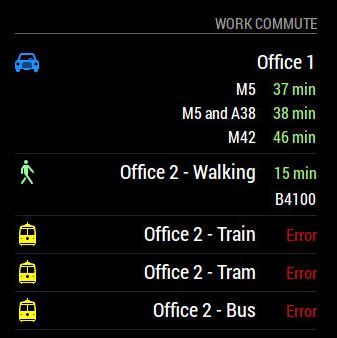
        0_1504002124877_MyCommute error.JPG

        strawberry 3.141S 1 Reply Last reply Reply Quote 0
        • strawberry 3.141S Offline
          strawberry 3.141 Project Sponsor Module Developer @Bob
          last edited by

          @Bob two times you have destination: 'Work 2 Postal Code, instead of destination: 'Work 2 Postal Code',

          Please create a github issue if you need help, so I can keep track

          1 Reply Last reply Reply Quote 0
          • yawnsY Offline
            yawns Moderator
            last edited by

            {
            	module: 'MMM-MyCommute',
            	header: "Work Commute",
            	position: 'bottom_right',
            	config: {
            		api_key: 'xxxxxxxxxxxxxxxxxxxxxxxxxxx',
            		origin: 'Home Postal Code',
            		showSummary: true,
            		startTime: '00:00',
            		endTime: '23:59',
            		colorCodeTravelTime: true,
            		moderateTimeThreshold: 1.01,
            		poorTimeThreshold: 1.05,
            		destinations: [
            			{
            			destination: 'Work  1 Postal Code', // Farther office, by car, alternatives on
            			label: 'Office 1',
            			color: '#1E90FF', //Blue
            			alternatives: true,
            			},
            			{
            			destination: 'Work  2 Postal Code', // Closer office, walking, alternatives off
            			label: 'Office 2 - Walking',
            			mode: 'walking',
            			color: '#98FB98', // Green
            			alternatives: false,
            			},
            			{
            			destination: 'Work 2 Postal Code',
            			label: 'Office 2 - Train',
            			mode: 'transit',
            			transitMode: 'train',
            			showNextVehicleDeparture: true,
            			color: '#ffff00', //Yellow
            			alternatives: false,
            			},
            			{
            			destination: 'Work 2 Postal Code',
            			label: 'Office 2 - Tram',
            			mode: 'transit',
            			transitMode: 'tram',
            			showNextVehicleDeparture: true,
            			color: '#ffff00', //Yellow
            			alternatives: false,
            			},
            			{
            			destination: 'Work 2 Postal Code',
            			label: 'Office 2 - Bus',
            			mode: 'transit',
            			transitMode: 'bus',
            			showNextVehicleDeparture: true,
            			color: '#ffff00', //Yellow
            			alternatives: false,
            			}
            		]
            	},
            },
            
            1 Reply Last reply Reply Quote 0
            • B Offline
              Bob
              last edited by

              @strawberry-3-141 I saw that, and fixed it (just not in my post)

              @yawns I cut and pasted your code (adjusted the API key and the postal codes), and still get the same error (as per previous screenshot)

              1 Reply Last reply Reply Quote 0
              • B Offline
                Bob
                last edited by

                I’m guessing no-one has any other ideas ? I wondered if there was a conflict with any other modules, so I’ve done a full rebuild of the RPi, stripped the config to just this module, and it still doesn’t work properly.

                Ho hum

                J 1 Reply Last reply Reply Quote 0
                • J Offline
                  j.e.f.f Project Sponsor Module Developer @Bob
                  last edited by

                  @Bob I’m the author of this module. Can you send me a private message? I’ll see if I can figure out what’s going on.

                  1 Reply Last reply Reply Quote 0
                  • K Offline
                    knubbl
                    last edited by

                    I got the same problem. So im really interested what is the problem and how to fix.

                    Thanks

                    1 Reply Last reply Reply Quote 0
                    • J Offline
                      j.e.f.f Project Sponsor Module Developer
                      last edited by

                      @Bob @knubbl The issue is that the config has api_key: "...". It should be apikey: "..." (no underscore)

                      B 1 Reply Last reply Reply Quote 0
                      • B Offline
                        Bob @j.e.f.f
                        last edited by

                        @j.e.f.f Thanks Jeff, problem solved, and everything now works. Typical that Google allows you to use the API without a valid key, and doesn’t error out to say it’s not a valid entry :(

                        Oh for the good old days of 2 word *nix error messages that required a manual the size of war and peace to troubleshoot…but at least you knew there was an error ! :)

                        1 Reply Last reply Reply Quote 0
                        • S Offline
                          shakir
                          last edited by

                          this helped immensely. i got my MM exactly where i want it now and can cancel CTATracker. sorry for being a nub

                          1 Reply Last reply Reply Quote 0

                          Hello! It looks like you're interested in this conversation, but you don't have an account yet.

                          Getting fed up of having to scroll through the same posts each visit? When you register for an account, you'll always come back to exactly where you were before, and choose to be notified of new replies (either via email, or push notification). You'll also be able to save bookmarks and upvote posts to show your appreciation to other community members.

                          With your input, this post could be even better 💗

                          Register Login

                          • 1 / 1
                          • First post
                            Last post
                          Enjoying MagicMirror? Please consider a donation!
                          MagicMirror created by Michael Teeuw.
                          Forum managed by Sam, technical setup by Karsten.
                          This forum is using NodeBB as its core | Contributors
                          Contact | Privacy Policy