Read the statement by Michael Teeuw here.
Failed at the magicmirror@2.2.2 start script 'sh-run-start.sh'
-
@mafin could you give me the exact command lint you used? In that guide the only thing said about the installation is to use the automatic installer…
Using it i’m stuck here: (is it complete or stuck?)pi@raspberrypi:~ $ sudo bash -c "$(curl -sL https://raw.githubusercontent.com/MichMich/MagicMirror/master/installers/raspberry.sh)" $$\ $$\ $$\ $$\ $$\ $$\ $$$$$$\ $$$\ $$$ | \__| $$$\ $$$ |\__| $$ __$$\ $$$$\ $$$$ | $$$$$$\ $$$$$$\ $$\ $$$$$$$\ $$$$\ $$$$ |$$\ $$$$$$\ $$$$$$\ $$$$$$\ $$$$$$\ \__/ $$ | $$\$$\$$ $$ | \____$$\ $$ __$$\ $$ |$$ _____|$$\$$\$$ $$ |$$ |$$ __$$\ $$ __$$\ $$ __$$\ $$ __$$\ $$$$$$ | $$ \$$$ $$ | $$$$$$$ |$$ / $$ |$$ |$$ / $$ \$$$ $$ |$$ |$$ | \__|$$ | \__|$$ / $$ |$$ | \__|$$ ____/ $$ |\$ /$$ |$$ __$$ |$$ | $$ |$$ |$$ | $$ |\$ /$$ |$$ |$$ | $$ | $$ | $$ |$$ | $$ | $$ | \_/ $$ |\$$$$$$$ |\$$$$$$$ |$$ |\$$$$$$$\ $$ | \_/ $$ |$$ |$$ | $$ | \$$$$$$ |$$ | $$$$$$$$\ \__| \__| \_______| \____$$ |\__| \_______|\__| \__|\__|\__| \__| \______/ \__| \________| $$\ $$ | \$$$$$$ | \______/ Updating packages ... Hit:1 http://mirrordirector.raspbian.org/raspbian stretch InRelease Hit:2 http://archive.raspberrypi.org/debian stretch InRelease Reading package lists... Done Installing helper tools ... Reading package lists... Done Building dependency tree Reading state information... Done build-essential is already the newest version (12.3). curl is already the newest version (7.52.1-5+deb9u3). git is already the newest version (1:2.11.0-3+deb9u2). unzip is already the newest version (6.0-21). wget is already the newest version (1.18-5+deb9u1). 0 upgraded, 0 newly installed, 0 to remove and 0 not upgraded. Check current Node installation ... Node.js is not installed. Installing Node.js ... ## Installing the NodeSource Node.js v6.x repo... ## Populating apt-get cache... + apt-get update Hit:1 http://archive.raspberrypi.org/debian stretch InRelease Hit:2 http://mirrordirector.raspbian.org/raspbian stretch InRelease Reading package lists... Done ## Confirming "stretch" is supported... + curl -sLf -o /dev/null 'https://deb.nodesource.com/node_6.x/dists/stretch/Release' ## Adding the NodeSource signing key to your keyring... + curl -s https://deb.nodesource.com/gpgkey/nodesource.gpg.key | apt-key add - OK ## Creating apt sources list file for the NodeSource Node.js v6.x repo... + echo 'deb https://deb.nodesource.com/node_6.x stretch main' > /etc/apt/sources.list.d/nodesource.list + echo 'deb-src https://deb.nodesource.com/node_6.x stretch main' >> /etc/apt/sources.list.d/nodesource.list ## Running `apt-get update` for you... + apt-get update Hit:1 http://archive.raspberrypi.org/debian stretch InRelease Hit:2 http://mirrordirector.raspbian.org/raspbian stretch InRelease Get:3 https://deb.nodesource.com/node_6.x stretch InRelease [4,635 B] Get:4 https://deb.nodesource.com/node_6.x stretch/main armhf Packages [1,006 B] Fetched 5,641 B in 2s (2,019 B/s) Reading package lists... Done ## Run `apt-get install nodejs` (as root) to install Node.js v6.x and npm Reading package lists... Done Building dependency tree Reading state information... Done The following NEW packages will be installed: nodejs 0 upgraded, 1 newly installed, 0 to remove and 0 not upgraded. Need to get 8,790 kB of archives. After this operation, 41.1 MB of additional disk space will be used. Get:1 https://deb.nodesource.com/node_6.x stretch/main armhf nodejs armhf 6.12.3-1nodesource1 [8,790 kB] Fetched 8,790 kB in 11s (771 kB/s) Selecting previously unselected package nodejs. (Reading database ... 63014 files and directories currently installed.) Preparing to unpack .../nodejs_6.12.3-1nodesource1_armhf.deb ... Unpacking nodejs (6.12.3-1nodesource1) ... Setting up nodejs (6.12.3-1nodesource1) ... Processing triggers for man-db (2.7.6.1-2) ... Node.js installation Done! Cloning MagicMirror ... Cloning into 'MagicMirror'... remote: Counting objects: 8976, done. remote: Compressing objects: 100% (8/8), done. remote: Total 8976 (delta 3), reused 3 (delta 1), pack-reused 8967 Receiving objects: 100% (8976/8976), 11.48 MiB | 1.09 MiB/s, done. Resolving deltas: 100% (5077/5077), done. Cloning MagicMirror Done! Installing dependencies ... npm WARN deprecated coffee-script@1.10.0: CoffeeScript on NPM has moved to "coffeescript" (no hyphen) npm WARN prefer global coffee-script@1.10.0 should be installed with -g npm WARN prefer global jsonlint@1.6.2 should be installed with -g > uws@0.14.5 install /root/MagicMirror/node_modules/uws > node-gyp rebuild > build_log.txt 2>&1 || exit 0 -
No you are stuck ^^
It is done. You can safely ignore warnings ;)
Just copy and rename the sample config.js and start the mirror in the MagicMirror folder with using „npm Start“
Or better use pm2
Take a look at the great tutorials in the Forum. -
@cruunnerr
I won’t be so sure…
ahahahaha> magicmirror@2.2.2 start /home/pi/MagicMirror > sh run-start.sh /home/pi/MagicMirror/node_modules/electron/index.js:9 throw new Error('Electron failed to install correctly, please delete node_modules/' + path.basename(__dirname) + ' and try installing again') ^ Error: Electron failed to install correctly, please delete node_modules/electron and try installing again at Object. (/home/pi/MagicMirror/node_modules/electron/index.js:9:9) at Module._compile (module.js:570:32) at Object.Module._extensions..js (module.js:579:10) at Module.load (module.js:487:32) at tryModuleLoad (module.js:446:12) at Function.Module._load (module.js:438:3) at Module.require (module.js:497:17) at require (internal/module.js:20:19) at Object. (/home/pi/MagicMirror/node_modules/electron/cli.js:3:16) at Module._compile (module.js:570:32) npm ERR! Linux 4.9.59-v7+ npm ERR! argv "/usr/bin/node" "/usr/bin/npm" "start" npm ERR! node v6.12.3 npm ERR! npm v3.10.10 npm ERR! code ELIFECYCLE npm ERR! magicmirror@2.2.2 start: `sh run-start.sh` npm ERR! Exit status 1 npm ERR! npm ERR! Failed at the magicmirror@2.2.2 start script 'sh run-start.sh'. npm ERR! Make sure you have the latest version of node.js and npm installed. npm ERR! If you do, this is most likely a problem with the magicmirror package, npm ERR! not with npm itself. npm ERR! Tell the author that this fails on your system: npm ERR! sh run-start.sh npm ERR! You can get information on how to open an issue for this project with: npm ERR! npm bugs magicmirror npm ERR! Or if that isn't available, you can get their info via: npm ERR! npm owner ls magicmirror npm ERR! There is likely additional logging output above. npm ERR! Please include the following file with any support request: npm ERR! /home/pi/MagicMirror/npm-debug.log -
didn’t expect that ^^
try going to your MagicMirror folder and type
npm install electron@1.4.15
Maybe it will say, that this version is invalid.
Check the version here:/home/pi/MagicMirror/node_modules/electron/dist/versionor try it global
sudo npm install -g electron@1.4.15Question: Did u first install it manually and then with the automatic installer?
If so, did u delete your MagicMirror folder before using the automatic installer? If not, maybe this causes the error.
So try deleting the MagicMirror folder and then use the automatic installer again. -
This post is deleted! -
@cruunnerr I went to jessie, tried again… it failed… reinstalled electron 3 times… still fails… always the same damn error…
i think i’m gonna build my own webpage with blackjack and hookers…This is so incredible…
-
Hi
i have the same Problem npm install electron@1.4.15 dasen`t work. it was of no use a blank mirror with the same error log.
have now one any idea ???
-
@Homerj i’m desperate, 2 days no result… i’d love an img to flash with everything working… anyone?
-
I have restored an old backup with which it ran with version 2.13 since 01:18 I have no chance to get it to work.
I have a rp3 with stretch on the run where synonymous fhem over it runs. if any one idea would be great -
@Homerj could you share it?
-
@L_i_v_e
Ok i checked your earlier posts again.
U did execute the whole stuff as root user. Thats not necessary and even not good!
I don’t know what else u did as root, but maybe first try to delete the whole MagicMirror Folder and run the command without sudo.
bash -c "$(curl -sL https://raw.githubusercontent.com/MichMich/MagicMirror/master/installers/raspberry.sh)"Or try a new installation of the raspbian and begin with this (for a full raspbian) or this (for a lite raspbian) tutorial. Do it exactly as its wrote down!
-
@cruunnerr From when sudo is a bad thing? I’ll try now
-
@cruunnerr after an auto install without sudo, made it work starting the installation of electron for the 2nd time in it’s folder. Now everything runs smooth if i give him commands but 1:
-server only does not work, i can’t access it remotely
-pm2 start does not work, the display goes all black but no module is loaded, it stays black. I tried with both my old config and the example config
-maybe local launch does not work too? i have no idea since it’s really hard to connect a mouse and keyboard. If i use a VNC can i start it with npm start only?
any idea? -
@L_i_v_e said in Failed at the magicmirror@2.2.2 start script ‘sh-run-start.sh’:
If i use a VNC can i start it with npm start only?
Yes.
Since i started my project a few weeks/month ago i have had some trouble, too. But it was all about my inexperience. So at this point im out at all, sorry.
Hope someone can help you.
But if i said before: Reading the many tutorials and do it like it’s written there brought me to the goal.
Only difference to you was, that i was using the early magic mirror versions.
Maybe u should give it a last try with Version 2.1.3 and updating later or hoping that there are other guys who can help you. :( -
I too have the same problems. In another thread started a few days ago because I have the same issues.
Started with Stretch, then went back to an old Jessie Lite version.
I have done the automatic install, the manual install, as root and not as root.
All fail at the same place. I currently have 5 MM running on PI3, then the update came and tried on one device when it crashed. I will not touch the others until this is resolved.
If someone fixes this can they post the steps they used and a link to the image that they used as well.
This is getting very frustrating. All my mirrors went together in a matter of an hour or so with no problems. Setting the modules and css is another thing though.
Any help is very much appreciated.
carltonb -
Because i am very interested why there are so much problems i will install a complete new Raspbian and MagicMirror. Let me try, i will report soon
-
Please let me know. If you make It work could you share It as an ISO ti flash? Would be so good
-
I too am keeping abreast of this. I have had 5 installs that went so well that after the update, I can not get it installed.
Are we the only ones having problems.
Do the install directions need to be changed. Luckily I have backed up every sd card so I am safe, but need to figure out if I do anything to them now (besides the MM upgrade) will they crash. -
I think i figured out what went wrong ;)
i set up a new raspbian (Desktop Version) and could install the MagicMirro without any issues.
IMPORTANT:
while the installation of MagicMirror (automatic installer) u will see this:
Cloning MagicMirror Done!
Installing dependencies ...
npm WARN deprecated coffee-script@1.10.0: CoffeeScript on NPM has moved to "coffeescript" (no hyphen)
npm WARN prefer global coffee-script@1.10.0 should be installed with -g
npm WARN prefer global jsonlint@1.6.2 should be installed with -g

> uws@0.14.5 install /home/pi/MagicMirror/node_modules/uws
> node-gyp rebuild > build_log.txt 2>&1 || exit 0
When u arrived this, it seems the installation is done. But wrong! just wait. it will take some time even if there is no cursor blinking.
Just wait and you will see some more installation steps:
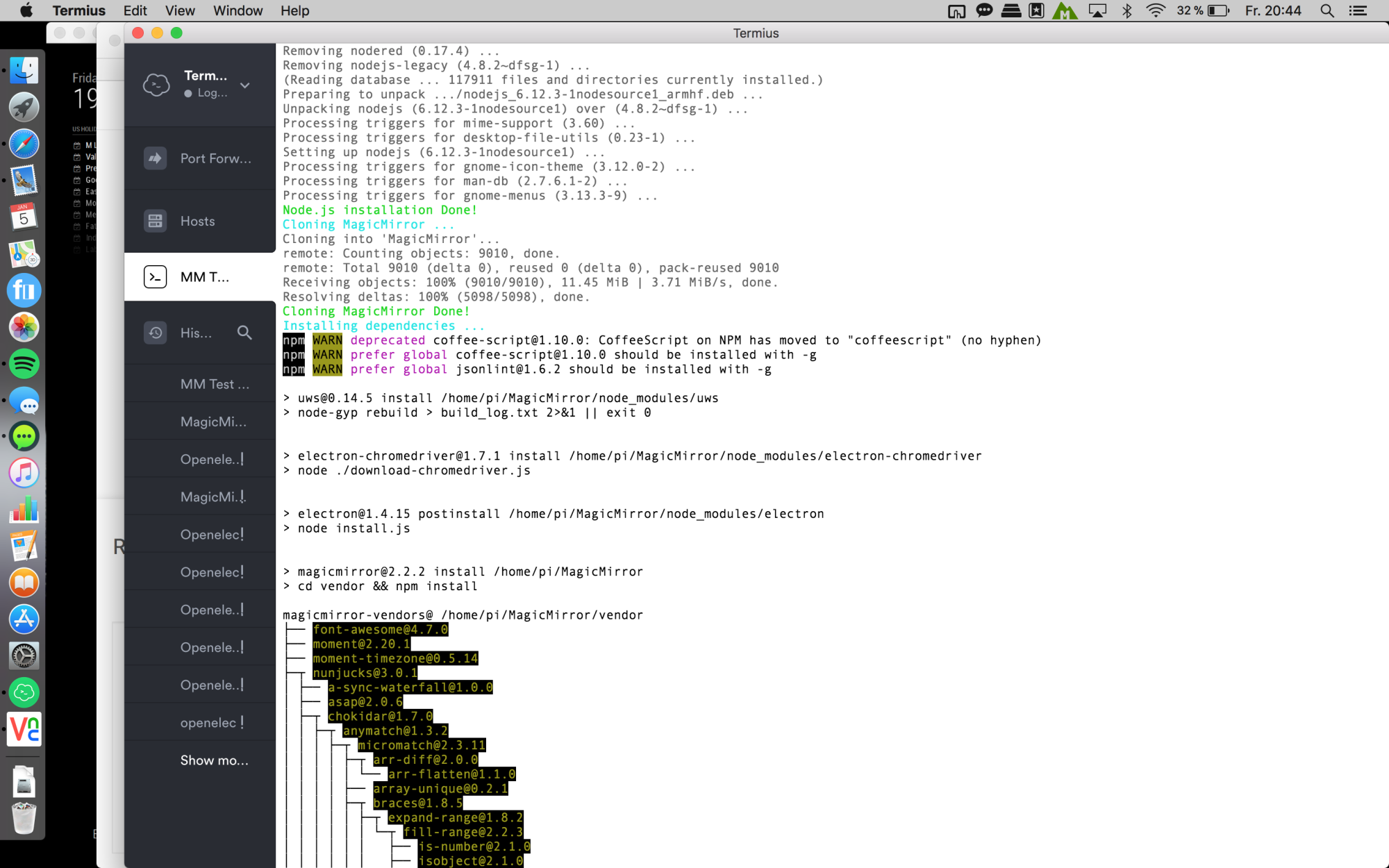
Wait again:
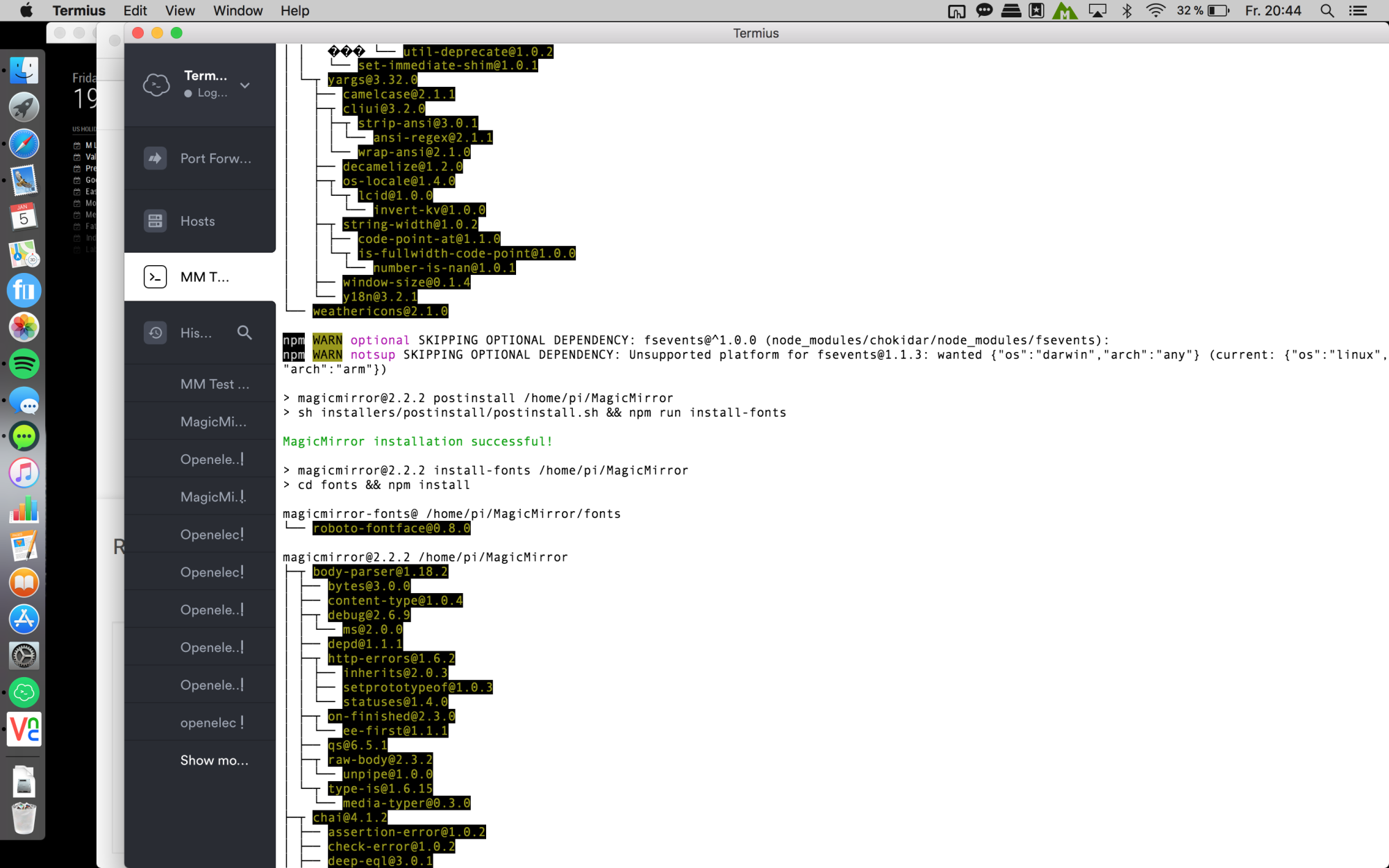
wait again ^^ and u will be asked if u want to use pm2. say YES! :
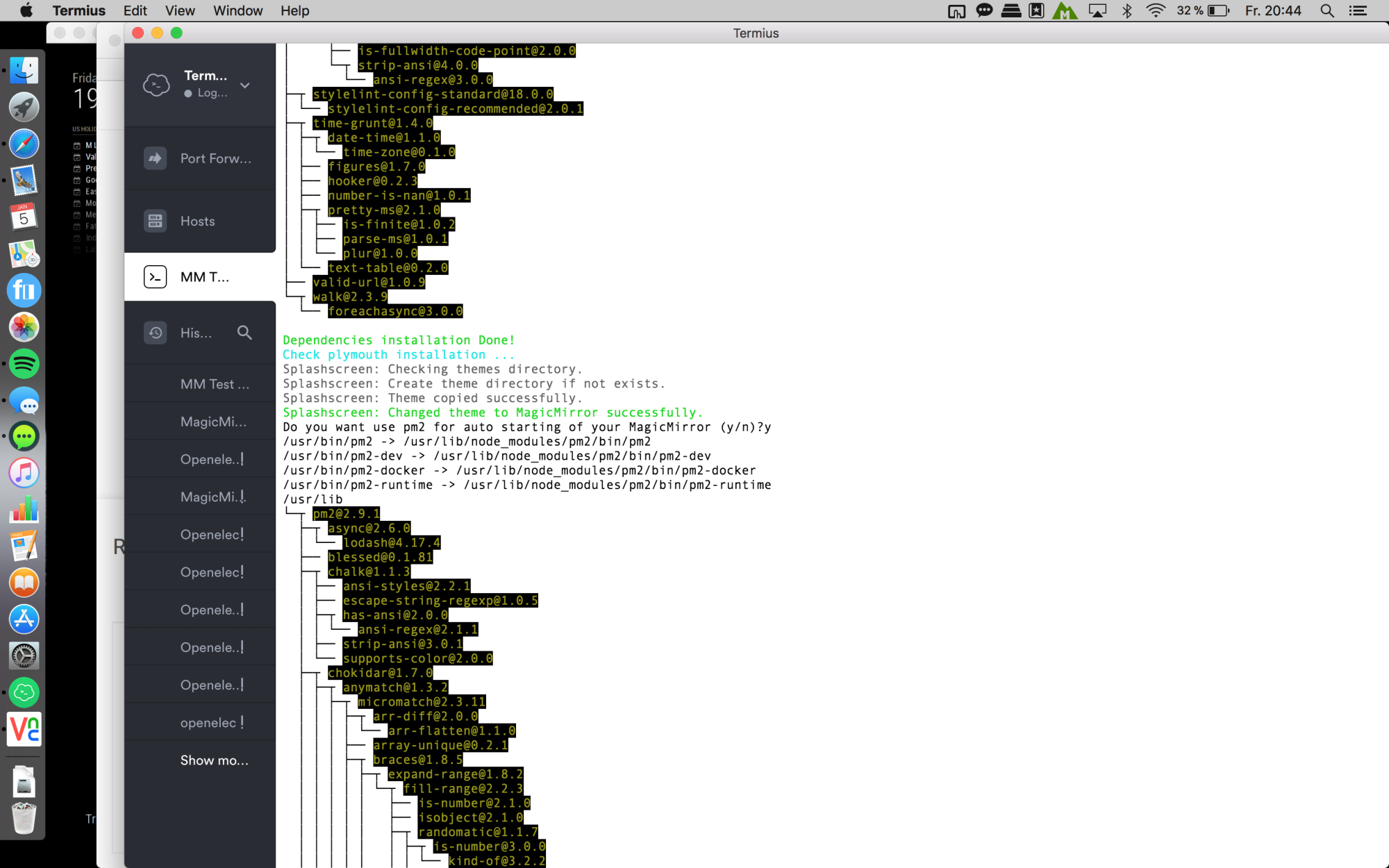
Finally u will see this:
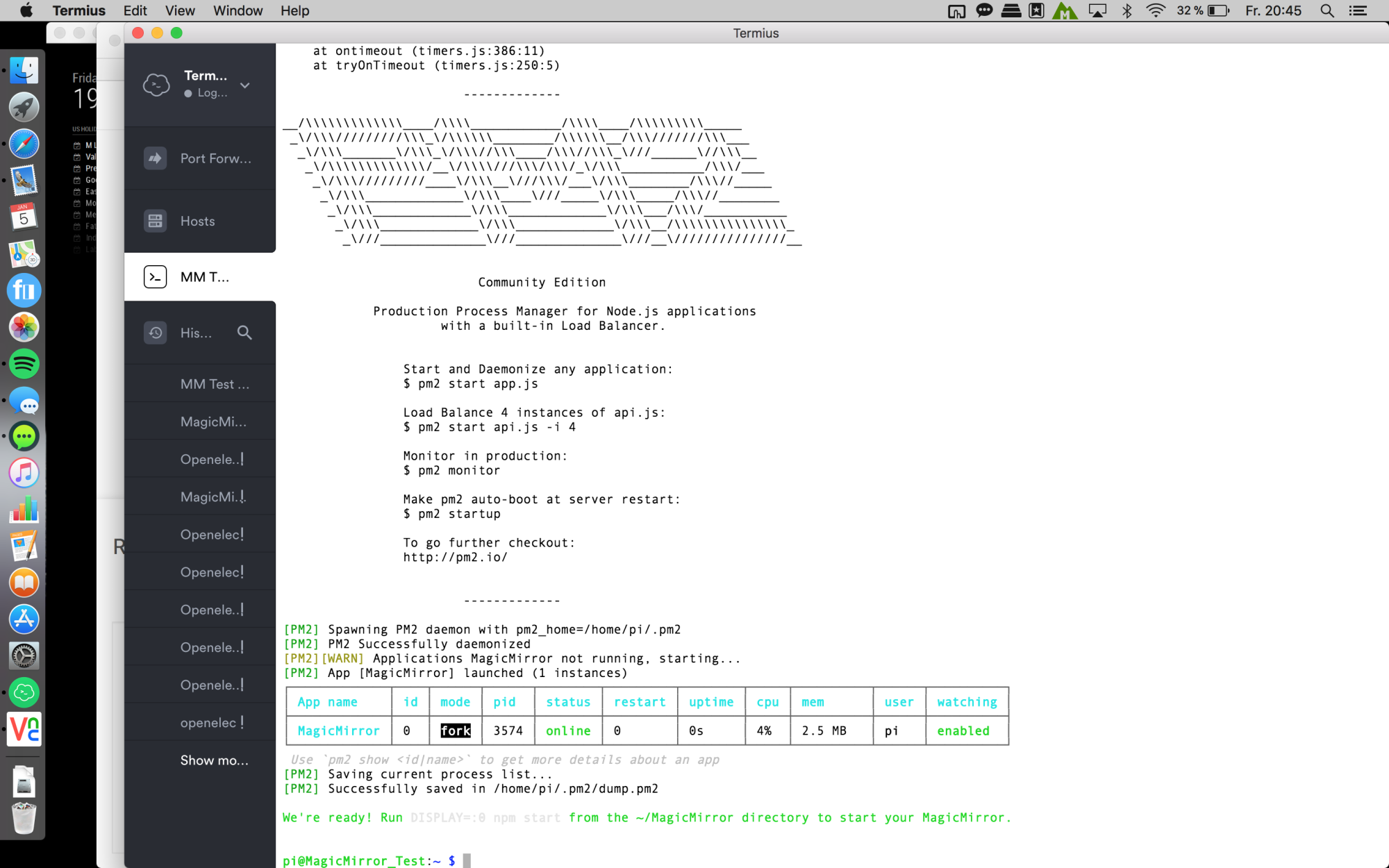
And after a few seconds the magic mirror will start automatically and u can enjoy :D
Edit:
so just to get sure, here are the quick steps i did:-
loaded the newest raspbian stretch with desktop from here
-
copy to SD card with ApplePi-Baker
-
put an empty file named “ssh” on the boot directory to enable ssh
-
start the pi
-
via ssh
sudo raspi-config
set up some configurations like Network-Name, Screen resolution, enabled VNC, expand filesystem etc. -
reboot
-
sudo apt-get update ; sudo apt-get upgrade
this will take a while -
sudo rpi-update
this will take a while, too -
reboot
-
bash -c "$(curl -sL https://raw.githubusercontent.com/MichMich/MagicMirror/master/installers/raspberry.sh)"
Then just wait! ;)
-
-
@cruunnerr said in Failed at the magicmirror@2.2.2 start script ‘sh-run-start.sh’:
VNC
No NPM install or other necessary pi setup as listed on the site at Configuring the Raspberry Pi?

Hello! It looks like you're interested in this conversation, but you don't have an account yet.
Getting fed up of having to scroll through the same posts each visit? When you register for an account, you'll always come back to exactly where you were before, and choose to be notified of new replies (either via email, or push notification). You'll also be able to save bookmarks and upvote posts to show your appreciation to other community members.
With your input, this post could be even better 💗
Register Login