MagicMirror Forum
    • Recent
    • Tags
    • Unsolved
    • Solved
    • MagicMirror² Repository
    • Documentation
    • 3rd-Party-Modules
    • Donate
    • Discord
    • Register
    • Login
    A New Chapter for MagicMirror: The Community Takes the Lead
    Read the statement by Michael Teeuw here.

    MMM-NOAA

    Scheduled Pinned Locked Moved Troubleshooting
    68 Posts 15 Posters 50.2k Views 13 Watching
    Loading More Posts
    • Oldest to Newest
    • Newest to Oldest
    • Most Votes
    Reply
    • Reply as topic
    Log in to reply
    This topic has been deleted. Only users with topic management privileges can see it.
    • Mykle1M Offline
      Mykle1 Project Sponsor Module Developer @evroom
      last edited by Mykle1

      @evroom

      This is from the readme.

      {
          disabled: false,
          module: 'MMM-NOAA',
          position: 'top_right',
          config: {
      	apiKey: "YOUR API KEY",    // https://www.wunderground.com/weather/api  select the middle plan... 	 
      	airKey: "YOUR API KEY",    // IF you want Air Quality Index
      	pws: "KNYELMIR13",         // go here to find your pws: https://www.wunderground.com/wundermap		 
      }
      },
      

      And this is mine

      {
                  disabled: false,
                  module: 'MMM-NOAA',
                  position: 'top_left',
                  config: {
                      apiKey: "MY API KEY", // https://www.wunderground.com/weather/api  select the middle plan... 
                      airKey: "MY AIR KEY", // IF you want Air Quality Index
                      pws1: "KNYNEWYO103", // go here to find your pws: https://www.wunderground.com/wundermap
                      animationSpeed: 0,
              }
              },
      

      Create a working config
      How to add modules

      1 Reply Last reply Reply Quote 0
      • cowboysdudeC Offline
        cowboysdude Module Developer @evroom
        last edited by

        @evroom Yes that used to be true…the readme is wrong, sorry. The old weather used to be wunderground and since they quit their free api I had to use a different provider and it works for one location only.

        There is no longer a need to use “PWS”…as the new api doesn’t use that. That’s an old wunderground requirement.

        At the moment this is all that’s required to make it work…

        {
                    disabled: false,
                    module: 'MMM-NOAA',
                    position: 'top_left',
                    config: {
                    	apiKey: "xxxxxx",
        		airKey: "xxxxx"
        			}
                 },
        

        I am also working to eliminate the airKey in that version…

        1 Reply Last reply Reply Quote 1
        • evroomE Offline
          evroom
          last edited by

          @cowboysdude
          Thanks for answering (@Mykle1 too).
          It is working, with just the apiKey in the config, but where does it take the location from?
          You say it works for one location only, is that a location I can determine, or is it a location that is hard coded somewhere?
          I like the temperatures it is showing, but is the weather I can expect in my location? :-)

          MagicMirror version: 2.33.0
          Raspberry Pi 4 Model B Rev 1.5 (8 GB RAM)
          Raspbian GNU/Linux 12 (bookworm)

          Test environment:
          MagicMirror version: v2.33.0
          Raspberry Pi 3 Model B Plus Rev 1.3 (1 GB RAM)
          Raspbian GNU/Linux 12 (bookworm)

          Mykle1M cowboysdudeC 2 Replies Last reply Reply Quote 0
          • Mykle1M Offline
            Mykle1 Project Sponsor Module Developer @evroom
            last edited by

            @evroom

            Ok, my bad on my previous answer. My apologies. :-/

            At the risk of answering in error again, I will say that the module determines your location (geo-location or some such)

            Create a working config
            How to add modules

            1 Reply Last reply Reply Quote 0
            • cowboysdudeC Offline
              cowboysdude Module Developer @evroom
              last edited by

              @evroom It automatically gets the latitude and longitude and uses that :)

              1 Reply Last reply Reply Quote 1
              • evroomE Offline
                evroom
                last edited by

                Okay, I see it uses http://ip-api.com/json to determine latitude and longitude.
                It is depending on the proxy server in use.
                I am at work now (in Germany) and I see my proxy server is located in Paris, France right now.
                Will try it at home to see for which location the weather is presented on my MM.

                MagicMirror version: 2.33.0
                Raspberry Pi 4 Model B Rev 1.5 (8 GB RAM)
                Raspbian GNU/Linux 12 (bookworm)

                Test environment:
                MagicMirror version: v2.33.0
                Raspberry Pi 3 Model B Plus Rev 1.3 (1 GB RAM)
                Raspbian GNU/Linux 12 (bookworm)

                1 Reply Last reply Reply Quote 0
                • evroomE Offline
                  evroom
                  last edited by

                  It appears to use the data from the proxy provider.
                  In my case the latitude and longitude are 67 kilometres away from my real location.
                  Also the “city” does not correspond with the “lat” and “lon” when I look them up in Google Maps.
                  Probably the “city” is from my provider and the “lat” and “lon” from the proxy server of that provider.
                  Therefore I decided to give MMM-YrThen a try, which looks nice.
                  Sorry to the persons that put so much efford in MMM-NOAA.

                  MagicMirror version: 2.33.0
                  Raspberry Pi 4 Model B Rev 1.5 (8 GB RAM)
                  Raspbian GNU/Linux 12 (bookworm)

                  Test environment:
                  MagicMirror version: v2.33.0
                  Raspberry Pi 3 Model B Plus Rev 1.3 (1 GB RAM)
                  Raspbian GNU/Linux 12 (bookworm)

                  1 Reply Last reply Reply Quote 0
                  • strawberry 3.141S Offline
                    strawberry 3.141 Project Sponsor Module Developer
                    last edited by

                    there should be the possibility to set the lat and lon yourself, maybe someone is also interested in a weather at a different location. Only if no lat lon was provided you should try to get it via this ip api provider

                    Please create a github issue if you need help, so I can keep track

                    1 Reply Last reply Reply Quote 0
                    • bheplerB Offline
                      bhepler Module Developer
                      last edited by bhepler

                      I’ve been trying to get this module to work and for the life of me I can’t get it to show up. I’ve gone as minimalist as I can and it’s still not appearing.

                      Here’s my config:

                      {
                           module: "MMM-NOAA",
                           position: "top_right",
                           config: {
                                apiKey: "debxxxxxx",
                                airKey: "Fpyyyyy"
                           }
                      },
                      

                      Here’s the error that I see in the web browser:

                      TypeError: "allDay is undefined"
                      getDomhttp://10.0.0.10:8080/modules/MMM-NOAA//MMM-NOAA.js:344:2
                      updateDomhttp://10.0.0.10:8080/js/main.js:110:28
                      updateDomhttp://10.0.0.10:8080/js/main.js:109:10
                      createDomObjectshttp://10.0.0.10:8080/js/main.js:53:29
                      createDomObjectshttp://10.0.0.10:8080/js/main.js:24:3
                      modulesStartedhttp://10.0.0.10:8080/js/main.js:471:4
                      startModuleshttp://10.0.0.10:8080/js/loader.js:59:3
                      loadNextModulehttp://10.0.0.10:8080/js/loader.js:40:6
                      onloadhttp://10.0.0.10:8080/js/loader.js:203:42
                      

                      And I keep seeing this in the pm2 logs:

                      0|MagicMir | libGL error: MESA-LOADER: failed to retrieve device information
                      0|MagicMir | MESA-LOADER: failed to retrieve device information
                      0|MagicMir | MESA-LOADER: failed to retrieve device information
                      
                      Hein-JanH 1 Reply Last reply Reply Quote 0
                      • Hein-JanH Offline
                        Hein-Jan @bhepler
                        last edited by

                        @bhepler

                        As far as I can tell the

                        libGL error: MESA-LOADER: failed to retrieve device information
                        MESA-LOADER: failed to retrieve device information
                        MESA-LOADER: failed to retrieve device information


                        Is due to the Open GL driver. I am using the Fake KMS and these are mine errors. I am not using NOAA.

                        1 Reply Last reply Reply Quote 1
                        • R Offline
                          rickelmund
                          last edited by

                          @evroom said in MMM-NOAA:

                          server is located in Paris, France

                          Well. Stumbled on this just now and same thing for me. But I don’t understand as https://www.abstractapi.com/ip-geolocation-api returns Sweden for me… How is that even possible

                          Mykle1M 1 Reply Last reply Reply Quote 0
                          • Mykle1M Offline
                            Mykle1 Project Sponsor Module Developer @rickelmund
                            last edited by

                            @rickelmund

                            You don’t have to use geolocation at all. I use my latitude and longitude and it fires right up. The module does error in the terminal, but only once. Then it performs as expected with no further errors.
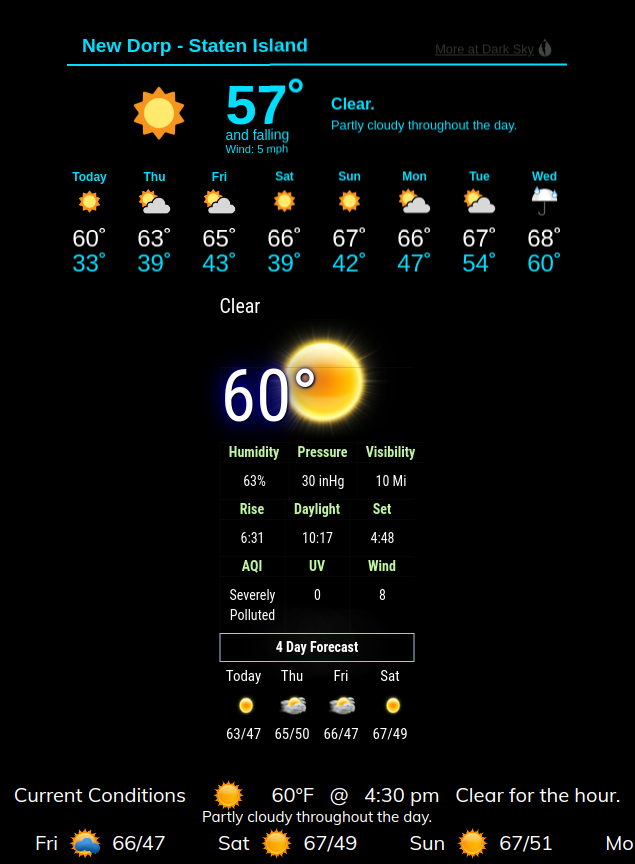
                            Screenshot from 2020-11-04 16-31-33.png

                            Create a working config
                            How to add modules

                            R 1 Reply Last reply Reply Quote 0
                            • R Offline
                              rickelmund @Mykle1
                              last edited by

                              @Mykle1 Interesting! Thank you. Let me try that out.

                              1 Reply Last reply Reply Quote 0
                              • H Offline
                                harney
                                last edited by

                                My question is a little different. After trying so many weather modules and looking for one that works accurately he in West Aus, NOAA was the firrst to actually work with some accuracy. Most of the others the API’s are now defunct. I use my MagicMirror on a 7inch Raspberry screen manly as an information screen of the weather and some server stats. At the moment I am trying to get this moduel to fit on the screen as the screen resolution is fixed.

                                My question is which file holds the code for the section headings. I figure if I take them out and just have the date and icons, the module will fit perfectly on the small screen, then I can desing the other modules to fit in the space left.
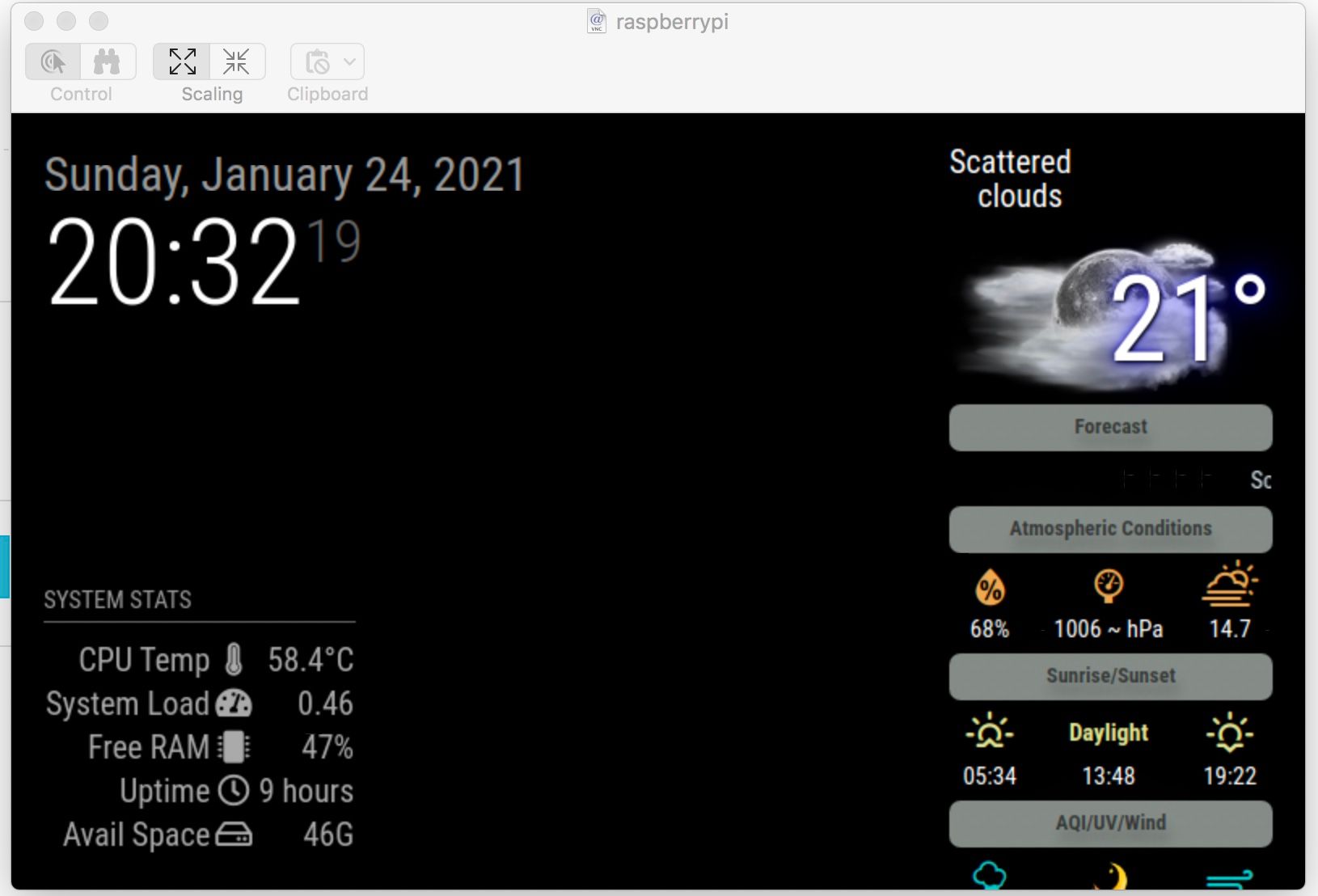
                                Untitled.jpeg

                                Thanks in Advance

                                1 Reply Last reply Reply Quote 0

                                Hello! It looks like you're interested in this conversation, but you don't have an account yet.

                                Getting fed up of having to scroll through the same posts each visit? When you register for an account, you'll always come back to exactly where you were before, and choose to be notified of new replies (either via email, or push notification). You'll also be able to save bookmarks and upvote posts to show your appreciation to other community members.

                                With your input, this post could be even better 💗

                                Register Login

                                • 1
                                • 2
                                • 3
                                • 4
                                • 4 / 4
                                • First post
                                  Last post
                                Enjoying MagicMirror? Please consider a donation!
                                MagicMirror created by Michael Teeuw.
                                Forum managed by Sam, technical setup by Karsten.
                                This forum is using NodeBB as its core | Contributors
                                Contact | Privacy Policy