Read the statement by Michael Teeuw here.
Change newsfeed title to image/logo?
-
Is there any chance to change that title text to image or logo? I have already made an png picture for that use but I have no idea how to do it. if that is possible it would be great if you can help how to adjust that pictures size as well with css for example. Thank you.
-
I can help you. set that up.
I sent you a chat message. -
No secrets! Share your procedure. :-)
-
I will, when I get it done!!! :winking_face:
-
I’t takes me a minute to do this stuff!
-
Then you should be done already. :-)
-
IKR!?
-
OK, I think I got it!



-
@justjim1220 cool…is that a scrolling newsfeed too?
-
Yeppers!
-
I know, the scroll part wasn’t in the request, But, I couldn’t help myself… :smiling_face_with_sunglasses:
-
@justjim1220 well now i want it all!
-
Change this section of the newsfeed.js file (copy, paste, overwrite)…

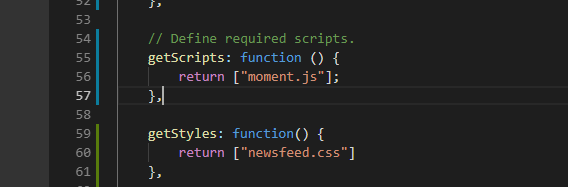
and add a getStyles function to call the newsfeed.css…
Create a newsfeed.css file and put the following in it…
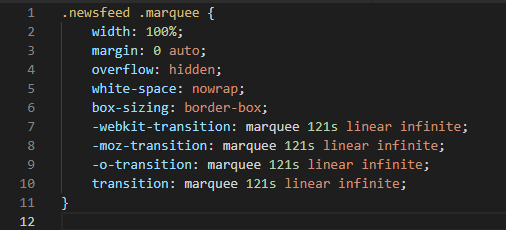
(I think I will post pics instead of code from now on!) :smiling_face_with_sunglasses: :smirking_face: :confused_face:
Enjoy!
-
You’ll have to find the logo for the news feed you are using (Google images)
save it to your newsfeed folder
change the part in the top code (USATodayLogo.jpg) to match your image
-
Now, to figure out how to do it for those who have more than 1 newsfeed!
-
I tried to do all those changes to newsfeed.js and created newsfeed.css file but it seems like that I’m doing something wrong beacuse now my whole newsfeed segment disappeared from my MagicMirror :D I took couple of screenshots to show what are the changes that I did.
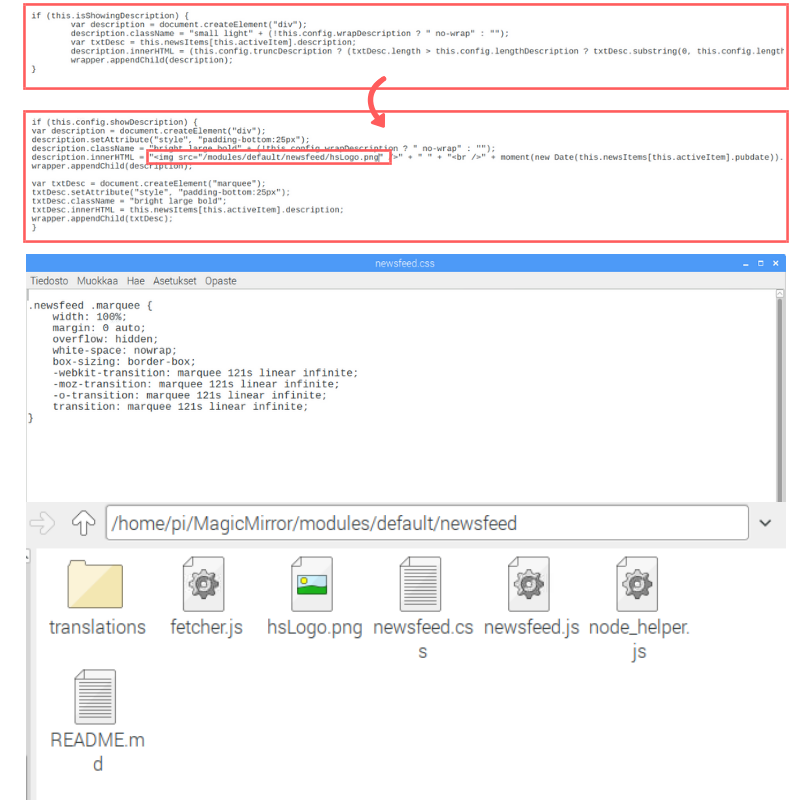
I replaced that part of the code that is shown in first picture with that one that is in the second picture.
newsfeed.css file is in the third picture and all of the files in the newsfeed folder are shown in the last picture.
Even if it is not working yet I really appreciate all your effort that you have been putting on this :thumbs_up_light_skin_tone:
-
description.innerHTML = `<img src="/modules/default/newsfeed/hsLogo.png">` + ...HTML entity escaping is not so good in this Forum BBS program
@justjim1220 might had typed'but this BBS program had changed it to"automatically.
Anyway, you can use above code; -
@blueadam
I think this would be what @justjim1220 really typed;

-
Yeah, with those changes newsfeed module came back but it still looks exactly the same that it was, so there isn’t that logo that I’m using
EDIT
showDescription was set to false and when I changed it to true all changes started to work but now I have another problem. Now there is the original headline and the new one so there are two headlines at the same time.
EDIT 2.0
Finally it works! I had to change the newsfeed.js code a little bit and had to change some true values to false from config.js. Also, I decided to move the module to bottom_left. After all changes the final result looks like this. I’m about to make second news module right below this one after this one.

-
@justjim1220 I was just about to say that! lol


Hello! It looks like you're interested in this conversation, but you don't have an account yet.
Getting fed up of having to scroll through the same posts each visit? When you register for an account, you'll always come back to exactly where you were before, and choose to be notified of new replies (either via email, or push notification). You'll also be able to save bookmarks and upvote posts to show your appreciation to other community members.
With your input, this post could be even better 💗
Register Login