Read the statement by Michael Teeuw here.
Spotify Play?
-
Hi,
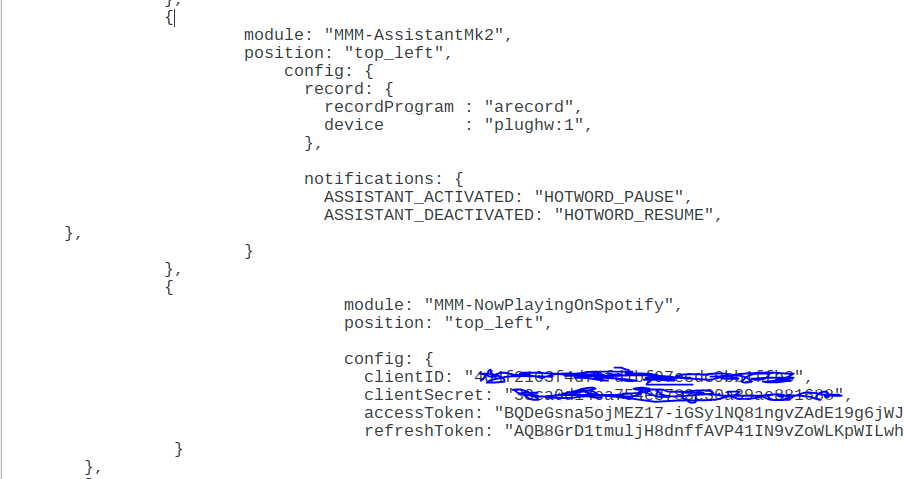
i have just installed both MMM-NowPlayingOnSpotify and the MMM-AssistantMk2 google assistant, but i dont know how to start the music?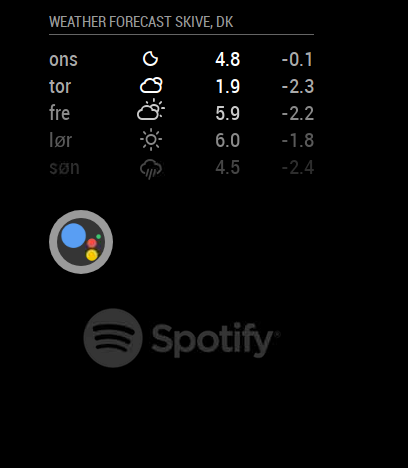
-
How do i play the spotify?
-
@rasmus-rytter First you have to have a premium Spotify account to play outside authorized Spotify devices (google home device is a different story) and if you have Spotify Premium you need to install raspotify on your Raspberry Pi (if that is what you are using) and than you can sling music to it from your phone or ask google to play Spotify on your mirror.
So 2 things:- Spotify premium
- You dont play it on the Magic Mirror per say or form the module you play it form the outside of the mirror in if i am making any sense …the MMM-NowPlayingOnSpotify does exactly that …displays whats playing on your Spotify at that time whether in your phone, tablet or mirror but just displays the info and art that is it …it does not play the music.
Raspotify is the one that does play the music
D
-
Thanks @richland007
so i need raspotify to start the music though the mirror? -
@rasmus-rytter said in Spotify Play?:
Thanks @richland007
so i need raspotify to start the music though the mirror?Yes, you need it. https://github.com/dtcooper/raspotify
And still you need something else (smartphone, tablet, computer/laptop) to control the playback. All you do is connect the “control device” to the same network as your mirror, start spotify, look for other playback devices and select your mirror instead. Then - in theory - playback should run on your mirror.
I used spotify-connect-web and MMM-SpotifyConnectUI, but I haven’t been playing around with my mirror installation for almost a year, so I am not sure if this still works. Biggest issue was getting the spotify appkey after registering as a developer. Looks like you don’t have to worry about this with the newer raspotify -
Hey @yawns,
Okay that makes sense. I have just wondered if i could play the music with my google assistant from MMM-AssistantMk2 but i guess not, Tanks :) -
Hi @rasmus-rytter,
if two or more people came to the same conclusion, its an indication that its not an to bad idea :-)
independent from this post i just had setup my mirror exactly the way @yawns and @richland007 described to you.I enhanced MMM-NowPlayingOnSpotify and MMM-AssistantMk2 to make them capable to control Spotify. It´s still in development but if you like you can have a look on my git forks.
MMM-NowPlayingOnSpotify
MMM-AssistantMk2you need to redo your authorization (Step 2) because we require now also the authorization user-modify-playback-state and you should add “deviceName” into your config-file.
Im looking forward to your feedback dear alpha-tester ;-)
-
@mantha Hi! How can I install this feature?
I want launch Spotify with my MagicMirror. I have installed NowPlayingOnSpotify, AssistantMK2 and Raspotify. All works fine.
Now, I can do the next: If I said to AssistantMK2 “SmartMirror, play Spotify on Chromecast Audio”, it launch raspotify and select my ChromeCast Audio as output. Do you think that it is possible?Sorry for my English.
-
@mantha Thank you for working on this !
I have installed you modules.
Unfortunately I can’t make the player respond to my play / stop command .
the player well respond when I select a song from my phone and send it to raspotify , the module is well updated with cover and paying status .But voice command just doesn’t work .
Anything particular I should say ?
Maybe your developement is just done 100% done yet.Thank you
Ejay
-
@ejay-ibm
the module is listening to an open.spotify.com answer from Google assistant.
It seems like the assistant is not aware of the preconfigured music provider and you need to point him in the right direction.“search for xxx on Spotify” works in my case. I’m almost sure that in the past also “play xxx from spotify” had worked, but now I got no more an open.spotify.com link backs. Would be interesting how it works for you.
FYI - I identified that the Device parameter does not work proper in the current github version. need to work on this…
-
Ok I see the answer coming to the screen but it look like it’s not passed to the module.
"Micheal Jackson on spotify" ((open.spotify.com -- https://open.spotify.com/artist/3fMbdgg4jU18AjLCKBhRSm))\nMichael Jackson wasn't merely the biggest pop ....Let me know if you need me to run some test or report logs to help you in debug.
Ejay
-
@ejay-ibm
in a first step you could check the console log for “[AMK2] openSpotify found:” and if the event PLAY_SPOTIFY was fired… -
@mantha none of both found .
could you point me to the line in your code sending this to the console log please ?
I see in MK2 js codeif (payload.foundOpenSpotify) { this.sendNotification("PLAY_SPOTIFY", { url: payload.foundOpenSpotify }) };I can say that the notification is not sent, so no payload.foundOpenSpotify occur
I can see as well in node_helper.js
if (openSpotify) {
          console.error("[AMK2] openSpotify found:", openSpotify[1])
          foundOpenSpotify = openSpotify[1]
        }
      })
Why in console error instead of console log ?
( Sorry i’m not a dev might be a silly question and I guess the result would be the same if log or error it should be sent to the console… ) -
As well I think the regex is not correct here : node_helper.js line 290
var re = new RegExp("\\(.open\\.spotify\\.com – (https:\\/\\/open\\.spotify\\.com[^ ]*).\\)", "gm")should be :
var re = new RegExp("\(open\.spotify\.com – (https:\/\/open\.spotify\.com[^ ]*\/\)", "gm")open\.spotify\.comis the correct regex to match with :
open.spotify.com
andhttps:\/\/open\.spotify\.com[^ ]*\/is the correct regex to match with :
https://open.spotify.com/fallback1234I may be wrong in my interpretation.
-
@ejay-ibm said in Spotify Play?:
Why in console error instead of console log ?
( Sorry i’m not a dev might be a silly question and I guess the result would be the same if log or error it should be sent to the console… )haha… there is a simple answer. I want them to be red to find them more easy. In a final version it should be console log…
Regarding the RegEx: I just tested them in german. I’m for sure not an RegEx pro (that’s a kind of black magic for me) ;-)
So if you have a better Regex expression feel free to change it.The additional escape characters was necessary to wrap the RegEx into the java code.
Are you getting it to work without these escapes?Proposal:
based on your post it seems to me, like the English version respond withopen.spotify.com -- https...instead of
open.spotify.com - https...So you might need to reflect this in the RegEx
var re = new RegExp("\\(.open\\.spotify\\.com –+ (https:\\/\\/open\\.spotify\\.com[^ ]*).\\)", "gm") -
@mantha
Sorry typo it well respond withopen.spotify.com - https...I have try :
 var re = new RegExp("https:\/\/open\.spotify\.com\/([^ ]*)", "gm")
        var openSpotify = re.exec(str)
        if (openSpotify) {
          console.error("[AMK2] openSpotify found:", openSpotify[1])
          foundOpenSpotify = openSpotify[1]
And I’m getting in console log :
received a module notification: PLAY_SPOTIFY from sender: MMM-AssistantMk2
but
var re = new RegExp("\\(.open\\.spotify\\.com – (https:\\/\\/open\\.spotify\\.com[^ ]*).\\)", "gm")I’m not getting anything.
What is strange is that in both case :
console.error(“[AMK2] openSpotify found:”, openSpotify[1])Doesn’t throw anything…
but as well
console.log(“[AMK2] video found:”, youtubeVideo[1])
Doesn’t throw anything either even when it find and play a video. so i’ll not worry for not about the notif logsSo, for Now, I consider it’s working as PLAY_SPOTIFY notification is fired.
What would be the next step now?
Ejay
-
please check the console in the dev mode, as well as the filesystem logs…
module and helper write unfortunately to different log destinations.Regarding the next steps I’m going to open a chat…
-
Ok I made a few changes in the MK2assistant node-helper.js
var re = new RegExp("https:\/\/open\.spotify\.com\/([a-zA-Z0-9?\/]+)", "gm")
        //var re = new RegExp("\\(.open\\.spotify\\.com – (https:\\/\\/open\\.spotify\\.com[^ ]*).\\)", "gm")
        var openSpotify = re.exec(str)
        if (openSpotify) {
        console.error("[AMK2] openSpotify found:", openSpotify[0])
          foundOpenSpotify = openSpotify[0]
And as well in Nowplayingoncpotify/core/Spotifyconnector.js
let uri = replaceall("/", ":", url.replace("https:\/\/open.spotify.com", "spotify"));The slash were not escaped in the url making half of the line be a comment.
After updating raspotify to the latest I can say : “Michael Jackson on spotify” and the song start playing .
Good stuff .I’m wondering if slash should be escaped as well here I haven’t do it since it’s working :
const tokenRefreshEndpoint = 'https://accounts.spotify.com/api/token';
const apiEndpoint = 'https://api.spotify.com/v1/me/player';
As you can see the editor consider the part after the slash as comment

Not sure how it works on interpretor side.anyway I’ll post my update in the repo .
Ejay
-
@ejay-ibm
Hey Ejay,many thanks for testing and bug fixing.
Regarding your findings: The original RegEx still works on my installation, but based on your experience it seams like the RegEx is more stable by just looking for the URL itself. I can´t see any downside of this approach.
In my test it turn out that “-” and “_” need to be added to the character set, due to they are used e.g. in usernames (spotify_germany) which are part of playlist path.Also the escaping is now much more proper (interesting that the raw version had worked…)
Important finding from ejay
if raspotify just jump back to track start instead of changing the song, an update of raspotify is needed. I had exactly the same behavior on my installation.


Hello! It looks like you're interested in this conversation, but you don't have an account yet.
Getting fed up of having to scroll through the same posts each visit? When you register for an account, you'll always come back to exactly where you were before, and choose to be notified of new replies (either via email, or push notification). You'll also be able to save bookmarks and upvote posts to show your appreciation to other community members.
With your input, this post could be even better 💗
Register Login