MagicMirror Forum
    • Recent
    • Tags
    • Unsolved
    • Solved
    • MagicMirror² Repository
    • Documentation
    • 3rd-Party-Modules
    • Donate
    • Discord
    • Register
    • Login
    A New Chapter for MagicMirror: The Community Takes the Lead
    Read the statement by Michael Teeuw here.

    node_helper.js does not work.

    Scheduled Pinned Locked Moved Solved Troubleshooting
    21 Posts 2 Posters 7.8k Views 2 Watching
    Loading More Posts
    • Oldest to Newest
    • Newest to Oldest
    • Most Votes
    Reply
    • Reply as topic
    Log in to reply
    This topic has been deleted. Only users with topic management privileges can see it.
    • S Do not disturb
      sdetweil @emrhssla
      last edited by sdetweil

      @emrhssla what is the error?

      open a terminal window or ssh window

      do

      npm start dev &
      

      node_helper output will show up in the terminal window

      then on the mirror UI, developers window
      select the console tab

      note that the filenames are CASE sensitive
      so you code should be in

      mm/modules/MMM-TestPython

      Sam

      How to add modules

      learning how to use browser developers window for css changes

      E 1 Reply Last reply Reply Quote 1
      • E Offline
        emrhssla @sdetweil
        last edited by emrhssla

        @sdetweil
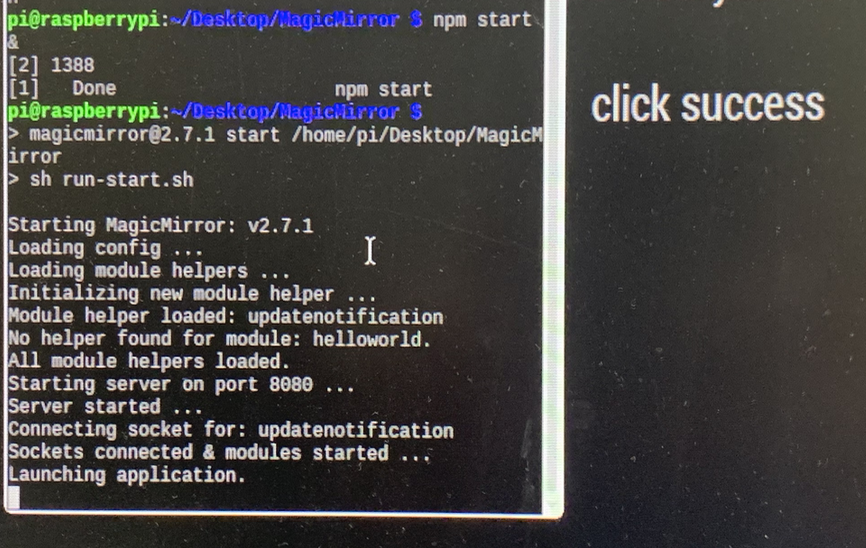
        in terminal, output is

        pi@raspberrypi:~/Desktop/MagicMirror $ npm start dev &
        [1] 1452
        pi@raspberrypi:~/Desktop/MagicMirror $
        
        magicmirror@2.7.1 start /home/pi/Desktop/MagicMirror
        sh run-start.sh “dev”
        
        Starting MagicMirror: v2.7.1
        Loading config …
        Loading module helpers …
        Initializing new module helper …
        Module helper loaded: updatenotification
        No helper found for module: helloworld.
        All module helpers loaded.
        Starting server on port 8080 …
        Server started …
        Connecting socket for: updatenotification
        Sockets connected & modules started …
        Launching application.
        

        after click,That’s all.
        There are no errors, and console.log() is not visible from the terminal window.
        0_1555332611559_6e3ba171-204b-47e8-9524-7552eb23b661-image.png

        S 1 Reply Last reply Reply Quote 0
        • S Do not disturb
          sdetweil @emrhssla
          last edited by

          @emrhssla i cut/pasted your code to create your module, added it to config.js
          and it performs as expected…

          i get in developers console

          hello~hello~hello~hello~hello~hello~hello~hello~hello~hello~    MMM-Testpython.js:62
           Socket recevied : hello                                        MMM-Testpython.js:71
          

          and in terminal window

          notification : TEST
          

          config entry

          {
            module: "MMM-Testpython",
            disabled: false,
            position: "middle",
            config:{
              
            }
          },
          

          Sam

          How to add modules

          learning how to use browser developers window for css changes

          1 Reply Last reply Reply Quote 1
          • S Do not disturb
            sdetweil
            last edited by sdetweil

            after the npm start &

            press enter… you should get the prompt back, and can do any command

            add this to your node module start function

              start: function() {
                socketTestpython=this;
                console.log(this.name + " node_helper started")    // < ---- add this
            

            should see this in terminal window

            MMM-Testpython node_helper started
            

            i do

            Sam

            How to add modules

            learning how to use browser developers window for css changes

            E 1 Reply Last reply Reply Quote 1
            • E Offline
              emrhssla @sdetweil
              last edited by

              @sdetweil
              0_1555333403414_e8ec6fad-d376-44a8-b46f-e1284090eaed-image.png

              S 1 Reply Last reply Reply Quote 0
              • S Do not disturb
                sdetweil @emrhssla
                last edited by sdetweil

                @emrhssla that console output doesn’t make sense… cause u should have seen this line at least

                Module helper loaded: MMM-Testpython
                

                before the

                Launching application 
                

                show me your config.js

                Sam

                How to add modules

                learning how to use browser developers window for css changes

                E 1 Reply Last reply Reply Quote 1
                • E Offline
                  emrhssla @sdetweil
                  last edited by

                  @sdetweil

                  /* Magic Mirror Config Sample
                   *
                   * By Michael Teeuw http://michaelteeuw.nl
                   * MIT Licensed.
                   *
                   * For more information how you can configurate this file
                   * See https://github.com/MichMich/MagicMirror#configuration
                   *
                   */
                  
                  var config = {
                  	address: "0.0.0.0", // Address to listen on, can be:
                  	                      // - "localhost", "127.0.0.1", "::1" to listen on loopback interface
                  	                      // - another specific IPv4/6 to listen on a specific interface
                  	                      // - "", "0.0.0.0", "::" to listen on any interface
                  	                      // Default, when address config is left out, is "localhost"
                  	port: 8080,
                  	ipWhitelist: ["127.0.0.1", "::ffff:127.0.0.1", "::1","172.16.100.133", "::ffff:172.16.100.133", "::1"], // Set [] to allow all IP addresses
                  	                                                       // or add a specific IPv4 of 192.168.1.5 :
                  	                                                       // ["127.0.0.1", "::ffff:127.0.0.1", "::1", "::ffff:192.168.1.5"],
                  	                                                       // or IPv4 range of 192.168.3.0 --> 192.168.3.15 use CIDR format :
                  	                                                       // ["127.0.0.1", "::ffff:127.0.0.1", "::1", "::ffff:192.168.3.0/28"],
                  
                  	language: "en",
                  	timeFormat: 24,
                  	units: "metric",
                  
                  	modules: [
                  		//0
                  		{
                  			module: 'MMM-iFrame',
                  			position: "bottom_center",	// This can be any of the regions.
                  			config: {
                  				// See 'Configuration options' for more information.
                  					url: ["https://comic.naver.com/webtoon/weekday.nhn"],  // as many URLs you want or you can just ["ENTER IN URL"] if single URL.
                  					updateInterval: 0.5 * 60 * 1000, // rotate URLs every 30 seconds
                  					width: "2000", // width of iframe
                  					height: "1800", // height of iframe
                  					frameWidth: "950", // width of embedded iframe, height is beeing calculated by aspect ratio of iframe
                  				}
                  		},
                  		//1
                  		{
                  			module: "MMM-EmbedYoutube1", 
                  			position: "bottom_bar",	
                  			config: {
                  				video_id: "w3jLJU7DT5E",
                  				searchlist1: "쯔위",
                  				loop: true
                  			}
                  		},
                  		//2	
                          {
                              module: "MMM-Modulebar1",
                              position: "top_left", 
                              classes: "default everyone", 
                              config: {
                  						
                                  
                              }
                  		},
                  		//3
                  		{
                              module: "MMM-Modulebar",
                              position: "top_left",
                              classes: "default everyone", 
                              config: {


                              }
                          },
                          
                          {
                              module: "MMM-Dynamic-Modules",
                          },
                  		{
                  			module: "alert",
                  		},
                  		{
                  			module: "updatenotification",
                  			position: "top_bar"
                  		},
                  		{
                  			module: "clock",
                  			position: "top_right"
                  		},
                  		
                  		{
                  			module: "newsfeed",
                  			position: "bottom_bar",
                  			config: {
                  				feeds: [
                  					{
                  						title: "New York Times",
                  						url: "http://www.nytimes.com/services/xml/rss/nyt/HomePage.xml"
                  					}
                  				],
                  				showSourceTitle: true,
                  				showPublishDate: true
                  			}
                  		},
                  		{
                  			  module: "MMM-Testpython",
                  			  disabled: false,
                  			  position: "middle",
                  			  config:{
                  			    
                  			  }
                  		},
                  	]
                  
                  };
                  
                  S 1 Reply Last reply Reply Quote 0
                  • S Do not disturb
                    sdetweil @emrhssla
                    last edited by sdetweil

                    @emrhssla that doesn’t match with the terminal window output…

                    in terminal window only

                    Starting MagicMirror: v2.7.1
                    Loading config …
                    Loading module helpers …
                    Initializing new module helper …
                    Module helper loaded: updatenotification   < ----
                    No helper found for module: helloworld. < -----
                    All module helpers loaded.
                    Starting server on port 8080 …
                    Server started …
                    Connecting socket for: updatenotification   
                    Sockets connected & modules started …
                    Launching application.
                    

                    there are only two modules referenced…

                    never mind, two of mine don’t have position and work fine
                    delete ---------also, all modules require a position

                    Sam

                    How to add modules

                    learning how to use browser developers window for css changes

                    E 1 Reply Last reply Reply Quote 1
                    • S Do not disturb
                      sdetweil
                      last edited by

                      this what I see on my startup in the terminal window, before the node_modules start outputing their text

                      Starting MagicMirror: v2.7.0-develop
                      Loading config ...
                      Loading module helpers ...
                      No helper found for module: alert.
                      Initializing new module helper ...
                      Module helper loaded: updatenotification
                      No helper found for module: clock.
                      Initializing new module helper ...
                      Module helper loaded: calendar
                      handler helper in init
                      Module helper loaded: MMM-SleepWake
                      Initializing new module helper ...
                      Module helper loaded: MMM-ImagesPhotos
                      Initializing new module helper ...
                      Module helper loaded: newsfeed
                      Initializing new module helper ...
                      Module helper loaded: MMM-AssistantMk2
                      Initializing new module helper ...
                      Module helper loaded: MMM-Hotword
                      Initializing new module helper ...
                      Module helper loaded: WaterLevels
                      Initializing new module helper ...
                      Module helper loaded: MMM-Testpython
                      All module helpers loaded.
                      Starting server on port 8086 ...
                      You're using a full whitelist configuration to allow for all IPs
                      Server started ...
                      Connecting socket for: updatenotification
                      Connecting socket for: calendar
                      Starting node helper for: calendar
                      Connecting socket for: MMM-SleepWake
                      handler helper in start
                      Connecting socket for: MMM-ImagesPhotos
                      Starting node helper for: MMM-ImagesPhotos
                      Connecting socket for: newsfeed
                      Starting module: newsfeed
                      Connecting socket for: MMM-AssistantMk2
                      Connecting socket for: MMM-Hotword
                      MMM-Hotword started
                      Connecting socket for: WaterLevels
                      Starting module: WaterLevels
                      Connecting socket for: MMM-Testpython
                      MMM-Testpythonnode_helper started
                      Sockets connected & modules started ...
                      Launching application.
                      

                      Sam

                      How to add modules

                      learning how to use browser developers window for css changes

                      1 Reply Last reply Reply Quote 1
                      • E Offline
                        emrhssla @sdetweil
                        last edited by

                        @sdetweil

                        /* Magic Mirror Config Sample
                         *
                         * By Michael Teeuw http://michaelteeuw.nl
                         * MIT Licensed.
                         *
                         * For more information how you can configurate this file
                         * See https://github.com/MichMich/MagicMirror#configuration
                         *
                         */
                        
                        var config = {
                        	address: "0.0.0.0", // Address to listen on, can be:
                        	                      // - "localhost", "127.0.0.1", "::1" to listen on loopback interface
                        	                      // - another specific IPv4/6 to listen on a specific interface
                        	                      // - "", "0.0.0.0", "::" to listen on any interface
                        	                      // Default, when address config is left out, is "localhost"
                        	port: 8080,
                        	ipWhitelist: ["127.0.0.1", "::ffff:127.0.0.1", "::1","172.16.100.133", "::ffff:172.16.100.133", "::1"], // Set [] to allow all IP addresses
                        	                                                       // or add a specific IPv4 of 192.168.1.5 :
                        	                                                       // ["127.0.0.1", "::ffff:127.0.0.1", "::1", "::ffff:192.168.1.5"],
                        	                                                       // or IPv4 range of 192.168.3.0 --> 192.168.3.15 use CIDR format :
                        	                                                       // ["127.0.0.1", "::ffff:127.0.0.1", "::1", "::ffff:192.168.3.0/28"],
                        
                        	language: "en",
                        	timeFormat: 24,
                        	units: "metric",
                        
                        	modules: [
                        		//0
                        		{
                        			module: 'MMM-iFrame',
                        			position: "bottom_center",	// This can be any of the regions.
                        			config: {
                        				// See 'Configuration options' for more information.
                        					url: ["https://comic.naver.com/webtoon/weekday.nhn"],  // as many URLs you want or you can just ["ENTER IN URL"] if single URL.
                        					updateInterval: 0.5 * 60 * 1000, // rotate URLs every 30 seconds
                        					width: "2000", // width of iframe
                        					height: "1800", // height of iframe
                        					frameWidth: "950", // width of embedded iframe, height is beeing calculated by aspect ratio of iframe
                        				}
                        		},
                        		//1
                        		{
                        			module: "MMM-EmbedYoutube1", 
                        			position: "bottom_bar",	
                        			config: {
                        				video_id: "w3jLJU7DT5E",
                        				searchlist1: "쯔위",
                        				loop: true
                        			}
                        		},
                        		//2	
                                {
                                    module: "MMM-Modulebar1",
                                    position: "top_left", 
                                    classes: "default everyone", 
                                    config: {
                        						
                                        
                                    }
                        		},
                        		//3
                        		{
                                    module: "MMM-Modulebar",
                                    position: "top_left",
                                    classes: "default everyone", 
                                    config: {


                                    }
                                },
                                
                        		{
                        			module: "updatenotification",
                        			position: "top_bar"
                        		},
                        		{
                        			module: "clock",
                        			position: "top_right"
                        		},
                        		
                        		{
                        			module: "newsfeed",
                        			position: "bottom_bar",
                        			config: {
                        				feeds: [
                        					{
                        						title: "New York Times",
                        						url: "http://www.nytimes.com/services/xml/rss/nyt/HomePage.xml"
                        					}
                        				],
                        				showSourceTitle: true,
                        				showPublishDate: true
                        			}
                        		},
                        		{
                        			  module: "MMM-Testpython",
                        			  disabled: false,
                        			  position: "middle",
                        			  config:{
                        			    
                        			  }
                        		}
                        	]
                        
                        };
                        

                        It’s the same. :(

                        pi@raspberrypi:~/Desktop/Beauty/MagicMirror $ npm start &
                        [1] 3066
                        pi@raspberrypi:~/Desktop/Beauty/MagicMirror $ 
                        > magicmirror@2.7.1 start /home/pi/Desktop/Beauty/MagicMirror
                        > sh run-start.sh
                        
                        Starting MagicMirror: v2.7.1
                        Loading config ...
                        Loading module helpers ...
                        Initializing new module helper ...
                        Module helper loaded: updatenotification
                        No helper found for module: helloworld.
                        All module helpers loaded.
                        Starting server on port 8080 ... 
                        Server started ...
                        Connecting socket for: updatenotification
                        Sockets connected & modules started ...
                        Launching application.
                        
                        
                        S 1 Reply Last reply Reply Quote 0
                        • S Do not disturb
                          sdetweil @emrhssla
                          last edited by sdetweil

                          @emrhssla show me output of

                          ls /home/pi/Desktop/Beauty/MagicMirror/config -laF
                          

                          Sam

                          How to add modules

                          learning how to use browser developers window for css changes

                          E 1 Reply Last reply Reply Quote 1
                          • E Offline
                            emrhssla @sdetweil
                            last edited by

                            @sdetweil

                            pi@raspberrypi:~ $ ls /home/pi/Desktop/Beauty/MagicMirror/config -laF
                            total 20
                            drwxr-xr-x 2 pi pi 4096 Apr 15 22:18 ./
                            drwxr-xr-x 17 pi pi 4096 Apr 15 22:16 …/
                            -rw-r–r-- 1 pi pi 2960 Apr 15 2019 config.js
                            -rw-r–r-- 1 pi pi 2623 Apr 15 22:11 config.js.sample
                            -rw-r–r-- 1 pi pi 13 Apr 15 22:29 .gitignore

                            S 1 Reply Last reply Reply Quote 0
                            • S Do not disturb
                              sdetweil @emrhssla
                              last edited by

                              @emrhssla ok, trying to replicate… moved mine to desktop/MagicMirror and it worked ok,
                              working on installing that repo

                              Sam

                              How to add modules

                              learning how to use browser developers window for css changes

                              E 1 Reply Last reply Reply Quote 1
                              • E Offline
                                emrhssla @sdetweil
                                last edited by

                                @sdetweil I don’t see what the problem is.

                                After upgrading the npm and node to the latest version, I installed the Magic Mirror, and I wonder if that’s the problem.

                                And I did the npm install python3 and I don’t think this is the cause.

                                S 2 Replies Last reply Reply Quote 0
                                • S Do not disturb
                                  sdetweil @emrhssla
                                  last edited by

                                  @emrhssla will advise once I see it myself

                                  Sam

                                  How to add modules

                                  learning how to use browser developers window for css changes

                                  1 Reply Last reply Reply Quote 1
                                  • S Do not disturb
                                    sdetweil @emrhssla
                                    last edited by sdetweil

                                    @emrhssla which MM are u working in?

                                    /home/pi/Desktop/Beauty (see its config/config.js
                                    or
                                    /home/pi/Desktop/Beauty/MagicMirror one? (see ITS config/config.js

                                    they are different (u have MagicMirror installed INSIDE a MagicMirror folder)
                                    to fix this, in /home/pi/Desktop/Beauty do

                                    mv MagicMirror ..
                                    

                                    now you will have

                                    /home/pi/Desktop/Beauty
                                    and
                                    /home/pi/Desktop/MagicMirror
                                    

                                    Sam

                                    How to add modules

                                    learning how to use browser developers window for css changes

                                    E 1 Reply Last reply Reply Quote 1
                                    • E Offline
                                      emrhssla @sdetweil
                                      last edited by

                                      @sdetweil
                                      I first ran a magic mirror at /home/pi/Desktop/MagicMirror . But after failing, another one was installed. Running /home/pi/Desktop/Beauty/MagicMirror gave the same result.

                                      In conclusion, there are two magic mirrors: /home/pi/Desktop/MagicMirror and /home/pi/Desktop/Beauty/MagicMirror.

                                      I’ll try it tomorrow, but maybe it doesn’t matter.

                                      S 1 Reply Last reply Reply Quote 0
                                      • S Do not disturb
                                        sdetweil @emrhssla
                                        last edited by

                                        @emrhssla when the mirror app is running, can u access from another system at http://mirror_ip:mirror_port

                                        Sam

                                        How to add modules

                                        learning how to use browser developers window for css changes

                                        E 1 Reply Last reply Reply Quote 1
                                        • E Offline
                                          emrhssla @sdetweil
                                          last edited by

                                          @sdetweil said in node_helper.js does not work.:

                                          when the mirror app is running, can u access from another system at http://mirror_ip:mirror_port

                                          I solved it!!
                                          A month ago, /fi/MagicMirror was installed.
                                          /pi/Magicmirror puts the code above, so node_helper.js work well.

                                          But I don’t know why /pi/Desktop/Beauty/Magicmirror isn’t working. Is this because of /pi/Magicmirror?

                                          Thanks to you, I solved it. Thank you all the time.

                                          S 1 Reply Last reply Reply Quote 0
                                          • S Do not disturb
                                            sdetweil @emrhssla
                                            last edited by

                                            @emrhssla said in node_helper.js does not work.:

                                            But I don’t know why /pi/Desktop/Beauty/Magicmirror isn’t working. Is this because of /pi/Magicmirror?

                                            because its a mess with all that macOS level binaries installed…

                                            i had to

                                            rm -rf  ~/Desktop/Beauty/node_modules/electron 
                                            cp ~/MagicMirror/node_modules/electron ~/Desktop/Beauty/node_modules
                                            

                                            to get the UI to show on the pi…

                                            i tested before by executing Electron to show some page
                                            in a terminal window ON THE PI
                                            do

                                            ~/Desktop/Beauty/node_modules/electron/dist/electron http://cnn.com
                                            

                                            this should open electron to show some web page

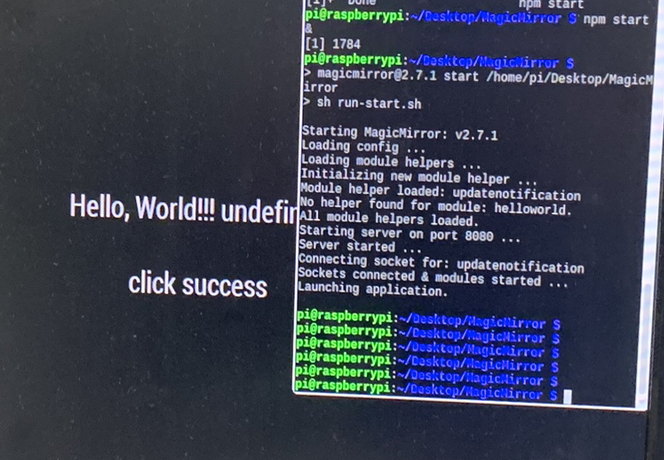
                                            initially I got a frame, with empty insides
                                            Sam

                                            How to add modules

                                            learning how to use browser developers window for css changes

                                            1 Reply Last reply Reply Quote 0

                                            Hello! It looks like you're interested in this conversation, but you don't have an account yet.

                                            Getting fed up of having to scroll through the same posts each visit? When you register for an account, you'll always come back to exactly where you were before, and choose to be notified of new replies (either via email, or push notification). You'll also be able to save bookmarks and upvote posts to show your appreciation to other community members.

                                            With your input, this post could be even better 💗

                                            Register Login

                                            • 1
                                            • 2
                                            • 1 / 2
                                            • First post
                                              Last post
                                            Enjoying MagicMirror? Please consider a donation!
                                            MagicMirror created by Michael Teeuw.
                                            Forum managed by Sam, technical setup by Karsten.
                                            This forum is using NodeBB as its core | Contributors
                                            Contact | Privacy Policy