Read the statement by Michael Teeuw here.
-
Description:
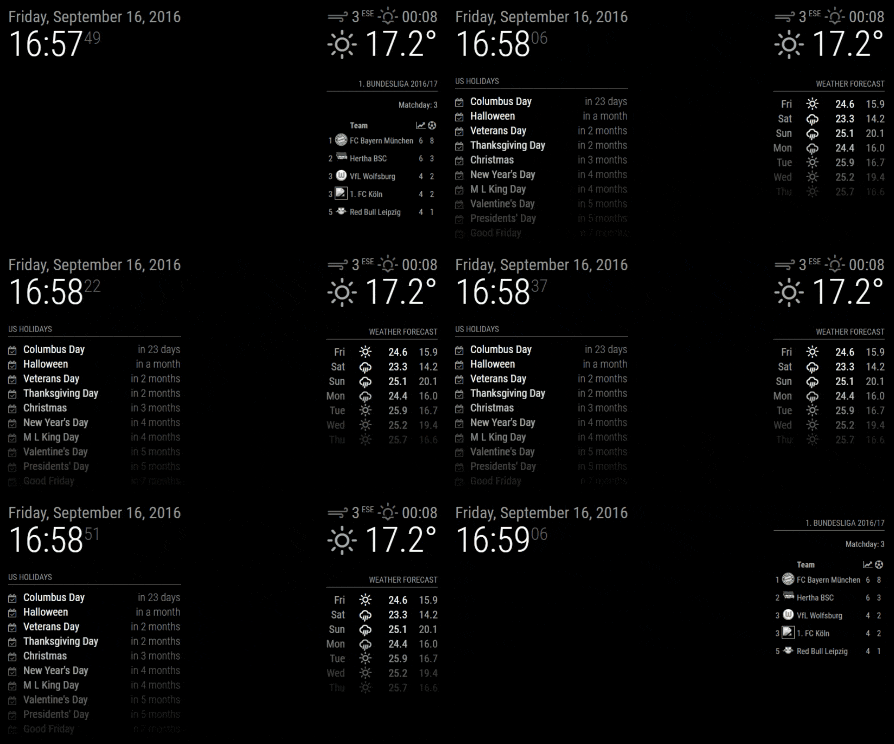
A helper module for creating schedules which
- Hide, show or dim individual modules, groups of modules or all modules
- Send notifications to other modules (e.g. to restart/turn off your MagicMirror, turn on/off your screen, and turn off your Pi via MMM-Remote-Control
As ever this is work in progress, so check out the ReadMe file for installation and configuration notes, keep your module updated and do report any issues.
Screenshots:
Add as many screenshots as you like.
Download:
[card:ianperrin/MMM-ModuleScheduler]
Change Log
Version 1.4
- Added global schedules which allow a single schedule to show/hide/dim all modules
- Added group schedules which allow a single schedule to show/hide/dim a subset of modules
- Added support for visibility locking introduced in Magic Mirror 2.1.0
- Added
debugconfig option to control output to logs
Version 1.3
- Added ability to schedule sending notifications to other modules
Version 1.2
- Added ability dim modules (instead of hiding them)
Version 1.1.0
- Added support for multiple schedules per module
Version 1.0.1
- Fixed issue with scheduled jobs when browser is refreshed
Version 1.0.0
- Initial version
-
Awesome module!! The only thing I found it doesn’t work on is the clock…
The clock doesn’t have a config section and if you add it the config won’t load…
-
@cowboysdude said in MMM-ModuleScheduler:
Awesome module!! The only thing I found it doesn’t work on is the clock…
The clock doesn’t have a config section and if you add it the config won’t load…
Can you post an example of your config for the clock with the scheduler options?
The following works for me to show the clock at 5 past each hour and hide in again at quarter past the hour…
{ module: 'clock', position: 'top_left', classes: 'scheduler', config: { module_schedule: {from: '5 * * * *', to: '15 * * * *'}, } }, -
Well as it turns out… had an issue and had to use my img backup to reinstall the mirror… little did I know I had this already set up and working on the img so it does!!! :)
-
@cowboysdude Glad to hear it works!
-
I must have had it setup wrong so that was my fault… like I said it’s working! Thank you!
-
Just curious would it be possible not to hide but to dim specific modules?
-
@cowboysdude adding a css filter to the specific module could set the brightness down
-
@strawberry-3.141 said in MMM-ModuleScheduler:
@cowboysdude adding a css filter to the specific module could set the brightness down
Great idea - will give it a go ;)
-
@cowboysdude said in MMM-ModuleScheduler:
Just curious would it be possible not to hide but to dim specific modules?
I’ve pushed an update which includes the ability to dim a module. Please feel free to update the module and use the example configuration to test it out.
“Live as if you were to die tomorrow. Learn as if you were to live forever.” - Mahatma Gandhi
-
@ianperrin That sir is AWESOME! Thank you!
-
Hey @ianperrin
Great module by the way. Im messing about with it, and works really well.
Do you think it would be possible to broadcast a notification to the module(s) that are being shown / hidden so they could react to it?
So for example if any given module were able to check for
SHOW_MODULE,HIDE_MODULEorDIM_MODULEin thenotificationReceivedfunction so that the module could react to it and handle some specific behaviour?What do you think?
-
@dr4ke616 hide module will call the hide method of the module
quote from the readme
When a module is hidden (using the module.hide() method), the suspend() method will be called. By subclassing this method you can perform tasks like halting the update timers.so you can do the specific behaviour you want in therefor show module it’s the
resumemethod -
@strawberry-3.141 I didnt notice this - thanks for pointing it out. Thats exactly what i need!
-
Hi,
Great idea, i’ve tried your module but i does not work for me. I might have missed a step or something.
I did put in the config file your module (after download and setup with
npm install))) :{ module: 'MMM-ModuleScheduler' },And then :
{
  module: 'MMM-WunderGround',
  position: 'top_right',
  config: {
    module_schedule: {from: '0 14 * * *', to: '0 18 * * *' },
    apikey: 'xxxxxxxxx', // private; don't share!
				pws: 'pws:IBOULOGN39', //culemborg
				hourly: '1',
				fctext: '1',
				fcdaycount: "5",
				fcdaystart: "0",
				hourlyinterval: "3",
				hourlycount: "2",
				alerttime: 10000,
				alerttruncatestring: "french:"
			},
			classes: 'for_all default'
		},
It’s 13:30 and the weather is still showing on the mirror.
Thanks for your help
Note from admin: Please use Markdown on code snippets for easier reading!
-
You’re missing the trigger ;)
Here do this:
{
module: ‘MMM-WunderGround’,
position: ‘top_right’,
classes: 'scheduler',
config: {
module_schedule: {from: ‘0 14 * * *’, to: ‘0 18 * * *’ },
apikey: ‘ad100f1e35ae51d2’, // **private; don’t share!**
pws: ‘pws:IBOULOGN39’, //culemborg
hourly: ‘1’,
fctext: ‘1’,
fcdaycount: “5”,
fcdaystart: “0”,
hourlyinterval: “3”,
hourlycount: “2”,
alerttime: 10000,
alerttruncatestring: “french:”'
}
},
Note from admin: Please use Markdown on code snippets for easier reading!
-
As @cowboysdude said, you need to configure the
classesoption to trigger the scheduler.As you already have the
classesoption set up for what looks like @paviro 's MMM-FacialRecognition module I would suggest trying the following config.{ module: 'MMM-WunderGround', position: 'top_right', config: { module_schedule: {from: '0 14 * * *', to: '0 18 * * *' }, apikey: 'ad100f1e35ae51d2', // private; don’t share! pws: 'pas:IBOULOGN39', //culemborg hourly: '1', fctext: '1', fcdaycount: '5', fcdaystart: '0', hourlyinterval: '3', hourlycount: '2', alerttime: 10000, alerttruncatestring: 'french:' }, classes: 'for_all default scheduler' },Please do report back if you are successful because I haven’t tested the compatibility of the two modules :)
-
Opps didn’t realize you were using Facial Recognition… LOL
Thanks @ianperrin !!
-
Thank you both, it works with paviro’s MMM-FacialRecognition module.
-
Okay I have another curve ball for you… how about … the ability to turn the mirror off and back on with this? :)


Hello! It looks like you're interested in this conversation, but you don't have an account yet.
Getting fed up of having to scroll through the same posts each visit? When you register for an account, you'll always come back to exactly where you were before, and choose to be notified of new replies (either via email, or push notification). You'll also be able to save bookmarks and upvote posts to show your appreciation to other community members.
With your input, this post could be even better 💗
Register Login