MagicMirror Forum
    • Recent
    • Tags
    • Unsolved
    • Solved
    • MagicMirror² Repository
    • Documentation
    • 3rd-Party-Modules
    • Donate
    • Discord
    • Register
    • Login
    A New Chapter for MagicMirror: The Community Takes the Lead
    Read the statement by Michael Teeuw here.

    YAPi0 Installer Stretch Lite

    Scheduled Pinned Locked Moved General Discussion
    118 Posts 4 Posters 103.9k Views 3 Watching
    Loading More Posts
    • Oldest to Newest
    • Newest to Oldest
    • Most Votes
    Reply
    • Reply as topic
    Log in to reply
    This topic has been deleted. Only users with topic management privileges can see it.
    • S Offline
      sdetweil @bdream
      last edited by

      @bdream all good!

      Make sure to copy the sample config.js to config.js in the config folder.

      Then npm start

      Sam

      How to add modules

      learning how to use browser developers window for css changes

      1 Reply Last reply Reply Quote 0
      • B Offline
        bdream
        last edited by

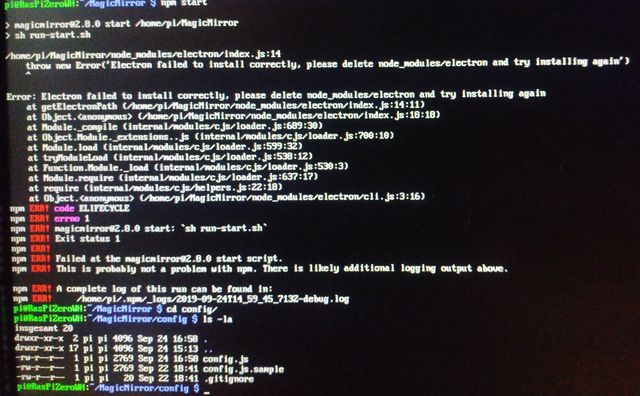
        0_1569337684282_npm_start.jpg

        Seems not to be an easy task.
        And I totally lost what I have to do in case I want to setup it again on Pi0 :dizzy_face:

        Cheers, bdream

        –
        cheers, bdream

        S 2 Replies Last reply Reply Quote 0
        • S Offline
          sdetweil @bdream
          last edited by

          @bdream hm… this hardware is not enough like pi0. My script works there.

          I will have to look at the YAPI0 doc and see what is different

          Sam

          How to add modules

          learning how to use browser developers window for css changes

          1 Reply Last reply Reply Quote 0
          • S Offline
            sdetweil @bdream
            last edited by

            @bdream said in YAPi0 Installer Stretch Lite:

            I’m not alowed to attach because the file type is .log

            change the filetype to .txt

            Sam

            How to add modules

            learning how to use browser developers window for css changes

            1 Reply Last reply Reply Quote 0
            • S Offline
              sdetweil @bdream
              last edited by

              @bdream ok, partial install is a mess… lets try this way

              cd ~/MagicMirror
              rm -rf node_modules
              npm install --arch=armv71
              

              then
              npm start

              Sam

              How to add modules

              learning how to use browser developers window for css changes

              1 Reply Last reply Reply Quote 0
              • B Offline
                bdream
                last edited by

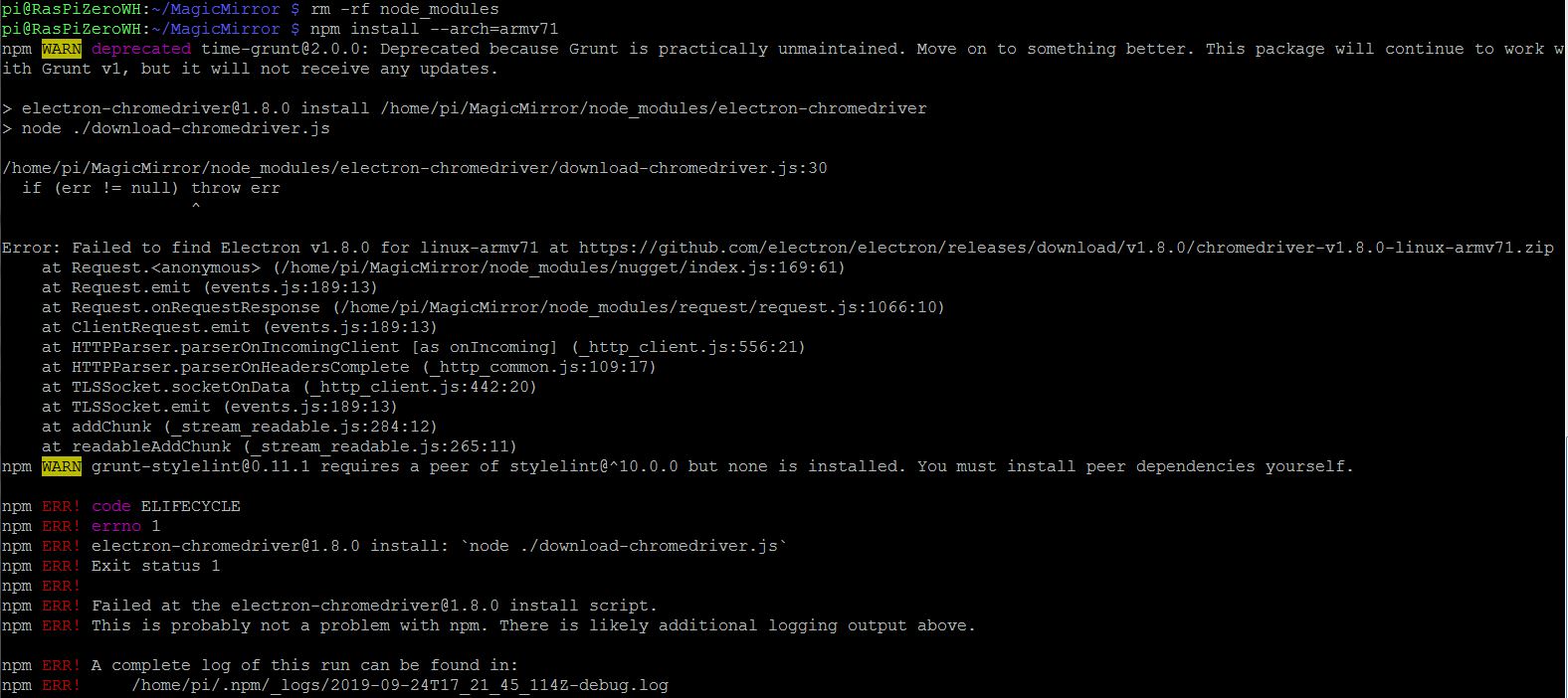
                0_1569385517608_npm_start.jpg

                npm install not yet. right?

                [0_1569360293647_2019-09-24T17_21_45_114Z-debug.txt](Uploading 100%)

                Not a working hint wit log -> txt. Only pics are allowed :(
                maybe as jpg even it is an log!

                [0_1569360379845_2019-09-24T17_21_45_114Z-debug.jpg](Uploading 100%)

                this is also not possible. what can I do?

                cheers, bdream

                –
                cheers, bdream

                S 1 Reply Last reply Reply Quote 0
                • S Offline
                  sdetweil @bdream
                  last edited by

                  @bdream hm… failed to find Electron v1.8.0… this should not be the case…

                  what is the version in the ~/MagicMirror/package.json for electron?

                   "electron": "^3.0.13",
                  

                  Sam

                  How to add modules

                  learning how to use browser developers window for css changes

                  1 Reply Last reply Reply Quote 0
                  • B Offline
                    bdream
                    last edited by

                    you mean this part here?

                      "dependencies": {
                        "colors": "^1.1.2",
                        "electron": "^3.0.13",
                        "electron-chromedriver": "^1.8.0",
                        "express": "^4.16.2",
                        "express-ipfilter": "^1.0.1",
                        "feedme": "latest",
                        "helmet": "^3.9.0",
                        "iconv-lite": "latest",
                        "moment": "latest",
                        "request": "^2.88.0",
                        "rrule": "^2.6.2",
                        "rrule-alt": "^2.2.8",
                        "simple-git": "^1.85.0",
                        "socket.io": "^2.1.1",
                        "valid-url": "latest"


                    cheers, bdream

                    –
                    cheers, bdream

                    S 1 Reply Last reply Reply Quote 0
                    • S Offline
                      sdetweil @bdream
                      last edited by sdetweil

                      @bdream weird…

                      don’t know why it works sometimes

                      in the npm info for chromedriver is lists different code mirrors…

                      # Electron mirror for China 
                      export ELECTRON_MIRROR="https://npm.taobao.org/mirrors/electron/"
                      

                      then

                      cd ~/MagicMirror
                      npm install electron-chromedriver@v1.8.0 --arch=armv71
                      

                      Sam

                      How to add modules

                      learning how to use browser developers window for css changes

                      1 Reply Last reply Reply Quote 0
                      • B Offline
                        bdream
                        last edited by

                        here the result :pouting_face:

                        pi@RasPiZeroWH:~/MagicMirror $ export ELECTRON_MIRROR=“https://npm.taobao.org/mirrors/electron/”
                        pi@RasPiZeroWH:~/MagicMirror $ npm install electron-chromedriver@v1.8.0 --arch=armv71
                        
                        > electron-chromedriver@1.8.0 install /home/pi/MagicMirror/node_modules/electron-chromedriver
                        > node ./download-chromedriver.js
                        
                        events.js:174
                              throw er; // Unhandled 'error' event
                              ^
                        
                        Error: Invalid URI "“https://npm.taobao.org/mirrors/electron/”1.8.0/chromedriver-v1.8.0-linux-armv71.zip"
                            at Request.init (/home/pi/MagicMirror/node_modules/request/request.js:273:31)
                            at new Request (/home/pi/MagicMirror/node_modules/request/request.js:127:8)
                            at request (/home/pi/MagicMirror/node_modules/request/index.js:53:10)
                            at /home/pi/MagicMirror/node_modules/request/index.js:100:12
                            at download (/home/pi/MagicMirror/node_modules/nugget/index.js:164:18)
                            at /home/pi/MagicMirror/node_modules/nugget/index.js:133:18
                            at FSReqWrap.oncomplete (fs.js:154:21)
                        Emitted 'error' event at:
                            at Request.init (/home/pi/MagicMirror/node_modules/request/request.js:273:17)
                            at new Request (/home/pi/MagicMirror/node_modules/request/request.js:127:8)
                            [... lines matching original stack trace ...]
                            at FSReqWrap.oncomplete (fs.js:154:21)
                        npm WARN grunt-stylelint@0.11.1 requires a peer of stylelint@^10.0.0 but none is installed. You must install peer dependencies yourself.
                        
                        npm ERR! code ELIFECYCLE
                        npm ERR! errno 1
                        npm ERR! electron-chromedriver@1.8.0 install: `node ./download-chromedriver.js`
                        npm ERR! Exit status 1
                        npm ERR!
                        npm ERR! Failed at the electron-chromedriver@1.8.0 install script.
                        npm ERR! This is probably not a problem with npm. There is likely additional logging output above.
                        
                        npm ERR! A complete log of this run can be found in:
                        npm ERR!     /home/pi/.npm/_logs/2019-09-25T13_49_38_086Z-debug.log


                        Will it make sense starting again with a clean raspbian?
                        Maybe there is anything weird on it…

                        Cheers, bdream

                        –
                        cheers, bdream

                        S 1 Reply Last reply Reply Quote 0
                        • S Offline
                          sdetweil @bdream
                          last edited by

                          @bdream said in YAPi0 Installer Stretch Lite:

                          “https://npm.taobao.org/mirrors/electron/”

                          no, this is the weird double quotes(the forum turns them into word document quotes), bad cut and paste on my part

                          either re-copy the commandline (I fixed my post) , or delete the double quote " and redo, start and end of the mirror setting

                          Sam

                          How to add modules

                          learning how to use browser developers window for css changes

                          1 Reply Last reply Reply Quote 0
                          • B Offline
                            bdream
                            last edited by

                            @sdetweil redo, start and end of the mirror setting
                            does it mean again (but single quotes in export ELECTRON…)?

                            export ELECTRON_MIRROR='https://npm.taobao.org/mirrors/electron/'
                            npm install electron-chromedriver@v1.8.0 --arch=armv71


                            Sorry for this many beginner-questions :disappointed_face:

                            cheers, bdream

                            –
                            cheers, bdream

                            S 1 Reply Last reply Reply Quote 0
                            • S Offline
                              sdetweil @bdream
                              last edited by

                              @bdream no… need double quotes…

                              use this. the markup protects the quotes…

                              export ELECTRON_MIRROR="https://npm.taobao.org/mirrors/electron/"
                              npm install electron-chromedriver@v1.8.0 --arch=armv71


                              Sam

                              How to add modules

                              learning how to use browser developers window for css changes

                              1 Reply Last reply Reply Quote 0
                              • B Offline
                                bdream
                                last edited by

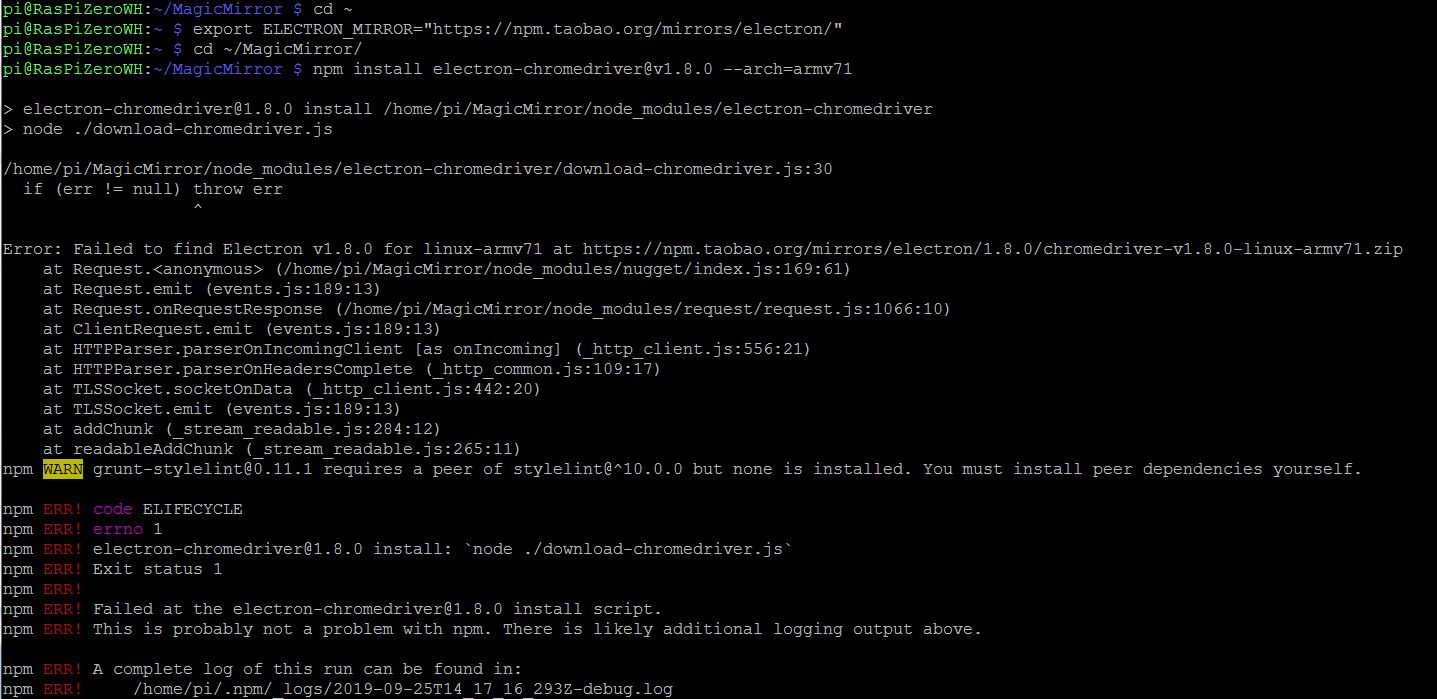
                                No change to before.
                                I tried already with double-quotes.

                                Only thing I changed now is executing

                                cd ~
                                export ELECTRON_MIRROR="https://npm.taobao.org/mirrors/electron/"
                                

                                and afterwards

                                npm install electron-chromedriver@v1.8.0 --arch=armv71
                                

                                and the result is 0_1569421573048_result.JPG

                                –
                                cheers, bdream

                                S 1 Reply Last reply Reply Quote 0
                                • S Offline
                                  sdetweil @bdream
                                  last edited by

                                  @bdream weird…

                                  works here on three different systems…

                                  can u show me the output of
                                  uname -a
                                  and
                                  lsb_release -a

                                  Sam

                                  How to add modules

                                  learning how to use browser developers window for css changes

                                  1 Reply Last reply Reply Quote 0
                                  • B Offline
                                    bdream
                                    last edited by

                                    uname -a

                                    Linux RasPiZeroWH 4.19.66+ #1253 Thu Aug 15 11:37:30 BST 2019 armv6l GNU/Linux
                                    

                                    lsb_release -a

                                    No LSB modules are available.
                                    Distributor ID: Raspbian
                                    Description:    Raspbian GNU/Linux 10 (buster)
                                    Release:        10
                                    Codename:       buster
                                    

                                    –
                                    cheers, bdream

                                    1 Reply Last reply Reply Quote 0
                                    • S Offline
                                      sdetweil
                                      last edited by sdetweil

                                      @bdream said in YAPi0 Installer Stretch Lite:

                                      cd ~
                                      export ELECTRON_MIRROR=“https://npm.taobao.org/mirrors/electron/”

                                      u need to be in the MagicMirror folder

                                      cd ~/MagicMirror

                                      I get the same error as you in the home folder

                                      every command MagicMirror related MUST be done from the MagicMirror folder (except the install script from the product or forum links)

                                      Sam

                                      How to add modules

                                      learning how to use browser developers window for css changes

                                      S 1 Reply Last reply Reply Quote 0
                                      • S Offline
                                        sdetweil @sdetweil
                                        last edited by

                                        @sdetweil looks like once its messed up, its messed up, and u have to start over with

                                        npm install --arch=armv71 
                                        

                                        (from the magicmirror folder)

                                        at least I had to…

                                        Sam

                                        How to add modules

                                        learning how to use browser developers window for css changes

                                        1 Reply Last reply Reply Quote 0
                                        • B Offline
                                          bdream
                                          last edited by

                                          Hi Sam, that was the first attempt I did anyway, starting in MagicMirror folder.
                                          Only last I missed it :frowning_face:
                                          I tried it again in this folder, but result is bad.

                                          0_1569426815365_result.JPG

                                          I guess it makes no sense working on this.
                                          You said you have running multiple Pi0… let me try another one.

                                          Not starting with wrong way let me ask if my understanding is right.

                                          1. It dosn’t matter if I run SSH or direkt with keyboard attached. Also changing for the different steps?

                                          2. preperation as shown are done

                                          sudo apt-get update 
                                          sudo apt-get upgrade 
                                          sudo apt-get dist-upgrade 
                                          sudo apt-get autoremove && sudo reboot
                                          
                                          
                                          1. I will run your updated script
                                          bash -c "$(curl -sL https://www.dropbox.com/s/rlh710ng0zwv3vp/raspberry.sh?dl=0)"
                                          
                                          1. start MM

                                          Is this right?

                                          –
                                          cheers, bdream

                                          S 1 Reply Last reply Reply Quote 0
                                          • S Offline
                                            sdetweil @bdream
                                            last edited by

                                            @bdream my script does all the system updates too…

                                            and it will start MM at the end if u use pm2.

                                            I do all my work on my mirrors over ssh.

                                            Sam

                                            How to add modules

                                            learning how to use browser developers window for css changes

                                            1 Reply Last reply Reply Quote 0

                                            Hello! It looks like you're interested in this conversation, but you don't have an account yet.

                                            Getting fed up of having to scroll through the same posts each visit? When you register for an account, you'll always come back to exactly where you were before, and choose to be notified of new replies (either via email, or push notification). You'll also be able to save bookmarks and upvote posts to show your appreciation to other community members.

                                            With your input, this post could be even better 💗

                                            Register Login

                                            • 1
                                            • 2
                                            • 3
                                            • 4
                                            • 5
                                            • 6
                                            • 2 / 6
                                            • First post
                                              Last post
                                            Enjoying MagicMirror? Please consider a donation!
                                            MagicMirror created by Michael Teeuw.
                                            Forum managed by Sam, technical setup by Karsten.
                                            This forum is using NodeBB as its core | Contributors
                                            Contact | Privacy Policy