MagicMirror Forum
    • Recent
    • Tags
    • Unsolved
    • Solved
    • MagicMirror² Repository
    • Documentation
    • 3rd-Party-Modules
    • Donate
    • Discord
    • Register
    • Login
    A New Chapter for MagicMirror: The Community Takes the Lead
    Read the statement by Michael Teeuw here.

    MMM-MyWastePickup (Toronto waste collection schedule)

    Scheduled Pinned Locked Moved Productivity
    69 Posts 16 Posters 57.7k Views 17 Watching
    Loading More Posts
    • Oldest to Newest
    • Newest to Oldest
    • Most Votes
    Reply
    • Reply as topic
    Log in to reply
    This topic has been deleted. Only users with topic management privileges can see it.
    • J Offline
      j.e.f.f Project Sponsor Module Developer @twosquirrels
      last edited by

      @twosquirrels any errors show up either in the log or in Electron’s console?

      1 Reply Last reply Reply Quote 0
      • M Offline
        MYLE-01
        last edited by MYLE-01

        Thanks alsum

        BUT took me 3 hours to get it going

        and it was me

        weeksToDisplay: 4 
         to 
        weeksToDisplay: "4"
        

        THANKS GUYS :clinking_beer_mugs:

        1 Reply Last reply Reply Quote 0
        • U Offline
          uppynz
          last edited by

          I’m loving this simple little module! I’m just trying to work out how I show only collections and not the blank days in between. I’ve tried adjusting the config variables but don’t seem to be getting the desired results. Ideally I only want to see the next two upcoming collections (what ever they may be)
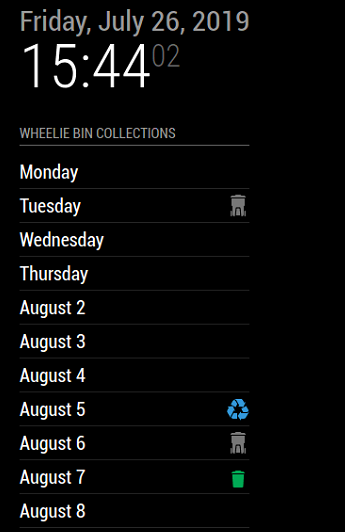
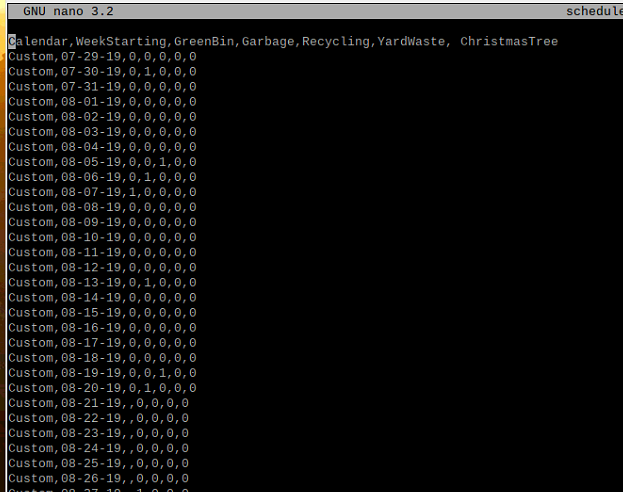
          1_1564112903473_MM Waste.PNG 0_1564112903473_MM Waste CSV.PNG

          		module: 'MMM-MyWastePickup',
          		position: 'top_left',
          		header: 'Wheelie Bin Collections',
          		config: {
          			collectionCalendar: 'Custom'
          
          1 Reply Last reply Reply Quote 0
          • StoffbeuteluweS Offline
            Stoffbeuteluwe Project Sponsor @twosquirrels
            last edited by

            @twosquirrels for me it works …

            1 Reply Last reply Reply Quote 0
            • KamiSchamiK Offline
              KamiSchami
              last edited by

              Hi, how can i change the date format? I live in Germany. Thank you.

              Real programmers never work 9 to 5. If they are around at 9 AM, it's because they were up all night.

              J 1 Reply Last reply Reply Quote 0
              • J Offline
                j.e.f.f Project Sponsor Module Developer @KamiSchami
                last edited by j.e.f.f

                @KamiSchami My module doesn’t support this. But if you want to modify it for your needs, the lines in particular are 116 and 118:

                      //determine how close pickup day is and formats accordingly.
                      var today = moment().startOf("day");
                      var pickUpDate = moment(pickup.pickupDate);
                      if (today.isSame(pickUpDate)) {
                        dateContainer.innerHTML = this.translate("TODAY");
                      } else if (moment(today).add(1, "days").isSame(pickUpDate)) {
                        dateContainer.innerHTML = this.translate("TOMORROW");
                      } else if (moment(today).add(7, "days").isAfter(pickUpDate)) {
                        dateContainer.innerHTML = pickUpDate.format("dddd");     // here...
                      } else {
                        dateContainer.innerHTML = pickUpDate.format("MMMM D");     //...and here
                      }
                

                This will help figure out your formatting options:
                https://momentjs.com/docs/#/displaying/

                • Jeff
                KamiSchamiK 1 Reply Last reply Reply Quote 0
                • KamiSchamiK Offline
                  KamiSchami @j.e.f.f
                  last edited by

                  @j-e-f-f Thank you, it works. Great Modul. Nice Icons.

                  Real programmers never work 9 to 5. If they are around at 9 AM, it's because they were up all night.

                  StoffbeuteluweS 1 Reply Last reply Reply Quote 0
                  • StoffbeuteluweS Offline
                    Stoffbeuteluwe Project Sponsor @KamiSchami
                    last edited by

                    @KamiSchami Can you show how to change that successfuly …I’m from Germany too

                    KamiSchamiK 1 Reply Last reply Reply Quote 0
                    • KamiSchamiK Offline
                      KamiSchami @Stoffbeuteluwe
                      last edited by

                      @Stoffbeuteluwe

                      Zeile 116 dateContainer.innerHTML = pickUpDate.format(“dddd”);
                      Zeile 118 dateContainer.innerHTML = pickUpDate.format(“DD. MMM YYYY”);

                      Real programmers never work 9 to 5. If they are around at 9 AM, it's because they were up all night.

                      StoffbeuteluweS 1 Reply Last reply Reply Quote 0
                      • StoffbeuteluweS Offline
                        Stoffbeuteluwe Project Sponsor @KamiSchami
                        last edited by

                        @KamiSchami Ok Danke

                        1 Reply Last reply Reply Quote 0
                        • M Offline
                          mike2323
                          last edited by

                          I had this working fine on my Magic Mirror with a custom schedule, but now that I’ve started from scratch and created a new Magic Mirror install - MMM-MyWastePickup shows ‘No Schedule’ on the main page.

                          Here’s my config:

                          {
                          	
                          		module: 'MMM-MyWastePickup',
                          		position: 'upper_third',
                          		header: 'Bin Schedule',
                          		config: {
                          		  collectionCalendar: 'Custom',
                          		}
                          	},```
                          

                          And my schedule:

                          Calendar,WeekStarting,GreenBin,Garbage,Recycling,YardWaste,ChristmasTree
                          Custom,02/07/21,0,0,1,0,0
                          Custom,02/14/21,1,0,0,0,0
                          Custom,02/21/21,0,0,1,0,0
                          Custom,02/28/21,1,0,0,0,0

                          And a pic of how it looks on the Magic Mirror

                          alt text

                          StoffbeuteluweS JerryPJ 3 Replies Last reply Reply Quote 0
                          • StoffbeuteluweS Offline
                            Stoffbeuteluwe Project Sponsor @mike2323
                            last edited by

                            @mike2323 ```
                            Calendar, WeekStarting, GreenBin, Garbage, Recycling, YardWaste, ChristmasTree
                            Custom, 01/07/21, 0, 1, 0, 0, 0
                            Custom, 01/14/21, 0, 0, 0, 1, 0
                            Custom, 01/15/21, 1, 0, 0, 0, 0
                            Custom, 01/21/21, 0, 1, 0, 0, 0
                            Custom, 01/28/21, 0, 0, 0, 1, 0
                            Custom, 02/04/21, 0, 1, 0, 0, 0
                            Custom, 02/11/21, 0, 0, 0, 1, 0
                            Custom, 02/12/21, 1, 0, 0, 0, 0
                            Custom, 02/18/21, 0, 1, 0, 0, 0
                            Custom, 02/25/21, 0, 0, 0, 1, 0
                            Custom, 03/04/21, 0, 1, 0, 0, 0
                            Custom, 03/11/21, 0, 0, 0, 1, 0
                            Custom, 03/12/21, 1, 0, 0, 0, 0
                            Custom, 03/18/21, 0, 1, 0, 0, 0
                            Custom, 03/25/21, 0, 0, 0, 1, 0
                            Custom, 04/01/21, 0, 1, 0, 0, 0
                            Custom, 04/09/21, 0, 0, 0, 1, 0
                            Custom, 04/10/21, 1, 0, 0, 0, 0
                            Custom, 04/15/21, 0, 1, 0, 0, 0
                            Custom, 04/22/21, 0, 0, 0, 1, 0
                            Custom, 04/29/21, 0, 1, 0, 0, 0
                            Custom, 05/06/21, 0, 0, 0, 1, 0
                            Custom, 05/07/21, 1, 0, 0, 0, 0
                            Custom, 05/14/21, 0, 1, 0, 0, 0
                            Custom, 05/20/21, 0, 0, 0, 1, 0
                            Custom, 05/28/21, 0, 1, 0, 0, 0
                            Custom, 06/03/21, 0, 0, 0, 1, 0
                            Custom, 06/04/21, 1, 0, 0, 0, 0
                            Custom, 06/10/21, 0, 1, 0, 0, 0
                            Custom, 06/17/21, 0, 0, 0, 1, 0
                            Custom, 06/24/21, 0, 1, 0, 0, 0
                            Custom, 07/01/21, 0, 0, 0, 1, 0
                            Custom, 07/02/21, 1, 0, 0, 0, 0
                            Custom, 07/08/21, 0, 1, 0, 0, 0
                            Custom, 07/15/21, 0, 0, 0, 1, 0
                            Custom, 07/22/21, 0, 1, 0, 0, 0
                            Custom, 07/29/21, 0, 0, 0, 1, 0
                            Custom, 07/30/21, 1, 0, 0, 0, 0
                            Custom, 08/05/21, 0, 1, 0, 0, 0
                            Custom, 08/12/21, 0, 0, 0, 1, 0
                            Custom, 08/19/21, 0, 1, 0, 0, 0
                            Custom, 08/26/21, 0, 0, 0, 1, 0
                            Custom, 08/27/21, 1, 0, 0, 0, 0
                            Custom, 09/02/21, 0, 1, 0, 0, 0
                            Custom, 09/09/21, 0, 0, 0, 1, 0
                            Custom, 09/16/21, 0, 1, 0, 0, 0
                            Custom, 09/23/21, 0, 0, 0, 1, 0
                            Custom, 09/24/21, 1, 0, 0, 0, 0
                            Custom, 09/30/21, 0, 1, 0, 0, 0
                            Custom, 10/07/21, 0, 0, 0, 1, 0
                            Custom, 10/14/21, 0, 1, 0, 0, 0
                            Custom, 10/21/21, 0, 0, 0, 1, 0
                            Custom, 10/22/21, 1, 0, 0, 0, 0
                            Custom, 10/28/21, 0, 1, 0, 0, 0
                            Custom, 11/04/21, 0, 0, 0, 1, 0
                            Custom, 11/11/21, 0, 1, 0, 0, 0
                            Custom, 11/19/21, 0, 0, 0, 1, 0
                            Custom, 11/20/21, 1, 0, 0, 0, 0
                            Custom, 11/25/21, 0, 1, 0, 0, 0
                            Custom, 12/02/21, 0, 0, 0, 1, 0
                            Custom, 12/09/21, 0, 1, 0, 0, 0
                            Custom, 12/16/21, 0, 0, 0, 1, 0
                            Custom, 12/17/21, 1, 0, 0, 0, 0
                            Custom, 12/23/21, 0, 1, 0, 0, 0
                            Custom, 12/30/21, 0, 0, 0, 1, 0

                            J 1 Reply Last reply Reply Quote 0
                            • StoffbeuteluweS Offline
                              Stoffbeuteluwe Project Sponsor @mike2323
                              last edited by

                              @mike2323
                              that works fine for me …
                              if it does not work in your case…there would be another problem.

                              1 Reply Last reply Reply Quote 0
                              • JerryPJ Offline
                                JerryP @mike2323
                                last edited by

                                @mike2323

                                may’i ask how you edit the file??? I got the same problem last week whit the Dutch variant mmm-MyGarbage
                                I help @leentje whit the problem.

                                If you trey to edit the file in Grany or excel or something else its keep saying “No schedule”
                                You must edit the file on the mirror i’t self

                                This is the way of the Dutch variant…
                                in the Terminal

                                cd ~/MagicMirror/modules/MMM-MyGarbage
                                sudo rm garbage_schedule.csv. (deletet corrupted file)
                                sudo nano garbage_schedule.csv (make new file)

                                Copy past…
                                WeekStarting,green,gray,blue,orange
                                11/18/20,0,1,0,1
                                11/25/20,1,0,0,0
                                12/02/20,0,1,0,0
                                12/09/20,1,0,0,0
                                12/16/20,0,1,0,1
                                enz…
                                Save the file

                                Than
                                sudo reboot (the mirror must reboot not cntr+r) hard reset!!

                                Thats work whit the dutch variant…

                                1 Reply Last reply Reply Quote 0
                                • J Offline
                                  j.e.f.f Project Sponsor Module Developer @Stoffbeuteluwe
                                  last edited by

                                  @stoffbeuteluwe I wonder if it’s the spaces you have after the commas? I think that might confuse the parser

                                  StoffbeuteluweS 1 Reply Last reply Reply Quote 0
                                  • StoffbeuteluweS Offline
                                    Stoffbeuteluwe Project Sponsor @j.e.f.f
                                    last edited by

                                    @j-e-f-f Hi, is it possible to change the names (Green Bin und the other names) I ask because I’m from Germany

                                    J 1 Reply Last reply Reply Quote 0
                                    • J Offline
                                      j.e.f.f Project Sponsor Module Developer @Stoffbeuteluwe
                                      last edited by

                                      @stoffbeuteluwe No you can’t change those names. The code explicitly looks for those header names. But they are never exposed to the module’s display – only icons are displayed

                                      If it helps, here are what the headers refer to:

                                      GreenBin: refers to compost
                                      Garbage: household waste that is not compost or recyclable
                                      Recycling: recyclable waste
                                      YardWaste: waste from gardening or landscaping (leaves, grass clippings, etc)
                                      ChristmasTree: usually a service provided in January that picks up dead Christmas trees after the festive season is over.

                                      StoffbeuteluweS 1 Reply Last reply Reply Quote 0
                                      • StoffbeuteluweS Offline
                                        Stoffbeuteluwe Project Sponsor @j.e.f.f
                                        last edited by

                                        @j-e-f-f thanks for your help …

                                        KamiSchamiK 1 Reply Last reply Reply Quote 0
                                        • KamiSchamiK Offline
                                          KamiSchami @Stoffbeuteluwe
                                          last edited by

                                          Hi, thank you very much for the module. It went on for over a year without any problems, then the appointments ran out. I entered new ones, but only “shop” comes up. Here is my custom. Do you have any idea? My mirror is not up to date, otherwise everything will go very well. Thanks.
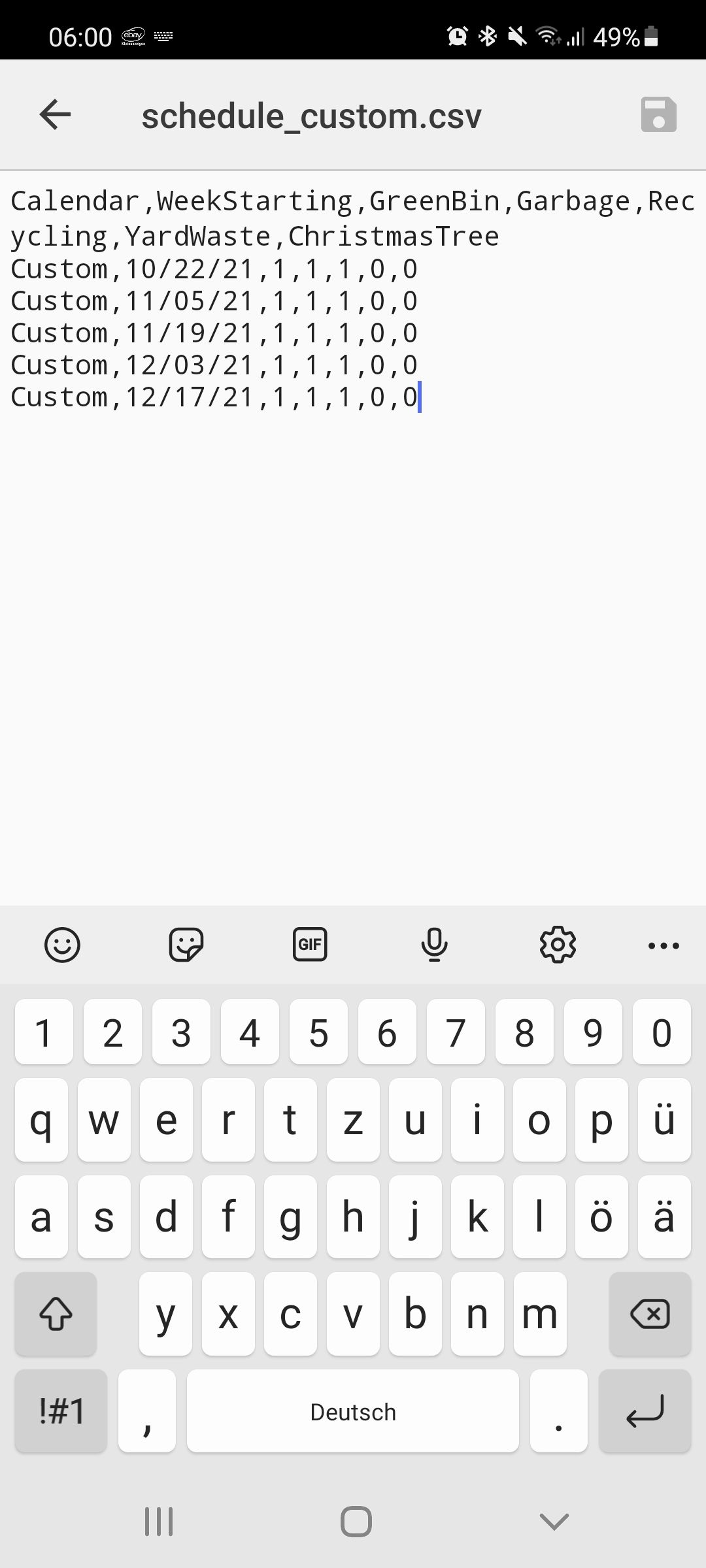

                                          Screenshot_20211109-060016_Cx File Explorer.jpg

                                          Real programmers never work 9 to 5. If they are around at 9 AM, it's because they were up all night.

                                          1 Reply Last reply Reply Quote 0

                                          Hello! It looks like you're interested in this conversation, but you don't have an account yet.

                                          Getting fed up of having to scroll through the same posts each visit? When you register for an account, you'll always come back to exactly where you were before, and choose to be notified of new replies (either via email, or push notification). You'll also be able to save bookmarks and upvote posts to show your appreciation to other community members.

                                          With your input, this post could be even better 💗

                                          Register Login

                                          • 1
                                          • 2
                                          • 3
                                          • 4
                                          • 3 / 4
                                          • First post
                                            Last post
                                          Enjoying MagicMirror? Please consider a donation!
                                          MagicMirror created by Michael Teeuw.
                                          Forum managed by Sam, technical setup by Karsten.
                                          This forum is using NodeBB as its core | Contributors
                                          Contact | Privacy Policy