MagicMirror Forum
    • Recent
    • Tags
    • Unsolved
    • Solved
    • MagicMirror² Repository
    • Documentation
    • 3rd-Party-Modules
    • Donate
    • Discord
    • Register
    • Login
    A New Chapter for MagicMirror: The Community Takes the Lead
    Read the statement by Michael Teeuw here.

    Extension of MMM-Tools (Bugsounet)

    Scheduled Pinned Locked Moved Development
    30 Posts 6 Posters 7.4k Views 6 Watching
    Loading More Posts
    • Oldest to Newest
    • Newest to Oldest
    • Most Votes
    Reply
    • Reply as topic
    Log in to reply
    This topic has been deleted. Only users with topic management privileges can see it.
    • ? Offline
      A Former User
      last edited by

      MMM-Tools v2.0.0 is now Released !

      Please Read wiki for new configuration

      1 Reply Last reply Reply Quote 0
      • R Offline
        robertybob @Guest
        last edited by

        @Bugsounet I will download it this week and report back ! :D

        1 Reply Last reply Reply Quote 0
        • ? Offline
          A Former User
          last edited by A Former User

          no problem, in all case, I release it (It is necessary, otherwise I will never do it!)

          It’s not because I’m releasing that I’m going to drop the project!
          if necessary I will add new request or correct some bug (maybe if happen)

          when i promise something i try to do my best for you all ! :)

          1 Reply Last reply Reply Quote 0
          • M Offline
            MrDondoT
            last edited by MrDondoT

            @Bugsounet - fyi using the module with MMM-TelegramBot happens that “The usage of CPU is …” over 100% (129 percent), I even got 238 percent

            1 Reply Last reply Reply Quote 0
            • ? Offline
              A Former User
              last edited by

              yes i know, i try an average value of cpu usage, i don’t know about the unit return value … I have X100 value but i think it’s not that

              so disable it (set it to 0), i will see

              1 Reply Last reply Reply Quote 0
              • ? Offline
                A Former User
                last edited by A Former User

                so … what is he unit of this:
                load average: 0,97, 0,72, 0,62

                i see some value > 1.5
                so it’s not in %

                I don’t want to check with the actual CPU usage value, because it’s not for a warning. i think average is a good choice but … my npm library for average not works like I want … humm

                S 1 Reply Last reply Reply Quote 0
                • S Offline
                  sdetweil @Guest
                  last edited by

                  @Bugsounet remember there are multiple cores. all at 100% usage is maybe 200%

                  Sam

                  How to add modules

                  learning how to use browser developers window for css changes

                  1 Reply Last reply Reply Quote 0
                  • ? Offline
                    A Former User
                    last edited by A Former User

                    so … RPI have 4 cores => can display 400% ?

                    if it’s that … I have to determinate the number of core (the npm libray can do that)
                    and divide the result by the number of cores

                    something like that :
                    avg = (averageValue * 100) / nbCore

                    1 Reply Last reply Reply Quote 0
                    • ? Offline
                      A Former User
                      last edited by

                      So:

                      avg = (averageValue * 100) / nbCore —> don’t working

                      I have coded my own method
                      I take 10 last values to do an average
                      now it’s works and fixed with v2.0.1 :)

                      M 1 Reply Last reply Reply Quote 0
                      • R Offline
                        robertybob
                        last edited by

                        This post is deleted!
                        1 Reply Last reply Reply Quote 0
                        • R Offline
                          robertybob
                          last edited by

                          I’ve installed this and everything seems to be working fine :)

                          1 Reply Last reply Reply Quote 0
                          • M Offline
                            MrDondoT @Guest
                            last edited by

                            @Bugsounet :thumbs_up: installed and it works great!

                            1 Reply Last reply Reply Quote 0
                            • Sandy2503S Offline
                              Sandy2503
                              last edited by

                              @Bugsounet

                              Today i updated the MMM-Tools from my old Version (Sean) to Your New Version 2.01.

                              It Looks great, but i have a Problem.
                              Your Module is in my mirror on Position Bottom Right - but the Information are standing the Center of the Module.
                              Is it possible to move the Information to the right side ?

                              Best Regards,
                              Sandy2503

                              Sorry, for my bad english

                              1 Reply Last reply Reply Quote 0
                              • ? Offline
                                A Former User
                                last edited by

                                @Sandy2503 :

                                • if you consider v1.1.x is sean version, so I did not have to make enough modification since v1.0.0 (like display OS, uptime, optimization) :(
                                • for your problem, i don’t know what do you really want… so try to adjust the css file
                                  • you can try in real time modifing with dev console in Elements tab (npm start dev)
                                1 Reply Last reply Reply Quote 0
                                • Sandy2503S Offline
                                  Sandy2503
                                  last edited by Sandy2503

                                  yes, my english isn`t very well.

                                  My be i can show you a picture.
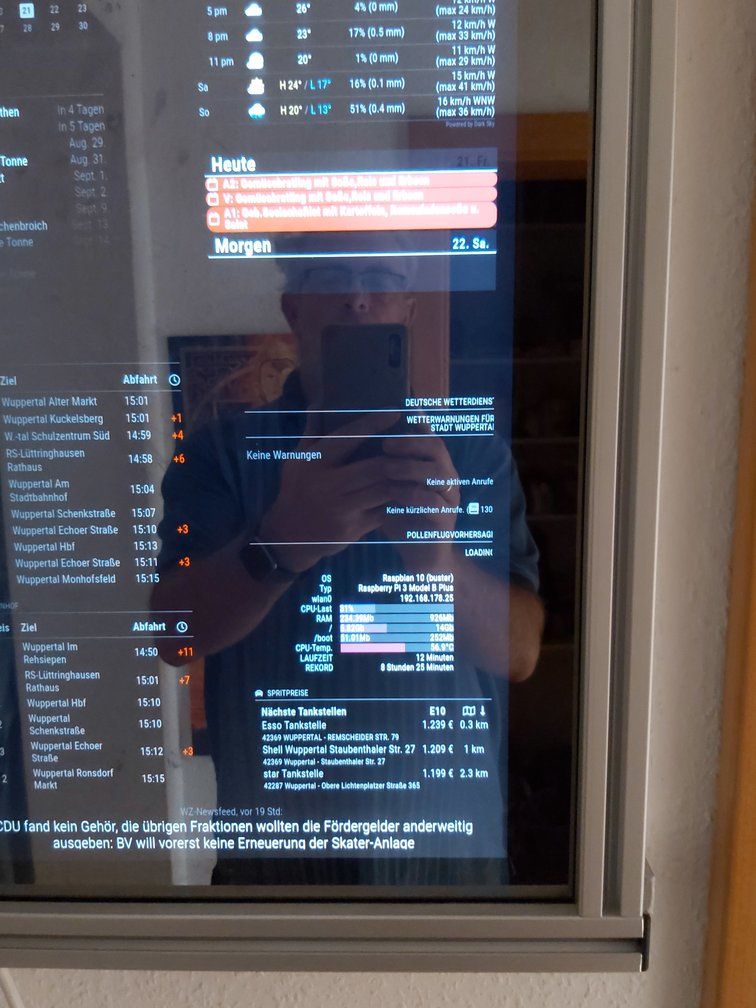
                                  rsz_20200821_1501531.jpg

                                  I`d like to move the informations to the right border or expand to the whole module position.

                                  i think it is possible with the correct css coding …

                                  1 Reply Last reply Reply Quote 0
                                  • ? Offline
                                    A Former User
                                    last edited by A Former User

                                    ah …

                                    Force contener size with feature:

                                    containerSize feature : unit it’s pixel
                                    sample:
                                    containerSize: 300,
                                    and it will make module wider

                                    you can aslo to the same thing with itemSize (for the label section like, os, typ, … rekord)

                                    itemSize: for the label section (like, os, typ, … rekord)
                                    containerSize: for the result value

                                    by default it and autocalc result

                                    see the full configuration sample and tunning section for more info of each feature

                                    1 Reply Last reply Reply Quote 0

                                    Hello! It looks like you're interested in this conversation, but you don't have an account yet.

                                    Getting fed up of having to scroll through the same posts each visit? When you register for an account, you'll always come back to exactly where you were before, and choose to be notified of new replies (either via email, or push notification). You'll also be able to save bookmarks and upvote posts to show your appreciation to other community members.

                                    With your input, this post could be even better 💗

                                    Register Login

                                    • 1
                                    • 2
                                    • 2 / 2
                                    • First post
                                      Last post
                                    Enjoying MagicMirror? Please consider a donation!
                                    MagicMirror created by Michael Teeuw.
                                    Forum managed by Sam, technical setup by Karsten.
                                    This forum is using NodeBB as its core | Contributors
                                    Contact | Privacy Policy