Read the statement by Michael Teeuw here.
Working Weather Underground module?
-
eeeeh - that was before you told me about the new way. :(
-
@c1olli sorry!
-
no problem the way is a little bit longer, but I will go to finish it.
For the next time I know the new way - hopefully I will not forget it :D -
@Saabman Thank you for doing this! When I tried out your version of the module, my MM loads with a blank screen. Actually I ran into this same problem when I tried to modify the modules myself a couple of days ago using the new API documentation that you found.
When I manually try using the API via the URL, it seems to return data (I’ve *** some data for privacy) ie
{"observations":[{"stationID":"***","obsTimeUtc":"2021-01-03T18:43:34Z","obsTimeLocal":"2021-01-03 10:43:34","neighborhood":"***","softwareType":null,"country":"US","solarRadiation":252.0,"lon":-121.763,"realtimeFrequency":null,"epoch":1609699414,"lat":37.32,"uv":0.7,"winddir":22,"humidity":85,"qcStatus":1,"metric":{"temp":12,"heatIndex":12,"dewpt":9,"windChill":12,"windSpeed":0,"windGust":3,"pressure":1024.38,"precipRate":0.00,"precipTotal":0.00,"elev":150}}]}I cannot see anything in the logs that is helpful :(
[2021-01-03 10:39:25.741] [LOG] Module helper loaded: MMM-WunderGround [2021-01-03 10:39:27.778] [LOG] Connecting socket for: MMM-WunderGround [2021-01-03 10:39:27.779] [LOG] MMM-WunderGround helper started ... [2021-01-03 10:39:27.829] [LOG] Sockets connected & modules started ... -
@chanster look in the developers window, ctrl-shift-i, select the console tab and scroll up. u can filter messages by module, by putting part of the module name in the filter field, weath here
if the data changed format, then the old code won’t work
-
-
I’m pretty I’m running @Saabman 's fork now but I’m still running into a blank screen when MM loads. Here’s what I can see in the console :
Load script: modules/MMM-WunderGround//MMM-WunderGround.js module.js:513 Module registered: MMM-WunderGround loader.js:148 Bootstrapping module: MMM-WunderGround loader.js:236 File already loaded: moment.js loader.js:153 Scripts loaded for: MMM-WunderGround loader.js:236 File already loaded: weather-icons.css loader.js:195 Load stylesheet: vendor/node_modules/weathericons/css/weather-icons-wind.css loader.js:195 Load stylesheet: modules/MMM-WunderGround/MMM-WunderGround.css loader.js:155 Styles loaded for: MMM-WunderGround translator.js:102 MMM-WunderGround - Load translation fallback: translations/en.json localhost/:2 Uncaught SyntaxError: Unexpected token / in JSON at position 4 at JSON.parse (<anonymous>) at XMLHttpRequest.xhr.onreadystatechange (translator.js:22) -
@chanster edit the module
translations/en.jsonand remove the comments
// …
or/*… */
comments not allowed in json
-
@sdetweil Thanks ! That did the trick!
-
@sdetweil Thanks for that I had seen the error but it didnt stop the application from running for me so didn’t look further into it.
@chanster I had forked the orignal version and then only modified the Develop branch.
If you just do a git clone you will get the Master branch not the develop branch - Im only learning my way around Github -so I might be doing something wrong as well. But from what I can work out if you use the following command it should get the the develop branch
git clone --single-branch --branch Develop https://github.com/saabman/MMM-WunderGround.git -
@Saabman see the topic at the top.of troubleshooting about test fixes and develop.
gives instructions -
@sdetweil Thanks Ill look into it.
Just got the module pulling the forecast info into it - only displays it in the console at the moment but its getting there
-
@Saabman funny, one has to READ the message to reply properly…
git clone should get all branches, unless u specifically ask for depth=??1
u can get another branch with git fetch remotename remotebranch_name: localbranch_name
then git checkout localbranch_name should work -
After the new installation of MM, I installed the module and I can see some weather data from my wether station - really good beginning.
@sdetweil Thanks for the fantastic installation script.
-
Nice that some people are working on it. I want also my pws in the mirror, and willing to help, but im not able to program. But can test if necessary. I tried the module so far , and yes there are some signs of live in the module. Thanks already.
-
Ive been spending some time working out how to use github a bit better. Thanks for the tips sdetweil.
So havent progressed any further on the module.
What I have noticed is the original module MMM-Wunderground has quiet a lot in it - been able to choose different icons/color moon phase etc. which is not stuff that your PWS will provide. So thinking of doing a cut down version that just provides current weather data as provided by your PWS.
-
@Saabman Thanks again for all the work you have put into updating this module. Have you checked out MMM-Currentweather-MQTT ? I got it to work with my PWS. It takes an interesting approach of blending in data from PWS where available and supplements it with data from OpenWeather. It does require your PWS to publish its data via MQTT.
-
@chanster I Wasnt aware of that one, That would definantly be another way to go and not rely on an external API that will probably change :lol:
My Weather station is about 20years old and I use a Raspberry pi runnig WEEWX to get the data of it and onto WunderGround and I just had a look and found a MQTT “plugin” for WEEWX so it would be simple enough to do. I already USE MQTT for energy Monitoring so Im half way there.
Thanks for that
-
@Saabman That’s great! Once I got my MQTT feed up, this module worked very well to display the data from my PWS.
-
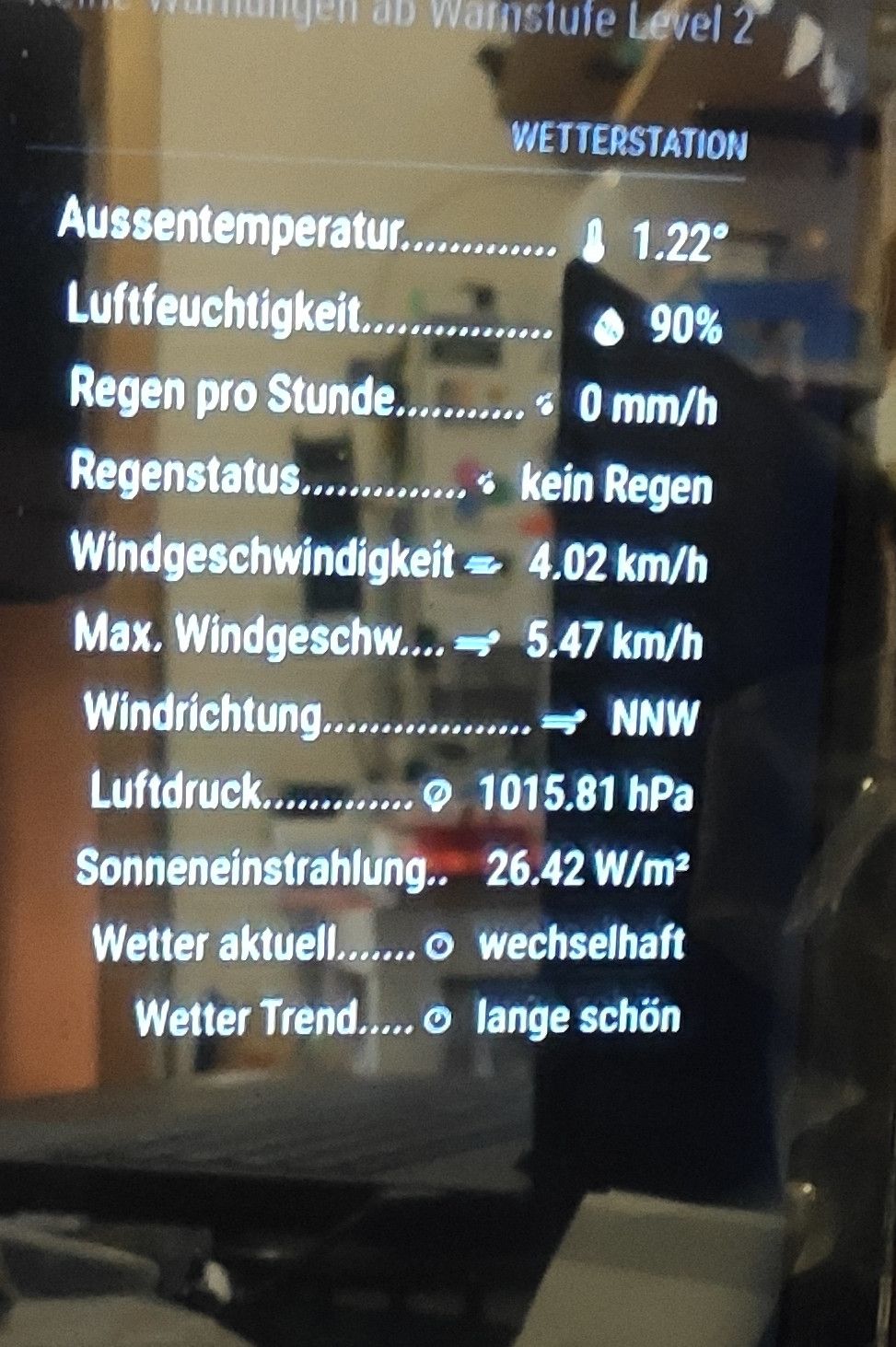
I tried out the MMM-ioBroker and this works properly.
IoBroker gets the Data directly from my WH4000ws Weatherstation with the module WLAN-Wetterstation from SBorg2014.Next Step ist to install MagicMirror and ioBroker on one Raspberry Pi.
Hello! It looks like you're interested in this conversation, but you don't have an account yet.
Getting fed up of having to scroll through the same posts each visit? When you register for an account, you'll always come back to exactly where you were before, and choose to be notified of new replies (either via email, or push notification). You'll also be able to save bookmarks and upvote posts to show your appreciation to other community members.
With your input, this post could be even better 💗
Register Login