MagicMirror Forum
    • Recent
    • Tags
    • Unsolved
    • Solved
    • MagicMirror² Repository
    • Documentation
    • 3rd-Party-Modules
    • Donate
    • Discord
    • Register
    • Login
    A New Chapter for MagicMirror: The Community Takes the Lead
    Read the statement by Michael Teeuw here.

    MMM-RAIN-MAP (new: version 2.x)

    Scheduled Pinned Locked Moved Utilities
    192 Posts 38 Posters 277.2k Views 41 Watching
    Loading More Posts
    • Oldest to Newest
    • Newest to Oldest
    • Most Votes
    Reply
    • Reply as topic
    Log in to reply
    This topic has been deleted. Only users with topic management privileges can see it.
    • M Offline
      MajorC Project Sponsor @MajorC
      last edited by

      @majorc

      Found it, in the custom.css use:

      /**
       * MMM-RAIN-MAP
       */
      .MMM-RAIN-MAP {
         opacity: 0.7;
      }
      
      1 Reply Last reply Reply Quote 0
      • M Offline
        MajorC Project Sponsor
        last edited by

        @Jalibu is there an option to limit the time period into the past and into the future?

        JalibuJ 1 Reply Last reply Reply Quote 0
        • JalibuJ Offline
          Jalibu Module Developer @MajorC
          last edited by Jalibu

          @majorc not yet.
          But you can open a feature request issue and say “please please please please”

          swvalentiS 1 Reply Last reply Reply Quote 1
          • swvalentiS Offline
            swvalenti Project Sponsor @Jalibu
            last edited by

            @jalibu said in MMM-RAIN-MAP (new: version 2.x):

            @majorc not yet.
            But you can open a feature request issue and say “please please please please”

            I second. Please.

            1 Reply Last reply Reply Quote 0
            • karsten13K Online
              karsten13 @MajorC
              last edited by

              @majorc said in MMM-RAIN-MAP (new: version 2.x):

              Does anyone know a map, with transparent or light transparent background?

              may not exactly what you want but I’m using this map

                      mapUrl: "https://tiles.wmflabs.org/bw-mapnik/{z}/{x}/{y}.png",
              

              which is nearly uncoloured.

              M 1 Reply Last reply Reply Quote 0
              • P Offline
                PH1TCH
                last edited by

                Hey @Jalibu,

                I noticed that the module started to throw errors in the logs.

                Do you have an idea how this could be addressed?

                0|mm       | [29.08.2021 13:07.10.633] [ERROR] ERROR! Could not validate main module js file.
                0|mm       | [29.08.2021 13:07.10.638] [ERROR] ReferenceError: window is not defined
                0|mm       |     at /home/pi/MagicMirror/modules/MMM-RAIN-MAP/MMM-RAIN-MAP.js:1:1913
                0|mm       |     at Object.243 (/home/pi/MagicMirror/modules/MMM-RAIN-MAP/MMM-RAIN-MAP.js:1:142305)
                0|mm       |     at e (/home/pi/MagicMirror/modules/MMM-RAIN-MAP/MMM-RAIN-MAP.js:1:151019)
                0|mm       |     at Object.138 (/home/pi/MagicMirror/modules/MMM-RAIN-MAP/MMM-RAIN-MAP.js:1:142720)
                0|mm       |     at e (/home/pi/MagicMirror/modules/MMM-RAIN-MAP/MMM-RAIN-MAP.js:1:151019)
                0|mm       |     at /home/pi/MagicMirror/modules/MMM-RAIN-MAP/MMM-RAIN-MAP.js:1:151060
                0|mm       |     at Object.<anonymous> (/home/pi/MagicMirror/modules/MMM-RAIN-MAP/MMM-RAIN-MAP.js:1:151067)
                0|mm       |     at Module._compile (internal/modules/cjs/loader.js:1078:30)
                0|mm       |     at Object.Module._extensions..js (internal/modules/cjs/loader.js:1108:10)
                0|mm       |     at Module.load (internal/modules/cjs/loader.js:935:32)


                Thanks again for your help!

                JalibuJ 1 Reply Last reply Reply Quote 0
                • JalibuJ Offline
                  Jalibu Module Developer @PH1TCH
                  last edited by

                  @ph1tch
                  I can’t reproduce that.
                  Please open a Github issue for that, if the problem still exists.

                  1 Reply Last reply Reply Quote 1
                  • M Offline
                    MajorC Project Sponsor @karsten13
                    last edited by

                    @karsten13 said in MMM-RAIN-MAP (new: version 2.x):

                    mapUrl: “https://tiles.wmflabs.org/bw-mapnik/{z}/{x}/{y}.png”,

                    Thank you. I will go now with:

                    mapUrl: "https://cartodb-basemaps-{s}.global.ssl.fastly.net/light_all/{z}/{x}/{y}.png",
                    

                    I think, this one is even more “lighter”.

                    earnestrichardsE 1 Reply Last reply Reply Quote 1
                    • earnestrichardsE Offline
                      earnestrichards @MajorC
                      last edited by

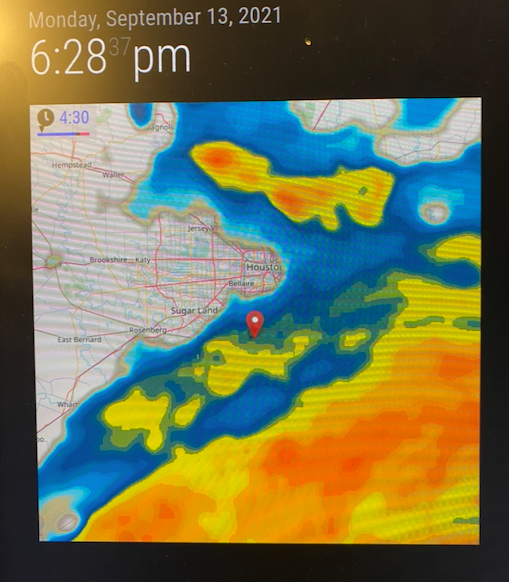
                      @Jalibu I love the new module… got it going just in time to track Tropical Storm Nicholas

                      earnestrichardsE 1 Reply Last reply Reply Quote 0
                      • earnestrichardsE Offline
                        earnestrichards @earnestrichards
                        last edited by

                        @earnestrichards Screen Shot 2021-09-13 at 6.30.46 PM.png

                        1 Reply Last reply Reply Quote 2
                        • L Offline
                          lishmalinyjames
                          last edited by

                          Displays Rainviewer.com radar layers on OpenStreetMap
                          Every 10 minutes a new weather snapshot is published
                          The snapshots of the last 2 hours are available, which show the weather events of the past
                          Additionally 3 layers are displayed as forecast of the next 30 minutes
                          Option to place multiple markers on map
                          Option for multiple, alternating map positions
                          Option to only show in current rainy weather conditions. Works only together with weather or MMM-OpenWeatherForecast as dependency.
                          Option to hide other modules in case of rain in favor to get more space.

                          G 1 Reply Last reply Reply Quote 0
                          • G Offline
                            gabrielm9 Project Sponsor @lishmalinyjames
                            last edited by

                            Thanks @Jalibu for a fantastic module!

                            Last year I modified the v1 code to change the color of the radar images to RainViewer color 4. My wife associates blue with snow, not rain, hence the preference for the Weather Channel scheme.

                            I accomplished this by modifying 2 instances of the URL in utils.js, consistent with the API documentation. Where I found “/256/{z}/{x}/{y}/2/1_1.png” in the code, I simply changed it to “/256/{z}/{x}/{y}/4/1_1.png”, with the 4 being the preferred radar color.

                            I’m unable to do the same in version 2.x. I found the URL in Client.ts, but modifying it had no effect on the output.

                            I’m happy to file an enhancement request if that’s the best route. I’m skilled enough to do find and replace in code, but I’m not a JS dev!

                            Thanks!

                            JalibuJ 2 Replies Last reply Reply Quote 0
                            • JalibuJ Offline
                              Jalibu Module Developer @gabrielm9
                              last edited by

                              Hi @gabrielm9 ,
                              contribution is always welcome :-)

                              You have to compile the Typescript sources using npm run build.

                              Let me know, if you have problems. I‘m waiting for your PR

                              1 Reply Last reply Reply Quote 0
                              • JalibuJ Offline
                                Jalibu Module Developer @gabrielm9
                                last edited by

                                Hi @gabrielm9,

                                the latest version 2.5.x supports different color schemes now.

                                swvalentiS G 2 Replies Last reply Reply Quote 0
                                • swvalentiS Offline
                                  swvalenti Project Sponsor @Jalibu
                                  last edited by

                                  Outstanding work fellas

                                  1 Reply Last reply Reply Quote 0
                                  • G Offline
                                    gabrielm9 Project Sponsor @Jalibu
                                    last edited by

                                    Hi @jalibu,

                                    Thanks very much! I was about to spend time figuring it out how to variabalize the code but I’ve learned from what you did. I would have taken me a week to figure it out :slightly_smiling_face:. The wife thanks you as well.

                                    1 Reply Last reply Reply Quote 0
                                    • F Offline
                                      fmarcu @bhepler
                                      last edited by

                                      @bhepler

                                      osmMapUrl: "https://cartodb-basemaps-{s}.global.ssl.fastly.net/dark_all/{z}/{x}/{y}.png"
                                      

                                      I’m using the dark map referenced above on a black background but every time the module changes zoom level it fills with a white background until the new map tiles populate. It’s worst when zooming out,
                                      Does anyone know if it there is a parameter I can change so the blank tiles between zoom levels stay black?

                                      This is a minor annoyance with an otherwise great module.
                                      Thank you!

                                      JalibuJ 1 Reply Last reply Reply Quote 0
                                      • JalibuJ Offline
                                        Jalibu Module Developer @fmarcu
                                        last edited by

                                        @fmarcu said in MMM-RAIN-MAP (new: version 2.x):

                                        Does anyone know if it there is a parameter I can change so the blank tiles between zoom levels stay black?

                                        try to add this to your custom.css

                                        .MMM-RAIN-MAP .leaflet-container {
                                          background: #000;
                                        }
                                        
                                        F karsten13K 2 Replies Last reply Reply Quote 0
                                        • F Offline
                                          fmarcu @Jalibu
                                          last edited by

                                          @jalibu said in MMM-RAIN-MAP (new: version 2.x):

                                          try to add this to your custom.css

                                          .MMM-RAIN-MAP .leaflet-container {
                                            background: #000;
                                          }
                                          

                                          That worked! Thank you!

                                          1 Reply Last reply Reply Quote 0
                                          • karsten13K Online
                                            karsten13 @Jalibu
                                            last edited by

                                            @jalibu

                                            f7463cbd-6335-424c-8149-f69c902750df-grafik.png

                                            68c8643f-e06b-495b-bfe2-7fab8ecd4458-grafik.png

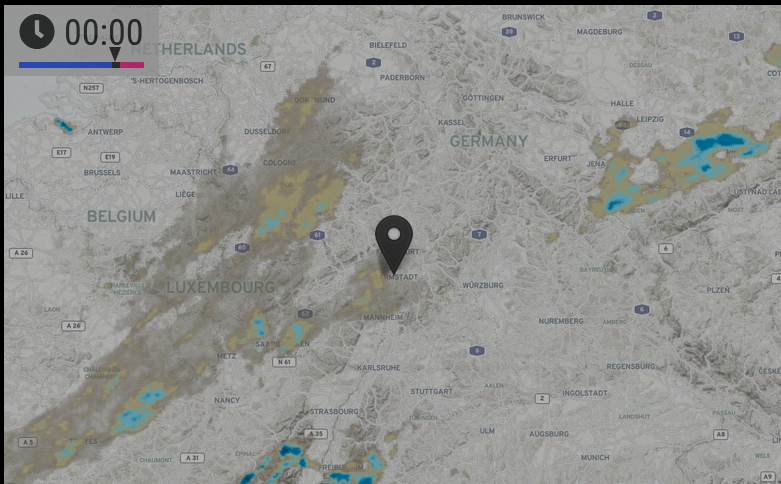
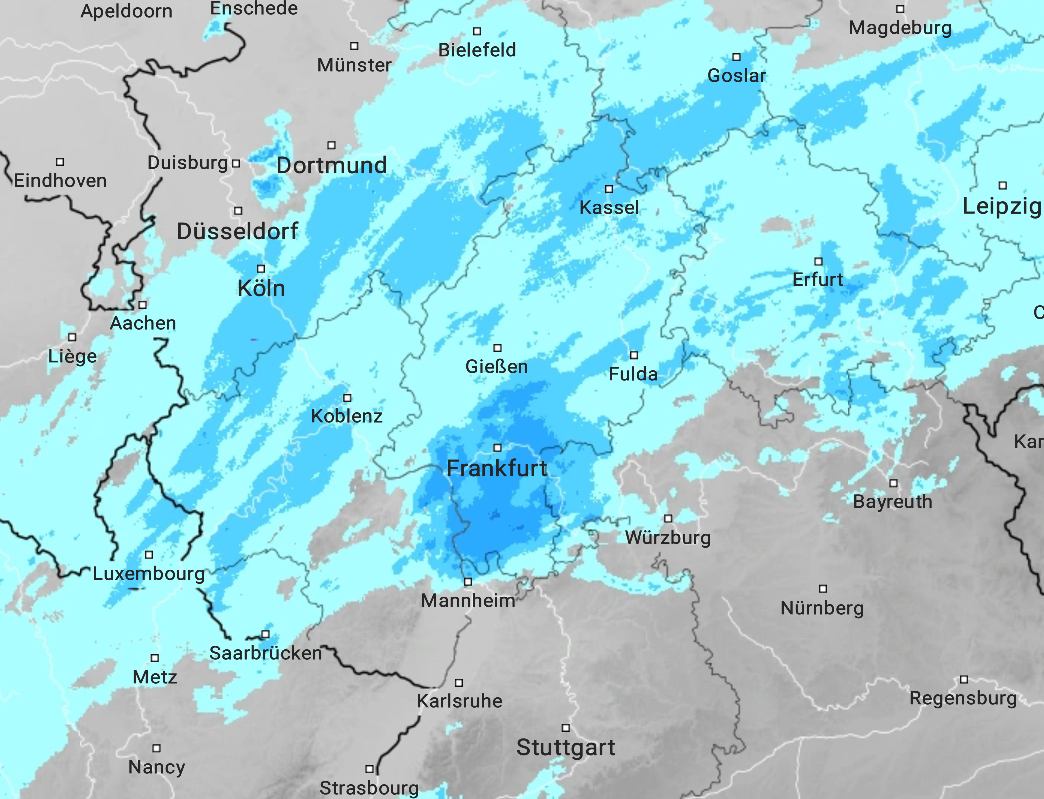
                                            this is the current rain situation and I don’t understand the differences, first picture your module, second one https://www.wetteronline.de/regenradar .

                                            And the second one is reality …

                                            JalibuJ 1 Reply Last reply Reply Quote 0

                                            Hello! It looks like you're interested in this conversation, but you don't have an account yet.

                                            Getting fed up of having to scroll through the same posts each visit? When you register for an account, you'll always come back to exactly where you were before, and choose to be notified of new replies (either via email, or push notification). You'll also be able to save bookmarks and upvote posts to show your appreciation to other community members.

                                            With your input, this post could be even better 💗

                                            Register Login

                                            • 1
                                            • 2
                                            • 5
                                            • 6
                                            • 7
                                            • 8
                                            • 9
                                            • 10
                                            • 7 / 10
                                            • First post
                                              Last post
                                            Enjoying MagicMirror? Please consider a donation!
                                            MagicMirror created by Michael Teeuw.
                                            Forum managed by Sam, technical setup by Karsten.
                                            This forum is using NodeBB as its core | Contributors
                                            Contact | Privacy Policy