MagicMirror Forum
    • Recent
    • Tags
    • Unsolved
    • Solved
    • MagicMirror² Repository
    • Documentation
    • 3rd-Party-Modules
    • Donate
    • Discord
    • Register
    • Login
    A New Chapter for MagicMirror: The Community Takes the Lead
    Read the statement by Michael Teeuw here.

    MMM-Spotify

    Scheduled Pinned Locked Moved Entertainment
    249 Posts 51 Posters 276.0k Views 54 Watching
    Loading More Posts
    • Oldest to Newest
    • Newest to Oldest
    • Most Votes
    Reply
    • Reply as topic
    Log in to reply
    This topic has been deleted. Only users with topic management privileges can see it.
    • Cr4z33C Offline
      Cr4z33 @Cr4z33
      last edited by Cr4z33

      @Cr4z33 said in MMM-Spotify:

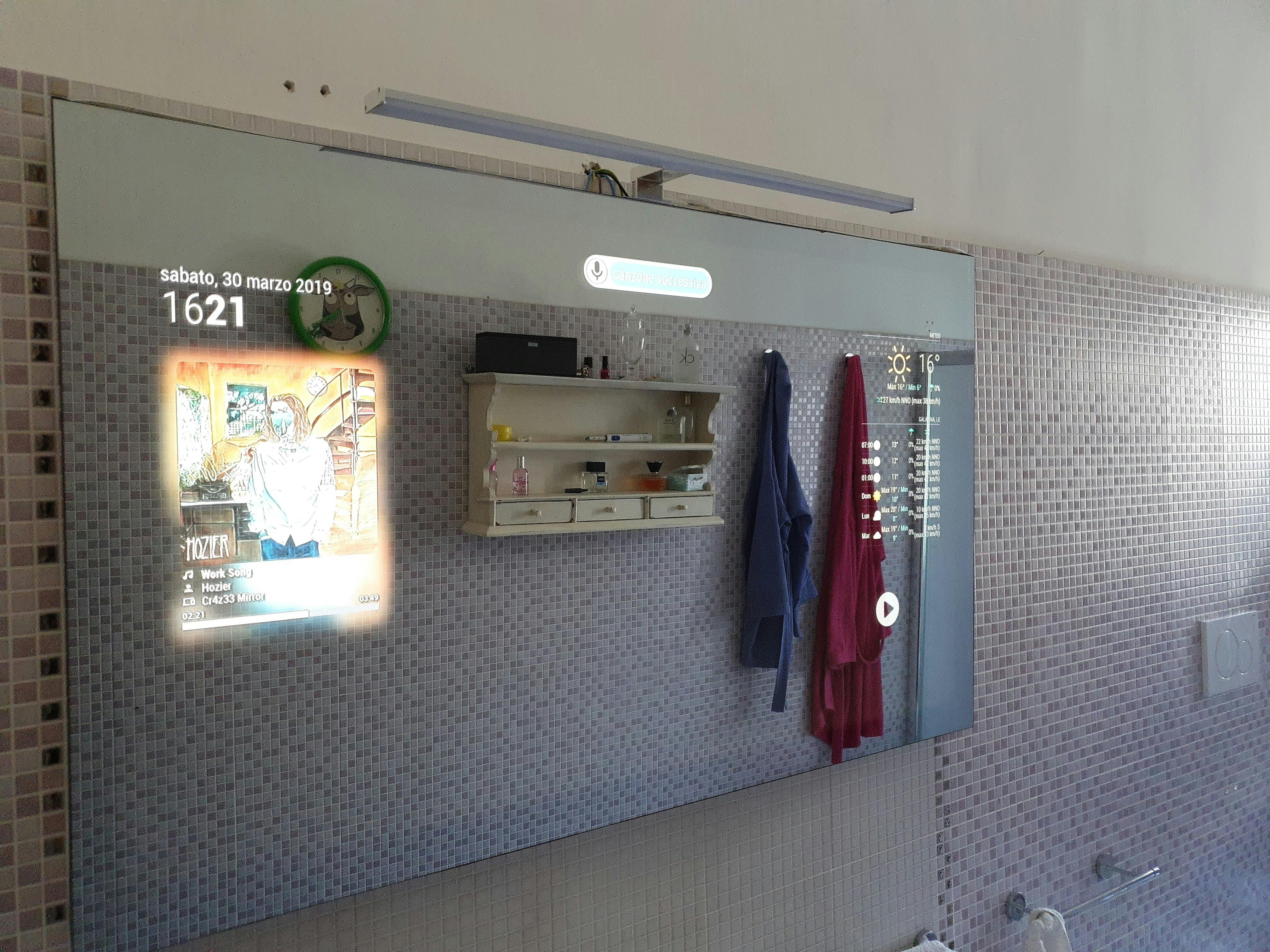
      @ejay-ibm @Sean I noticed only now that if using allowDevices: with the Raspotify device name I can then hear the music, but somehow the module doesn’t ‘wake up’ and keeps showing the Spotify logo only.

      Guys any idea why? :grimacing_face:

      Also @ejay-ibm maybe it’s because I translated them into Italian, but the commands used with MMM-AssistantMk2 that you posted earlier this week don’t get applied.
      Ie. I say the hotword and then ‘next song’ and nothing happens…

      Usually GA either executes the command or replies saying he didn’t understand, but not this time… :thinking_face:
      alt text

      1 Reply Last reply Reply Quote 1
      • ejay-ibmE Offline
        ejay-ibm Project Sponsor Module Developer
        last edited by ejay-ibm

        @Cr4z33 1st you have a wonderfull miror
        2nd , if you send it to me maybe i’ll give you the answer ^^… joking …
        I’m not sure what’s wrong .

        What I would do first is turn on verbose mode on hotword and Mk2 assistant and check .
        1- Console log .
        2- pm2 out logs ( see “pm2 show scriptname” )
        3- pm2 error logs

        Capitalization is very important in hook eg .
        hook is like “next song”
        when you say this to assistant if assistnat wirte " Next song" that that wikk not work .

        All I can say for now is check the logs and share with us , that mitght help to help .

        Ejay

        Cr4z33C 1 Reply Last reply Reply Quote 0
        • I Offline
          icripps
          last edited by

          can whatever that is playing on your phone be played by the mirror too?

          ? 1 Reply Last reply Reply Quote 0
          • ? Offline
            A Former User @icripps
            last edited by

            @icripps
            If you mean multi-speaker, It isn’t.
            To play Spotify on your MagicMirror(Raspberry Pi), you need to install Raspotify on your Raspberry Pi.
            Then, you can play Spotify on your MM directly and can control Spotify (Wherever it played on).

            1 Reply Last reply Reply Quote 1
            • Cr4z33C Offline
              Cr4z33 @ejay-ibm
              last edited by Cr4z33

              @ejay-ibm lol for my mirror and thanks for the suggestion. :smiling_face_with_open_mouth_closed_eyes:

              @icripps please note that to be able to use Raspotify a Spotify Premium account is MANDATORY. ;)

              1 Reply Last reply Reply Quote 0
              • I Offline
                icripps
                last edited by

                Okay thank you. Will manage what I have for now

                1 Reply Last reply Reply Quote 0
                • B Offline
                  bolish
                  last edited by

                  Hi guys,
                  Do you know which parameter to play with into the custom.css to get the module smaller in size? (it’s taking to much place on my screen).
                  Thx

                  ? 1 Reply Last reply Reply Quote 0
                  • ? Offline
                    A Former User @bolish
                    last edited by

                    @bolish
                    Is style: "mini" still too big? It has only around 360px X 120px.
                    Unfortunately, there is no single magic keypoint to modify simply.
                    See MMM-Spotify.css and redefine values on your css/custom.css

                    1 Reply Last reply Reply Quote 0
                    • B Offline
                      bolish
                      last edited by

                      @sean thanks for feedback.
                      I liked the default view, but wanted it to be a little bit smaller.

                      I was a bit lost into the .css but I will try to play around with it and see what happens.

                      Good idea would have been to have a single entry to modify ( like in %) so that user could adjust itself but I believe it’s very personal need, it’s maybe not worth to implement into the module.

                      ? 1 Reply Last reply Reply Quote 0
                      • ? Offline
                        A Former User @bolish
                        last edited by A Former User

                        @bolish
                        Add this into your css/custom.css.

                        :root {
                          --sp-width: 300px;
                        }
                        #SPOTIFY {
                         width: var(--sp-width);
                        }
                        #SPOTIFY_INFO {
                          width: calc(var(--sp-width) - 20px);
                        }
                        #SPOTIFY_INFO .text {
                          width: calc(var(--sp-width) - 70px);
                        }
                        #SPOTIFY_COVER {
                          width: calc(var(--sp-width) - 40px);
                          height: calc(var(--sp-width) - 40px);
                        }
                        

                        --sp-width:300px is magic point. adjust it as your wish. I think 200px is the minimal value possible.

                        1 Reply Last reply Reply Quote 0
                        • B Offline
                          bolish
                          last edited by

                          @sean, thanks I will try in the evening

                          1 Reply Last reply Reply Quote 0
                          • B Offline
                            bolish
                            last edited by

                            @Sean Works great. Tx

                            1 Reply Last reply Reply Quote 0
                            • M Offline
                              mmmmh Project Sponsor
                              last edited by

                              Another awesome module, thank you!

                              The displayed album cover goes dim when there is no playback which is nice. Would it be possible to add an option to completely hide the module when there is no playback?

                              ? 1 Reply Last reply Reply Quote 0
                              • ? Offline
                                A Former User @mmmmh
                                last edited by

                                @mmmmh
                                Add this into your css/custom.css

                                #SPOTIFY.pausing {
                                display:none;
                                }

                                M Cr4z33C 2 Replies Last reply Reply Quote 1
                                • M Offline
                                  mmmmh Project Sponsor @Guest
                                  last edited by

                                  @Sean said in MMM-Spotify:

                                  #SPOTIFY.pausing {
                                  display:none;
                                  }

                                  Simple and works perfectly. Thanks!

                                  1 Reply Last reply Reply Quote 0
                                  • Cr4z33C Offline
                                    Cr4z33 @Guest
                                    last edited by Cr4z33

                                    @Sean said in MMM-Spotify:

                                    @mmmmh
                                    Add this into your css/custom.css

                                    #SPOTIFY.pausing {
                                    display:none;
                                    }

                                    I stopped and quit the Windows 10 Spotify app, but the artwork keeps showing.

                                    ? 1 Reply Last reply Reply Quote 0
                                    • ? Offline
                                      A Former User @Cr4z33
                                      last edited by

                                      @Cr4z33
                                      That checks only playing and pausing. Inactive device is another issue.
                                      This module is pooling to pull current playback data per 1~2 secs.
                                      PPL may have several spotify devices, so if one device is deactivated, but others could be alive. And there’s no way to receive one device’s activeness at event time. (Spotify API doesn’t support pushing to client)
                                      To check “ALL DEVICES” are inactive, another pooling be needed to pull data about available devices per 1~2 sec. I’m not sure whether it’s good approach or not. It would make API usage double. (Somebody be already worrying about too many DNS calling by this module)
                                      Anyway, I’ll consider it.

                                      Cr4z33C 1 Reply Last reply Reply Quote 0
                                      • Cr4z33C Offline
                                        Cr4z33 @Guest
                                        last edited by

                                        @Sean OK thanks.

                                        1 Reply Last reply Reply Quote 0
                                        • ? Offline
                                          A Former User
                                          last edited by

                                          UPDATED

                                          1.1.1 (2019-04-11)

                                          • Added : CSS variable for easy adjusting size. (Adjust only --sp-width to resize)
                                          • Added : Hiding module when current playback device is inactivated. If you don’t want to hide , modify CSS .inactive. (More test might be needed, but…)
                                          justjim1220J 1 Reply Last reply Reply Quote 1
                                          • justjim1220J Offline
                                            justjim1220 Module Developer @Guest
                                            last edited by

                                            @Sean

                                            This popped up today:

                                            [SPOTIFY] API Request fail on : /v1/me/player
                                            { Error: connect ECANCELED 35.186.224.53:443
                                                at TCPConnectWrap.afterConnect [as oncomplete] (net.js:1161:14)
                                              errno: 'ECANCELED',
                                              code: 'ECANCELED',
                                              syscall: 'connect',
                                              address: '35.186.224.53',
                                              port: 443 } undefined
                                            Whoops! There was an uncaught exception...
                                            TypeError: Cannot read property 'statusCode' of undefined
                                                at Request.request [as _callback] (C:\Users\jiman\MagicMirror\modules\MMM-Spotify\Spotify.js:189:23)
                                                at self.callback (C:\Users\jiman\MagicMirror\node_modules\request\request.js:185:22)
                                                at Request.emit (events.js:182:13)
                                                at Request.onRequestError (C:\Users\jiman\MagicMirror\node_modules\request\request.js:877:8)
                                                at ClientRequest.emit (events.js:182:13)
                                                at TLSSocket.socketErrorListener (_http_client.js:382:9)
                                                at TLSSocket.emit (events.js:182:13)
                                                at emitErrorNT (internal/streams/destroy.js:82:8)
                                                at emitErrorAndCloseNT (internal/streams/destroy.js:50:3)
                                                at process._tickCallback (internal/process/next_tick.js:63:19)
                                            MagicMirror will not quit, but it might be a good idea to check why this happened. Maybe no internet connection?
                                            If you think this really is an issue, please open an issue on GitHub: https://github.com/MichMich/MagicMirror/issues
                                            

                                            Any Ideas?

                                            The module seems to be working as it is supposed to… :confused_face:

                                            "Life's Too Short To Dance With Ugly People"
                                            Jim Hallock - 1995

                                            ? 1 Reply Last reply Reply Quote 0

                                            Hello! It looks like you're interested in this conversation, but you don't have an account yet.

                                            Getting fed up of having to scroll through the same posts each visit? When you register for an account, you'll always come back to exactly where you were before, and choose to be notified of new replies (either via email, or push notification). You'll also be able to save bookmarks and upvote posts to show your appreciation to other community members.

                                            With your input, this post could be even better 💗

                                            Register Login

                                            • 1
                                            • 2
                                            • 3
                                            • 4
                                            • 5
                                            • 12
                                            • 13
                                            • 3 / 13
                                            • First post
                                              Last post
                                            Enjoying MagicMirror? Please consider a donation!
                                            MagicMirror created by Michael Teeuw.
                                            Forum managed by Sam, technical setup by Karsten.
                                            This forum is using NodeBB as its core | Contributors
                                            Contact | Privacy Policy

