MagicMirror Forum
    • Recent
    • Tags
    • Unsolved
    • Solved
    • MagicMirror² Repository
    • Documentation
    • 3rd-Party-Modules
    • Donate
    • Discord
    • Register
    • Login
    A New Chapter for MagicMirror: The Community Takes the Lead
    Read the statement by Michael Teeuw here.

    Magic Mirror Redesign WIP :D

    Scheduled Pinned Locked Moved Showcase
    47 Posts 21 Posters 36.3k Views 26 Watching
    Loading More Posts
    • Oldest to Newest
    • Newest to Oldest
    • Most Votes
    Reply
    • Reply as topic
    Log in to reply
    This topic has been deleted. Only users with topic management privileges can see it.
    • E Offline
      earlman
      last edited by

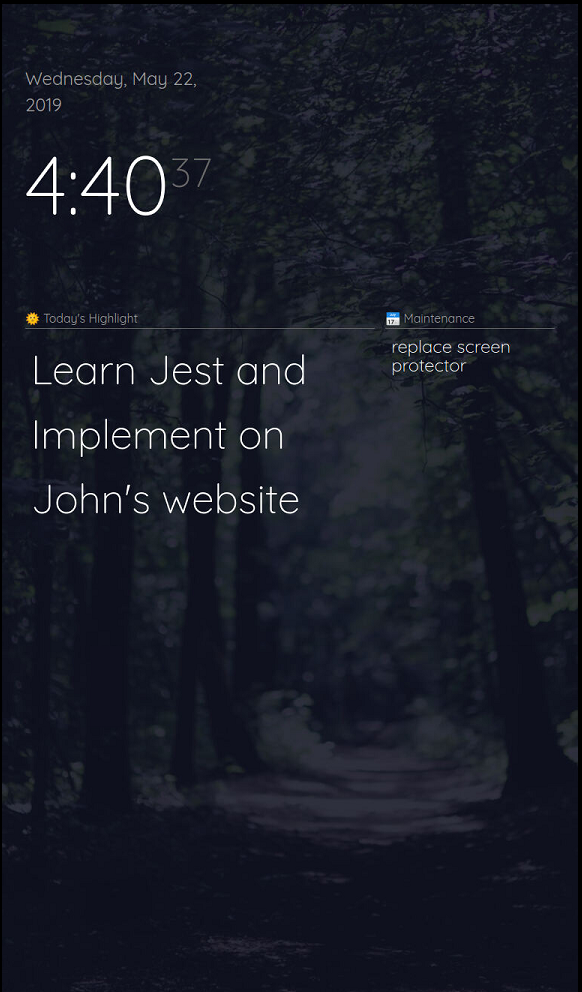
      This is how it currently looks

      0_1558561855468_v0.1.0.PNG

      This is what I’m planning for the eventual v1.0.0 release:
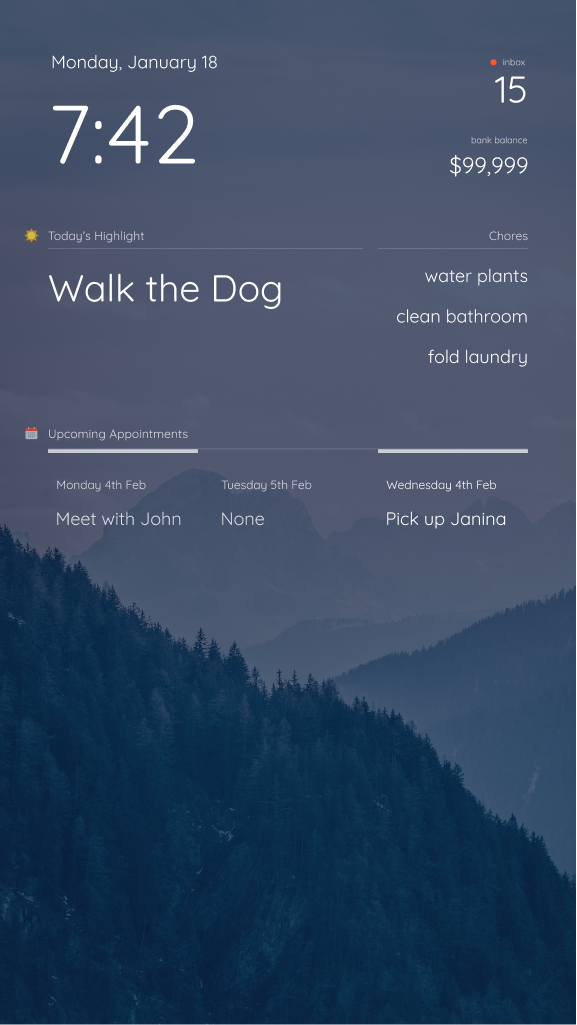
      0_1558561881000_v1.0.0-preview.png

      If you’re interested in how I did this, let me know. I dove pretty deep into the development. Here’s some not-so-apparent features I’ve added:

      • Refactored the Layout in main.css to use CSS Grid
        • This allows for a more flexible layout that’s easier to work with
      • Modified MMM-Wallpaper to load images from Pexels
      • Using two instances of MMM-Todoist to load my “Daily Highlight” for the day
      • After 6:00pm, changes the Daily Highlight to tomorrow’s highlight
      S B lavolp3L N M 6 Replies Last reply Reply Quote 5
      • S Offline
        skibro @earlman
        last edited by

        @earlman HI! That looks fantastic, very nice work! Which calendar modul are you planning to use? I would love something like this - in weekly view. I would be greatful if you could point me in the right direction with this. Thanks for sharing!

        E 1 Reply Last reply Reply Quote 0
        • E Offline
          earlman @skibro
          last edited by

          @skibro hiyaa! This is the one I’ve used in the past. It has the best documentation and is the most stripped down, making it the easiest to style. Tons of config options, too.

          S 1 Reply Last reply Reply Quote 0
          • S Offline
            skibro @earlman
            last edited by

            @earlman Hiyaa! Thanks for your reply. I will try the linked module - I am quite new to js and css, would you mind to share some of your calendar related CSS? I am especially curious of the upper border styiling in the second image you posted. Thanks in advance, have a great day!

            E 1 Reply Last reply Reply Quote 0
            • E Offline
              earlman @skibro
              last edited by

              @skibro That’s actually just a mockup I made in Figma (a design tool). I haven’t built that into my mirror yet, by since you’re interested, I’ll move that up the priority list. I’ll post back here when I have something up on github.

              1 Reply Last reply Reply Quote 0
              • B Offline
                bachoo786 @earlman
                last edited by

                @earlman this looks proper nice do you mind sharing the whole lot i.e. your css, the wallpapers etc?

                Thanks.

                1 Reply Last reply Reply Quote 0
                • E Offline
                  earlman
                  last edited by

                  @bachoo786 @skibro What modules are you guys currently using? I’m doing some prep work for release and wanna make sure it works with your current setups

                  S 1 Reply Last reply Reply Quote 0
                  • ? Offline
                    A Former User
                    last edited by

                    Is it possible to use horizontal layout instead vertical?

                    E 2 Replies Last reply Reply Quote 1
                    • E Offline
                      earlman @Guest
                      last edited by

                      @Sean yup! The reason I messed around with the CSS so much was to make it much more flexible with different screen sizes. I’ll post a screenshot once I get back to my computer

                      1 Reply Last reply Reply Quote 0
                      • E Offline
                        earlman @Guest
                        last edited by

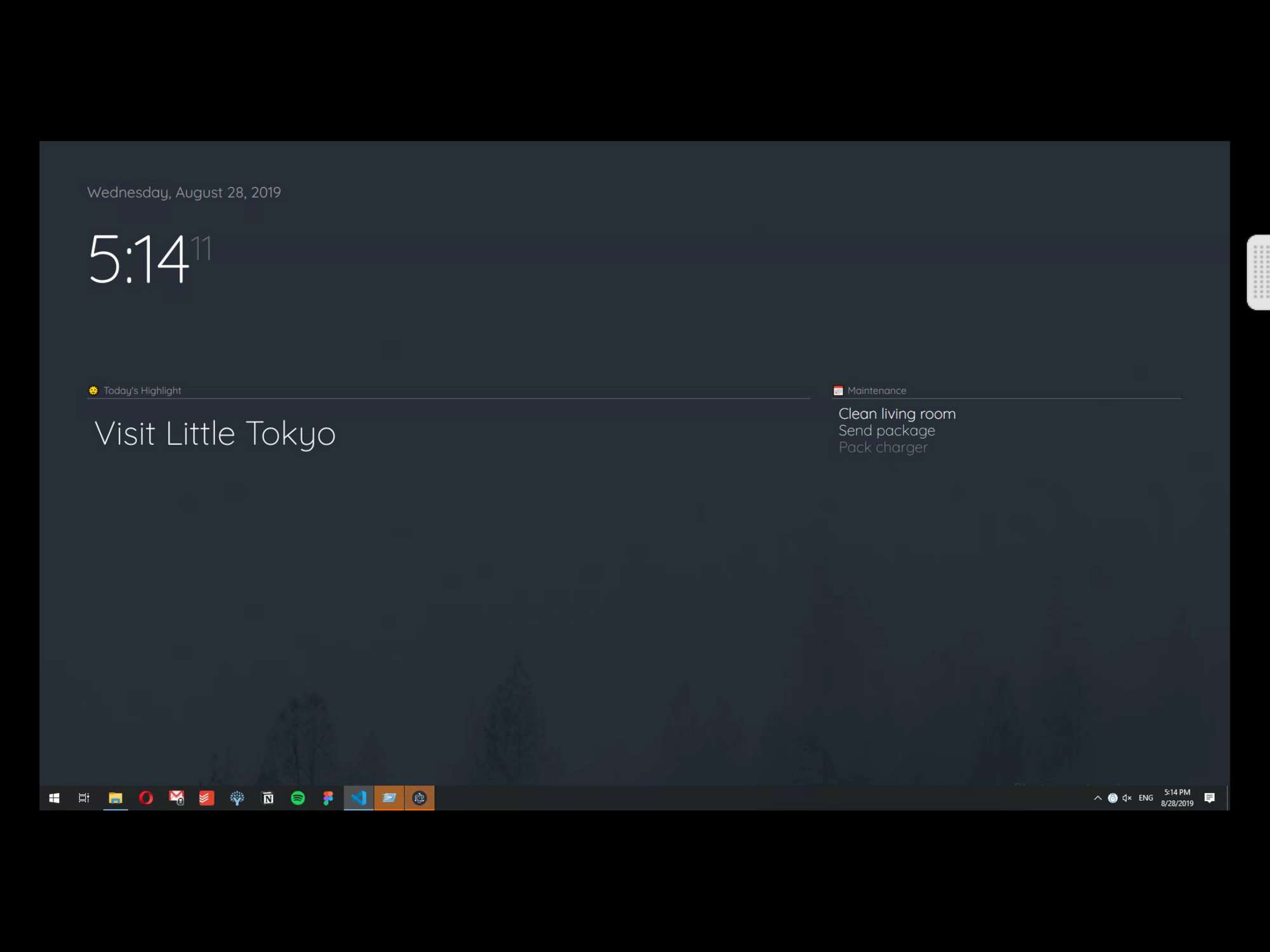
                        @Sean i like keeping it pretty minimal right now, but here’s what it looks like in landscape 0_1567030482787_25D7C3A6-B9CA-4000-97FB-A1B08E8810AD.png
                        ? 1 Reply Last reply Reply Quote 0
                        • S Offline
                          smackenzie5 @earlman
                          last edited by

                          @earlman
                          I’m using the default clock, calendar, current weather, and weather forecast. I’m also using google-route. I’d be interested in anything you could do to make the Google map look better in the route module. I assume you don’t care about the modules that run in the background and don’t show on the screen. Thanks

                          1 Reply Last reply Reply Quote 0
                          • ? Offline
                            A Former User @earlman
                            last edited by

                            @earlman
                            Looks so nice. I want to try yours.

                            1 Reply Last reply Reply Quote -1
                            • E Offline
                              earlman
                              last edited by earlman

                              Project Update (& Installation Instructions)

                              @skibro @bachoo786 @Sean @smackenzie5
                              Alrighty y’all! Got some great news for those who wanna try this setup out. Heads up though—might take a bit of time to set up,
                              so don’t expect to get it looking right in a couple clicks.

                              First, I’ve added Pexels support to MMM-Wallpaper (thanks @kolbyjack for the quick response).

                              As for everything else, all the instructions for setting it up can be found here

                              Though I’ve been doing development work for a while, this is one of my first open-source projects, so I’ll definitely do my best to help you guys out if you need it.

                              S 1 Reply Last reply Reply Quote 0
                              • lavolp3L Offline
                                lavolp3 Module Developer @earlman
                                last edited by lavolp3

                                @earlman I have to say I really love the grid concept. I have a monitor sitting in the lower right corner of the mirror and a grid design would look much better.
                                Can you share your main.css or is it on GitHub?
                                Sorry just saw the latest reply with all the information I needed. Thanks man!!

                                How to troubleshoot modules
                                MMM-soccer v2, MMM-AVStock

                                E 1 Reply Last reply Reply Quote 0
                                • S Offline
                                  smackenzie5 @earlman
                                  last edited by

                                  @earlman
                                  Thanks for putting this together.
                                  Finally had some time to work on this today but got the following error message when running it for the first time:

                                  pi@raspberrypi:~ $ cd MagicMirror
                                  pi@raspberrypi:~/MagicMirror $ sudo npm start
                                  
                                  > magicmirror@2.7.1 start /home/pi/MagicMirror
                                  > sh run-start.sh
                                  
                                  Starting MagicMirror: v2.7.1
                                  Loading config ...
                                  WARNING! Could not validate config file. Starting with default configuration. Please correct syntax errors at or above this line: /home/pi/MagicMirror/config/config.js:116
                                      				pexels_key: [my API key was here],
                                      				             ^^^^^^
                                  
                                  SyntaxError: Invalid or unexpected token
                                      at new Script (vm.js:74:7)
                                      at createScript (vm.js:246:10)
                                      at Object.runInThisContext (vm.js:298:10)
                                      at Module._compile (internal/modules/cjs/loader.js:678:28)
                                      at Object.Module._extensions..js (internal/modules/cjs/loader.js:722:10)
                                      at Module.load (internal/modules/cjs/loader.js:620:32)
                                      at tryModuleLoad (internal/modules/cjs/loader.js:559:12)
                                      at Function.Module._load (internal/modules/cjs/loader.js:551:3)
                                      at Module.require (internal/modules/cjs/loader.js:658:17)
                                      at require (internal/modules/cjs/helpers.js:20:18)
                                  Loading module helpers ...
                                  Initializing new module helper ...
                                  Module helper loaded: updatenotification
                                  No helper found for module: helloworld.
                                  All module helpers loaded.
                                  Starting server on port 8080 ... 
                                  Server started ...
                                  Connecting socket for: updatenotification
                                  Sockets connected & modules started ...
                                  Launching application.
                                  

                                  Here’s my config.js:

                                  {
                                  			module: "MMM-Wallpaper",
                                  			position: "fullscreen_below",
                                  			config: { // See "Configuration options" for more information.
                                  				source: "pexels",
                                      				slideInterval: 60 * 1000, // Change slides every minute
                                      				orientation: "vertical",
                                      				pexels_key: [my API key was here],
                                      				pexels_search: "beach"
                                  				}
                                    		},
                                  

                                  Thoughts?

                                  Thanks,
                                  Scott

                                  S 1 Reply Last reply Reply Quote 0
                                  • S Do not disturb
                                    sdetweil @smackenzie5
                                    last edited by

                                    @smackenzie5 said in Magic Mirror Redesign WIP :D:

                                    exels_key: [my API key was here],

                                    you need to get a pexels api key and put in where the text says

                                    Sam

                                    How to add modules

                                    learning how to use browser developers window for css changes

                                    S 1 Reply Last reply Reply Quote 0
                                    • S Offline
                                      smackenzie5 @sdetweil
                                      last edited by

                                      @sdetweil
                                      Yeah, I have the Pexels API key.
                                      Replaced it with those words just for the forum post.

                                      @earlman
                                      BTW - getting the Pexels API key was immediate, no wait

                                      Thanks,
                                      Scott

                                      S 1 Reply Last reply Reply Quote 0
                                      • S Do not disturb
                                        sdetweil @smackenzie5
                                        last edited by sdetweil

                                        @smackenzie5 did you put quotes around the key value? If not, that would explain the config error message

                                        Sam

                                        How to add modules

                                        learning how to use browser developers window for css changes

                                        1 Reply Last reply Reply Quote 0
                                        • E Offline
                                          earlman
                                          last edited by

                                          @smackenzie5 nice good news, glad it was quick to get.

                                          What sdetweil said, did ya put quotes around the key?

                                          S 1 Reply Last reply Reply Quote 0
                                          • E Offline
                                            earlman @lavolp3
                                            last edited by

                                            @lavolp3 Yup, no problem :D hope it works out, if you’re having layout troubles feel free to post a screenshot. Haven’t tested this on a more filled out layout so I’d be curious how it looks

                                            1 Reply Last reply Reply Quote 0

                                            Hello! It looks like you're interested in this conversation, but you don't have an account yet.

                                            Getting fed up of having to scroll through the same posts each visit? When you register for an account, you'll always come back to exactly where you were before, and choose to be notified of new replies (either via email, or push notification). You'll also be able to save bookmarks and upvote posts to show your appreciation to other community members.

                                            With your input, this post could be even better 💗

                                            Register Login

                                            • 1
                                            • 2
                                            • 3
                                            • 5 / 3
                                            • First post
                                              Last post
                                            Enjoying MagicMirror? Please consider a donation!
                                            MagicMirror created by Michael Teeuw.
                                            Forum managed by Sam, technical setup by Karsten.
                                            This forum is using NodeBB as its core | Contributors
                                            Contact | Privacy Policy